








microsoft/fluentui 9664
We've moved! UI Fabric is now Fluent UI - A set of React components for building Microsoft web experiences.
🏎 A set of primitives to build simple, flexible, WAI-ARIA compliant React autocomplete, combobox or select dropdown components.
An ecosystem for building highly customizable enterprise class user interfaces.
Fast, easy and reliable testing for anything that runs in a browser.
silviuaavram/cypress-documentation 0
Cypress Documentation including Guides, API, Plugins, Examples, & FAQ.
✍ It has never been so easy to document your things!
silviuaavram/eslint-plugin-jest-dom 0
eslint rules for use with jest-dom
silviuaavram/mws-restaurant-stage-1 0
Starter Code for the Udacity's "Mobile Web Specialist Restaurant Reviews App: Stage 1" Project
issue commentdownshift-js/downshift
[UseSelect] reach onOuterClick functionality to give right feedback to Formik
https://github.com/downshift-js/downshift/tree/master/src/hooks/useSelect#onstatechange
Because you don’t probably want to handle the event. You just want to react to a state change, which is useSelect.stateChangeTypes.MenuBlur.
On Fri, 30 Oct 2020 at 00:26, Silviu Avram [email protected] wrote:
Maybe you don’t need any of this. What are you trying to achieve? When do you want to run your validation? If you want on menu blur, why not use onStateChange and capture MenuBlur state change type?
On Thu, 29 Oct 2020 at 21:21, Kerem Sevencan [email protected] wrote:
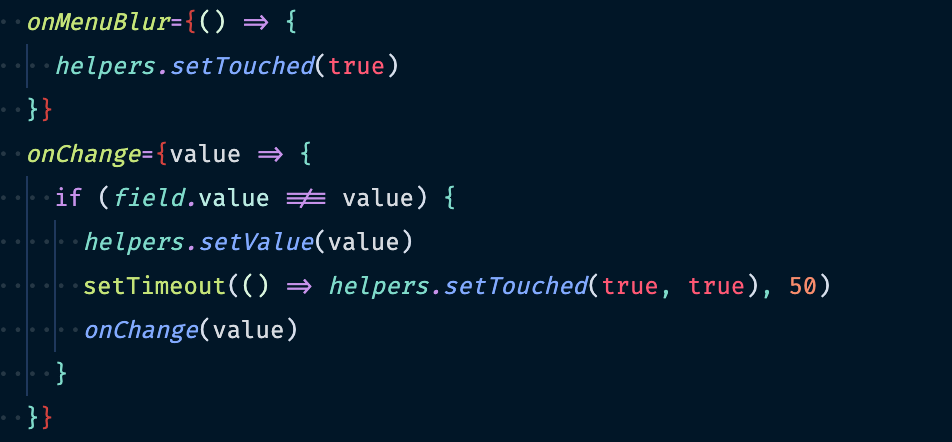
[image: Screenshot 2020-10-29 at 20 18 00] https://user-images.githubusercontent.com/1593488/97622104-147fd980-1a24-11eb-9026-d39385e983bc.png
I trigger validation two times to reach right evaluation. onMenuBlur always give me same event.target, I couldn't find a way to say don't run setTouched if user clicks on menu item
— You are receiving this because you are subscribed to this thread. Reply to this email directly, view it on GitHub https://github.com/downshift-js/downshift/issues/1191#issuecomment-718968268, or unsubscribe https://github.com/notifications/unsubscribe-auth/ACWAZAHHINRWXFDGGG2NDFTSNG6C7ANCNFSM4TD5WPIQ .

comment created time in 2 days
issue commentdownshift-js/downshift
[UseSelect] reach onOuterClick functionality to give right feedback to Formik
Maybe you don’t need any of this. What are you trying to achieve? When do you want to run your validation? If you want on menu blur, why not use onStateChange and capture MenuBlur state change type?
On Thu, 29 Oct 2020 at 21:21, Kerem Sevencan [email protected] wrote:
[image: Screenshot 2020-10-29 at 20 18 00] https://user-images.githubusercontent.com/1593488/97622104-147fd980-1a24-11eb-9026-d39385e983bc.png
I trigger validation two times to reach right evaluation. onMenuBlur always give me same event.target, I couldn't find a way to say don't run setTouched if user clicks on menu item
— You are receiving this because you are subscribed to this thread. Reply to this email directly, view it on GitHub https://github.com/downshift-js/downshift/issues/1191#issuecomment-718968268, or unsubscribe https://github.com/notifications/unsubscribe-auth/ACWAZAHHINRWXFDGGG2NDFTSNG6C7ANCNFSM4TD5WPIQ .
comment created time in 2 days
issue commentdownshift-js/downshift
aria-labelledby has invalid value
We strongly support physical labels. If you don't support one, you can use the solution above and aria-label instead.

comment created time in 9 days
issue commentdownshift-js/downshift
aria-labelledby has invalid value
You can override it. If you are using useCombobox {...getInputProps({'aria-labelledby': null})}.
comment created time in 9 days
issue commentdownshift-js/downshift
Newer Chrome versions ignore autocomplete=off
That thread is from 2016 🧐

comment created time in 9 days
issue commentdownshift-js/downshift
[useMultipleSelection] `onSelectedItemsChange` doesn't fire when using controlled `selectedItems`
use it like this
              onClick={e => {
                e.stopPropagation();
                removeSelectedItem(selectedItem)
              }}
I cannot remember why you had to do this, but I will try to remember and mention it in the docs. Or fix it, I don't know.

comment created time in 9 days
issue commentdownshift-js/downshift
[useMultipleSelection] `onSelectedItemsChange` doesn't fire when using controlled `selectedItems`
Interesting, we should look into it. Thanks for reporting!
comment created time in 9 days
issue commentchakra-ui/chakra-ui
Feature request: accessible combobox
You can also do it with Downshift's useCombobox. Here is a draft, sorry about the styling.
https://codesandbox.io/s/mystifying-taussig-6c43h?file=/src/Combobox.jsx
There is someone already creating a multiple selection combobox with Chakra UI and useCombobox and looks super dope! We are going to post it in our examples / docsite.

comment created time in 9 days
issue commentdownshift-js/downshift
Input Loses Focus in MultipleSelection
@joe-bell your Wrap seems to be the issue. Once you add another element to the selection, it will rerender everything again.
The problem is that it considers every node to be an <li> be it selected item or the combobox input. So on rerender, it will re-create the <li> with the combobox. Since the old <li> node is discarded, the ref to the input in useCombbox is going to be null => focus is lost to the body.
Makes sense? I don't know what to suggest as a fix, it's related to Chakra so you may need to figure it out. But once you're done the whole components looks great! Please consider creating PRs to add it as a usage example to both downshift-examples and downshift-docs. I will guide you further if needed. Thank you!

comment created time in 10 days
issue commentdownshift-js/downshift
Input Loses Focus in MultipleSelection (Chakra-UI)
Sure. Just remove refKey: 'innerRef' and it will work.
If you check the ChakraUI Input props, you will not see any innerRef prop, but ref. Downshift also uses ref as prop name by default, so no need for you to specify another refKey.
This is useful as both downshift and Input require the ref for the input html element. Since downshift will end up dumping props on the Input, knowing what's the custom component's prop for the ref is important. You can check our code for [refKey]: handleRefs and see how we are handling this case.
Something wrong in your example: when you select an item, the focus jumps from the Input to some Chakra container. This must not happen, after selection input should still be focused, so you can keep what you are doing.
Let me know how it goes.
comment created time in 17 days
issue commentdownshift-js/downshift
Attempted import error: 'UseComboboxStateChangeTypes' is not exported from 'downshift'.
Well, even if you augment them in your type, you will still not get them in onStateChange or stateReducer. We only dispatch our downshift-related state changes, and those end up in your callbacks, to be used by you in order to have a better understanding on why the state changes/is about to get changed.
So if you added your own state changes in your select, you need to handle them separately. It should be easy to merge downshift + your logic via onChange / stateReducer / controlled props, but you cannot add your logic inside downshift directly. Or you can, just fork the repo and go wild :D

comment created time in 17 days
issue commentdownshift-js/downshift
Input Loses Focus in MultipleSelection (Chakra-UI)
Hi @joe-bell ! Please use ref instead of innerRef. The input component's (Chakra UI) prop to access the ref seems to be ref not innerRef.
Also don't forget to finish the state reducer by returning changes in the default case for the switch, as per examples/documentation.
Let me know how it goes. I will ask you afterwards to create ChakraUI examples for the docsite and examples repo if you don't mind. Thank you!
comment created time in 17 days
issue commentdownshift-js/downshift
Attempted import error: 'UseComboboxStateChangeTypes' is not exported from 'downshift'.
@wootencl it's answered above, use useCombobox.stateChangeTypes, like useCombobox.stateChangeTypes.InputKeyDownEscape. It's also in the documentation. https://github.com/downshift-js/downshift/tree/master/src/hooks/useCombobox#statechangetypes
Thanks!
comment created time in 17 days
issue commentdownshift-js/downshift
How to provide defaultValue to input using useCombobox hook
Found the solution?
On Wed, 7 Oct 2020 at 21:36, Corey Bruyere [email protected] wrote:
Closed #1186 https://github.com/downshift-js/downshift/issues/1186.
— You are receiving this because you are subscribed to this thread. Reply to this email directly, view it on GitHub https://github.com/downshift-js/downshift/issues/1186#event-3851972169, or unsubscribe https://github.com/notifications/unsubscribe-auth/ACWAZAAVRI7HGIJKXQROEMLSJSYJXANCNFSM4SHXET6A .

comment created time in 24 days
issue commentdownshift-js/downshift
Examples in codesandbox don't work
Hi! Read what’s in that sandbox and you will find out how to get the view to switch to the example. Thanks!
On Wed, 7 Oct 2020 at 19:26, mgpGit [email protected] wrote:
demo examples have been moved to https://www.downshift-js.com/use-combobox .
Codesandbox examples still don't work though...
— You are receiving this because you are subscribed to this thread. Reply to this email directly, view it on GitHub https://github.com/downshift-js/downshift/issues/1185#issuecomment-705049722, or unsubscribe https://github.com/notifications/unsubscribe-auth/ACWAZAFWNF7ZBZM5PBODUNDSJSJCTANCNFSM4SHSKBAQ .

comment created time in 24 days
issue commentdownshift-js/downshift
VoiceOver in Safari on macOS cannot interact with combobox
So it's still not the behaviour you are looking for. Follow up with ARIA or VoiceOver/Safari?

comment created time in a month
issue commentdownshift-js/downshift
[hooks]: Suggestion: keep dropdown open when clicking outside the document
@EddyVinck I think you actually want to use stateReducer. onStateChange is used for triggering actions based on the state that changed. If you want to tweak the actual state change, then stateReducer.
https://www.downshift-js.com/use-select#state-reducer

comment created time in a month
issue commentdownshift-js/downshift
VoiceOver in Safari on macOS cannot interact with combobox
It may be worth looking at https://raw.githack.com/w3c/aria-practices/aria1.2-combobox-proposal/examples/combobox/combobox-autocomplete-list.html as well. ARIA are changing the DOM structure guidelines. Not sure when ARIA 1.2 will land, I believe they are currently in draft still, but downshift will support the new guidelines.
comment created time in a month
issue commentdownshift-js/downshift
From popper website (https://popper.js.org/) in the FLIPPING section they should already support this.

comment created time in a month
issue closeddownshift-js/downshift
Is there a way to have the menu open upwards if it will overflow the bottom of the page? I am using useCombobox and popperjs and cannot find a way to do this.
closed time in a month
mike391
issue commentdownshift-js/downshift
Hi @mike391 ! This is a question related to popper, since that is used for the UI. I am not knowledgeable in popper but they should support placement options.
comment created time in a month
issue commentdownshift-js/downshift
VoiceOver in Safari on macOS cannot interact with combobox
Hi @olivvysaur! Thank you for reporting this, I was hoping this use case will work. Is your scenario working in the examples from ARIA at https://www.w3.org/TR/wai-aria-practices/examples/combobox/aria1.1pattern/listbox-combo.html?
comment created time in a month
issue closeddownshift-js/downshift
Autocomplete: `aria-labelledby` is still present when `aria-label` is passed.
Autocomplete: aria-labelledby is still present when aria-label is passed.
Both on getMenuProps() and getInputProps().
Workaround:
        <input
          ref={ref}
          {...getInputProps({
            'aria-labelledby': undefined,
            'aria-label': 'abc'
          })} />
closed time in a month
catamphetamine
issue commentdownshift-js/downshift
Autocomplete: `aria-labelledby` is still present when `aria-label` is passed.
That's expected. I understand that it may be cool to have aria-labelledby removed automatically when aria-label is used. However it's not something I would like to encourage. Form elements should always have a physical label for many reasons. If your spec simply just cannot contain a physical label, then the workaround above should be good enough.
Thank you!
comment created time in a month
issue commentdownshift-js/downshift
Downshift hooks discard previous action dispatch changes if a new action is dispatched
I see. The question remains the same, can the code be improved and can a PR be submitted? Thank you!

comment created time in a month
issue commentdownshift-js/downshift
[useMultipleSelection] Add New Item if not Exists
Closing as https://github.com/downshift-js/downshift-examples/pull/30 is merged.

comment created time in a month
issue closeddownshift-js/downshift
[useMultipleSelection] Add New Item if not Exists
<!-- Thanks for your interest in the project. I appreciate bugs filed and PRs submitted! Please make sure that you are familiar with and follow the Code of Conduct for this project (found in the CODE_OF_CONDUCT.md file).
Please fill out this template with all the relevant information so we can understand what's going on and fix the issue.
I'll probably ask you to submit the fix (after giving some direction). If you've never done that before, that's great! Check this free short video tutorial to learn how: http://kcd.im/pull-request -->
downshiftversion: "downshift": "5.4.3",nodeversion: 12npm(oryarn) version: npm
Relevant code or config
What you did: Building up from the example https://codesandbox.io/s/usemultipleselection-combobox-usage-k5jtx How can a multiple selection be extended to add new fields if it does not exist, so a user can create a new selection based on their input: See here https://react-select.com/advanced#accessing-internals
Suggested solution: A prop that allows you to append a new selection to items based on user input value
closed time in a month
koolamusic
push eventdownshift-js/downshift-examples
commit sha 304dcd38b30846e448b300175a638e042d194597
feat: multiselect with ability to create items (#30)
push time in a month
PR merged downshift-js/downshift-examples
A proof of concept of how you might modify the useMultipleSelection and useCombobox hooks to enable creation of non-existent items

pr closed time in a month
issue commentdownshift-js/downshift
[useMultipleSelection] Add New Item if not Exists
I love the usage, brilliant work @mattrothenberg ! Thank you for your effort, it's very much appreciated!
comment created time in a month
push eventdownshift-js/downshift-examples
commit sha 0dbd32b57d1ce8ba6746eccbaf7088ed2ab1fc20
fix(shared.js): menuMultipleStlyes typo (#31) Co-authored-by: Paweł Schmidt <[email protected]>
push time in a month
PR merged downshift-js/downshift-examples

pr closed time in a month
pull request commentdownshift-js/downshift-examples
fix(shared.js): menuMultipleStlyes typo
Thank you very much!
comment created time in a month
push eventdownshift-js/downshift
commit sha f4cb1779fdca7973276cd2b5f217203e3b1c0c25
docs: fix typo (#1179)
push time in a month
PR merged downshift-js/downshift
<!-- Thanks for your interest in the project. Bugs filed and PRs submitted are appreciated!
Please make sure that you are familiar with and follow the Code of Conduct for this project (found in the CODE_OF_CONDUCT.md file).
Also, please make sure you're familiar with and follow the instructions in the contributing guidelines (found in the CONTRIBUTING.md file).
If you're new to contributing to open source projects, you might find this free video course helpful: http://kcd.im/pull-request
Please fill out the information below to expedite the review and (hopefully) merge of your pull request! -->
<!-- What changes are being made? (What feature/bug is being fixed here?) -->
What: :hankey:
<!-- Why are these changes necessary? -->
Why:
<!-- How were these changes implemented? -->
How:
<!-- Have you done all of these things? -->
Checklist:
<!-- add "N/A" to the end of each line that's irrelevant to your changes -->
<!-- to check an item, place an "x" in the box like so: "- [x] Documentation" -->
- [x] Documentation
- [ ] Tests
- [ ] TypeScript Types
- [ ] Flow Types
- [x] Ready to be merged <!-- In your opinion, is this ready to be merged as soon as it's reviewed? -->
<!-- feel free to add additional comments -->

pr closed time in a month
pull request commentdownshift-js/downshift
Very smelly typo. Thanks!
comment created time in a month
issue commentdownshift-js/downshift
Add a `isItemDisabled` property to all the hooks
I think so. The disabled part is helpful for item navigation and selection with the menu closed. The selected part isn’t something that brings us a benefit, or I am not seeing it at the moment.
On Wed, 23 Sep 2020 at 14:28, Pedro Filho [email protected] wrote:
Good question, tbh, idk, it's just something that exists on the react-select. Should we just skip it for now?
— You are receiving this because you commented.
Reply to this email directly, view it on GitHub https://github.com/downshift-js/downshift/issues/1176#issuecomment-697302993, or unsubscribe https://github.com/notifications/unsubscribe-auth/ACWAZAEN72R7NG7FVNF5WI3SHHLUDANCNFSM4RRC6LVQ .

comment created time in a month
issue commentdownshift-js/downshift
disabled prop in getItemProps() breaks React.memo on Item component
Thank you! I will take a look at it once I get home.
On Wed, 23 Sep 2020 at 14:32, ConneXNL [email protected] wrote:
It’s the reason why you should describe the issue, there is also a template for that. Dropping some sandboxes and ‘it breaks’ is hardly helpful. Maybe the issue is obvious to you, but we should know what we are looking for without spending time investigating.
… <#m_-8556226379401308654_>
On Wed, 23 Sep 2020 at 11:30, ConneXNL @.***> wrote: What do you mean by it breaks? I see no problem with any of the examples. It seems I didn't save on the broken example. I updated and saved it now. — You are receiving this because you commented. Reply to this email directly, view it on GitHub <#1178 (comment) https://github.com/downshift-js/downshift/issues/1178#issuecomment-697216707>, or unsubscribe https://github.com/notifications/unsubscribe-auth/ACWAZADKR546X4B3H3FWZSTSHGW2JANCNFSM4RR7UU4A .
I updated the issue again, describing the steps to reproduce the broken state.
— You are receiving this because you commented.
Reply to this email directly, view it on GitHub https://github.com/downshift-js/downshift/issues/1178#issuecomment-697304794, or unsubscribe https://github.com/notifications/unsubscribe-auth/ACWAZACLS55PUEAWY4XRHLDSHHMD5ANCNFSM4RR7UU4A .

comment created time in a month
issue commentdownshift-js/downshift
Add a `isItemDisabled` property to all the hooks
I can see the value for disabled, but why for selected?
On Wed, 23 Sep 2020 at 14:22, Pedro Filho [email protected] wrote:
Nope, I can do it here, so, the idea is to first implement the isItemDisabled and then the isItemSelected? Or create one PR for both together? (I think that I should create one for each)
If so, I'll create the PR this weekend.
— You are receiving this because you commented.
Reply to this email directly, view it on GitHub https://github.com/downshift-js/downshift/issues/1176#issuecomment-697300766, or unsubscribe https://github.com/notifications/unsubscribe-auth/ACWAZAFNBBDAHWKTTHCAI5TSHHK7VANCNFSM4RRC6LVQ .
comment created time in a month
issue commentdownshift-js/downshift
disabled prop in getItemProps() breaks React.memo on Item component
It’s the reason why you should describe the issue, there is also a template for that. Dropping some sandboxes and ‘it breaks’ is hardly helpful. Maybe the issue is obvious to you, but we should know what we are looking for without spending time investigating.
On Wed, 23 Sep 2020 at 11:30, ConneXNL [email protected] wrote:
What do you mean by it breaks? I see no problem with any of the examples.
It seems I didn't save on the broken example. I updated and saved it now.
— You are receiving this because you commented.
Reply to this email directly, view it on GitHub https://github.com/downshift-js/downshift/issues/1178#issuecomment-697216707, or unsubscribe https://github.com/notifications/unsubscribe-auth/ACWAZADKR546X4B3H3FWZSTSHGW2JANCNFSM4RR7UU4A .
comment created time in a month
issue commentdownshift-js/downshift
Add a `isItemDisabled` property to all the hooks
Ok, then go for it. We used disabled in getItemProps back when we did not navigate with the menu closed. By adding navigation in the combobox with arrows up/down on closed menu, but also especially on the useSelect many ways to navigate with the menu closed, we should have this prop.
Firstly we should support both this prop and disabled for getItemProps, and we will mark it as deprecated in the future. Then remove it.
Do you have anything you need to code it?
On Wed, 23 Sep 2020 at 01:25, Pedro Filho [email protected] wrote:
I had to use it to disable sizes out of stock, on a summary page that I'm building.
I'm taking this example from react-select, and they have it for isOptionDisabled and isOptionSelected, that are 2 little nice helpers, that can help a lot to migrate react-select components to downshift.
One thing that I have to mention is that this one could be just a documented example on the docs, and it would already work.
— You are receiving this because you commented.
Reply to this email directly, view it on GitHub https://github.com/downshift-js/downshift/issues/1176#issuecomment-697014630, or unsubscribe https://github.com/notifications/unsubscribe-auth/ACWAZABNMIQITBZAHCTK2F3SHEP6PANCNFSM4RRC6LVQ .
comment created time in a month
issue closeddownshift-js/downshift
[useSelect] Dropdown doesn't get closed on selection change in case of defaultIsOpen.
downshiftversion: 6.0.6
Relevant code or config
  const {
    isOpen,
    selectedItem,
    getToggleButtonProps,
    getLabelProps,
    getMenuProps,
    highlightedIndex,
    getItemProps
  } = useSelect({ items, defaultIsOpen: true });
What you did: Set defaultIsOpen to true
What happened: Dropdownlist doesn't get closed on item select (by mouse or keyboard). However I can still close it by click toggle button or click outside dropdown.
Reproduction repository:
https://codesandbox.io/s/loving-worker-sifxr?file=/src/index.js
closed time in a month
AndreyLuzinov
issue commentdownshift-js/downshift
disabled prop in getItemProps() breaks React.memo on Item component
What do you mean by it breaks? I see no problem with any of the examples.
comment created time in a month
issue commentdownshift-js/downshift
Add a `isItemDisabled` property to all the hooks
I know that this can solve a corner case for disabled items, specifically on navigation action with the menu closed.
Apart from this is there any other advantage you can think of?
comment created time in a month
issue commentdownshift-js/downshift
[useSelect] Dropdown doesn't get closed on selection change in case of defaultIsOpen.
As per documentation:
This is the value to set the isOpen to anytime downshift is reset, when the the selection is cleared, or when an item is selected
comment created time in a month
issue closeddownshift-js/downshift
onFocus race condition with useCombobox.stateChangeTypes.ToggleButtonClick
<!-- Thanks for your interest in the project. I appreciate bugs filed and PRs submitted! Please make sure that you are familiar with and follow the Code of Conduct for this project (found in the CODE_OF_CONDUCT.md file).
Please fill out this template with all the relevant information so we can understand what's going on and fix the issue.
I'll probably ask you to submit the fix (after giving some direction). If you've never done that before, that's great! Check this free short video tutorial to learn how: http://kcd.im/pull-request -->
As per #504 we've added an onFocus listener to be able open the menu when the user focuses the input. At the same time, if the menu is already opened and the user clicks on the ToggleButton, we need to close the menu again.
The problem is that if the input is not focused and the user clicks on the ToggleButton to focus the input, our onFocus listener will open the menu, and then after that the useCombobox.stateChangeTypes.ToggleButtonClick state change is triggered, which would cause our app the close the menu again.
downshiftversion: 5.4.5nodeversion: N/A, this is in browsernpm(oryarn) version: yarn 1.17.3
Relevant code or config
Our listeners:
 // inside the state change callback
        case useCombobox.stateChangeTypes.ToggleButtonClick:
          if (!isOpen) {
            openMenu()
          }
          else {
            closeMenu()
          }
          break

// the input focus callback
  const onInputFocus = useCallback(() => {
    if (!isOpen) {
      openMenu()
    }
  }, [])
Our input:
            <Input
              {...getInputProps({
                ...getDropdownProps({
                  preventKeyAction: isOpen,
                  ref: inputRef,
                }),
                onKeyDown,
                placeholder,
              })}
              onFocus={onInputFocus}
            />
How can we avoid closing the menu due to onInputFocus and ToggleButtonClick firing sequentially, the first opening the menu, and the second closing it again? We only want ToggleButtonClick to close the menu if it was not that click that first focused the input.
closed time in 2 months
tommedema
issue commentdownshift-js/downshift
Inconsistent state change when browser tab is switched in `useSelect`
Looking a bit more, seems that the blur on the menu gets triggered the first them, then one the second time it will not get triggered, then on the third time it will get triggered, and so on.
Our handlers seem to be correct, maybe it's not something related to useSelect. If you can look deeper into the problem I can leave this issue open. Thank you very much!

comment created time in 2 months
issue commentdownshift-js/downshift
Inconsistent state change when browser tab is switched in `useSelect`
@tzlilal that stateReducer is making the menu stay open on selection by click. Why is it related to the blur issue on tab switch?
comment created time in 2 months
issue commentdownshift-js/downshift
highlightedIndex value should appear in the text field
@john45321 can you add the example to https://codesandbox.io/s/github/kentcdodds/downshift-examples? It should be possible directly via codesandbox, which is super cool and straightforward. You can clone the repo, make the changes, and create a PR with the changes directly in codesandbox. Let me know if you take this one.

comment created time in 2 months
starteddownshift-js/downshift-docs
started time in 2 months
push eventdownshift-js/downshift-examples
commit sha 471d6658cafdec7524a735672b7a6b0e3015187f
fix: bring back the correct react-window example (#29)
push time in 2 months
PR merged downshift-js/downshift-examples
Fixes https://github.com/downshift-js/downshift-examples/issues/27

pr closed time in 2 months
issue closeddownshift-js/downshift-examples
react-window example overwritten
Seems like react-window example is overwritten with react-tiny-virtual-list, was this on purpose?
https://github.com/downshift-js/downshift-examples/blob/master/src/downshift/other-examples/react-window/index.js#L3
closed time in 2 months
quangv
starteddownshift-js/downshift-examples
started time in 2 months
PR opened downshift-js/downshift-examples
pr created time in 2 months
issue commentdownshift-js/downshift-examples
react-window example overwritten
Not really, it's an issue made by me while doing a bunch of changes.
comment created time in 2 months
push eventdownshift-js/downshift-examples
commit sha 8c0dddd1d55405140aa382e0bb662a6661717c80
docs: explain how to get to current module view (#28) I've never used codesandbox.io before and have no idea what it does or what the various buttons do. I do know that the previous instructions took me five minutes to figure out since going to "Current Module View" involves clicking a button labeled "Project View." I think this should clarify.
push time in 2 months
PR merged downshift-js/downshift-examples
I've never used codesandbox.io before and have no idea what it does or what the various buttons do. I do know that the previous instructions took me five minutes to figure out since going to "Current Module View" involves clicking a button labeled "Project View."
I think this should clarify.

pr closed time in 2 months
pull request commentdownshift-js/downshift-examples
Explain how to get to current module view
Thank you for the clarification!
comment created time in 2 months
push eventdownshift-js/downshift-examples
commit sha d364eb83d2af4672d628940f3dbb16e2be0953bd
fix: export Apollo combobox example (#26)
push time in 2 months
PR merged downshift-js/downshift-examples
Last line was causing example to not load and throwing error: re.module.default is not a function. Changed to render(<ApolloUseComboboxExample />, document.getElementById('root'))

pr closed time in 2 months
pull request commentdownshift-js/downshift-examples
Fixed last line of of Apollo Combobox Example
Thank you!
comment created time in 2 months
issue commentdownshift-js/downshift
[useMultipleSelection] Add New Item if not Exists
That should be straightforward @mattrothenberg just go to https://codesandbox.io/s/github/kentcdodds/downshift-examples and fork it. You can contribute back to the origin via codesandbox, which is pretty cool.
comment created time in 2 months
issue closeddownshift-js/downshift
[useCombobox] Blur will select highlighted item when menu is closed
downshiftversion: 6.0.5
What you did:
Have useCombobox with initialHighlightedIndex or defaultHighlightedIndex passed as prop.
Focus input, then blur.
What happened:
Item at highlightedIndex gets selected, even though the menu is closed.
Reproduction repository:
useMultipleSelection example: https://www.downshift-js.com/use-multiple-selection#usage-with-combobox
Problem description:
Selection at blur (apart from clicking outside) should still work, but not in the case when the menu is closed.
Suggested solution:
InputBlur should also check if isOpen === true before selecting the item. If false, should do nothing.
closed time in 2 months
silviuaavram
issue commentdownshift-js/downshift
[useCombobox] Blur will select highlighted item when menu is closed
Fixed in 6.0.6
comment created time in 2 months
issue commentdownshift-js/downshift
Downshift hooks discard previous action dispatch changes if a new action is dispatched
That's unfortunate. Do you think the focus management in useCombobobx can be improved?
comment created time in 2 months
issue closeddownshift-js/downshift
useMultipleSelection hook not working with groups
downshiftversion: 5.4.6
Relevant code or config
CodeSandbox example: https://codesandbox.io/s/multiple-selection-hook-downshift-2mu7t?file=/src/Multidropdown.jsx
What you did:
Tried to create multi dropdown component using useSelect and useMultipleSelection hooks by passing items sorted in groups.
Structure of the passed data:
[
  {
     type: "GROUP",
     title: "South America",
     options: [
       {
          disabled: false
          label: "São Paulo"
          value: "GRU"
        },
       .......
     ]
  },
  {
     title: "Australia",
     type: "GROUP",
     options: [
        {
           disabled: false
           label: "Melbourne"
           value: "MEL"
        },
      ......
    ]
  }
]
Problem description:
When option is selected, selectedItems, provided by useMultipleSelection hook, will have some random group and not the selected option. Also, selectedItem, provided by useSelect hook will be an object with some random group too.
Reproduction repository:
This issue is reproduced in the codeSandbox example mentioned above.
closed time in 2 months
markosrb89
issue commentdownshift-js/downshift
useMultipleSelection hook not working with groups
Awesome! Thanks for the feedback!
comment created time in 2 months
pull request commentdownshift-js/downshift
useMultipleSelection: Prevent browser navigation when pressing `Backspace`.
@bnjmnt4n the unit test seems to fail, can you look into it please?

comment created time in 2 months
push eventdownshift-js/downshift
commit sha 7972eb064352023fa9fafb69f85cdfa6477dd1a3
docs: fix useMultipleSelection import (#1175)
push time in 2 months
PR merged downshift-js/downshift
<!-- Thanks for your interest in the project. Bugs filed and PRs submitted are appreciated!
Please make sure that you are familiar with and follow the Code of Conduct for this project (found in the CODE_OF_CONDUCT.md file).
Also, please make sure you're familiar with and follow the instructions in the contributing guidelines (found in the CONTRIBUTING.md file).
If you're new to contributing to open source projects, you might find this free video course helpful: http://kcd.im/pull-request
Please fill out the information below to expedite the review and (hopefully) merge of your pull request! -->
<!-- What changes are being made? (What feature/bug is being fixed here?) -->
What:
Consequence of https://github.com/downshift-js/downshift/pull/1168.
Why:
<!-- How were these changes implemented? -->
How:
<!-- Have you done all of these things? -->
Checklist:
<!-- add "N/A" to the end of each line that's irrelevant to your changes -->
<!-- to check an item, place an "x" in the box like so: "- [x] Documentation" -->
- [ ] Documentation
- [ ] Tests
- [ ] TypeScript Types
- [ ] Flow Types
- [ ] Ready to be merged <!-- In your opinion, is this ready to be merged as soon as it's reviewed? -->
<!-- feel free to add additional comments -->
pr closed time in 2 months
PR closed downshift-js/downshift
Fix typo
<!-- Thanks for your interest in the project. Bugs filed and PRs submitted are appreciated!
Please make sure that you are familiar with and follow the Code of Conduct for this project (found in the CODE_OF_CONDUCT.md file).
Also, please make sure you're familiar with and follow the instructions in the contributing guidelines (found in the CONTRIBUTING.md file).
If you're new to contributing to open source projects, you might find this free video course helpful: http://kcd.im/pull-request
Please fill out the information below to expedite the review and (hopefully) merge of your pull request! -->
<!-- What changes are being made? (What feature/bug is being fixed here?) -->
What: There was a bug in the sample code in README.md code.
<!-- Why are these changes necessary? -->
Why: Its causes confusion for a new user of the library.
<!-- How were these changes implemented? -->
How: By changing the README.md
<!-- Have you done all of these things? -->
Checklist:
<!-- add "N/A" to the end of each line that's irrelevant to your changes -->
<!-- to check an item, place an "x" in the box like so: "- [x] Documentation" -->
- [ ] Documentation
- [ ] Tests
- [ ] TypeScript Types
- [ ] Flow Types
- [ ] Ready to be merged <!-- In your opinion, is this ready to be merged as soon as it's reviewed? -->
<!-- feel free to add additional comments -->

pr closed time in 2 months
PR opened downshift-js/downshift
<!-- Thanks for your interest in the project. Bugs filed and PRs submitted are appreciated!
Please make sure that you are familiar with and follow the Code of Conduct for this project (found in the CODE_OF_CONDUCT.md file).
Also, please make sure you're familiar with and follow the instructions in the contributing guidelines (found in the CONTRIBUTING.md file).
If you're new to contributing to open source projects, you might find this free video course helpful: http://kcd.im/pull-request
Please fill out the information below to expedite the review and (hopefully) merge of your pull request! -->
<!-- What changes are being made? (What feature/bug is being fixed here?) -->
What:
Consequence of https://github.com/downshift-js/downshift/pull/1168.
Why:
<!-- How were these changes implemented? -->
How:
<!-- Have you done all of these things? -->
Checklist:
<!-- add "N/A" to the end of each line that's irrelevant to your changes -->
<!-- to check an item, place an "x" in the box like so: "- [x] Documentation" -->
- [ ] Documentation
- [ ] Tests
- [ ] TypeScript Types
- [ ] Flow Types
- [ ] Ready to be merged <!-- In your opinion, is this ready to be merged as soon as it's reviewed? -->
<!-- feel free to add additional comments -->
pr created time in 2 months
delete branch downshift-js/downshift
delete branch : all-contributors/add-ndeom
delete time in 2 months
push eventdownshift-js/downshift
commit sha fec27b737f78920bdcabcb0b6aab5207e515996c
docs: add ndeom as a contributor (#1171) * docs: update README.md [skip ci] * docs: update .all-contributorsrc [skip ci] Co-authored-by: allcontributors[bot] <46447321+allcontributors[bot]@users.noreply.github.com>
push time in 2 months
PR merged downshift-js/downshift
Adds @ndeom as a contributor for code, bug.
This was requested by silviuaavram in this comment

pr closed time in 2 months
push eventdownshift-js/downshift
commit sha 79c051b386df6f097639618b489d07c243c305a1
docs: improve Readme files (#1174)
push time in 2 months
PR merged downshift-js/downshift
<!-- Thanks for your interest in the project. Bugs filed and PRs submitted are appreciated!
Please make sure that you are familiar with and follow the Code of Conduct for this project (found in the CODE_OF_CONDUCT.md file).
Also, please make sure you're familiar with and follow the instructions in the contributing guidelines (found in the CONTRIBUTING.md file).
If you're new to contributing to open source projects, you might find this free video course helpful: http://kcd.im/pull-request
Please fill out the information below to expedite the review and (hopefully) merge of your pull request! -->
<!-- What changes are being made? (What feature/bug is being fixed here?) -->
What:
Improve documentation for itemToString and autocomplete.
<!-- Why are these changes necessary? -->
Why: To have a better documentation <!-- How were these changes implemented? -->
How:
<!-- Have you done all of these things? -->
Checklist:
<!-- add "N/A" to the end of each line that's irrelevant to your changes -->
<!-- to check an item, place an "x" in the box like so: "- [x] Documentation" -->
- [x] Documentation
- [ ] Tests
- [ ] TypeScript Types
- [ ] Flow Types
- [ ] Ready to be merged <!-- In your opinion, is this ready to be merged as soon as it's reviewed? -->
<!-- feel free to add additional comments -->
pr closed time in 2 months
push eventdownshift-js/downshift
commit sha 21ec3db64f1affc456e9ebc677529fe7b5d88129
docs: improve Readme files
push time in 2 months
PR opened downshift-js/downshift
<!-- Thanks for your interest in the project. Bugs filed and PRs submitted are appreciated!
Please make sure that you are familiar with and follow the Code of Conduct for this project (found in the CODE_OF_CONDUCT.md file).
Also, please make sure you're familiar with and follow the instructions in the contributing guidelines (found in the CONTRIBUTING.md file).
If you're new to contributing to open source projects, you might find this free video course helpful: http://kcd.im/pull-request
Please fill out the information below to expedite the review and (hopefully) merge of your pull request! -->
<!-- What changes are being made? (What feature/bug is being fixed here?) -->
What:
Improve documentation for itemToString and autocomplete.
<!-- Why are these changes necessary? -->
Why: To have a better documentation <!-- How were these changes implemented? -->
How:
<!-- Have you done all of these things? -->
Checklist:
<!-- add "N/A" to the end of each line that's irrelevant to your changes -->
<!-- to check an item, place an "x" in the box like so: "- [x] Documentation" -->
- [ ] Documentation
- [ ] Tests
- [ ] TypeScript Types
- [ ] Flow Types
- [ ] Ready to be merged <!-- In your opinion, is this ready to be merged as soon as it's reviewed? -->
<!-- feel free to add additional comments -->
pr created time in 2 months
issue closeddownshift-js/downshift
<!-- Thanks for your interest in the project. I appreciate bugs filed and PRs submitted! Please make sure that you are familiar with and follow the Code of Conduct for this project (found in the CODE_OF_CONDUCT.md file).
Please fill out this template with all the relevant information so we can understand what's going on and fix the issue.
I'll probably ask you to submit the fix (after giving some direction). If you've never done that before, that's great! Check this free short video tutorial to learn how: http://kcd.im/pull-request -->
downshiftversion:nodeversion:npm(oryarn) version:
Relevant code or config
What you did:
What happened:
<!-- Please provide the full error message/screenshots/anything -->
Reproduction repository:
<!-- If possible, please create a repository that reproduces the issue with the minimal amount of code possible. -->
Problem description: downshift: The ref prop "ref" from getInputProps was not applied correctly on your element. This is my input element
<input
            className="search_input"
            placeholder={placeholder}
            {...getInputProps({
              ref: TripxInputRef,
              id: "tripx-search-INPro",
              "aria-controls": "downshift-tripx-menu",
              "aria-labelledby": "downshift-tripx-label",
              autoComplete: "on",
            })}
The component works fine but I get console error. Any help resolving this would be much appreciated Suggested solution:
closed time in 2 months
mr365
issue closeddownshift-js/downshift
Have `Home`/`End` keys change cursor position, not selected item
Downshift (useComboBox) is set up for Home and End keys to select the first or last option in the dropdown. However, the WAI-ARIA ListBox spec suggests that those keys should have their normal behavior of moving the cursor to the beginning/end of the text input.
closed time in 2 months
bhollis
issue commentdownshift-js/downshift
Have `Home`/`End` keys change cursor position, not selected item
Will close this, since we already have a workaround and details posted.
comment created time in 2 months
issue commentdownshift-js/downshift
Expose alternative `InputBlur`-like event for use with `useMultipleSelection`
Actually I don't think this should be done. The reasons is that we should keep tabindex=0 on the active item for you to be able to return to it via Tab.
comment created time in 2 months
issue closeddownshift-js/downshift
The form gets automatically submitted
<!-- Thanks for your interest in the project. I appreciate bugs filed and PRs submitted! Please make sure that you are familiar with and follow the Code of Conduct for this project (found in the CODE_OF_CONDUCT.md file).
Please fill out this template with all the relevant information so we can understand what's going on and fix the issue.
I'll probably ask you to submit the fix (after giving some direction). If you've never done that before, that's great! Check this free short video tutorial to learn how: http://kcd.im/pull-request -->
downshiftversion: 6.0.3nodeversion: 10.22.0npm(oryarn) version: 6.14.6
<!-- Please provide the full error message/screenshots/anything -->
<!-- If possible, please create a repository that reproduces the issue with the minimal amount of code possible. -->
Problem description:
I am using useSelect hook inside form element, when I clicked the button to trigger open the menu, the page gets refreshed automatically, it looks like the button has default type to submit.
Suggested solution:
add type="button" on the element will fix this problem and I think it should be added to the docs, can I open PR for this?
closed time in 2 months
fcrezza
issue commentdownshift-js/downshift
The form gets automatically submitted
Solved with PRs in downshift-docs and downshift-examples, closing.
comment created time in 2 months
issue closeddownshift-js/downshift
downshiftversion: 6.0.3nodeversion: irrelevantnpm(oryarn) version: irrelevant
Relevant code or config
This example: https://www.downshift-js.com/use-multiple-selection#usage-with-combobox
What you did:
There are 2 issues:
- Editing something in the middle of the input makes the cursor jump to the end.
- Entering special characters with deadkeys (e.g. for german umlauts typing
"and thenoshould result inö) inserts the deadkey as regular character ("o).
What happened:
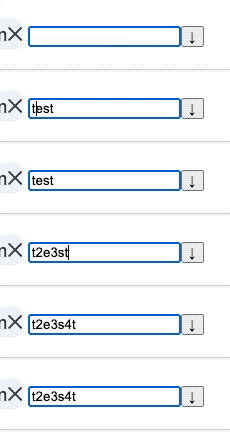
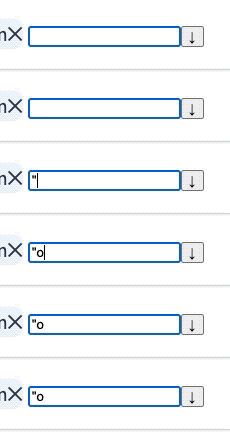
Reproduction repository:
https://www.downshift-js.com/use-multiple-selection#usage-with-combobox
Problem description:
The problem in the example is that setValue is called too late on the useCombobox.stateChangeTypes.InputChange event. That prevents React ignoring the value update which would preserve the cursor position and deadkeys.
Suggested solution:
Instead of using useCombobox.stateChangeTypes.InputChange, use an onChange handler directly on the input:
          <input
            {...getInputProps(
              getDropdownProps({
                preventKeyAction: isOpen,
                onChange: e => {
                  setInputValue(e.target.value)
                },
              }),
            )}
          />
https://codesandbox.io/s/usemultipleselection-combobox-usage-forked-fixed-deadkeys-and-editing-middle-of-input-rnivj?file=/src/index.js:1094-1134
closed time in 2 months
fabb
issue closeddownshift-js/downshift
useComboBox - selectHighlightedItem/selectItemAtIndex?
Is it possible to use 'selectHighlightedItem' or 'selectItemAtIndex'? Im doing some custom key combos and want to be able to select an item based on the index.
closed time in 2 months
mike391
issue closeddownshift-js/downshift
Chrome screen reader unable to read content of Downshift menu
<!-- Thanks for your interest in the project. I appreciate bugs filed and PRs submitted! Please make sure that you are familiar with and follow the Code of Conduct for this project (found in the CODE_OF_CONDUCT.md file).
Please fill out this template with all the relevant information so we can understand what's going on and fix the issue.
I'll probably ask you to submit the fix (after giving some direction). If you've never done that before, that's great! Check this free short video tutorial to learn how: http://kcd.im/pull-request -->
downshiftversion: 6.0.2nodeversion: 12.16.2npmversion: 6.14.4chrome84.0.4147.105 (Official Build) (64-bit)macOSCatalina 10.15.5
Relevant code or config (Create React App)
import React from "react";
import Downshift from "downshift";

export const DownshiftExample = () => {
  const items = [
    { value: "value1", id: "id1" },
    { value: "value2", id: "id2" },
    { value: "value3", id: "id3" },
  ];

  const itemToString = (item) => (item.value ? item.value : "");
  return (
    <div>
      <h1>Downshift Example</h1>
      <div>
        <Downshift itemToString={itemToString}>
          {({
            getLabelProps,
            getInputProps,
            getMenuProps,
            getItemProps,
            getToggleButtonProps,
            isOpen,
            highlightedIndex,
          }) => (
            <div>
              <label {...getLabelProps()}> Test Screen Reader</label>

              <input
                readOnly={true}
                placeholder="select"
                {...getInputProps()}
              ></input>
              <button {...getToggleButtonProps()}>
                {isOpen ? "Close Menu" : "Open Menu"}
              </button>

              <ul {...getMenuProps()}>
                {isOpen
                  ? items.map((item, i) => (
                      <li
                        key={i}
                        {...getItemProps({
                          item,
                          key: item.id,
                          style: {
                            backgroundColor:
                              highlightedIndex === i ? "green" : "blue",
                          },
                        })}
                      >
                        {item.value}
                      </li>
                    ))
                  : null}
              </ul>
            </div>
          )}
        </Downshift>
      </div>
    </div>
  );
};
What you did:
- Made a Create React App
- Installed downshift (npm i downshift)
- Created a Downshift component, and render in App.js
- NPM run start
What happened: Chrome does not support VoiceOver for reading contents of a Downshift dropdown menu. Safari does not have this issue. More specifically when using the down key when focus is on the input element the menu opens up and screen reader functions as expected. If the user is to use the toggleButton to open the menu, then screen reader is not able to read content of the dropdown menu.
Reproduction repository: https://github.com/SteelFace87/Downshift-Screenreader-Issue
Problem description: Same as What happened
Suggested solution: Only workaround I have found is to create an aria-live div with opacity:0 and position:absolute to hide the content of the aria live div. Then using a debounced function updating the content of the aria-live div once the user has stopped scrolling through the dropdown menu. This however causes issues when using Safari since safari can read the content of the Downshift menu, and on top of that also reads the content of the aria-live div. The only work around this is to remove the aria tags added by Downshift so that Safari won't read the menu items twice, however this defeats the purpose of using Downshift in the first place.
import debounce from 'lodash.debounce';

const [ariaLiveContent, setAriaLiveContent] = useState('');

const updateAriaLive = (content: string) => {
    setAriaLiveContent(content);
  };

const updateAriaLiveDebounced = debounce(
    (content: string) => updateAriaLive(content),
    500,
    { leading: false, trailing: true }
  );

const onDownshiftStateChange = (state: StateChangeOptions<any>) => {
    if (typeof state.highlightedIndex === 'number') {
      updateAriaLiveDebounced(
        `${ariaLabel} ${options[state.highlightedIndex].text}`
      );
    }
  };

<div style={{opacity:"0", position:"absolute"}} role="log" aria-live="polite">
            {ariaLiveContent}
</div>
closed time in 2 months
SteelFace87
issue closeddownshift-js/downshift
useCombobox - prevent typing into input a value not in items
downshiftversion: 5.4.5nodeversion: 14.7.0npmversion: 6.14.7
Problem description:
Wondering what the approach should be to have a useCombobox that filters as the user types, but I'd like to prevent the user from being able to type in a value into the input that would not match on of the available items. Currently my useCombobox component will display the filtered items as the user types into the input, but will let the user type anything. I'd like it to behave more like a select control that prevents the user entering arbitrary values. I suspect that inputValue needs to be controlled but could not find an example of this.
closed time in 2 months
made-in-nz

issue commentdownshift-js/downshift
useMultipleSelection hook not working with groups
As far as I can see, you probably need to pass a indexStart to DropdownOptions component in order to tell it from where to start numbering the index it is going to pass to useSelect. In index: index + 0, that 0 should be the indexStart.
Also you have items as objects, please use itemToString as suggested in the documentation, for both useSelect and useMultipleSelection. https://www.downshift-js.com/use-select#materialui https://github.com/downshift-js/downshift/tree/master/src/hooks/useMultipleSelection#itemtostring
Let us know how it goes after this.
comment created time in 2 months
pull request commentdownshift-js/downshift
docs: update downshift logo link
:tada: This PR is included in version 6.0.6 :tada:
The release is available on:
npm package (@latest dist-tag)- GitHub release
Your semantic-release bot :package::rocket:
comment created time in 2 months
pull request commentdownshift-js/downshift
docs: remove the docsite examples
:tada: This PR is included in version 6.0.6 :tada:
The release is available on:
npm package (@latest dist-tag)- GitHub release
Your semantic-release bot :package::rocket:
comment created time in 2 months