








A minimal skeleton for building testable React apps using Babel
:warning: An experimental, next-generation, coroutine-based, modular compiler for a subset of ooc. (deprecated)
Augment your views with DOM awareness
Brunch.io skeleton featuring socket.io
Official documentation for ooc 0.3+
ooc TextMate bundle (Migrated to https://git.sr.ht/~nilium/ooc.tmbundle)
A puzzle game being written in ClojureScript using React Native and Om.next [WIP]
Real-time streaming of Wolfram Alpha queries
pheuter/Altlaw-Student-Crawlers 4
Court crawlers written for Altlaw
Sublime Text 2 and 3 plugin that displays current Bitcoin exchange rate in status and converts arbitrary BTC values to USD
issue commentAzure/azure-functions-host
Add Config to set output serializer to System.Text.Json
I am also currently running into the problem of needing to use a custom JsonConverter that's designed to work with System.Text.Json, but Azure Functions appears to enforce Newtonsoft with no way to override in Startup.Configure

comment created time in 10 hours
issue commentAzure/azure-functions-host
This issue appears related: https://github.com/Azure/azure-functions-host/issues/5469
I am also currently running into the problem of needing to use a custom JsonConverter that's designed to work with System.Text.Json, but Azure Functions appears to enforce Newtonsoft with no way to override in Startup.Configure

comment created time in 10 hours
startedTarmil/FSharp.SystemTextJson
started time in 16 hours
startedHomebrew/homebrew-cask-fonts
started time in 2 days
startedAzure/homebrew-functions
started time in 2 days
startedAdoptOpenJDK/homebrew-openjdk
started time in 2 days
issue openedMicrosoftDocs/azure-docs
Typo in "Configure Oauth2 for API Management"
There is a typo in the Configure Oauth2 for API Management section:
- Scroll down and populate an Additional body parameter called 'resource' with the Backend Function API client ID from the Azure AD B2C App registration
What it should say instead is something like this:
6. Scroll down and populate an Additional body parameter called 'resource' with the full URI of the API scope you exposed earlier in Azure AD B2C.
That is, in order to properly populate the aud claim with the back-end functions api client id, the resource we pass must be the api scope uri, not the client id of the backend api b2c app registration.
So for example, resource should look something like "https://mytenant.onmicrosoft.com/api/My.Api" instead of "2753z7d1-03d6-4828-a613-3yc87c741234"
Document Details
⚠ Do not edit this section. It is required for docs.microsoft.com ➟ GitHub issue linking.
- ID: 623cc870-6f9d-039e-b965-a964482a3e6d
- Version Independent ID: 80cb6774-fc95-f551-aae7-5f8091bd3b17
- Content: Protect SPA backend with OAuth 2.0 by using Azure Active Directory B2C and Azure API Management.
- Content Source: articles/api-management/howto-protect-backend-frontend-azure-ad-b2c.md
- Service: api-management
- GitHub Login: @WillEastbury
- Microsoft Alias: wieastbu
created time in 4 days
issue commentdotnet/aspnetcore
Blazor WebAssembly app with IndividualB2C auth unable to retrieve access token
@javiercn I built aspnetcore source on the release/3.1 branch and was not able to reproduce the issue locally. However, it occurred to me that, this time, I was testing it on Edge whereas before I was using Safari. Could it be that the issues described here are causing the Msal auth flow to fail on Safari? If so, is this something that will be fixed once WebAssembly.Msal switches over to Msal.js v2.0? Is there an ETA on that?

comment created time in 12 days
issue commentdotnet/aspnetcore
Blazor WebAssembly app with IndividualB2C auth unable to retrieve access token
@mkArtakMSFT This is currently breaking our app on production, is there a quick fix/workaround in the meantime?
comment created time in 12 days
startedBetterThanTomorrow/calva
started time in 13 days
issue openeddotnet/aspnetcore
Blazor WebAssembly app with IndividualB2C auth unable to retrieve access token
Problem
My standalone webassembly app is successfully able to initiate an AAD B2C sign in user flow, which returns back to the app with an id token and my user is authenticated, but I am unable to use the HttpClient to make calls to my API because the auth flow never sent back an access token, despite my confirming that the scope query parameter properly contained the API permission:
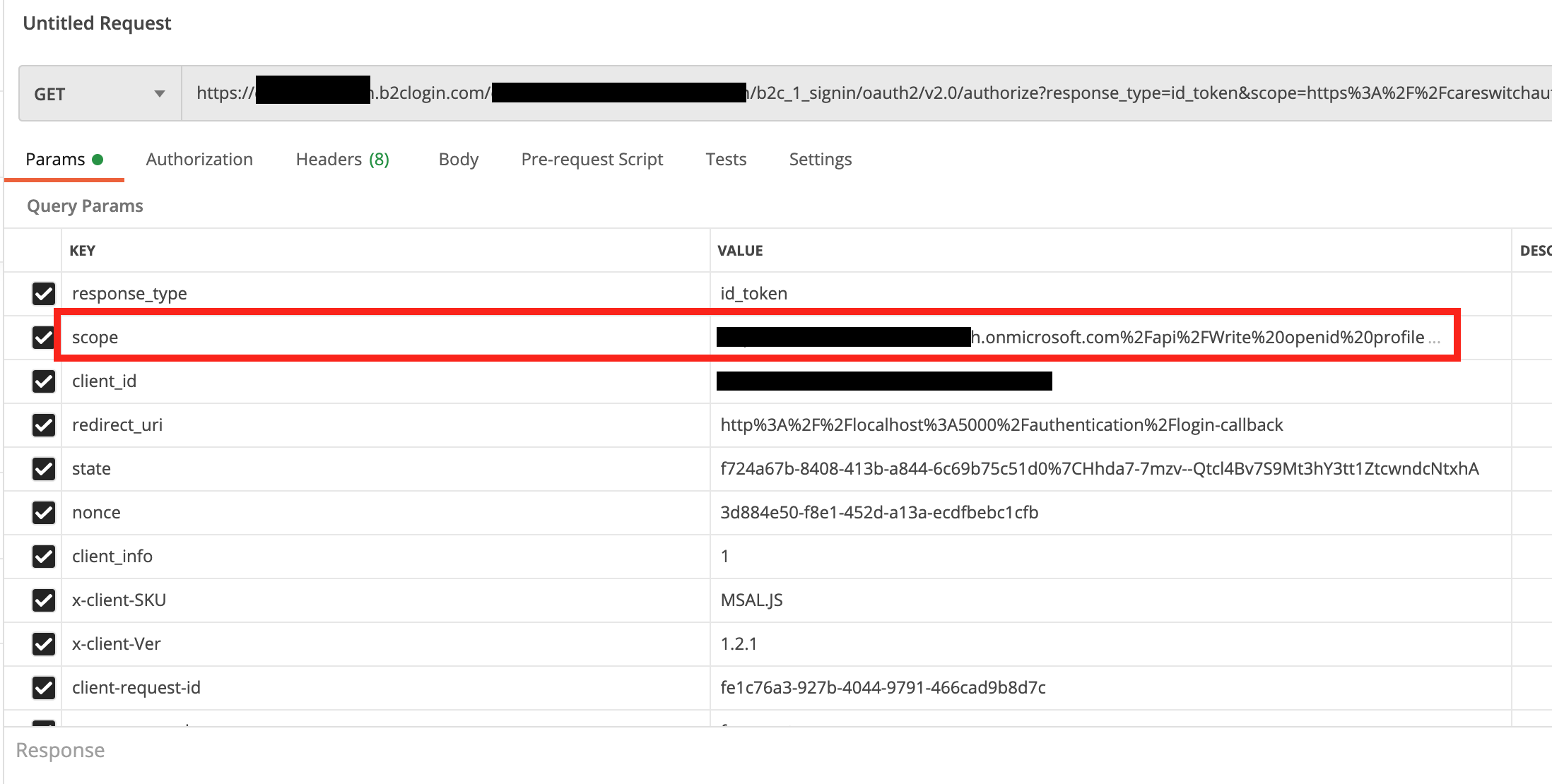
I believe it has something to do with MSAL.js passing along id_token instead of token for the response_type query parameter, but I have no idea why that happens or how I can control that. I have followed the documentation to setup an access token scope as you can see from the code I share below, but that doesn't seem to work. That is to say, it properly passes it along in the scope, but an access token is never generated.
Configuration
appsettings.json
{
  "AzureAdB2C": {
    "Authority": "https://mytenant.b2clogin.com/tfp/mytenant.onmicrosoft.com/B2C_1_SignIn",
    "ClientId": "<MY_APP_CLIENT_ID>",
    "ValidateAuthority": false
  }
}
Program.cs
private const string ApiScope = "https://careswitchauth.onmicrosoft.com/api/Write";

builder.Services.AddHttpClient("ServerAPI",
        client => client.BaseAddress =
            new Uri(builder.Configuration.GetValue<string>("ApiBaseUrl")))
    .AddHttpMessageHandler(sp => sp.GetRequiredService<AuthorizationMessageHandler>()
        .ConfigureHandler(
            new[] { builder.Configuration.GetValue<string>("ApiBaseUrl") },
            new[] { ApiScope }));

builder.Services.AddMsalAuthentication(options =>
{
    builder.Configuration.Bind("AzureAdB2C", options.ProviderOptions.Authentication);
    options.ProviderOptions.Cache.CacheLocation = "localStorage";
    options.ProviderOptions.DefaultAccessTokenScopes.Add(ApiScope);
});

builder.Services.AddOptions();
builder.Services.AddAuthorizationCore();
.NET Core SDK (reflecting any global.json):
 Version:   3.1.302
 Commit:    41faccf259

Runtime Environment:
 OS Name:     Mac OS X
 OS Version:  10.16
 OS Platform: Darwin
 RID:         osx-x64
 Base Path:   /usr/local/share/dotnet/sdk/3.1.302/

Host (useful for support):
  Version: 3.1.6
  Commit:  3acd9b0cd1

.NET Core SDKs installed:
  3.1.302 [/usr/local/share/dotnet/sdk]

.NET Core runtimes installed:
  Microsoft.AspNetCore.App 3.1.6 [/usr/local/share/dotnet/shared/Microsoft.AspNetCore.App]
  Microsoft.NETCore.App 3.1.6 [/usr/local/share/dotnet/shared/Microsoft.NETCore.App]

To install additional .NET Core runtimes or SDKs:
  https://aka.ms/dotnet-download
<Project Sdk="Microsoft.NET.Sdk.Web">

  <PropertyGroup>
    <TargetFramework>netstandard2.1</TargetFramework>
    <RazorLangVersion>3.0</RazorLangVersion>
  </PropertyGroup>

  <ItemGroup>
    <PackageReference Include="Microsoft.AspNetCore.Components.WebAssembly" Version="3.2.1" />
    <PackageReference Include="Microsoft.AspNetCore.Components.WebAssembly.Build" Version="3.2.1" PrivateAssets="all" />
    <PackageReference Include="Microsoft.AspNetCore.Components.WebAssembly.DevServer" Version="3.2.1" PrivateAssets="all" />
    <PackageReference Include="Microsoft.AspNetCore.WebUtilities" Version="2.2.0" />
    <PackageReference Include="Microsoft.Authentication.WebAssembly.Msal" Version="3.2.1" />
    <PackageReference Include="Microsoft.Extensions.Http" Version="3.1.6" />
    <PackageReference Include="System.Net.Http.Json" Version="3.2.1" />
  </ItemGroup>

</Project>
created time in 13 days
issue commentdotnet/aspnetcore
Cannot render raw json response from HttpTrigger
Hi @captainsafia, thanks for the response! I was afraid you might suggest that, I initially opened up this issue in that repo, but noticed that the response time is significantly longer than on this one, and the problem is related to certain MVC features like OutputFormatters so figured I'd give it a go. This is currently affecting our development significantly so some urgency would go a long way.
comment created time in 14 days
issue openeddotnet/aspnetcore
Cannot render raw json response from HttpTrigger
Context
I'm building out an Azure Functions F# Class Library project and would like to use FSharp.Json as the main (de)serialization library so that I can handle discriminated unions, options, and other F# types more idiomatically as I read and write json via HttpTrigger functions. In order to do that, I would like to turn off the default MVC OutputFormatters so that I can pass through my custom serialized Json instead.
Setup
I have created a Startup file that looks like this:
type Startup() =
    inherit FunctionsStartup()

    override _.Configure(builder: IFunctionsHostBuilder) =
        builder.Services.AddMvcCore(fun options ->
            options.OutputFormatters.RemoveType(typeof<StringOutputFormatter>)
            options.OutputFormatters.RemoveType(typeof<SystemTextJsonOutputFormatter>))
        |> ignore

module Assembly =
    [<assembly:FunctionsStartup(typeof<Startup>)>]
    do ()
And then in my HttpTrigger I attempt to serialize my types using the third partly library and respond back with a json:
let run ([<HttpTrigger(...)>] req: HttpRequest) =
    async {
        let! result = ...

        // string
        let serializedUsers = Json.serialize result

        req.HttpContext.Response.ContentType <- "application/json"
        return serializedUsers
    }
    |> Async.StartAsTask
Problem
What ends up happening is my json string gets double encoded, meaning it is returned to the user as a json string containing my json array, instead of an actual json array. This suggests that there is still some automatic formatting taking place after my serialized json string is returned from the HttpTrigger, despite my removing the OutputFormatters in Startup.

Possible alternative?
If not via OutputFormatters, is there any way that I can have an HttpTrigger function return a raw JSON string with the proper application/json Content-Type without having it be re-encoded by the framework?
Perhaps something like Content("", "application/json") that's available in ASP.NET Core MVC?
created time in 15 days
issue openedAzure/Azure-Functions
Cannot render raw json response from HttpTrigger
Context
I'm building out an Azure Functions F# Class Library project and would like to use FSharp.Json as the main (de)serialization library so that I can handle discriminated unions, options, and other F# types more idiomatically as I read and write json via HttpTrigger functions. In order to do that, I would like to turn off the default MVC OutputFormatters so that I can pass through my custom serialized Json instead.
Setup
I have created a Startup file that looks like this:
type Startup() =
    inherit FunctionsStartup()

    override _.Configure(builder: IFunctionsHostBuilder) =
        builder.Services.AddMvcCore(fun options ->
            options.OutputFormatters.RemoveType(typeof<StringOutputFormatter>)
            options.OutputFormatters.RemoveType(typeof<SystemTextJsonOutputFormatter>))
        |> ignore

module Assembly =
    [<assembly:FunctionsStartup(typeof<Startup>)>]
    do ()
And then in my HttpTrigger I attempt to serialize my types using the third partly library and respond back with a json:
let run ([<HttpTrigger(...)>] req: HttpRequest) =
    async {
        let! result = ...

        // string
        let serializedUsers = Json.serialize result

        req.HttpContext.Response.ContentType <- "application/json"
        return serializedUsers
    }
    |> Async.StartAsTask
Problem
What ends up happening is my json string gets double encoded, meaning it is returned to the user as a json string containing my json array, instead of an actual json array. This suggests that there is still some automatic formatting taking place after my serialized json string is returned from the HttpTrigger, despite my removing the OutputFormatters in Startup.
Possible alternative?
If not via OutputFormatters, is there any way that I can have an HttpTrigger function return a raw JSON string with the proper application/json Content-Type without having it be re-encoded by the framework?
Perhaps something like Content("", "application/json") that's available in ASP.NET Core MVC?
created time in 15 days
issue commentAzure/azure-functions-core-tools
F# function based on azure-functions-templates doesn't start; "Host.json file in missing"
What I've done in my CD workflow is simply create a stub file before build—because <CopyToPublishDirectory>Never</CopyToPublishDirectory> is set it'll never make it into the published output dir.
.fsproj:
<ItemGroup>
  <None Include="host.json">
    <CopyToOutputDirectory>PreserveNewest</CopyToOutputDirectory>
  </None>
  <None Include="local.settings.json">
    <CopyToOutputDirectory>PreserveNewest</CopyToOutputDirectory>
    <CopyToPublishDirectory>Never</CopyToPublishDirectory>
  </None>
</ItemGroup>
action:
- name: Build and publish
  run: |
    touch local.settings.json
    dotnet build -c Release
    dotnet publish -c Release -o ./output

comment created time in 23 days
startedatomcorp/themes
started time in a month
issue commentdotnet/aspnetcore
Blazor WebAssembly Msal breaks when attempting AD B2C Password Reset user flow
Yeah I was afraid that was our only option left. Our current architecture is a Blazor Wasm app deployed to CDN and our server is actually just Azure Functions. Sounds like we'll want to create a new asp.net core web app to handle the password reset and edit profile flows.
comment created time in a month
issue commentdotnet/aspnetcore
Blazor WebAssembly Msal breaks when attempting AD B2C Password Reset user flow
@javiercn Makes sense. There's a comment on that password reset policy PR that suggests B2C is solving this issue internally by building password reset into their flows on the server side. Problem is I'm not sure what the timeline looks like there. If not for a hotfix PR that doesn't introduce any breaking changes, what are we supposed to do in the meantime to provide password reset to our users?
comment created time in a month
issue commentdotnet/aspnetcore
Blazor WebAssembly Msal breaks when attempting AD B2C Password Reset user flow
I can take a look at getting a PR together to get these changes in to support password reset flow from Blazor WebAssembly. Would it be possible to get a hotfix release out sooner if I did that?
comment created time in a month
issue commentdotnet/aspnetcore
Blazor WebAssembly Msal breaks when attempting AD B2C Password Reset user flow
Correction, I linked to OidcProviderOptions above, but mean to link to MsalAuthenticationOptions
comment created time in a month
issue commentdotnet/aspnetcore
Blazor WebAssembly Msal breaks when attempting AD B2C Password Reset user flow
@javiercn That's great news :) Looking at the PR, it may require a little code change other than bumping the version number. This error check and loginRedirect call will need to have some equivalent in the AuthenticationService, and OidcProviderOptions will probably need to support providing a separate Forgot Password authority like the PR does here.
comment created time in a month
issue commentdotnet/aspnetcore
Blazor WebAssembly Msal breaks when attempting AD B2C Password Reset user flow
@javiercn I just noticed that there was a PR merged that appears to address the issue of triggering a password reset redirect flow. It appears to suggest that there is now a fix for this in Msal.js v1.3.x, and Authentication.Msal is currently lagging behind.
comment created time in a month
issue commentdotnet/aspnetcore
Blazor WebAssembly Msal breaks when attempting AD B2C Password Reset user flow
I'm noticing two different versions of that service:
- Authentication.Msal - relies on
msal - WebAssembly.Authentication - relies on
oidc-client
Slightly confused as to which one is relevant, or how they potentially work together. Which one ends up getting exposed to Blazor WebAssembly app's window.AuthenticationService?
In my code, I have <script src="_content/Microsoft.Authentication.WebAssembly.Msal/AuthenticationService.js"></script>, which suggests it's the Msal one, but then the oidc one is in the same package that exposes RemoteAuthenticatorView.cs.
comment created time in a month
issue commentdotnet/aspnetcore
Blazor WebAssembly Msal breaks when attempting AD B2C Password Reset user flow
@javiercn Thanks for the response, I'll take a look at what a custom provider implementation might look like. To make sure I'm on the same page, are you referring to AuthenticationService.ts, or are there .net files you have in mind as well?
comment created time in a month
issue commentdotnet/aspnetcore
MSAL login modes options: redirect / pop-up
This functionality would be helpful for me too for the following reason: I have noticed that when a pop-up successfully opens but the user initiates a different User Flow inside it, such as clicking on "Forgot Password", the popup redirects back into the app with an error which in turn causes a redirect attempt. I would like to prevent the popup -> redirect fallback in the first place to streamline the user experience so that they don't have to select "Forgot Password" twice, once in the popup and then again during the redirect.

comment created time in a month
issue openeddotnet/aspnetcore
Blazor WebAssembly Msal breaks when attempting AD B2C Password Reset user flow
Describe the bug
Blazor WebAssembly authentication (Microsoft.Authentication.WebAssembly.Msal) relies on a state query param passed to B2C user flows to keep track of the authentication process and successfully log users in when they're redirected back into the app. Because Msal currently does not support B2C user flows as first-class entities (at least for flows other than sign in, like password reset), we rely on manually building a user flow url (see example below), part of which is the state query param. If this param is completely left out, the Msal library will throw an unhandled error complaining that no state param was found.
This is an issue because we want to be able to handle the Password Reset user flow, which by design throws an error back to the initiating app (AADB2C90118) and it becomes the app's responsibility to trigger the password reset as a separate user flow. As mentioned above, this currently happens by manually building the flow url, which brings us back to the original issue of populating the state query param.
To Reproduce
Modify Pages/Authentication.razor to look similar to what I have below, which is designed to handle the AD B2C AADB2C90118 error for linking sign in user flow with the password reset user flow:
@page "/authentication/{action}"

@using Microsoft.Extensions.Configuration;
@using Microsoft.AspNetCore.Components.WebAssembly.Authentication

@inject NavigationManager NavManager
@inject IConfiguration Configuration

<RemoteAuthenticatorView Action="@Action" />

@code {
    [Parameter] public string Action { get; set; }

    protected override void OnAfterRender(bool firstRender)
    {
        if (Action == "login-failed")
        {
            var uri = NavManager.ToAbsoluteUri(NavManager.Uri);

            if (QueryHelpers.ParseQuery(uri.Query).TryGetValue("message", out var _loginError))
            {
                // Indicates that user attempted to initiate password reset flow
                if (_loginError.Single().Contains("AADB2C90118"))
                {
                    var resetPasswordFlow = Configuration["AzureAdB2C:ResetPasswordUserFlow"];
                    var clientId = Configuration["AzureAdB2C:ClientId"];
                    var redirectUri = $"{NavManager.BaseUri}authentication/login-callback";

                    var userFlowBuilder = $@"https://ourtenant.b2clogin.com/ourtenant.onmicrosoft.com/oauth2/v2.0/authorize
                        ?p={resetPasswordFlow}
                        &client_id={clientId}
                        &redirect_uri={redirectUri}
                        &nonce=defaultNonce
                        &scope=openid
                        &response_type=id_token
                        &prompt=login";

                    var userFlowUrl = String.Concat(userFlowBuilder.Where(c => !Char.IsWhiteSpace(c)));
                    NavManager.NavigateTo(userFlowUrl, forceLoad: true);
                }
            }
        }
    }
}
Exceptions (if any)
blazor.webassembly.js?v=6:1 crit: Microsoft.AspNetCore.Components.WebAssembly.Rendering.WebAssemblyRenderer[100]
      Unhandled exception rendering component: Unexpected error in authentication.: Hash does not contain state.
      AuthError: Unexpected error in authentication.: Hash does not contain state.
          at new t (http://localhost:5000/_content/Microsoft.Authentication.WebAssembly.Msal/AuthenticationService.js?v=2:16:24631)
Further technical details
.NET Core SDK (reflecting any global.json):
 Version:   3.1.300
 Commit:    b2475c1295

Runtime Environment:
 OS Name:     debian
 OS Version:  10
 OS Platform: Linux
 RID:         debian.10-x64
 Base Path:   /usr/share/dotnet/sdk/3.1.300/

Host (useful for support):
  Version: 3.1.4
  Commit:  0c2e69caa6

.NET Core SDKs installed:
  3.1.300 [/usr/share/dotnet/sdk]

.NET Core runtimes installed:
  Microsoft.AspNetCore.App 3.1.4 [/usr/share/dotnet/shared/Microsoft.AspNetCore.App]
  Microsoft.NETCore.App 3.1.4 [/usr/share/dotnet/shared/Microsoft.NETCore.App]

To install additional .NET Core runtimes or SDKs:
  https://aka.ms/dotnet-download
created time in a month
issue openeddotnet/aspnetcore
Force Blazor WebAssembly Msal auth to redirect instead of popup
Describe the bug
MSAL.js docs state that it is possible to sign users in using a popup window or a redirect. Blazor WebAssembly Standalone Auth appears to use MSAL.js under the hood, and the default functionality is to attempt a popup window first, and if that fails fallback to a redirect. I would like to force the app to always redirect for auth, but not clear how to do that.
To Reproduce
- Start a new Blazor WebAssembly Standalone Auth project:
> dotnet new blazorwasm -au IndividualB2C --aad-b2c-instance "{AAD B2C INSTANCE}" --client-id "{CLIENT ID}" --domain "{TENANT DOMAIN}" -ssp "{SIGN UP OR SIGN IN POLICY}"
- Navigate to
authentication/loginvia a button click, which will trigger a popup window.
Further technical details
dotnet --info:
.NET Core SDK (reflecting any global.json):
 Version:   3.1.300
 Commit:    b2475c1295

Runtime Environment:
 OS Name:     debian
 OS Version:  10
 OS Platform: Linux
 RID:         debian.10-x64
 Base Path:   /usr/share/dotnet/sdk/3.1.300/

Host (useful for support):
  Version: 3.1.4
  Commit:  0c2e69caa6

.NET Core SDKs installed:
  3.1.300 [/usr/share/dotnet/sdk]

.NET Core runtimes installed:
  Microsoft.AspNetCore.App 3.1.4 [/usr/share/dotnet/shared/Microsoft.AspNetCore.App]
  Microsoft.NETCore.App 3.1.4 [/usr/share/dotnet/shared/Microsoft.NETCore.App]

To install additional .NET Core runtimes or SDKs:
  https://aka.ms/dotnet-download
created time in a month
issue openeddotnet/AspNetCore.Docs
Unclear how to customize the Authentication component to persist tokens in local storage
The default implementation is to persist the JWT from AD B2C user flow in sessionStorage, which gets cleared after the browser window closes. I would like to implement more persistent auth sessions by storing and retrieving the token in localStorage, but it is unclear from the documentation how to actually accomplish that.
Document Details
⚠ Do not edit this section. It is required for docs.microsoft.com ➟ GitHub issue linking.
- ID: ce89fc06-2c18-fbf8-0ac5-f50d41a67d8a
- Version Independent ID: 490b7aec-0d31-9032-cb1d-ffcdfea5c976
- Content: Secure an ASP.NET Core Blazor WebAssembly standalone app with Azure Active Directory B2C
- Content Source: aspnetcore/blazor/security/webassembly/standalone-with-azure-active-directory-b2c.md
- Product: aspnet-core
- Technology: aspnetcore-blazor
- GitHub Login: @guardrex
- Microsoft Alias: riande
created time in a month
startedphotonlines/Intuitive-Guide-to-Maxwells-Equations
started time in a month
starteddotnet/maui
started time in a month
startedpikapkg/snowpack
started time in 2 months
startedmicrosoft/winget-pkgs
started time in 3 months
issue openedmicrosoft/PowerToys
Shortcut for toggling between windows of same app
Summary of the new feature/enhancement
Would be absolutely wonderful introduce something similar to the Mac <kbd>Cmd ⌘</kbd> + <kbd>`</kbd> shortcut, which would cycle between different windows belonging to the same app (think multiple Visual Studio windows or multiple Edge windows) without having to cycle through all other apps.
created time in 3 months
startedalpinejs/alpine
started time in 3 months
startedJanDeDobbeleer/oh-my-posh
started time in 3 months