








mozilla/Spoke 277
Easily create custom 3D environments
MozillaReality/hubs-avatar-pipelines 49
Mozilla Hubs avatars and related assets for avatar customization.
glTF Sample Models
MozillaReality/hubs-rock-kit 0
Rocks for building scenes in Spoke
issue commentKhronosGroup/glTF
Question: Video/Image Sequence/GIF to be used as a Texture in GLTF
Regarding the 'flipboard-style' animation technique, there is an add-on for Blender made by Mozilla that allows you to attach a component called uv-scroll with simple controls to specify offset increments. When you export from Blender as a .glb, the component will be embedded in the model as a glTF extension. (This add-on also adds support for lightmaps, among other features.) The Blender add-on: https://github.com/MozillaReality/hubs-blender-exporter
Using uv-scroll: https://www.youtube.com/playlist?list=PLCxaiaRxTL69_GbaTY0RElleY37oeooSh

comment created time in 4 hours
issue openedmozilla/Spoke
'Model' and 'Spawner' elements default to a scale of 0.1
When using either the 'Model' or 'Spawner' elements, the default scale of the element is 0.1
I would expect the model scale to be 1.0 by default.
This can cause confusion when placing models in your scene.
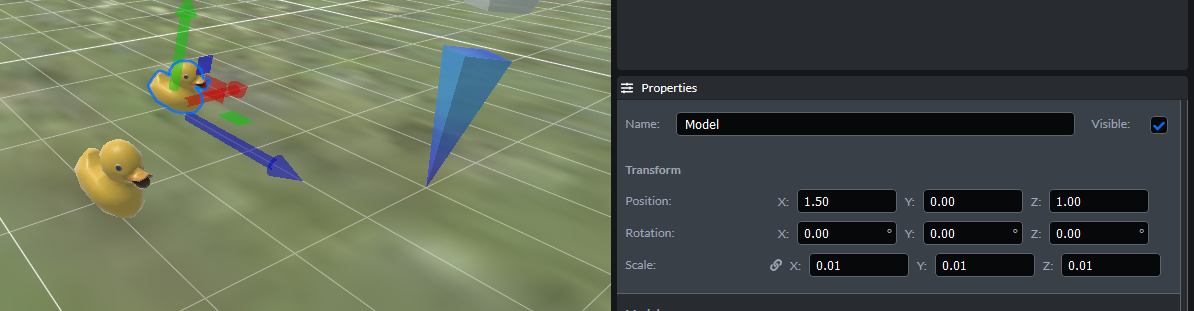
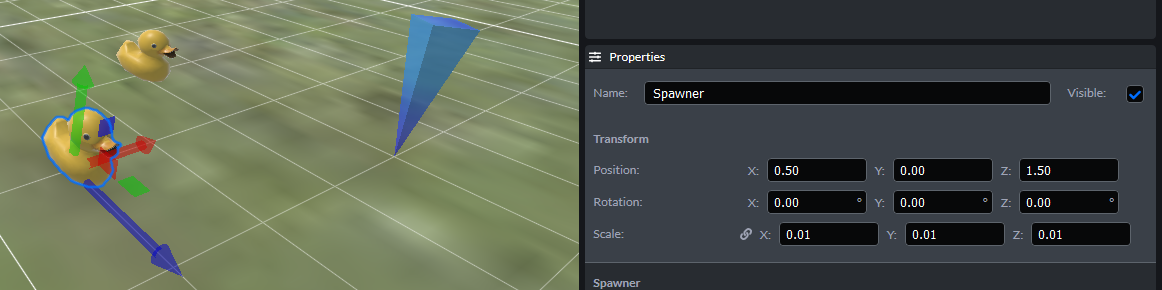
created time in 2 days
issue commentmozilla/hubs
UV scroll with normal map causes graphics corruption over time
Thanks for reporting this one. We’ve noted this before— it’s due to floating point errors as the uv coordinates get bigger and bigger and lose accuracy. We need to change the code to have it ‘loop back’ to the starting point instead of scrolling to infinity. It’s fascinating yet annoying. 😆

comment created time in 5 days
issue commentmozilla/hubs
Enable videos with transparency
There are not very many video formats (codecs) that support alpha channels. Most that do were not intended for use on the web. As far as I understand, in order for Hubs to support this type of format, there would need to be an extension to glTF to allow it. Also, three.js would need to support rendering the format, which it may already.

comment created time in 13 days
issue openedmozilla/hubs
Media Frames light up when using the Pen tool
Description When activating the Pen tool, all Media Frames light up (as if you're holding a frame-able object)
To Reproduce Steps to reproduce the behavior:
- Enter a room with media frames (default XR room works)
- Click the Pen tool button
- Look around
- Result: Media frames light up
Expected behavior Media frames should not light up while holding the Pen
Screenshots
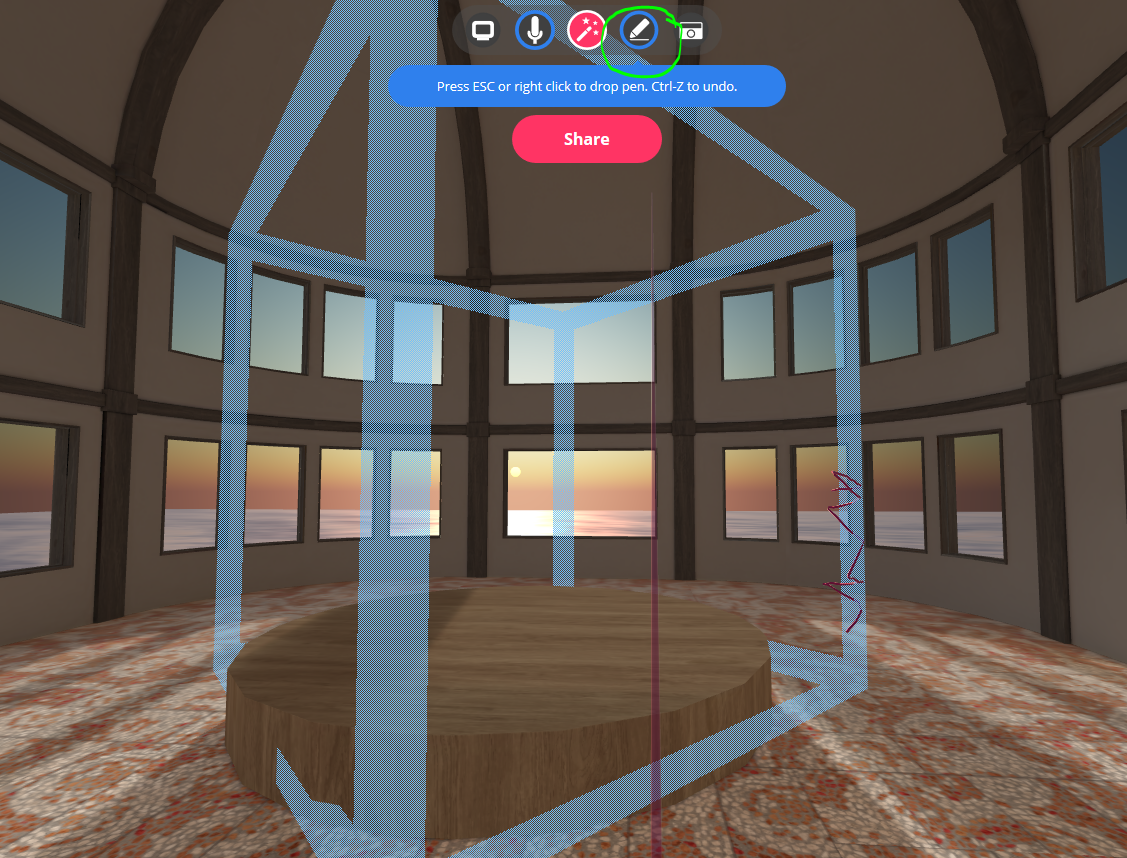
Hardware <!-- Please complete the following information -->
- Device: Desktop
- OS: Windows 10
- Browser: Firefox (probably all)
Additional context You can also draw on the media frames as if they were solid boxes.
created time in 14 days
issue openedmozilla/Spoke
Browser tab title shows scene name when back in Projects
Description: After editing a scene, returning 'Back to Projects' still shows the previously edited scene name in the browser tab title. This occurs in Firefox and Edge, although I'm guessing it would occur in any browser.
Steps:
- Go to hubs.mozilla.com/spoke
- Create a new scene or edit an existing one (note the name)
- Save, then go to hamburger menu-->Back to Projects
- Result: The browser tab still displays the name of that scene
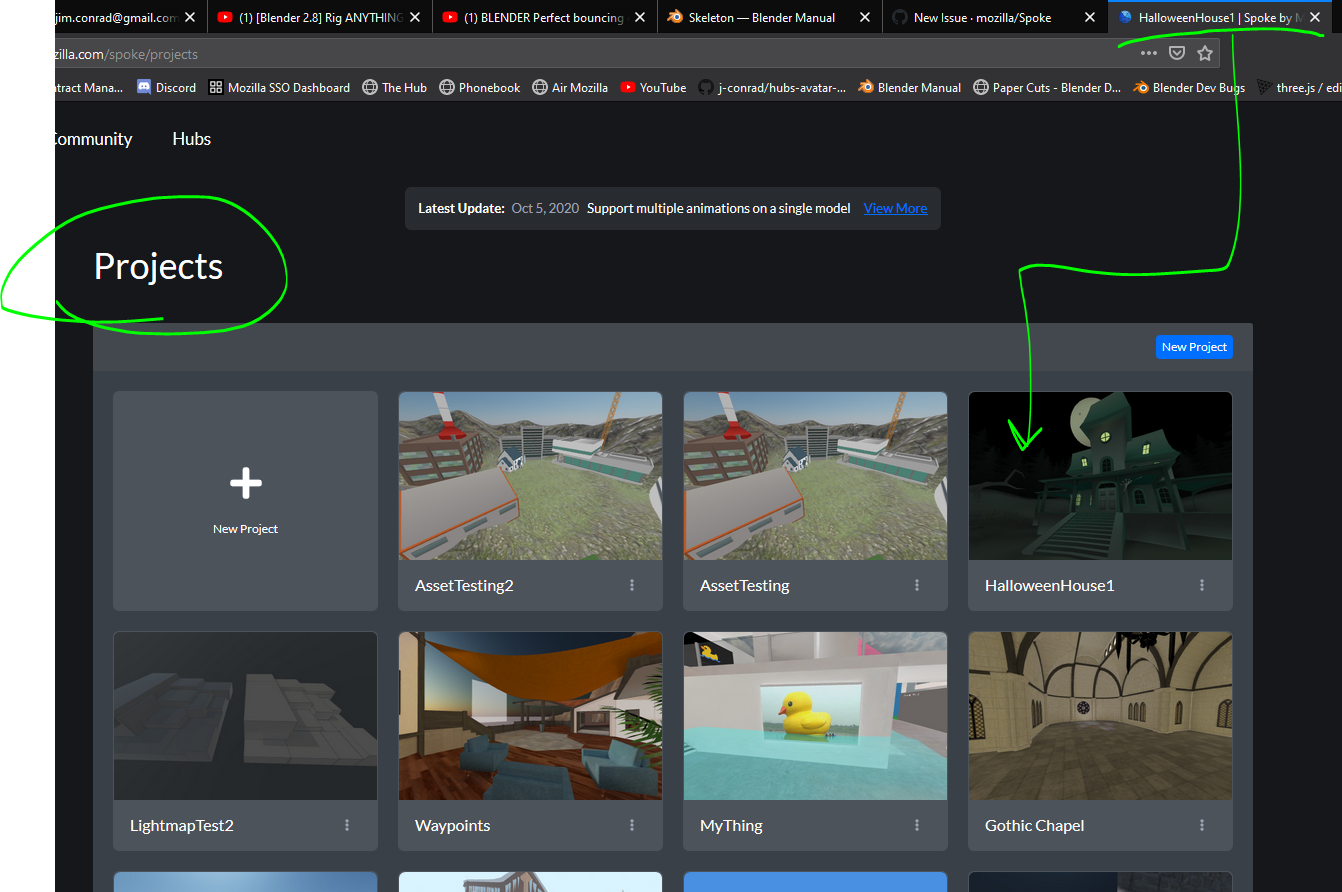
Details: OS: Windows 10 Browser: Firefox, Edge, maybe others
created time in 15 days
issue commentmozilla/hubs
Improve Broken Media Link Appearance
The broken link icon is clean and clear. 👍
comment created time in a month
issue commentmozilla/Spoke
Need a field to allow manual attribution for acquired content
"- Uploaded images and videos shouldn't have default attributions, the user will need to set them directly."
If there's a place somwhere in Spoke to specify the Spoke account holder's info, we could auto-populate with that. This might break down if the model was taken from somewhere else though. Not sure how I feel about this the more I consider it. 🤷♂️

comment created time in a month
issue commentKhronosGroup/glTF-Blender-IO
Merging color and alpha to one texture when they use different UV channels
Possibly related to https://github.com/KhronosGroup/glTF-Blender-IO/issues/1219?

comment created time in a month
pull request commentmozilla/hubs
Fallback to default local model when there is an avatar load error
I'd probably go with one of the standard 'color' bots since they have hands (in case you're using 6-DOF controllers).

comment created time in a month
issue commentmozilla/hubs
Screen sharing appears to be related to audio choppiness in a room
Dom and I noticed this again today during the meetup:
- I was sharing my screen, and Dom reported my voice as being garbled/choppy.
- I stopped sharing my screen, but Dom reported my voice quality remained poor.
- Only when I re-entered the space did my audio improve for Dom.

comment created time in a month
issue openedKhronosGroup/glTF-Blender-IO
Alpha is ignored unless BaseColor is assigned an image texture
If an image texture's Alpha output is plugged into the BSDF node's Alpha input, it gets ignored on export. The only way it seems to work is if the BSDF node has an image texture plugged into the BaseColor input. This can be either the same image as the source of the alpha, or a different image altogether.
To Reproduce Steps to reproduce the behavior:
- Create a plane
- Assign a BSDF shader to it
- Plug an image texture node (with a PNG containing transparency) from the Alpha output to the Alpha input of the BSDF shader node
- Export as .glb and view in any glTF viewer
- RESULT: The alpha is not exported
- Now go back and plug ANY image into the BaseColor input of the BSDF node.
- Re-export as .glb and view in any glTF viewer
- RESULT: The alpha is now showing
Expected behavior Using an image texture's alpha as the source of transparency should work independently of whether the BaseColor has an image texture input. In other words, BaseColor and Alpha should be completely independent.
Screenshots
This exports alpha correctly:

And so does this:
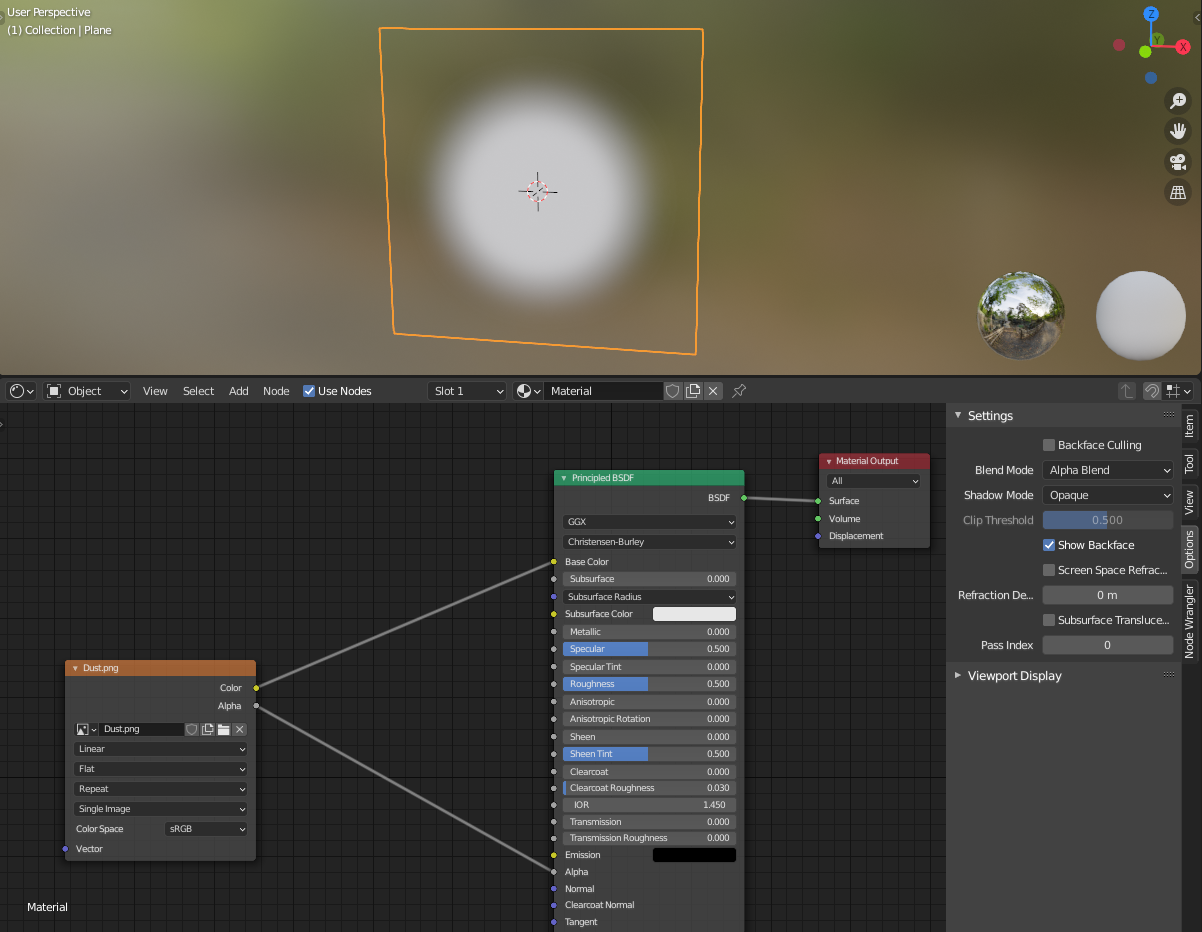
But this does NOT export with alpha:

.blend file/ .gltf VertexAlphaIssue.zip
Version
- OS: Windows 10
- Blender Version 2.90.0
created time in a month
issue openedmozilla/Spoke
Lightmaps get ignored on export when using PBR shader
If you have a model using a built-in lightmap (exported from Blender using our hubs-blender-exporter add-on), if you are using a BSDF shader (PBR), it will be ignored by Spoke when publishing to Hubs. The lightmap will show as expected inside Hubs, so there must be something getting ignored or stripped out at publish time. (Two .glb objects attached for reference)
The object on the right is using an unlit shader (Background node in Blender), whereas the lefthand object is using the Standard material (BSDF node in Blender):
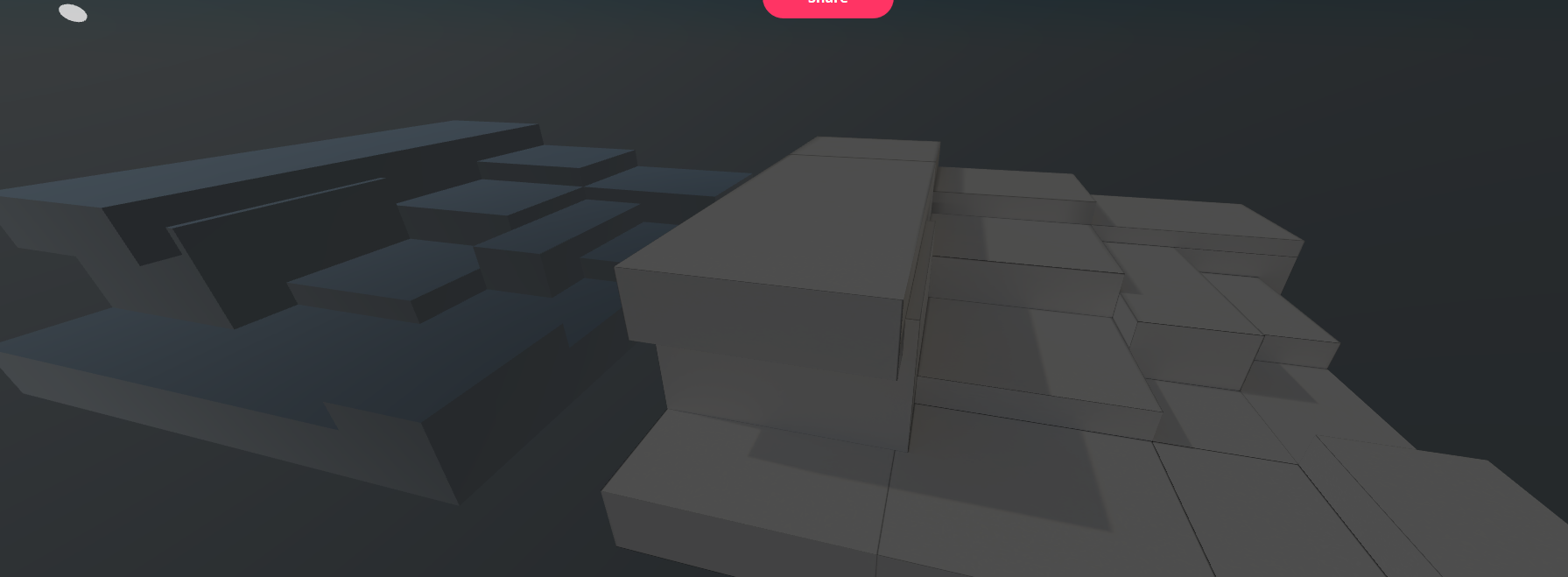
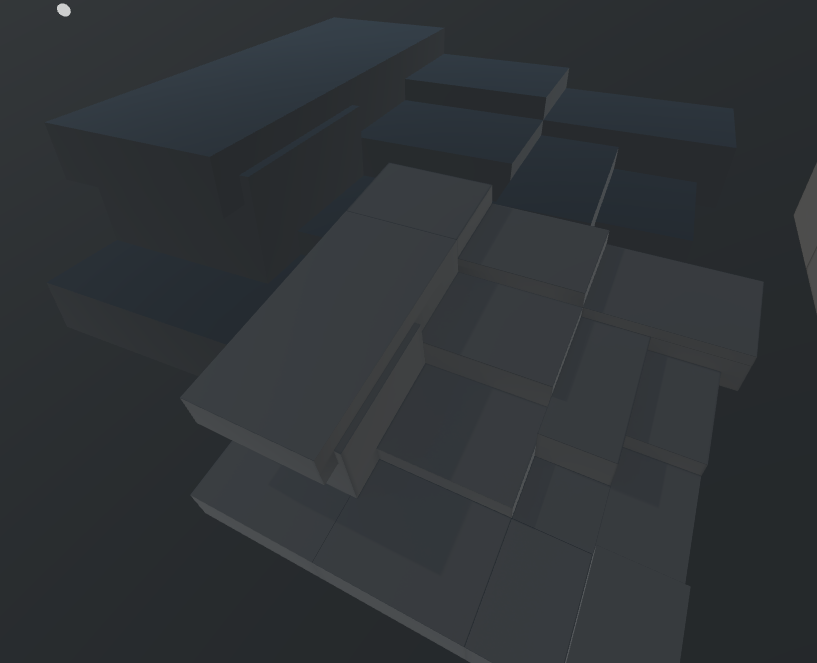
Note: Hubs will recognize the object's lightmaps correctly if you simply drag/drop them into Hubs:
(Foreground is the dropped-in object):
created time in 2 months
push eventMozillaReality/hubs-docs
commit sha bb77b47003513d2cae558b1b0d02c88039fccb6d
Update creators-advanced-avatar-customization.md
push time in 2 months
issue commentmozilla/hubs
Add dropdown selections for Admin tool tags
Also, consider a different tag name for that particular tag "featured-remixable"... That tag is actually used to make the scene appear in Spoke as a project template. But that's not very apparent by the name--in fact, it's somewhat misleading.
comment created time in 3 months
issue openedmozilla/hubs
Add dropdown selections for Admin tool tags
When attempting to add tags to scenes in the Admin tool, having a dropdown of choices for those tags would be very helpful. Currently, you need to know the exact syntax for the tag you wish to add, which isn't shown anywhere on that page.

(Pardon the crude drawing on the screenshot)
created time in 3 months
issue closedmozilla/Spoke
Morning Dew Hubs template by JC not loading into Spoke
Description Error message comes up when try to remix Morning Dew scene in Spoke
To Reproduce
- Go to '...' https://hubs.mozilla.com/scenes/PwDk4BG/morning-dew
- Click on '....' Remix in Spoke
- See error
Expected behavior To be able to remix Morning Dew scene
Screenshots
If applicable, add screenshots to help explain your problem.

Hardware <!-- Please complete the following information -->
- Device: Desktop
- OS: Windows 10 Pro
- Browser: Chrome
Additional context Add any other context about the problem here.
closed time in 3 months
jessicasymons
issue commentmozilla/Spoke
Morning Dew Hubs template by JC not loading into Spoke
Looks like the Sketchfab model owner marked the main model as Private so it cannot be downloaded anymore, and therefore, cannot be remixed in Spoke.
I went through the Admin tool and turned OFF remixable, but left the scene as-is since it will currently load in Hubs just fine.
comment created time in 3 months