








emotion-js/emotion 11851
👩🎤 CSS-in-JS library designed for high performance style composition
Override webpack configurations for create-react-app 2.0
arkmanager/ark-server-tools 481
Set of server tools used to manage ARK: Survival Evolved servers on Linux
Ask Me Anything
FezVrasta/bootstrap-material-datepicker 6
Datepicker for bootstrap-material
Popper fork w/ custom modifiers infra
FezVrasta/bootstrap-material-design 4
Redirect repository
Stupid extension to uniform the color of the main toolbar with the rest of Brackets.
FezVrasta/angular-barcode-generator 2
Angular directive for Code128 Barcode
FezVrasta/amazon-transcribe-websocket-static 1
A static site demonstrating real-time audio transcription via Amazon Transcribe over a WebSocket.
pull request commentpopperjs/popper-core
Adds support for `placement: 'center'`
@MichaelOstrovsky you could publish it as an npm module, it would be useful for others.

comment created time in 19 hours
issue closedpopperjs/popper-core
Unable to get property 'toString' of undefined for node objects
Hi guys, after I updated @popperjs/core from v2.4.2 to v.2.4.4 I started getting those weird errors on IE11 and Edge about node object being empty in some cases. Unfortunately, can't reproduce it in my app :(
Here is my Stacktrace
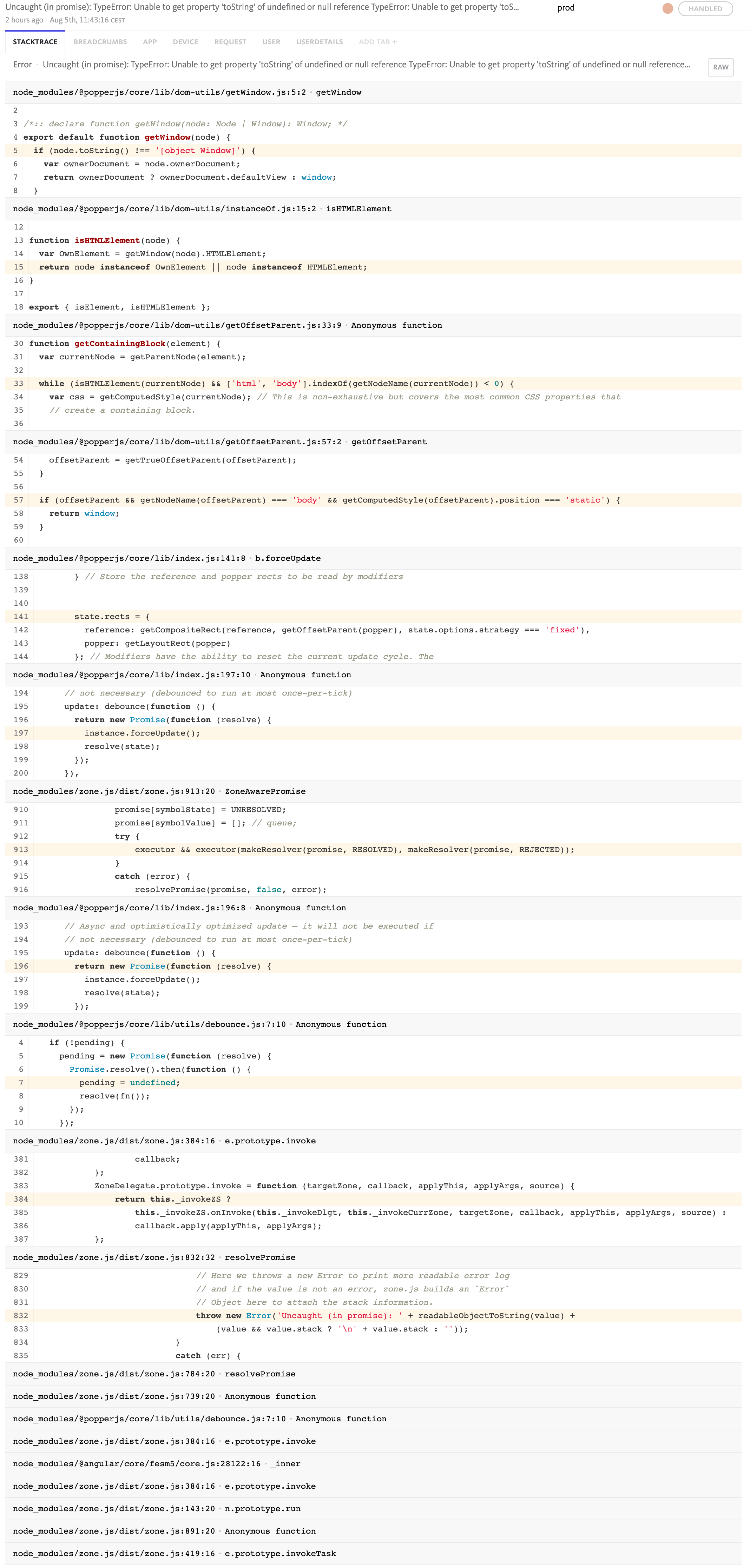
Any thoughts?
closed time in 2 days
gabskoro
push eventpopperjs/popper-core
commit sha 66b4ca6a1458914e96fbddbb42e94ece19463695
Fixed fallback
commit sha 671f71e2b6990765e5ca780daaea7d1f7175beb6
Merge pull request #1185 from ktmouk/fix-root-node-ie11 Fix: IE11 does not support getRootNode
push time in 2 days
pull request commentpopperjs/popper-core
Fix: IE11 does not support getRootNode
thanks!

comment created time in 2 days
PR merged popperjs/popper-core
IE11 does not support getRootNode.
When parent.contains(child) is false, IE11 raises Unable to get property 'toString' error.
This PR adds a check that rootNode is not undefined.
https://developer.mozilla.org/en-US/docs/Web/API/Node/getRootNode
pr closed time in 2 days
push eventpopperjs/website
commit sha 9e61cd71ac54c99168f0e69bfff559888c6e5815
deployed via Gatsby Publish Action 🎩 for 2b7680577236ba177f408bddc695c9ee5f5657b0
push time in 2 days
push eventpopperjs/website
commit sha 9106772cba78bb305ffbc9eb9486a8136e7c3f2e
Update index.mdx Add a slash so that sidebar works properly.
commit sha 2b7680577236ba177f408bddc695c9ee5f5657b0
Merge pull request #10 from ColinChartier/patch-1 Update index.mdx
push time in 2 days
PR merged popperjs/website
Add a slash so that sidebar works properly.

pr closed time in 2 days
issue closedpopperjs/popper-core
Hi Popper is really useful and works well in the examples I've seen. In my case, I'm using a library that uses popper to show pop up menus. But when I use the packaged library reference the pop up breaks and is stuck to the top left of the page and does not close as shown below:

The following example shows this.
CodeSandbox demo
<!DOCTYPE html>
<html>
<head>
<meta charset="utf-8"/>
<meta http-equiv="X-UA-Compatible" content="IE=edge"/>
<meta name="viewport" content="width=device-width,initial-scale=1,viewport-fit=cover">
<title>Action Menu – 1</title>
<script src="https://jspm.dev/@spectrum-web-components/bundle/elements.js" type="module"></script>
<style id="applicationStylesheet" type="text/css">
	.mediaViewInfo {
		--web-view-name: Action Menu – 1;
		--web-view-id: Action_Menu__1;
		--web-enable-deep-linking: true;
		--web-page-font: Arial;
	}
	:root {
		--web-view-ids: Action_Menu__1;
	}
	* {
		margin: 0;
		padding: 0;
		box-sizing: border-box;
		border: none;
	}
	#Action_Menu__1 {
		position: absolute;
		width: 628px;
		height: 472px;
		font-family: Arial;
		background-color: rgba(255,255,255,1);
		overflow: hidden;
		--web-view-name: Action Menu – 1;
		--web-view-id: Action_Menu__1;
		--web-enable-deep-linking: true;
		--web-page-font: Arial;
	}
	#Component_13__1 {
		box-sizing: border-box;
		margin: 0;
		padding: 0;
		position: absolute;
		width: 120px;
		height: 31px;
		left: 233px;
		top: 89px;
		overflow: visible;
	}
	#More_Actions {
		left: 32px;
		top: 7px;
		position: absolute;
		overflow: visible;
		width: 77px;
		white-space: nowrap;
		text-align: left;
		font-family: Adobe Clean, Arial;
		font-style: normal;
		font-weight: normal;
		font-size: 14px;
		color: rgba(112,112,112,1);
	}
</style>
</head>
<body>
<sp-theme id="Action_Menu__1" scale="medium" color="light">
<sp-action-menu id="Component_13__1" label="More Actions">
     <span slot="label">
		More Actions
     </span>
    <sp-menu>
        <sp-menu-item>
            Deselect
        </sp-menu-item>
        <sp-menu-item>
            Select inverse
        </sp-menu-item>
        <sp-menu-item>
            Feather...
        </sp-menu-item>
        <sp-menu-item>
            Select and mask...
        </sp-menu-item>
        <sp-menu-divider></sp-menu-divider>
        <sp-menu-item>
            Save selection
        </sp-menu-item>
        <sp-menu-item disabled>
            Make work path
        </sp-menu-item>
    </sp-menu>
</sp-action-menu>
</sp-theme>
</body>
</html>
Steps to reproduce the problem
- Create and view the HTML page in the browser
- Click on the action button to display a pop up
What is the expected behavior?
The pop up opens in the correct location and is closable.
What went wrong?
The pop up is not positioned correctly and does not close.
Any other comments?
From the library authors, "It looks like JSPM is not removing Node.JS code in their processing of packages."
closed time in 2 days
velara3
issue commentpopperjs/popper-core
Seems like an issue with spectrum, not popper
comment created time in 2 days
issue commentdotansimha/graphql-code-generator
Parsing files with React's JSX in *.js files throws SyntaxError: Unexpected token
I'm sorry, it may not be related actually, it was failing during a pre-commit hook but on my master branch with clean git state it works, so it must be smth different 🤦♂️

comment created time in 2 days
pull request commentfacebook/flow
[DOCS] document react.runtime option
Using the search functionality on the documentation and searching for jsx and runtime returns no results

comment created time in 2 days
issue commentdotansimha/graphql-code-generator
Parsing files with React's JSX in *.js files throws SyntaxError: Unexpected token
I'm having the same issue after I upgraded to create-react-app 4.0 and removed the React imports due to the new JSX transform plugin
comment created time in 2 days
issue commentfacebook/create-react-app
Very slow recompile times (~20 seconds)
What I do is to set all my rules to warn and then in CI I run eslint --max-warnings=0 so that the build fails if any rule throws a warning.
comment created time in 3 days
issue commentpopperjs/react-popper
Virtual Elements inside a function body without Memoization will trigger an infinite loop
Fixing the root cause would be great, but Popper relies on re-renders to work on the most recent DOM properties (stylings, positioning, etc) so it's often required to trigger a re-render before we can compute the new position.

comment created time in 3 days
issue commentpopperjs/react-popper
Virtual Elements inside a function body without Memoization will trigger an infinite loop
A PR to improve the docs would be great.
comment created time in 3 days
pull request commentpopperjs/website
The link already works, what's the problem?
comment created time in 3 days
issue openedatlassian/gajira-find-issue-key
Find issue from PR description?
Hi, is it possible to find an issue from the PR description?
created time in 4 days
issue closedpopperjs/popper-core
Hi team, we have developed a page using popper js. Our clients performed "Fortify" scan and came up with few issues. Please find the attached report and help us find the solution.
closed time in 4 days
Deepti0101
issue commentpopperjs/popper-core
Popper doesn't include any encryption key, I don't understand what the report talks about. It looks like some automated tool thought that the minified Popper source code is a key itself.
comment created time in 4 days
issue commentfacebook/create-react-app
CSF and import/no-anonymous-default-export
You can add this configuration to your package.json:
{
  "eslintConfig": {
    "overrides": [
      {
        "files": [
          "src/**/*.stories.js"
        ],
        "rules": {
          "import/no-anonymous-default-export": "off"
        }
      }
    ]
  }
}

comment created time in 5 days
issue commentfacebook/create-react-app
Make ESLint configuration flexible
If you use Yarn you can use the resolutions section to force some package versions. You could use that to upgrade the eslint deps.

comment created time in 5 days
pull request commentreactjs/reactjs.org
specify required option to use Flow with new JSX transform
https://github.com/facebook/flow/pull/8514/files
comment created time in 5 days
PR opened facebook/flow
<!-- If this is a change to library defintions, please include links to relevant documentation. If this is a documentation change, please prefix the title with [DOCS].
If this is neither, ensure you opened a discussion issue and link it in the PR description. -->
pr created time in 5 days
push eventFezVrasta/flow
commit sha b31201d1f766bce6377ca61a5da5a12ec3952cf8
docs: document react.runtime option
push time in 5 days
issue commentfacebook/create-react-app
Hot Reload stopped working with React "^17.0.1"
@FezVrasta fast refresh is definitely NOT enabled by default, or I'm not able to read code anymore, have a look: https://github.com/facebook/create-react-app/pull/8582/files For example, one comment explicitly mentions:
        // Whether or not react-refresh is enabled.
        // react-refresh is not 100% stable at this time,
        // which is why it's disabled by default.
The comment is outdated, fast refresh is enabled by default, in fact the checks is FAST_REFRESH !== 'false' because they assume any value different than false is going to be true

comment created time in 5 days
issue commentnpm/cli
[BUG] npx behavior in CI environments
Hitting this too, it broken all our CI scripts... Why did you introduce a breaking change in a minor/patch release?

comment created time in 5 days
issue commentfacebook/flow
New JSX transform not working with Flow
I was informed on Discord that there's an option to enable to make Flow understand the new JSX transform.
[options]
react.runtime=automatic
I can't find it documented anywhere in the docs though.
comment created time in 5 days
PR opened reactjs/reactjs.org
Note to Hacktoberfest 🎃 participants:
While we appreciate the enthusiasm, we are experiencing a high volume of drive-by pull requests (one-line changes, README tweaks, etc.). Please remember that hundreds of people are subscribed to this repo and will receive notifications for these PRs. Spam submissions will be closed and won't count towards your Hacktoberfest goals.
Please search for issues tagged good first issue or hacktoberfest to find things to work on.
You can also search all of GitHub.
<!--
Thank you for the PR! Contributors like you keep React awesome!
Please see the Contribution Guide for guidelines:
https://github.com/reactjs/reactjs.org/blob/master/CONTRIBUTING.md
If your PR references an existing issue, please add the issue number below
-->
Unfortunately the option is not documented on the Flow docs, and it's not very obvious how to get Flow to work with the new JSX transform.
pr created time in 5 days
push eventFezVrasta/reactjs.org
commit sha 7289ad609861e480958aee8f9e4ec7648d2a25d7
specify required option to use Flow with new JSX transform
push time in 5 days
push eventFezVrasta/create-react-app
commit sha d4cf76b8939470b4c37412320ac49fe7d49ea4b8
docs: - add instructions to enable new JSX transform with Flow - add instructions to suppress node_modules type errors
push time in 5 days
PR opened facebook/create-react-app


- add instructions to enable new JSX transform with Flow
- add instructions to suppress node_modules type errors
<!-- Thank you for sending the PR!
If you changed any code, please provide us with clear instructions on how you verified your changes work. Bonus points for screenshots!
Happy contributing! -->
pr created time in 5 days
issue commentfacebook/create-react-app
Hot Reload stopped working with React "^17.0.1"
fast refresh is enabled by default.
comment created time in 6 days
issue openedfacebook/flow
New JSX transform not working with Flow
<!-- Please fill out this entire template so that we can address your bug report as quickly as possible.
Any bug reports that don't contain instructions to reproduce the issue will be closed. -->
Flow version: 0.136.0
Expected behavior
I should be allowed to use JSX without importing React.
Actual behavior
Cannot resolve name `React`. [cannot-resolve-name]
<!-- Please reproduce your issue on flow.org/try so that we can debug it.
Not all issues are reproducible on try-flow because they may require multiple files or specific flowconfig settings. If your bug can only be reproduced under one of these constraints, please make a small github repo that contains a minimal way to reproduce your problem. -->
- Link to Try-Flow or Github repo:
https://flow.org/try/#0PQKgBAAgZgNg9gdzCYAoVAeAJgSwG5jAB8QA
created time in 6 days
push eventFezVrasta/create-react-app
commit sha 5fab0be804c029c35fbd5af13c8e2d9d5f0745ac
fix: slow recompile time fixes #9886
push time in 6 days
PR opened facebook/create-react-app

fixes #9886
<!-- Thank you for sending the PR!
If you changed any code, please provide us with clear instructions on how you verified your changes work. Bonus points for screenshots!
Happy contributing! -->
pr created time in 6 days
issue commentfacebook/create-react-app
Hot Reload stopped working with React "^17.0.1"
CRA 4 uses Fast Refresh instead of Hot Reload, the page doesn't reload on file changes.
comment created time in 7 days
startedswc-project/swc
started time in 7 days
issue commentfacebook/create-react-app
Very slow recompile times (~20 seconds)
It may be a coincidence, but running eslint . takes 20 seconds too, so it looks like CRA is running ESlint from scratch on each file change, rather than using a partial approach or some kind of cache.
comment created time in 7 days
issue commentstyleguidist/react-styleguidist
@component comment + Flow types give "unknown" property type
Don't close this issue. This is an automatic message by Fresh - a bot against stale bots.
comment created time in 7 days
issue commentfacebook/create-react-app
Very slow recompile times (~20 seconds)
Is anyone aware of a flag that can be set to make the yarn start command log verbose output? I'd like to understand what's the underlying issue but with the existing log there isn't any information available.
comment created time in 7 days
issue commentfacebook/jest
Invalid variable access _jsxFileName
Alternatively the plugin could also allow variables prefixed by a double underscore, so that it's generic enough for other libraries to follow the same convention if they need to. I know right now it supports mock prefixed variables, so it wouldn't be much different.

comment created time in 7 days
issue commentfacebook/jest
Invalid variable access _jsxFileName
Would (yet) another configuration option make sense? Today is React who needs this variable, tomorrow may be framework x that needs another one.
comment created time in 7 days
issue openedfacebook/create-react-app
Invalid variable access: _jsxFileName
<!-- Please note that your issue will be fixed much faster if you spend about half an hour preparing it, including the exact reproduction steps and a demo.
If you're in a hurry or don't feel confident, it's fine to report bugs with
less details, but this makes it less likely they'll get fixed soon.

In either case, please use this template and fill in as many fields below as you can.

Note that we don't provide help for webpack questions after ejecting.
You can find webpack docs at https://webpack.js.org/.
-->
Describe the bug
My tests are failing because I have some Jest mocks that use JSX. The error is Invalid variable access: _jsxFileName.
Did you try recovering your dependencies?
<!-- Your module tree might be corrupted, and that might be causing the issues. Let's try to recover it. First, delete these files and folders in your project:
* node_modules
* package-lock.json
* yarn.lock
Then you need to decide which package manager you prefer to use. We support both npm (https://npmjs.com) and yarn (http://yarnpkg.com/). However, they can't be used together in one project so you need to pick one.
If you decided to use npm, run this in your project directory:
npm install -g npm@latest
npm install
This should fix your project.
If you decided to use yarn, update it first (https://yarnpkg.com/en/docs/install). Then run in your project directory:
yarn
This should fix your project.
Importantly, if you decided to use yarn, you should never run npm install in the project.
For example, yarn users should run yarn add <library> instead of npm install <library>.
Otherwise your project will break again.
Have you done all these steps and still see the issue?
Please paste the output of npm --version and/or yarn --version to confirm.
-->
Yes.
Which terms did you search for in User Guide?
<!-- There are a few common documented problems, such as watcher not detecting changes, or build failing. They are described in the Troubleshooting section of the User Guide:
https://facebook.github.io/create-react-app/docs/troubleshooting
Please scan these few sections for common problems. Additionally, you can search the User Guide itself for something you're having issues with:
https://facebook.github.io/create-react-app/
If you didn't find the solution, please share which words you searched for. This helps us improve documentation for future readers who might encounter the same problem. -->
_jsxFileName
Environment
<!-- To help identify if a problem is specific to a platform, browser, or module version, information about your environment is required. This enables the maintainers quickly reproduce the issue and give feedback.
Run the following command in your React app's folder in terminal. Note: The result is copied to your clipboard directly.
npx create-react-app --info
Paste the output of the command in the section below. -->
Environment Info:

  System:
    OS: macOS 10.15.7
    CPU: (4) x64 Intel(R) Core(TM) i5-4690 CPU @ 3.50GHz
  Binaries:
    Node: 14.5.0 - /usr/local/bin/node
    Yarn: 1.22.5 - /usr/local/bin/yarn
    npm: 6.14.5 - /usr/local/bin/npm
  Browsers:
    Chrome: 86.0.4240.111
    Firefox: 81.0
    Safari: 14.0
  npmPackages:
    react: ^16.6.3 => 16.14.0
    react-dom: ^16.6.0 => 16.14.0
    react-scripts: ^4.0.0 => 4.0.0
  npmGlobalPackages:
    create-react-app: Not Found
Steps to reproduce
<!-- How would you describe your issue to someone who doesn’t know you or your project? Try to write a sequence of steps that anybody can repeat to see the issue. -->
- create a test file
- add
jest.mock('./someModule', () => <div />) - run the tests to observe the error
Expected behavior
<!-- How did you expect the tool to behave? It’s fine if you’re not sure your understanding is correct. Just write down what you thought would happen. -->
Tests should work.
Actual behavior
<!-- Did something go wrong? Is something broken, or not behaving as you expected? Please attach screenshots if possible! They are extremely helpful for diagnosing issues. -->
  ● Test suite failed to run

    ReferenceError: /Users/federicozivolo/Projects/[...]/frontend/src/__mocks__/material-ui.js: The module factory of `jest.mock()` is not allowed to reference any out-of-scope variables.
    Invalid variable access: _jsxFileName
    Allowed objects: Array, ArrayBuffer, Atomics, BigInt, BigInt64Array, BigUint64Array, Boolean, Buffer, DataView, Date, Error, EvalError, Float32Array, Float64Array, Function, Generator, GeneratorFunction, Infinity, Int16Array, Int32Array, Int8Array, InternalError, Intl, JSON, Map, Math, NaN, Number, Object, Promise, Proxy, RangeError, ReferenceError, Reflect, RegExp, Set, SharedArrayBuffer, String, Symbol, SyntaxError, TextDecoder, TextEncoder, TypeError, URIError, URL, URLSearchParams, Uint16Array, Uint32Array, Uint8Array, Uint8ClampedArray, WeakMap, WeakSet, WebAssembly, arguments, clearImmediate, clearInterval, clearTimeout, console, decodeURI, decodeURIComponent, encodeURI, encodeURIComponent, escape, eval, expect, global, globalThis, isFinite, isNaN, jest, parseFloat, parseInt, process, queueMicrotask, require, setImmediate, setInterval, setTimeout, undefined, unescape.
    Note: This is a precaution to guard against uninitialized mock variables. If it is ensured that the mock is required lazily, variable names prefixed with `mock` (case insensitive) are permitted.
     (This is an error on an internal node. Probably an internal error.)

      at File.buildCodeFrameError (node_modules/@babel/core/lib/transformation/file/file.js:250:12)
      at NodePath.buildCodeFrameError (node_modules/@babel/traverse/lib/path/index.js:163:21)
Reproducible demo
<!-- If you can, please share a project that reproduces the issue. This is the single most effective way to get an issue fixed soon.
There are two ways to do it:
* Create a new app and try to reproduce the issue in it.
  This is useful if you roughly know where the problem is, or can’t share the real code.

* Or, copy your app and remove things until you’re left with the minimal reproducible demo.
  This is useful for finding the root cause. You may then optionally create a new project.
This is a good guide to creating bug demos: https://stackoverflow.com/help/mcve Once you’re done, push the project to GitHub and paste the link to it below: -->
(Paste the link to an example project and exact instructions to reproduce the issue.)
<!-- What happens if you skip this step?
We will try to help you, but in many cases it is impossible because crucial information is missing. In that case we'll tag an issue as having a low priority, and eventually close it if there is no clear direction.
We still appreciate the report though, as eventually somebody else might create a reproducible example for it.
Thanks for helping us help you! -->
created time in 7 days
PR opened timarney/react-app-rewired
Right now, if for example, you try to set resetMocks to false, the option will be ignored because the condition evaluates to false.
pr created time in 7 days
push eventFezVrasta/react-app-rewired
commit sha c8f97bde38b4f52a49f66622b6d81bd98bf714b1
fix: support `false` values in jest config override
push time in 7 days
issue closedfacebook/create-react-app
Can't override jest.resetMocks
<!-- Please note that your issue will be fixed much faster if you spend about half an hour preparing it, including the exact reproduction steps and a demo.
If you're in a hurry or don't feel confident, it's fine to report bugs with
less details, but this makes it less likely they'll get fixed soon.

In either case, please use this template and fill in as many fields below as you can.

Note that we don't provide help for webpack questions after ejecting.
You can find webpack docs at https://webpack.js.org/.
-->
Describe the bug
Even though it's documented, if I set "resetMocks": false in the package.json jest configuration, the option is still set to true.
Did you try recovering your dependencies?
<!-- Your module tree might be corrupted, and that might be causing the issues. Let's try to recover it. First, delete these files and folders in your project:
* node_modules
* package-lock.json
* yarn.lock
Then you need to decide which package manager you prefer to use. We support both npm (https://npmjs.com) and yarn (http://yarnpkg.com/). However, they can't be used together in one project so you need to pick one.
If you decided to use npm, run this in your project directory:
npm install -g npm@latest
npm install
This should fix your project.
If you decided to use yarn, update it first (https://yarnpkg.com/en/docs/install). Then run in your project directory:
yarn
This should fix your project.
Importantly, if you decided to use yarn, you should never run npm install in the project.
For example, yarn users should run yarn add <library> instead of npm install <library>.
Otherwise your project will break again.
Have you done all these steps and still see the issue?
Please paste the output of npm --version and/or yarn --version to confirm.
-->
(Write your answer here.) Yes
Which terms did you search for in User Guide?
<!-- There are a few common documented problems, such as watcher not detecting changes, or build failing. They are described in the Troubleshooting section of the User Guide:
https://facebook.github.io/create-react-app/docs/troubleshooting
Please scan these few sections for common problems. Additionally, you can search the User Guide itself for something you're having issues with:
https://facebook.github.io/create-react-app/
If you didn't find the solution, please share which words you searched for. This helps us improve documentation for future readers who might encounter the same problem. -->
(Write your answer here if relevant.) resetMocks override
Environment
<!-- To help identify if a problem is specific to a platform, browser, or module version, information about your environment is required. This enables the maintainers quickly reproduce the issue and give feedback.
Run the following command in your React app's folder in terminal. Note: The result is copied to your clipboard directly.
npx create-react-app --info
Paste the output of the command in the section below. -->
(paste the output of the command here.)
Steps to reproduce
<!-- How would you describe your issue to someone who doesn’t know you or your project? Try to write a sequence of steps that anybody can repeat to see the issue. -->
(Write your steps here:)
Expected behavior
<!-- How did you expect the tool to behave? It’s fine if you’re not sure your understanding is correct. Just write down what you thought would happen. -->
(Write what you thought would happen.)
Actual behavior
<!-- Did something go wrong? Is something broken, or not behaving as you expected? Please attach screenshots if possible! They are extremely helpful for diagnosing issues. -->
(Write what happened. Please add screenshots!)
Reproducible demo
<!-- If you can, please share a project that reproduces the issue. This is the single most effective way to get an issue fixed soon.
There are two ways to do it:
* Create a new app and try to reproduce the issue in it.
  This is useful if you roughly know where the problem is, or can’t share the real code.

* Or, copy your app and remove things until you’re left with the minimal reproducible demo.
  This is useful for finding the root cause. You may then optionally create a new project.
This is a good guide to creating bug demos: https://stackoverflow.com/help/mcve Once you’re done, push the project to GitHub and paste the link to it below: -->
(Paste the link to an example project and exact instructions to reproduce the issue.)
<!-- What happens if you skip this step?
We will try to help you, but in many cases it is impossible because crucial information is missing. In that case we'll tag an issue as having a low priority, and eventually close it if there is no clear direction.
We still appreciate the report though, as eventually somebody else might create a reproducible example for it.
Thanks for helping us help you! -->
closed time in 7 days
FezVrasta
issue openedfacebook/create-react-app
Can't override jest.resetMocks
<!-- Please note that your issue will be fixed much faster if you spend about half an hour preparing it, including the exact reproduction steps and a demo.
If you're in a hurry or don't feel confident, it's fine to report bugs with
less details, but this makes it less likely they'll get fixed soon.

In either case, please use this template and fill in as many fields below as you can.

Note that we don't provide help for webpack questions after ejecting.
You can find webpack docs at https://webpack.js.org/.
-->
Describe the bug
Even though it's documented, if I set "resetMocks": false in the package.json jest configuration, the option is still set to true.
Did you try recovering your dependencies?
<!-- Your module tree might be corrupted, and that might be causing the issues. Let's try to recover it. First, delete these files and folders in your project:
* node_modules
* package-lock.json
* yarn.lock
Then you need to decide which package manager you prefer to use. We support both npm (https://npmjs.com) and yarn (http://yarnpkg.com/). However, they can't be used together in one project so you need to pick one.
If you decided to use npm, run this in your project directory:
npm install -g npm@latest
npm install
This should fix your project.
If you decided to use yarn, update it first (https://yarnpkg.com/en/docs/install). Then run in your project directory:
yarn
This should fix your project.
Importantly, if you decided to use yarn, you should never run npm install in the project.
For example, yarn users should run yarn add <library> instead of npm install <library>.
Otherwise your project will break again.
Have you done all these steps and still see the issue?
Please paste the output of npm --version and/or yarn --version to confirm.
-->
(Write your answer here.) Yes
Which terms did you search for in User Guide?
<!-- There are a few common documented problems, such as watcher not detecting changes, or build failing. They are described in the Troubleshooting section of the User Guide:
https://facebook.github.io/create-react-app/docs/troubleshooting
Please scan these few sections for common problems. Additionally, you can search the User Guide itself for something you're having issues with:
https://facebook.github.io/create-react-app/
If you didn't find the solution, please share which words you searched for. This helps us improve documentation for future readers who might encounter the same problem. -->
(Write your answer here if relevant.) resetMocks override
Environment
<!-- To help identify if a problem is specific to a platform, browser, or module version, information about your environment is required. This enables the maintainers quickly reproduce the issue and give feedback.
Run the following command in your React app's folder in terminal. Note: The result is copied to your clipboard directly.
npx create-react-app --info
Paste the output of the command in the section below. -->
(paste the output of the command here.)
Steps to reproduce
<!-- How would you describe your issue to someone who doesn’t know you or your project? Try to write a sequence of steps that anybody can repeat to see the issue. -->
(Write your steps here:)
Expected behavior
<!-- How did you expect the tool to behave? It’s fine if you’re not sure your understanding is correct. Just write down what you thought would happen. -->
(Write what you thought would happen.)
Actual behavior
<!-- Did something go wrong? Is something broken, or not behaving as you expected? Please attach screenshots if possible! They are extremely helpful for diagnosing issues. -->
(Write what happened. Please add screenshots!)
Reproducible demo
<!-- If you can, please share a project that reproduces the issue. This is the single most effective way to get an issue fixed soon.
There are two ways to do it:
* Create a new app and try to reproduce the issue in it.
  This is useful if you roughly know where the problem is, or can’t share the real code.

* Or, copy your app and remove things until you’re left with the minimal reproducible demo.
  This is useful for finding the root cause. You may then optionally create a new project.
This is a good guide to creating bug demos: https://stackoverflow.com/help/mcve Once you’re done, push the project to GitHub and paste the link to it below: -->
(Paste the link to an example project and exact instructions to reproduce the issue.)
<!-- What happens if you skip this step?
We will try to help you, but in many cases it is impossible because crucial information is missing. In that case we'll tag an issue as having a low priority, and eventually close it if there is no clear direction.
We still appreciate the report though, as eventually somebody else might create a reproducible example for it.
Thanks for helping us help you! -->
created time in 7 days
issue openedfacebook/create-react-app
Very slow recompile times (~20 seconds)
<!-- Please note that your issue will be fixed much faster if you spend about half an hour preparing it, including the exact reproduction steps and a demo.
If you're in a hurry or don't feel confident, it's fine to report bugs with
less details, but this makes it less likely they'll get fixed soon.

In either case, please use this template and fill in as many fields below as you can.

Note that we don't provide help for webpack questions after ejecting.
You can find webpack docs at https://webpack.js.org/.
-->
Describe the bug
(Write your answer here.)
Hi, I'm trying to upgrade from 3.4.1 to 4.0.0 but I noticed that when I make a change it takes approx 20 seconds to recompile. With 3.4.1 it's just a couple of seconds.
Did you try recovering your dependencies?
<!-- Your module tree might be corrupted, and that might be causing the issues. Let's try to recover it. First, delete these files and folders in your project:
* node_modules
* package-lock.json
* yarn.lock
Then you need to decide which package manager you prefer to use. We support both npm (https://npmjs.com) and yarn (http://yarnpkg.com/). However, they can't be used together in one project so you need to pick one.
If you decided to use npm, run this in your project directory:
npm install -g npm@latest
npm install
This should fix your project.
If you decided to use yarn, update it first (https://yarnpkg.com/en/docs/install). Then run in your project directory:
yarn
This should fix your project.
Importantly, if you decided to use yarn, you should never run npm install in the project.
For example, yarn users should run yarn add <library> instead of npm install <library>.
Otherwise your project will break again.
Have you done all these steps and still see the issue?
Please paste the output of npm --version and/or yarn --version to confirm.
-->
I deleted node_modules, yarn.lock, and installed the deps.
Which terms did you search for in User Guide?
<!-- There are a few common documented problems, such as watcher not detecting changes, or build failing. They are described in the Troubleshooting section of the User Guide:
https://facebook.github.io/create-react-app/docs/troubleshooting
Please scan these few sections for common problems. Additionally, you can search the User Guide itself for something you're having issues with:
https://facebook.github.io/create-react-app/
If you didn't find the solution, please share which words you searched for. This helps us improve documentation for future readers who might encounter the same problem. -->
(Write your answer here if relevant.)
Slow, compile time, recompile.
Environment
<!-- To help identify if a problem is specific to a platform, browser, or module version, information about your environment is required. This enables the maintainers quickly reproduce the issue and give feedback.
Run the following command in your React app's folder in terminal. Note: The result is copied to your clipboard directly.
npx create-react-app --info
Paste the output of the command in the section below. -->
Environment Info:
System: OS: macOS 10.15.7 CPU: (4) x64 Intel(R) Core(TM) i5-4690 CPU @ 3.50GHz Binaries: Node: 14.5.0 - /usr/local/bin/node Yarn: 1.22.5 - /usr/local/bin/yarn npm: 6.14.5 - /usr/local/bin/npm Browsers: Chrome: 86.0.4240.111 Firefox: 81.0 Safari: 14.0 npmPackages: react: ^16.6.3 => 16.13.1 react-dom: ^16.6.0 => 16.13.1 react-scripts: ^4.0.0 => 4.0.0 npmGlobalPackages: create-react-app: Not Found
Steps to reproduce
<!-- How would you describe your issue to someone who doesn’t know you or your project? Try to write a sequence of steps that anybody can repeat to see the issue. -->
(Write your steps here:)
yarn start- change a file
- observe the time it spends on "Compiling..."
Expected behavior
<!-- How did you expect the tool to behave? It’s fine if you’re not sure your understanding is correct. Just write down what you thought would happen. -->
The recompile time should be almost instantaneous.
Actual behavior
<!-- Did something go wrong? Is something broken, or not behaving as you expected? Please attach screenshots if possible! They are extremely helpful for diagnosing issues. -->
(Write what happened. Please add screenshots!) The app takes 20 seconds to recompile.
Reproducible demo
<!-- If you can, please share a project that reproduces the issue. This is the single most effective way to get an issue fixed soon.
There are two ways to do it:
* Create a new app and try to reproduce the issue in it.
  This is useful if you roughly know where the problem is, or can’t share the real code.

* Or, copy your app and remove things until you’re left with the minimal reproducible demo.
  This is useful for finding the root cause. You may then optionally create a new project.
This is a good guide to creating bug demos: https://stackoverflow.com/help/mcve Once you’re done, push the project to GitHub and paste the link to it below: -->
(Paste the link to an example project and exact instructions to reproduce the issue.) Not available, I think it's related to the size of my app (It's 1012 files)
<!-- What happens if you skip this step?
We will try to help you, but in many cases it is impossible because crucial information is missing. In that case we'll tag an issue as having a low priority, and eventually close it if there is no clear direction.
We still appreciate the report though, as eventually somebody else might create a reproducible example for it.
Thanks for helping us help you! -->
created time in 8 days
issue commentpetyosi/react-virtuoso
Re-rendered because of hook changes
I get quite a lot of re-renders during the initial rendering phase (but that probably happens because I'm loading data asynchronously), but I also see it during scroll.
comment created time in 9 days
issue commentpetyosi/react-virtuoso
Re-rendered because of hook changes
Oh the message comes from why-did-you-render, once enabled it logs this useful info.
The problem seems to be that the render function in VirtuosoStore.tsx:177 is inline so it changes identity on each render.
comment created time in 9 days
issue openedpetyosi/react-virtuoso
Re-rendered because of hook changes
Hi, I'm trying to improve the performance of my app and I noticed a lot of these messages:
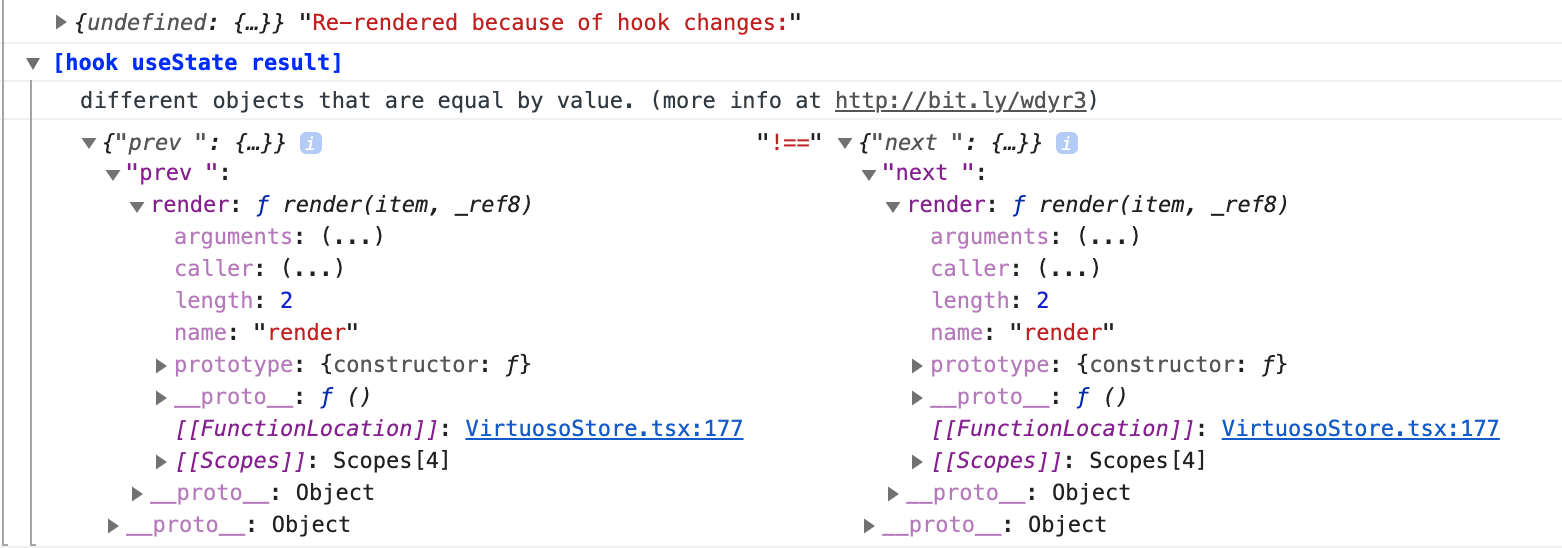
They seem to be related to the VirtuosoStore.tsx file, do you think there could be a way to memoize the value to avoid unnecessary rerenders?
created time in 10 days
pull request commentpopperjs/react-popper
Add React 17 to peerDependencies
thanks!

comment created time in 10 days
PR merged popperjs/react-popper
This PR adds React 17 (released on October 20) to the supported peerDependencies.
It also changes the react version in the devDependencies so the tests run against React 17.
pr closed time in 10 days
push eventpopperjs/react-popper
commit sha 68a992c07dc145935acbe682fa496f888136e55c
Add React 17 to peerDependencies (#390) Co-authored-by: Diego Fernandez <[email protected]>
push time in 10 days
issue commentdotansimha/graphql-code-generator
Double // @flow comment added to generated file
comment created time in 13 days
issue commentdotansimha/graphql-code-generator
Double // @flow comment added to generated file
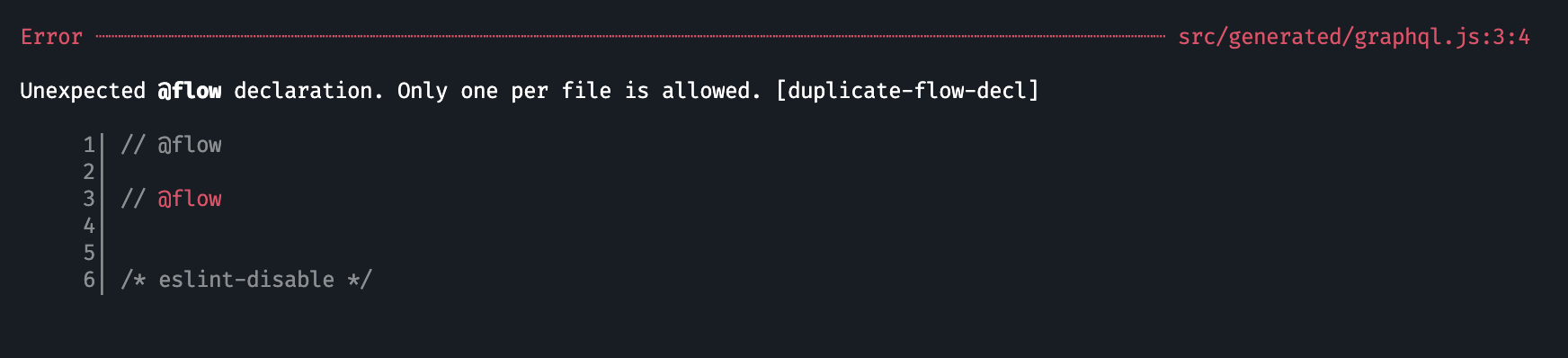
It errors in my create-react-app project
comment created time in 13 days
push eventpopperjs/website
commit sha 85f1a11236cec16f4afe4520ee90f5e6fa6baefd
deployed via Gatsby Publish Action 🎩 for 4cef289003aa59a698568bb29ec8610110e84ca2
push time in 13 days
push eventpopperjs/website
commit sha 4cef289003aa59a698568bb29ec8610110e84ca2
wording
push time in 13 days
fork FezVrasta/graphql-code-generator
A tool for generating code based on a GraphQL schema and GraphQL operations (query/mutation/subscription), with flexible support for custom plugins.
https://graphql-code-generator.com
fork in 15 days
PR closed popperjs/website
This makes the header colors look more coherent on dark mode

pr closed time in 15 days
push eventpopperjs/website
commit sha c4ba2179b4b497de2f7446a0e932cff5a733631d
deployed via Gatsby Publish Action 🎩 for 534d107efb983f47f9b0fd3201d775495f287cc8
push time in 15 days
push eventpopperjs/website
commit sha 78076e05e2d5d76a17dc16f9d12b2125a1032df7
deployed via Gatsby Publish Action 🎩 for 08722b1259de579860355775fef0f69f8eae56c4
push time in 15 days
push eventpopperjs/website
commit sha d76768b577e5c04ca4fcce85a285f2421de9de0d
deployed via Gatsby Publish Action 🎩 for efd28026217bd8c930729af5506a2f5bba43b700
push time in 15 days
push eventpopperjs/website
commit sha 9cc049858a629b5a3e925584e243fc9255765e95
Fix react-popper docs' createPopper link
commit sha 08722b1259de579860355775fef0f69f8eae56c4
Merge pull request #8 from Sun-2/fix-docs-link Fix react-popper docs' createPopper link
push time in 15 days
PR merged popperjs/website
The createPopper link in react-popper docs leads to 404 at https://popper.js.org/react-popper/docs/v2/constructors/#createpopper.
Now it leads to https://popper.js.org/docs/v2/constructors/#createpopper, which is the proper destination.

pr closed time in 15 days
push eventpopperjs/website
commit sha 41167f1b7de0a771d3a3c58161c182e95bb81a89
deployed via Gatsby Publish Action 🎩 for 8a56879130761c53ff6a2acc5de97dcbf1968143
push time in 15 days
push eventpopperjs/website
commit sha e3e76140abb264f625efc73b4c8668f8c0163028
deps: upgrade to docsearch v3
commit sha 4e12083ef582db49f54b54497709c27ee0d9127f
feat: integrate DocSearch v3
commit sha 1edb1aadf8bd8c7e4d2599c03e565dc9368e3011
refactor: remove unused import
commit sha 9b9442d249a7c0337c5b68f0cd4f364207231015
refactor: remove shadowing component
commit sha 4337ff61467e1a1acf3054b5d38626a309075c41
refactor: removing filtering on version
commit sha af4f0b677187f2d549939906322556a928aee363
Update src/components/Search.js Co-authored-by: François Chalifour <[email protected]>
commit sha 387157ab988f8eb1a3198e0fb68d6feac39df334
style(search): extend search Icon
commit sha 8da678d59b243b5574de2e51e472d8cdf0ea77ea
refactor(search): remove duplicate
commit sha 9e1a9e1a9030d52787963f6b35e5212ac5419ed9
style(search): override default styling on key controls
commit sha 65f64602b0e6b3c97ac60b232e278fc620c2dddc
style(search): keep constrast consistent within search button
commit sha 3d5de3aceb96ef5bba09ef79f435183cf1ebeb36
feat(search): preload page data when hits are hovered
commit sha 9242d820dfd6525a5f55f3a6f0afe80e1b97e2c4
style(search): override default styling on li
commit sha 4ce39b104ea29eeb78832ef453ee61ca4f29c428
style(search): fix contrast on commands keys
commit sha 9625f82fa35fa5f99f7ad17a70815ad93704da0e
style(search): refactor rules
commit sha 7345e92f72591449e317342ea35904402887b4a9
style(search): center vertically center commands keys, should be removed if francoischalifour/autocomplete#75 is deployed
commit sha e57c4689a5e9bcab92b699d8a10d7c05b7f07a9c
Revert "style(search): keep constrast consistent within search button" This reverts commit 65f64602b0e6b3c97ac60b232e278fc620c2dddc.
commit sha 1211cbc497b15a5b554a66fc540d89a9ec7dbe8a
style(search): increase contrast on search button
commit sha e7869df3e62af8e47c466547aa1e8e3264756d37
style(search): refine searchbox shadow
commit sha 534d107efb983f47f9b0fd3201d775495f287cc8
Merge pull request #7 from s-pace/feat/docsearch-v3 feat(search): update search to DocSearch v3
push time in 15 days
PR merged popperjs/website
👋🏻 Popper team!
This PR integrates the new version of DocSearch, that better reflects what we think documentation search should be.
Description:
Reducing users' efforts to get them started integrating your product is key to adoption. We created DocSearch in 2015 as a community effort to solve this problem.
We've had time to try different approaches since then and would like to propose you a new documentation search experience.
This new experience has been well received and is now live on the Docusaurus v2 integration: facebook/docusaurus#2815.
Preview:
 .
.
| Mobile | Desktop |
|---|---|
 |
 |
Changes:
You can read about all the new features in the Docusaurus PR , but here's a summary:
- We replaced the dropdown list for a modal
- You can open the search modal with <kbd>Ctrl + K</kbd>, <kbd>⌘ + K</kbd> or <kbd>/</kbd>
- No hard refresh (we leverage the Gatsby navigation API in this integration)
- The experience works on mobile and is close to a native mobile experience
- Recent searches
- Favorite searches
- Selection search
- Search suggestions
- Offline detection
- The bundle size decreased and we now provide React components which can be lazy loaded.
What's next
This new DocSearch version has been used in production for a couple of weeks now, on the DocSearch website and on a few Docusaurus v2 integrations.
This version is marked as alpha for now because the underlying libraries that we use (e.g., autocomplete-core) are still being worked on at @algolia to make sure that it handles more cases than DocSearch and usual autocomplete search experiences. We plan to go stable in the coming weeks but no major changes will happen to DocSearch.
Let us know what you think!

pr closed time in 15 days
pull request commentpopperjs/website
feat(search): update search to DocSearch v3
Thanks! Sorry I didn't realize I wasn't following this repo 😳
comment created time in 15 days
push eventpopperjs/website
commit sha d737acb6844beb3628e237096359d80b8b61c575
Fix a few react-popper to popper links
commit sha efd28026217bd8c930729af5506a2f5bba43b700
Merge pull request #5 from skvale/patch-1 Fix a few react-popper to popper links
push time in 15 days
PR merged popperjs/website

pr closed time in 15 days
push eventpopperjs/website
commit sha 8a56879130761c53ff6a2acc5de97dcbf1968143
fix ssr
push time in 15 days
push eventpopperjs/website
commit sha e6986c88b7110085141ac62d051117a3b34475eb
add mdbbootstrap
push time in 15 days
issue closedardeois/graphql-codegen-typescript-mock-data
Option to generate plain JS without types?
Hi, is there any option to generate the mock data in plain JavaScript?
closed time in 15 days
FezVrasta
issue commentardeois/graphql-codegen-typescript-mock-data
Option to generate plain JS without types?
No need to be rude.
comment created time in 15 days
issue commentardeois/graphql-codegen-typescript-mock-data
Option to generate plain JS without types?
Is there any technical reason behind this behavior?
comment created time in 15 days
issue openedardeois/graphql-codegen-typescript-mock-data
Option to generate plain JS without types?
Hi, is there any option to generate the mock data in plain JavaScript?
created time in 16 days
issue openeddotansimha/graphql-code-generator
Double // @flow comment added to generated file
Describe the bug <!-- A clear and concise description of what the bug is. -->
Hi, when I enable flow and flow-operations plugins at the same time, two // @flow headers are added to the graphql.js file.
To Reproduce Steps to reproduce the behavior:
I tried to edit the template but it doesn't seem to work with the Flow plugins.
https://codesandbox.io/s/wizardly-paper-wsqgl?file=/document.graphql
- My GraphQL schema:
Not relevant for the issue
- My GraphQL operations:
Not relevant for the issue
- My
codegen.ymlconfig file:
overwrite: true
schema: 'allSchema.graphql'
generates:
  ./src/generated/graphql.js:
    documents: 'queries/*.js'
    plugins:
      - flow
      - flow-operations
Expected behavior <!-- A clear and concise description of what you expected to happen. -->
Environment:
- OS: macOS Catalina
@graphql-codegen/flow: same as codesandbox@graphql-codegen/flow-operations: same as codesandbox- NodeJS: 14.5.0
Additional context <!-- Add any other context about the problem here. -->
created time in 16 days
issue openedpetyosi/react-virtuoso
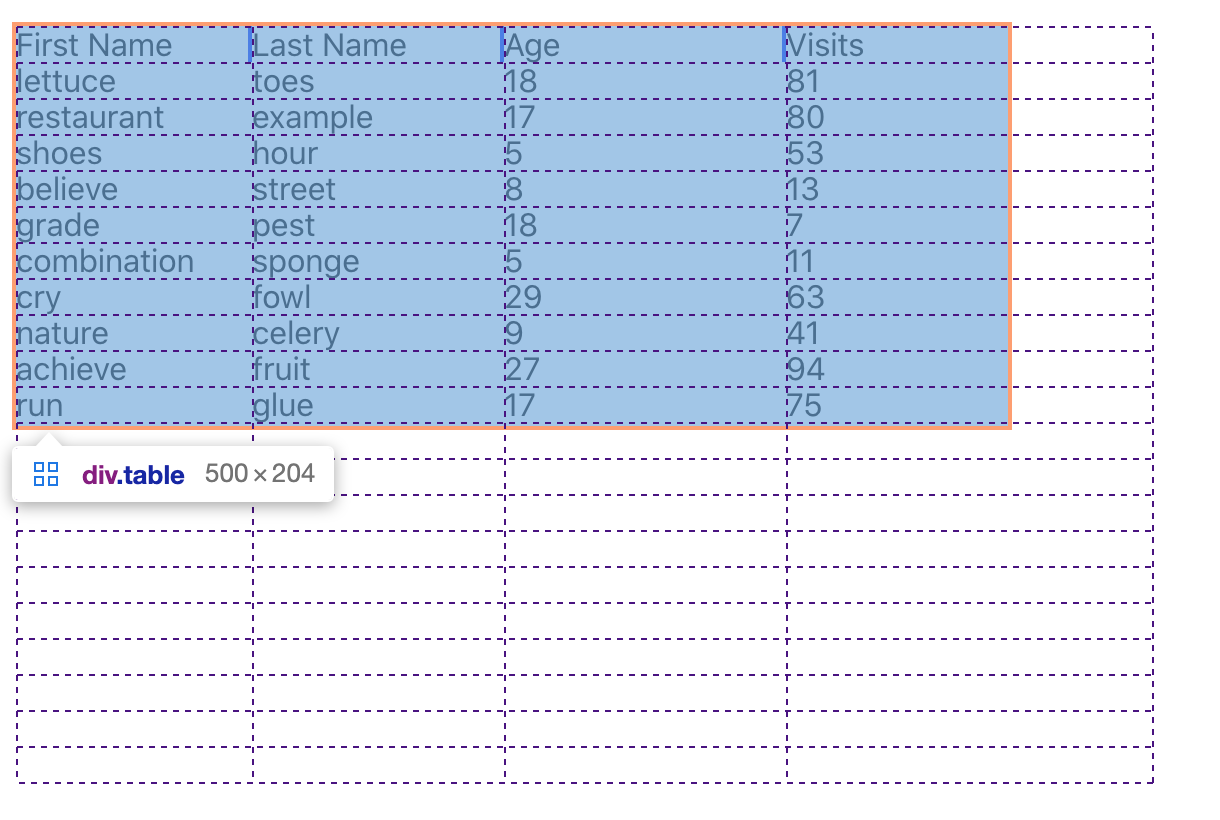
Hi, I was trying to update my react-table + react-virtuoso table to use the new CSS grid layout provided by react-table but I realized Virtuoso needs one DOM element for each row to work.
Do you think it could be possible to use CSS grid with Virtuoso?
Example of react-table rendered with CSS grid:
created time in 17 days
pull request commenttannerlinsley/react-table
feat(useGridLayout): Add functionality for proposed useGridLayout
I think what it'd need is some logic that takes the column widths and adjusts them to not exceed the parent width.
Probably CSS grid can't help that much in this case. :-(

comment created time in 17 days
pull request commenttannerlinsley/react-table
feat(useGridLayout): Add functionality for proposed useGridLayout
Hi, thanks for this new layout! I was wondering if this could solve the issue described in #1639? (having the table never exceed its parent width)
comment created time in 20 days
push eventpopperjs/popper-core
commit sha 03bb0443878e60d47c833ea298cc49a097177cf9
chore: upgrade @khanacademy/flow-to-ts
commit sha 7cfd52de6fd1771bf8f772c8c21f25a212ff5b1a
Merge pull request #1180 from cuyl/master chore: upgrade @khanacademy/flow-to-ts
push time in 20 days
PR merged popperjs/popper-core
Upgrade @khanacademy/flow-to-ts and remove patch-package. #1150 Upstream PR Khan/flow-to-ts/pull/179 has published

pr closed time in 20 days
issue closedpopperjs/react-popper
Custom modifiers create an infinite loop when you provide an 'fn'
<!--
Thanks for your interest in contributing to react-popper!
Do you have any generic question about the library? Find us on Spectrum!
https://spectrum.chat/popper-js/react-popper
Do you want to report a bug? Please, make sure to fill all the sections of the template before submitting any issue.
Issues without the required informations will be closed. Do not delete this template or it will be closed!
If your issue is a feature request please feel free to delete the template and describe it.
Want your issue to be fixed earlier? Create a PR that introduces a CI test that fails because of the bug you found! -->
Reproduction demo
<!--
Fork and/or modify this CodeSandbox template to allow the contributors to easily reproduce your problem.
If the problem can't be reproduced using these template, explain why in this section.
https://codesandbox.io/s/7mwkynymlq
--> This issue causes the page to enter an infinite loop, therefore on some browsers entering this sandbox will just freeze the browser, and in others a blank page will be rendered.
https://codesandbox.io/s/react-popper-v2x-issue-template-forked-crt8b
Steps to reproduce the problem
- Provide a custom modifier to usePopper with any fn function. Example:
{
        name: "myCustomModifier",
        phase: "main",
        enabled: true,
        fn: () => {}
}
- Done. It will now crash or render a blank page depending on the browser.
What is the expected behavior?
The expected behavior on the given repro is that nothing changes compared to the issue template.
What went wrong?
Browser enters what seems to be an infinite loop/freezes whenever you provide a custom modifier.
Any other comments?
Even the community modifiers mentioned here freeze the browser: https://popper.js.org/docs/v2/modifiers/#custom-modifiers
Packages versions
- Popper.js: 2.3.3 (also tested on 2.5.3)
- react-popper: 2.2.2 (also tested on 2.2.3)
closed time in 20 days
ruigouveiamaciel
issue closedkwsch/NHSE
Hi, since the 1.5.1 update it's not possible to load saves in NHSE
closed time in 22 days
FezVrasta
issue openedkwsch/NHSE
Hi, since the 1.5.1 update it's not possible to load saves in NHSE
created time in 22 days
issue openedflowtype/flow-for-vscode
Hi, could you add an option to prefix the intellisense suggestions with something that makes it possible to understand the suggestion is coming from Flow (rather than another intellisense plugin)?
Right now I'm working on a monorepo with a mix of TS and Flow and things are quite messy, I think it would be a small change but a huge life quality imporvement.
created time in 23 days
issue closedpopperjs/popper-core
Don't remove inline styles when destroying popper instance
Feature description
Currently, when calling popperInstance.destroy(), not only does the instance get destroyed, but the computed position held in the tooltip inline styles is removed. Here's why I don't want that to happen.
When I call destroy, I want the popper instance to stop listening to resize/scroll events and recomputing the tooltip position frequently, but I want the last computed position to remain so I can perform a fade-out CSS animation. I have a work around, but it is silly:
const style = tooltip.getAttribute("style");
if (popper)
  popper.destroy();
tooltip.style = style;
Also, it would really be good to add destroy to the docs, as it currently is only mentioned in passing in the example.
Why should this feature be part of the Popper's core?
I feel like this should probably be easy to implement as an option to destroy(), and could be useful to people.
closed time in 23 days
vincerubinetti
issue commentpopperjs/popper-core
Don't remove inline styles when destroying popper instance
What you could do is to disable the event listeners (set the eventListeners modifier enabled flag to falase), fade the tooltip out, and then destroy the instance.
comment created time in 23 days
issue commenthg-pyun/axios-logger
Show query params for GET requests
The problem with this is that you are not logging what Axios will actually call, the way params are serialized to string may differ by the qs options you provided.

comment created time in 23 days
issue commenthg-pyun/axios-logger
Show query params for GET requests
Adding my request here, I'd love to see the final URL, with the serialized query params, unlike the example posted by the OP.
For example, I'd like to see:
[Request] 17:54:56 GET /wp-json/wp-v2-posts/?slug=article&_fields=id
so that it's easy to see the final URL hit by Axios.
comment created time in 23 days
push eventpopperjs/react-popper
commit sha f0b1ef9c272737e1bc25f125da54861f1e13d71c
added typing for RefHandler (#386) * added typing for RefHandler fixes issues 373 * export added
push time in 25 days

push eventpopperjs/react-popper
commit sha 3a2f12a6acf8f12bd806e29a4159bec22888ebbd
Update react-popper.d.ts (#388) update type to reflect actual types returned.
push time in 25 days