





DeSmuME Aspect Ratio is an automated aspect ratio based resizing method for DeSmuME for playing in specific Aspect Ratio's.
PHOENiX's compilation of VapourSynth Script's and Functions
Scriptable MediaInfo-fed NFO Generator for Movies and TV
Extract chapters from a Blu-ray .mpls to a Matroska recognized XML file.
DGMPGDec's DGIndex - MPEG-1 and MPEG-2 video frame indexer
The most informative Home-media backup solution.
DIRECTV -> M3U8 Grabber (DRM-Free channels ONLY)
Automatic and Headless UDF Disc Backup Utility
rlaphoenix/P2P-Filename-Format 2
Common P2P-Style filename format and explanation!
Basic but fairly configurable Python FFMPEG CLI batch thing.
issue commentfiles-community/Files
Allow pressing Enter on a Delete Confirmation Dialog to proceed with the deletion.
I've found out why! The bug in question only occurs if the "Permanently delete" is disabled (cannot be unticked). E.g. while deleting from the Recycle Bin.

comment created time in 12 hours
issue commentfiles-community/Files
Allow pressing Enter on a Delete Confirmation Dialog to proceed with the deletion.
Ok strangely I've retried again, and it now works fine. That's quite odd. I was definitely testing this on v1.19.15 too.
comment created time in 12 hours
issue commentfiles-community/Files
Allow pressing Enter on a Delete Confirmation Dialog to proceed with the deletion.
@rlaphoenix this should already be implemented in v1.9.15, can you check if it ever works?
I've tried already. It seems to focus on the first file in the list of items to be deleted, so pressing enter tries to click on the file rather than the button.
comment created time in 12 hours
issue commentfiles-community/Files
Blue highlight on files get stuck if you drag after selecting
Correct. Purely visual. It only asks to delete the truly selected ones.
comment created time in 20 hours
issue commentfiles-community/Files
Allow removing Favorites from the sidebar via Sidebar settings (Like Libraries, Drives, WSL)
I agree yeah, I won't ever be using the Home and Recycle Bin items. And it's not like the project is worried about people being unable to access the recycle bin as there is an option to hide the Recycle Bin already.
comment created time in 20 hours
issue commentfiles-community/Files
Details Layout has a small bit of blank space on the right causing scrollbar to appear
I see now that its the same happening on the left-most column, a bit of space for resizing the column.
May I ask for an option in settings to remove or condense this then?
comment created time in 20 hours
issue openedfiles-community/Files
Allow removing Favorites from the sidebar via Sidebar settings (Like Libraries, Drives, WSL)
Is your feature request related to a problem? I do not wish to have a Favorites section as I do not use one. All I need is Libraries, Drives, etc to satisfy my navigation needs. Since the others have an appropriate option to hide it from the sidebar, I don't see why Favorites can't be added too.
Describe the solution Add Favorites to the Settings -> Sidebar section. "Show favorites section on the sidebar" with it defaulted to On, allowing you to choose Off.
Describe alternatives you've considered N/A
Scope
| Capability | Priority |
|---|---|
| Allow favorites section to be hidden from the Sidebar | Must |
| Add the option to Settings -> Sidebar | Must |
System Information
- OS Version: Windows 11 21H2 22000.100
- App version: v1.9.15.0
Additional comment N/A
created time in a day
issue commentfiles-community/Files
Just adding a comment I personally use windows terminal but know a lot of people will used cmd over powershell and terminal (Most people probably don't even have terminal installed on win10)
I'm not saying force people to use it in the preferred order, I'm saying it should default to it. If the user really does want CMD, even though they have Microsoft Terminal or PowerShell, then they can change back to CMD in the settings.
comment created time in a day
issue openedfiles-community/Files
Blue highlight on files get stuck if you drag after selecting
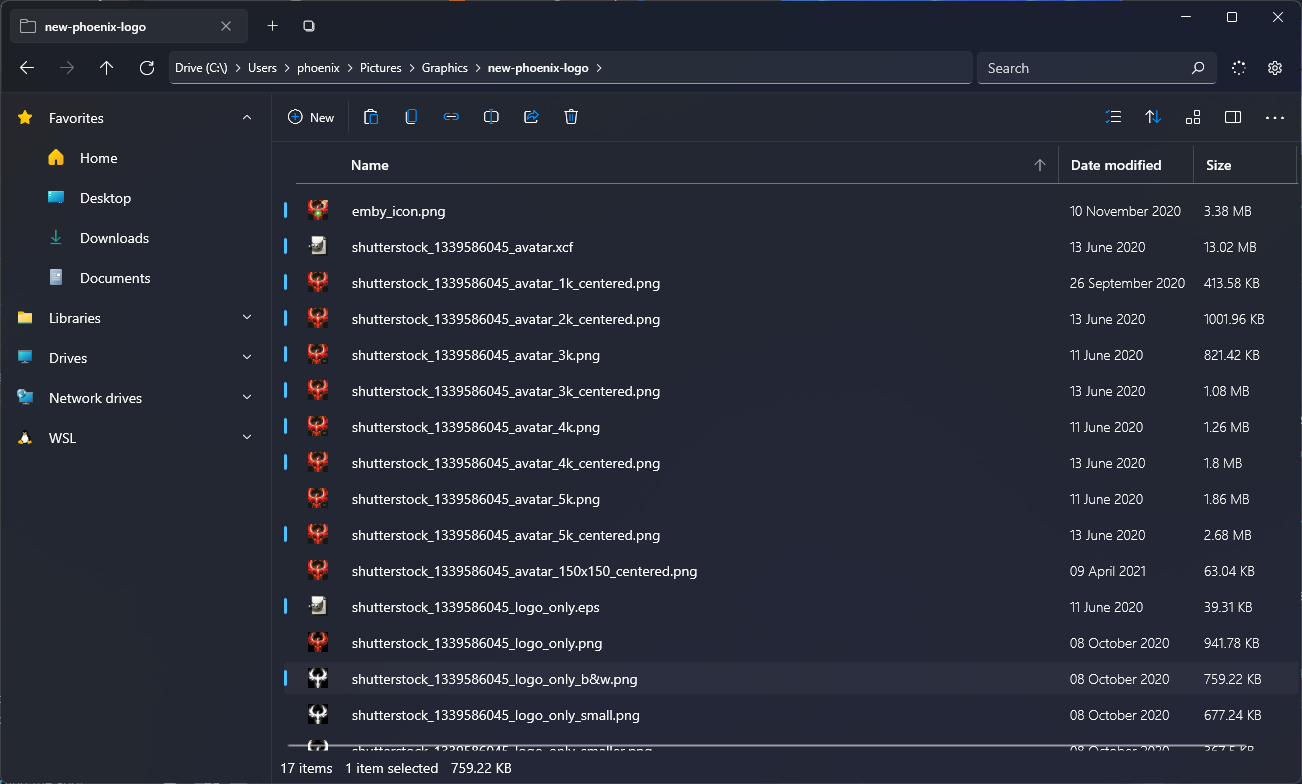
Explain the bug If you click a file, then drag it, the Blue pill/highlight on the left of the file gets stuck until you click away from it and re-click it, and again click away from it.
To reproduce
- Click any file
- Click, hold, and drag around and just let go of the drag so it doesn't move the file anywhere.
- Repeat for a few files and you will notice they are all stuck.
The file you drag does not have to be the file you clicked that you are trying to get stuck.
Expected behavior When dragging the Blue pill/highlight should be removed.
Logfile N/A. Not necessary.
Screenshots
System Information
- OS Version: Windows 11 21H2 22000.100
- App version: v1.9.15.0
Additional comment It gets unstuck once you do anything that would refresh its state, that includes changing the folder, restarting, etc.
created time in a day
issue commentfiles-community/Files
Better management of column sizes and auto-sizing
Something like the following where I can have Name column automatically fill, globally, across all folders is what I ultimately would want. We shouldn't have to manually resize columns for something that should be simple.
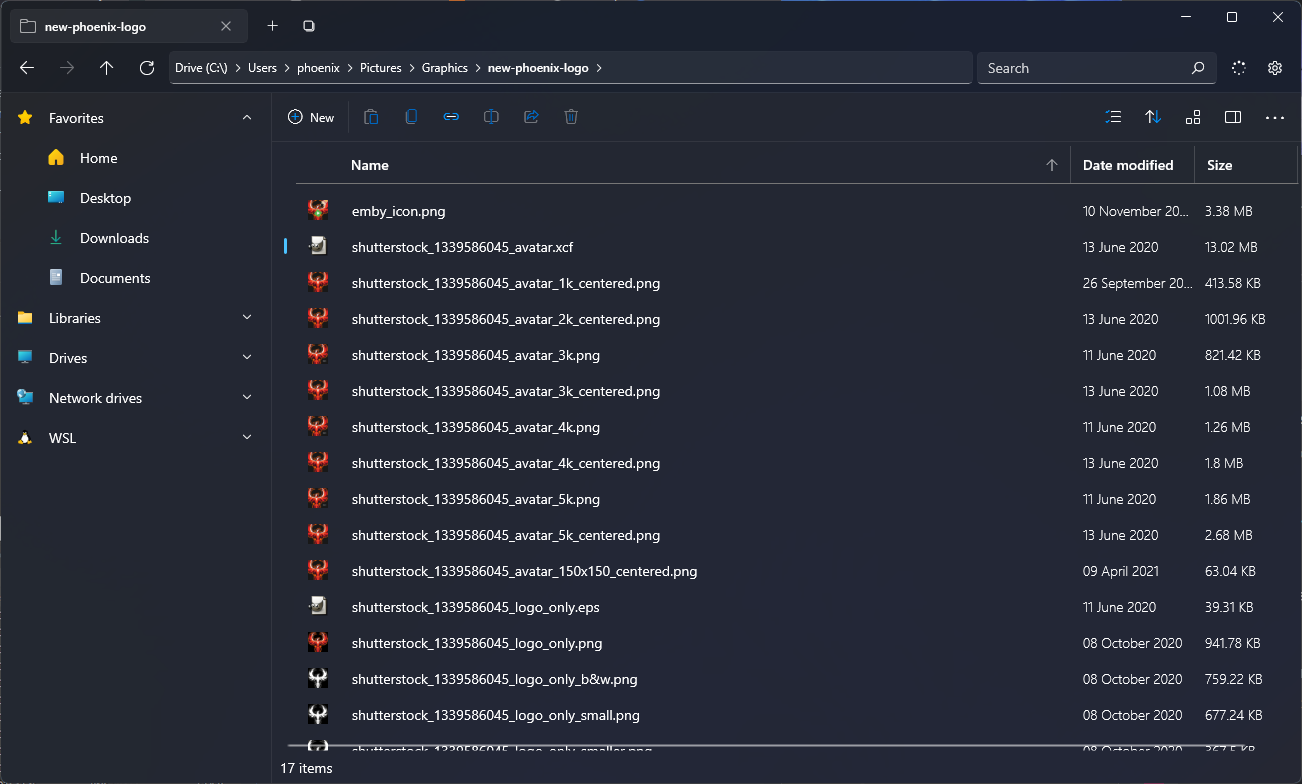
(Ignore the scrollbar, see #5587)
comment created time in a day
issue openedfiles-community/Files
Details Layout has a small bit of blank space on the right causing scrollbar to appear
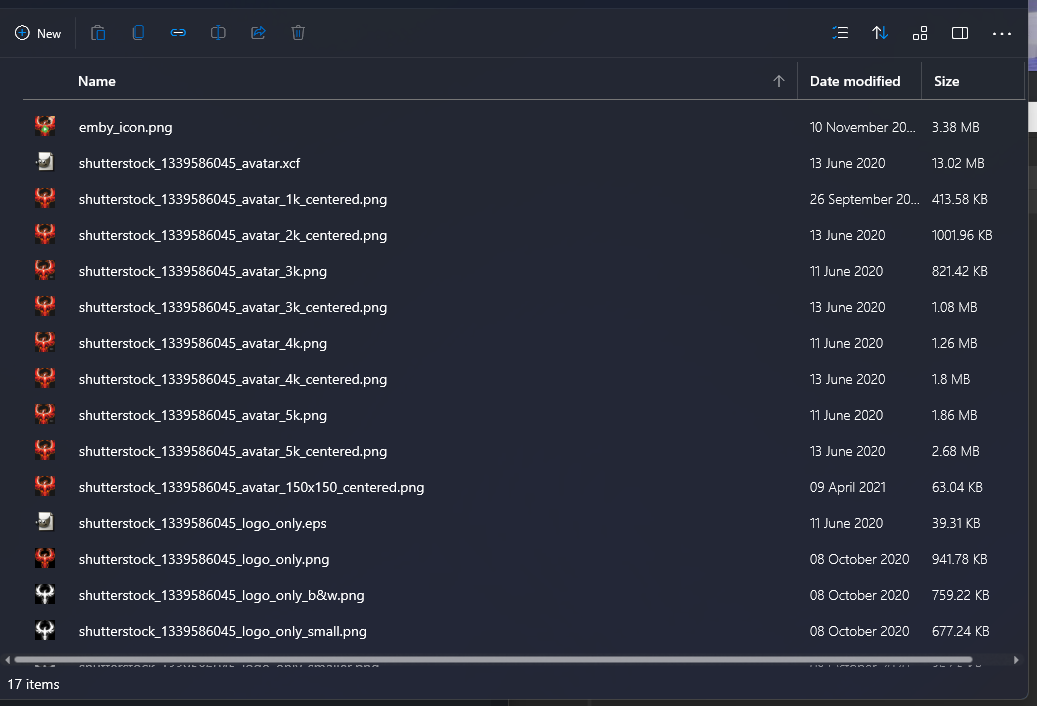
Explain the bug E.g. after "Size" column, there's a tiny mini bit of an empty column that when you resize other columns (e.g. Name) to move the last column (in my case Size) to the very edge of the window, as indicated by its border-right of the Size column header, it causes a Horizontal scrollbar to appear, as if there's some text I've overflowed.
To reproduce
- Open any folder, and assume you only have 3 columns. Name, Date modified, and Size.
- Enlarge the Name columns width to move size to the far right of the window's edge.
- You will notice a horizontal scrollbar appears as if you overflowed some text or content, but you haven't.
Expected behavior It shouldn't show the scrollbar as there was no content in what was hidden.
Logfile N/A. It's unnecessary.
Screenshots As you can see below, I've moved the size column to the very edge, and it still thinks there's content there so it shows a scrollbar.
System Information
- OS Version: Windows 11 21H2 22000.100
- App version: v1.9.15.0
Additional comment N/A
created time in a day
issue openedfiles-community/Files
Better management of column sizes and auto-sizing
Is your feature request related to a problem? I don't find it helpful whatsoever that each column resizes proportionally to the window size. E.g. by default without any manual changes, each column is equal in size to each other. Why would the File name and Size columns need to be the same size?
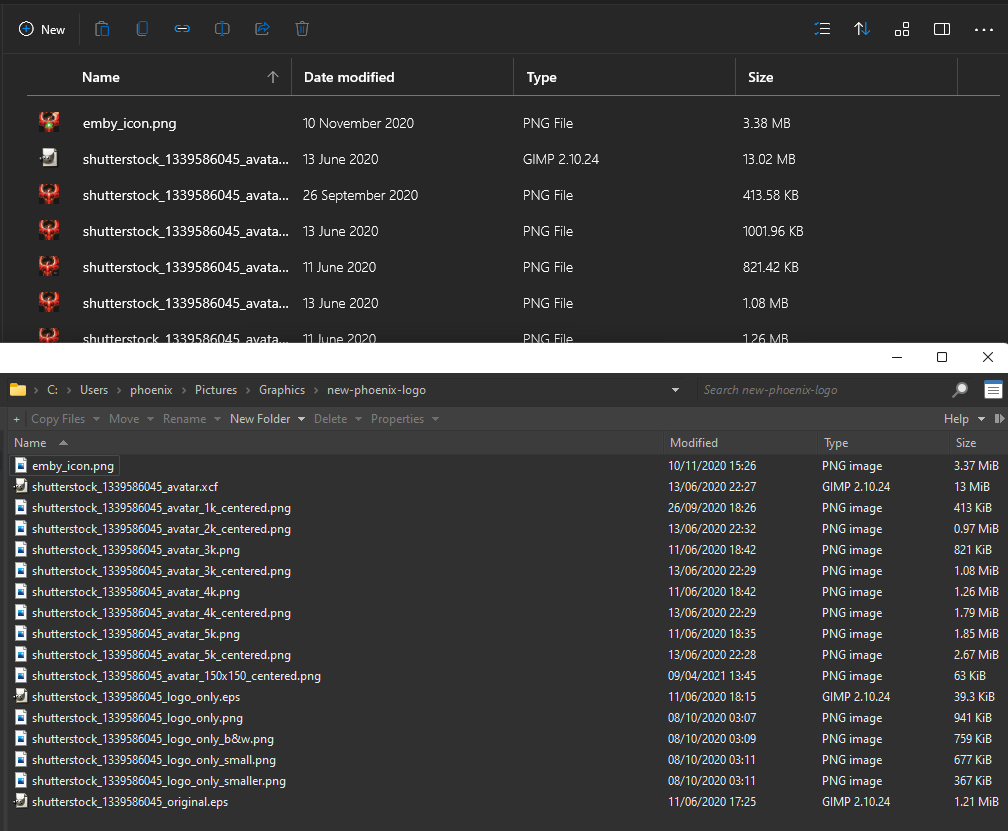
My main trip with this is I would ideally like each column to be a default set size (like win explorer), but allow some columns to fill the remaining untaken space of the window (like Dolphin and Directory Opus).
Describe the solution Let's say I wanted to always have the Filename column take up as much space in the window as it can, without eating up the space I set for the other columns. This isn't currently possible in Files. If it was possible, it would allow me to always see the full filename length unless my window is too small or the other columns' hardcoded space is too large. I could then resize either the columns to be smaller to allow more space for the Filename column or make the window larger to give more space for all columns.
Describe alternatives you've considered I tried manually resizing each column and such to get as best I could with the sizing, but at the end of the day it did not pan out. It felt very annoying as I constantly had to be messing with the column sizes to get what ultimately could be done automatically.
Scope
| Capability | Priority |
|---|---|
| Allow one column to be a filler column (take up all leftover horizontal space) | Must |
| Do not resize the columns with the window sizing (otherwise resizing the app doesn't give more space to the filler column) | Must |
| Filler column will push other columns outside the visible view space (e.g. overflow out the right side of the window) | Won't |
| Name column should be larger in size by default compared to other columns | Could |
System Information
- OS Version: Windows 11 21H2 22000.100
- App version: v1.9.15.0
Additional comment Before you may potentially pass off this as a misunderstood feature request, you may not potentially understand the productivity and UX improvements this brings along. You should give Directory Opus's Free Trial a shot, which has this feature. You can set any one column as a filler column in settings (e.g. the Name column) so that you don't constantly have to meddle with column sizes to see long filenames in full, as it optimizes the space based on what space is left over after the other columns take their needed space.
Here's an example of the same folder showing how annoying it is to see the full file names compared to Directory Opus with a filler column on Name:
created time in a day
issue commentfiles-community/Files
Move ongoing tasks button back to the status bar.
I actually agree with Tropical here. It doesn't make sense to be up there, which can potentially cause a layout shift when you proceed with making it hide when there are no ongoing tasks. This could be a hindrance when navigating and all of a sudden it pops up.

comment created time in a day
issue openedfiles-community/Files
Allow pressing Enter on a Delete Confirmation Dialog to proceed with the deletion.
Is your feature request related to a problem? When I press SHIFT+DEL to delete some files, I'm used to Windows asking if I'm sure with a Yes/No prompt, with Yes auto-focused. This allowed me to simply press SHIFT+DEL+Enter to proceed.
Describe the solution Like Windows File Explorer's own Dialog, it would be ideal to autofocus on the "Delete" button so I can simply press enter.
Describe alternatives you've considered N/A
Scope
| Capability | Priority |
|---|---|
| Press Enter on a Delete Confirmation Dialog to proceed with Deletion | Must |
| Mouse should not need to be used | Should |
System Information
- OS Version: Windows 11 22000.100
- App version: v1.9.15.0
Additional comment N/A
created time in a day
issue openedfiles-community/Files
Is your feature request related to a problem? No.
Describe the solution When you first install Files, it should default to using Windows Terminal, PowerShell, or CMD, in that order of Availability. This is instead of simply assuming CMD as the default.
Describe alternatives you've considered N/A
Scope
| Capability | Priority |
|---|---|
| Default to Windows Terminal if available | Must |
| Default to PowerShell if available | Must |
| Default to Command Prompt if neither were available | Must |
System Information
- OS Version: Windows 11 21H2 22000.100
- App version: v1.9.15.0
Additional comment It's generally recommended by most to consider the order of preference to be Microsoft Terminal > PowerShell > CMD. Windows itself is also doing the same order of preference.
created time in a day
issue openedfiles-community/Files
Allow Navigation via Scroll Wheel Up/Down on Address Bar
Is your feature request related to a problem? No.
Describe the solution Ever need to quickly jump between neighboring folders? Perhaps to compare the files within them, or compare filenames or sizes? Then this can often be a highly productive and quick way of doing so.
Describe alternatives you've considered N/A.
Scope
| Capability | Priority |
|---|---|
| Next folder via Scroll Wheel Down | Must |
| Previous folder via Scroll Wheel Up | Must |
| Allow this functionality on any folder of the address bar | Should |
| Honor the parent folder's sorting/order when deciding which folder to navigate to | Could |
System Information
- OS Version: Windows 11 21H2 22000.100
- App version: V2 Beta
Additional comment If you need to see what I mean in action, take a look at Dolphin. There are also beta/tinkery windows msvc binaries available on the KDE Jenkins build server that has the functionality. Simply open Dolphin, hover over a folder in the address bar, and scroll up or down.
created time in 2 days
startedfrida/frida
started time in 5 days
startedsensepost/objection
started time in 5 days
issue commentDS-Homebrew/nds-bootstrap
I waited until today (spawns on fridays) to catch drifloon and the area has frozen three times now, is this possibly related?
It is theorised by some to be related to in game time counting or such yes.

comment created time in 5 days
pull request commentsangwonl/python-mpegdash
Add cenc KID attribute to the Descriptor class (#47)
This issue is related to this pull request: https://github.com/sangwonl/python-mpegdash/issues/47

comment created time in 6 days
pull request commentsangwonl/python-mpegdash
Add cenc KID attribute to the Descriptor class (#47)
ns2 is an alternative to cenc. What if we do an or situation here instead of creating a cenc specific kid attribute? There's more than just ns2 and cenc as well, but I'm sort of blanking on remembering any more of them.
comment created time in 6 days
startedwebsocket-client/websocket-client
started time in 6 days
startedXmader/musescore-downloader
started time in 6 days
issue closedwindicss/windicss-webpack-plugin
[NextJS] Page WindiCSS being removed on next page build if any change occurred in `next dev`
Describe the bug
When I change something in a page, be it some JSX, className value, some text, anything, the CSS stops working, and never recovers. It seems to occur whenever ANY sort of page gets built after an edit is made, prior to the page build. It doesn't even have to be a user-made page in /pages. It can even be the build page: /next/dist/pages/_error.
To Reproduce
- Clone repository https://github.com/windicss/windicss-webpack-plugin
- Run
npm run dev:nextjs - Edit
example/next/pages/index.jsxand change the top "Should be Yellow" to "Should be Yellow123". Hit save and see the change appear. - Go to any other page (force a 404 if needed, this works too, but do Step 2 to 4 quickly before it prebuilds).
- Now go back to https://localhost:3000 and see the "Should be Yellow123", notice how it's clearly white BG and black text, default font-family, and the rest of the page is seemingly relatively blank CSS.
Expected behavior The CSS should still have applied like normal.
Screenshots
Before:

After:

Additional context
Even refreshing the page multiple times, going back and forth between pages, etc. won't do anything. Only fix? Stop and restart the next dev.
closed time in 7 days
rlaphoenix
issue commentwindicss/windicss-webpack-plugin
[NextJS] Page WindiCSS being removed on next page build if any change occurred in `next dev`
Amazing, it seems to work as expected now. Thank you!
comment created time in 7 days
issue commentwindicss/windicss-webpack-plugin
[NextJS] Page WindiCSS being removed on next page build if any change occurred in `next dev`
Is there any update on this?
comment created time in 10 days
created tagrlaphoenix/pynfogen
Scriptable MediaInfo-fed NFO Generator for Movies and TV
created time in 16 days
push eventrlaphoenix/pynfogen
commit sha d18df0a0ca9405562dd30903b6535a13b44290ca
poetry: Bump to v0.4.3, update some packages
push time in 16 days