








myspaghetti/macos-virtualbox 5040
Push-button installer of macOS Catalina, Mojave, and High Sierra guests in Virtualbox for Windows, Linux, and macOS
myspaghetti/virtualbox-scancodes 4
A shell script that translates strings of characters and sends them to a VirtualBox guest
myspaghetti/virtualbox-generate-nvram-bin-file 3
Bash shell script that generates binary NVRAM files for dmpstore, a builtin command for VirtualBox EFI Internal Shell
issue commentmyspaghetti/macos-virtualbox
Failed to create "Catalina_BaseSystem.vdi".
./macos-guest-virtualbox.sh prompt_delete_temporary_files

comment created time in an hour
issue commentmyspaghetti/macos-virtualbox
Failed to create "Catalina_BaseSystem.vdi".
On VirtualBox, probably not. On KVM/QEMU, with GPU passthrough.
comment created time in 2 hours
issue commentmyspaghetti/macos-virtualbox
The script can be made to fetch any version of the macOS installer available from swscan.apple.com. Looking at the Catalina software update catalog for example, the available versions are 10.14.5.0.0.1563168771, 10.14.6.0.0.1569030045, 10.13.6.0.0.1544783150, 10.14.4.0.0.1552634279, 10.13.5.0.0.1525410252, 10.15.3.0.0.1583234667, 10.15.4.0.0.1587988616, 10.15.5.0.0.1591330708, and 10.15.6.0.0.1594329682
The script looks for the string specified in the variable CFBundleShortVersionString when determining the download URL, and selects the last (latest) match.
You can change CFBundleShortVersionString to 10.15.4 for example, in line 339, or add specific versions of Catalina, or even allow user input for the version string.
See the attached macos-guest-virtualbox.sh.txt for a hardcoded download of 10.15.4, where line 339 has been replaced with the following:
CFBundleShortVersionString="10.15.4"
I think there are developer software update catalog URLs that have more versions available.
I currently don't plan on implementing version selection, but I will accept pull requests.

comment created time in 6 hours
pull request commentmyspaghetti/macos-virtualbox
Made cpu_profile a settable variable.
It's kind of a mess I don't want to get into.
There's no documentation for which profiles work with which CPUs, and the VirtualBox documentation refers the user to the CPU architecture documentation. VBoxManage list hostcpuids lists the host CPU's CPUIDs but again there's no documentation for any of the leaves and some are architecture-specific.
QEMU handles CPU features in a much more sensible manner, with each CPU feature being named and conflicts with the host CPU are automatically resolved (unless they conflicting settings are explicitly forced). You can see this in practice in Hayden Barnes's WSL2 nested virtualization project or the KVM-OpenCore project.
VirtualBox doesn't use the +feature.a -feature.b syntax, so hardware-independent CPUID settings require parsing the VBoxManage list hostcpuids output and filtering out the features that make macOS crash, but I feel like the code that implements this would be longer than the current script (see QEMU code) unless there's a very short list of CPU features that result in a macOS kernel-panic.
Generally, I don't want to blindly apply CPUID settings, but all of these issues could be resolved with enough work.

comment created time in 10 hours
issue closedmyspaghetti/macos-virtualbox
I doubt this has anything to do with the installer, but I can't find anything about it anywhere else after lots of searching.
I've install 4 times using the installer, High Sierra, Mojave, Catalina.
Every time, after installation is over, or mostly over, the guest os screen stops refreshing.
I've found that if I change to scaled display, then back to normal, it starts refreshing, so I can actually use it, which is great! But it's weird.
This happens whether it's showing the terminal text bootup output or the graphical ui after full boot.
No search results with this anywhere else, and since I can't get support on the VB forums, figured I'd shoot here to see if anyone can give any help.
closed time in 11 hours
jfacemyer
issue closedmyspaghetti/macos-virtualbox
Failed to create "Catalina_BaseSystem.vdi".
I'm pretty sure I did everything right, but I got this error message at the end of running . MacOS was created in VirtualBox, but when I run it it just opens up this window.

closed time in 12 hours
s3hMC
issue commentmyspaghetti/macos-virtualbox
Can't complete the installation.
Duplicate of #283, fixed in version 0.96.6

comment created time in 12 hours
issue commentmyspaghetti/macos-virtualbox
create_basesystem_virtual_disk stage issue
Duplicate of #283, fixed in version 0.96.6

comment created time in 12 hours
issue commentmyspaghetti/macos-virtualbox
./macos-guest-virtualbox.sh: line 649: dmg2img: command not found
Duplicate of #283, fixed in version 0.96.6

comment created time in 12 hours
issue commentmyspaghetti/macos-virtualbox
Failed to create "Catalina_BaseSystem.vdi".
Totally my fault, I messed up the dmg2img check. Fixed in version 0.96.6
comment created time in 16 hours
created tagmyspaghetti/macos-virtualbox
Push-button installer of macOS Catalina, Mojave, and High Sierra guests in Virtualbox for Windows, Linux, and macOS
created time in 16 hours
issue commentmyspaghetti/macos-virtualbox
Failed to create "Catalina_BaseSystem.vdi".
Please attach the entire file here by clicking on the "Attach files" in the comment box. The pastebin is missing most of the relevant information.
comment created time in 16 hours
push eventmyspaghetti/macos-virtualbox
commit sha 261b2bb61e2e0fe593bae73db709dce9a1966539
fixed cygwin dmg2img condition
push time in 17 hours
issue commentmyspaghetti/macos-virtualbox
Failed to create "Catalina_BaseSystem.vdi".
For some reason the script did not exit when the dependency was checked. Please upload the file macOS_troubleshoot.txt generated when running ./macos-guest-virtualbox.sh troubleshoot
You can skip the hash generation, I just need to know the script version, OS version, etc, provided by the first stage of troubleshooting.
comment created time in 18 hours
issue commentmyspaghetti/macos-virtualbox
Failed to create "Catalina_BaseSystem.vdi".
What's the output of dmg2img -d
comment created time in 18 hours
issue commentmyspaghetti/macos-virtualbox
Failed to create "Catalina_BaseSystem.vdi".
You need to provide more details first. Please post the complete output of the last executed stage of the script.
comment created time in 18 hours
issue commentmyspaghetti/macos-virtualbox
Failed to create "Catalina_BaseSystem.vdi".
It's very likely BaseSystem.dmg failed to download or the file is corrupt. There should be an error message from dmg2img prior to Failed to create.
comment created time in 19 hours
issue openedtelegramdesktop/tdesktop
[Feature Request] display how many messages are selected
Is your feature request related to a problem?
On Telegram Desktop 2.2, only 100 messages can be selected at a time. When trying to select more than 100 messages, only the earliest 100 are selected. The number of selected messages is displayed only when the selection process is complete, which requires the user to guess when the limit has been reached.
Describe the solution you'd like
Either allow many thousands of messages to be selected, or update the selected messages count while selecting is still in progress, so the user knows when the 100-message limit has been reached.
created time in a day
push eventmyspaghetti/macos-virtualbox
commit sha 7e67c3b65343bca4cc38f71330f69f929146034d
Update README.md
push time in 4 days
issue commentmyspaghetti/macos-virtualbox
Yes, but the process is complicated and no support is offered for topics outside the scope of the script.

comment created time in 5 days
issue commentmyspaghetti/macos-virtualbox
This is an issue tracker for issues with the script. The script has correctly identified that VirtualBox is using NEM and that VT-x/AMD-V is not available for VirtualBox. By design the script does not require elevated privileges and does not alter any system configuration. No support is offered for disabling Hyper-V or core isolation or any of the many Windows features that prevent VirtualBox from using VT-x/AMD-V.
comment created time in 5 days
issue closedmyspaghetti/macos-virtualbox
I checked all my WSL distro's and I have 2 docker WSL's (running on WSL2) so I deleted those, rebooted and the message STILL persists!
closed time in 5 days
snaildos
issue commentmyspaghetti/macos-virtualbox
Successful installation, but fails to boot
The bug only appears on VirtualBox 5.2 or 6.0 when executing the script on zsh
Thank you for finding it and for your excellent issue reporting.

comment created time in 6 days
push eventmyspaghetti/macos-virtualbox
commit sha 3b252ba272dd7fa9636e5a99858e9ae9007f7e04
Update README.md
push time in 6 days
issue commentmyspaghetti/macos-virtualbox
Successful installation, but fails to boot
Well I put the bug there in the first place so I'm a supervillain too.
comment created time in 6 days
created tagmyspaghetti/macos-virtualbox
Push-button installer of macOS Catalina, Mojave, and High Sierra guests in Virtualbox for Windows, Linux, and macOS
created time in 6 days
issue closedmyspaghetti/macos-virtualbox
Successful installation, but fails to boot
Hi, thank you so much for building this. The installation process was amazing.
I seem to be having an issue booting up though:

Any tips on how to fix this?
Details
- Default settings on script, macOS release: Mojave
- Host OS: OSX 10.15.6 (Catalina)
- Virtualbox Version 6.1.12 r139181 (Qt5.6.3)
closed time in 6 days
dac09
issue commentmyspaghetti/macos-virtualbox
Successful installation, but fails to boot
Fixed in version 0.96.5
comment created time in 6 days
push eventmyspaghetti/macos-virtualbox
commit sha 94e8f98c594246f6c37612081ebb0d0e56b8b4a9
fixed zsh \c bug (issue #281)
push time in 6 days
issue commentmyspaghetti/macos-virtualbox
Successful installation, but fails to boot
Bug reproduced. zsh interprets \c as a break.
comment created time in 6 days
issue commentmyspaghetti/macos-virtualbox
Successful installation, but fails to boot
If you still haven't replaced it, I'd appreciate the content of startup.nsh from the VM's ESP too.
comment created time in 6 days
issue commentmyspaghetti/macos-virtualbox
Successful installation, but fails to boot
Yes, you need to replace startup.nsh on the ESP (EFI System Partition) as described in the documentation section about updating NVRAM variables. You need to execute on the host ./macos-guest-virtualbox.sh create_macos_installation_files_viso and then boot into the macOS VM, mount the ESP, and copy the new startup.nsh to the ESP, see the docs for more details.
Very strange that the file would be cut off like that and that the part meant for VBox 5.2/6.0 is present on a VBox 6.1 installation. I'll test the stage create_macos_installation_files_viso on zsh which I assume you're using.
comment created time in 6 days
issue commentmyspaghetti/macos-virtualbox
Successful installation, but fails to boot
You can boot macOS manually by entering fs0:\System\Library\CoreServices\boot.efi in the EFI Internal Shell (replace 0 with subsequent fs numbers until macOS boots) but I would like you to post startup.nsh here so I can troubleshoot the issue.
If you don't mind, please rename macOS_startup.nsh to macOS_startup.nsh.txt (or whatever you like with a .txt suffix) and attach it here.
The correct startup.nsh is supposed to look like this:
echo -off
if exist "fs0:\EFI\NVRAM\MLB.bin" then
  dmpstore -all -l fs0:\EFI\NVRAM\MLB.bin
  dmpstore -all -l fs0:\EFI\NVRAM\ROM.bin
  dmpstore -all -l fs0:\EFI\NVRAM\csr-active-config.bin
  dmpstore -all -l fs0:\EFI\NVRAM\system-id.bin
endif
for %a run (1 5)
  if exist "fs%a:\EFI\NVRAM\MLB.bin" then
    dmpstore -all -l fs%a:\EFI\NVRAM\MLB.bin
    dmpstore -all -l fs%a:\EFI\NVRAM\ROM.bin
    dmpstore -all -l fs%a:\EFI\NVRAM\csr-active-config.bin
    dmpstore -all -l fs%a:\EFI\NVRAM\system-id.bin
  endif
endfor
for %a run (1 5)
  if exist "fs%a:\macOS Install Data\Locked Files\Boot Files\boot.efi" then
    "fs%a:\macOS Install Data\Locked Files\Boot Files\boot.efi"
  endif
endfor
for %a run (1 5)
  if exist "fs%a:\System\Library\CoreServices\boot.efi" then
    "fs%a:\System\Library\CoreServices\boot.efi"
  endif
endfor
For some reason your startup.nsh has the VirtualBox 6.0 and 5.2 drivers:
load fs0:\EFI\OC\Drivers\AppleImageLoader.efi
load fs0:\EFI\OC\Drivers\AppleUiSupport.efi
load fs0:\EFI\OC\Drivers\ApfsDriverLoader.efi
map -r
comment created time in 6 days
issue commentmyspaghetti/macos-virtualbox
Successful installation, but fails to boot
You can boot macOS manually by entering fs0:\System\Library\CoreServices\boot.efi in the EFI Internal Shell but I would like you to post startup.nsh here so I can troubleshoot the issue.
If you don't mind, please rename macOS_startup.nsh to macOS_startup.nsh.txt (or whatever you like with a .txt suffix) and attach it here.
The correct startup.nsh is supposed to look like this:
echo -off
if exist "fs0:\EFI\NVRAM\MLB.bin" then
  dmpstore -all -l fs0:\EFI\NVRAM\MLB.bin
  dmpstore -all -l fs0:\EFI\NVRAM\ROM.bin
  dmpstore -all -l fs0:\EFI\NVRAM\csr-active-config.bin
  dmpstore -all -l fs0:\EFI\NVRAM\system-id.bin
endif
for %a run (1 5)
  if exist "fs%a:\EFI\NVRAM\MLB.bin" then
    dmpstore -all -l fs%a:\EFI\NVRAM\MLB.bin
    dmpstore -all -l fs%a:\EFI\NVRAM\ROM.bin
    dmpstore -all -l fs%a:\EFI\NVRAM\csr-active-config.bin
    dmpstore -all -l fs%a:\EFI\NVRAM\system-id.bin
  endif
endfor
for %a run (1 5)
  if exist "fs%a:\macOS Install Data\Locked Files\Boot Files\boot.efi" then
    "fs%a:\macOS Install Data\Locked Files\Boot Files\boot.efi"
  endif
endfor
for %a run (1 5)
  if exist "fs%a:\System\Library\CoreServices\boot.efi" then
    "fs%a:\System\Library\CoreServices\boot.efi"
  endif
endfor
For some reason your startup.nsh has the VirtualBox 6.0 and 5.2 drivers:
load fs0:\EFI\OC\Drivers\AppleImageLoader.efi
load fs0:\EFI\OC\Drivers\AppleUiSupport.efi
load fs0:\EFI\OC\Drivers\ApfsDriverLoader.efi
map -r
comment created time in 6 days
push eventmyspaghetti/macos-virtualbox
commit sha 443a781dbaa572df1a75f4af5406807e04be0d6f
delete_temporary_files changed to prompt_delete_temporary_files
push time in 6 days
push eventmyspaghetti/macos-virtualbox
commit sha 0b5119ebda9ba85d89a5fe8bce51a15ee3e86bd2
documentation
push time in 6 days
issue closedmyspaghetti/macos-virtualbox
Virtualbox is not using hardware-supported virtualization features. Check that software such as Hyper-V, Windows Sandbox, WSL2, memory integrity protection, and other Windows features that lock virtualization are turned off. Exiting.
I have none of these.
closed time in 6 days
snaildos
issue commentmyspaghetti/macos-virtualbox
You're running the script on WSL2.
comment created time in 6 days
push eventmyspaghetti/macos-virtualbox
commit sha d3b39d03e6f980caa8f9c9de6db51f2991f80a73
reordered functions, made the "populate" functions atomic. This looks like a big diff but it isn't
push time in 7 days
issue commentmyspaghetti/macos-virtualbox
Cannot boot into macOS or run Reinstall macOS
Thanks.
The last stage of the script involves Terminal running startosinstall and then it reboots the VM into the macOS initial setup. The script doesn't check that startosinstall completes successfully. The first boot takes several minutes to an hour while macOS populates itself, then macOS boots regularly.
If the VM boots into the rescue environment after startosinstall, the installation might have failed. The script doesn't check that the installation is successful and I don't really have any way to check that startosinstall was successful so the easiest thing would be to try to populate the target disk again:
./macos-guest-virtualbox.sh create_installer_virtual_disk create_target_virtual_disk populate_virtual_disks populate_macos_target_disk

comment created time in 7 days
issue commentmyspaghetti/macos-virtualbox
Cannot boot into macOS or run Reinstall macOS
Thanks.
The last stage of the script involves Terminal running startosinstall and then it reboots the VM into the macOS initial setup. The script doesn't check that startosinstall completes successfully. The first boot takes several minutes to an hour while macOS populates itself, then macOS boots regularly.
If the VM boots into the rescue environment after startosinstall, the installation might have failed. The script doesn't check that the installation is successful and I don't really have any way to check that startosinstall was successful so the easiest thing would be to try to populate the target disk again:
./macos-guest-virtualbox.sh create_target_virtual_disk populate_macos_target_disk
comment created time in 7 days
issue commentmyspaghetti/macos-virtualbox
Please run ./macos-guest-virtualbox.sh troubleshoot and attach the resulting macOS_troubleshoot.txt file here.
comment created time in 7 days
push eventmyspaghetti/macos-virtualbox
commit sha 4654b7b7e72ef10f6c5bd5543ce6b529be3657fc
simplified dmg2img conditionals
push time in 8 days
push eventmyspaghetti/macos-virtualbox
commit sha af8c16b8ee6f0f157017a1ea15dd268e0c85a9ea
simplified dmg2img conditionals
push time in 8 days
issue commentmyspaghetti/macos-virtualbox
./macos-guest-virtualbox.sh: line 649: dmg2img: command not found
Did check if PWD was set? I'd like to know what bash sessions don't set PWD if you don't mind.
When the script is active you're not supposed to manually interact with the VM.
comment created time in 8 days
issue commentmyspaghetti/macos-virtualbox
./macos-guest-virtualbox.sh: line 649: dmg2img: command not found
If PWD was set, the script would have used dmg2img.exe from the working directory; bash should be launched with the -i (interactive) and --login options. When you enter echo ${PWD} it should output the current working directory.
At any rate if you put dmg2img.exe in ~/bin/ or /usr/local/bin the script should find dmg2img. Additionally I think I'll add a test that verifies PWD is set, since you're the second person to report this issue.
comment created time in 8 days
issue commentmyspaghetti/macos-virtualbox
./macos-guest-virtualbox.sh: line 649: dmg2img: command not found
I believe Cygwin configures bash by default to inherit the Windows PATH variable but just put dmg2img.exe in ~/bin/ or /usr/local/bin if you're unsure.
By the way it appears the PWD variable is not set, are you running the script in an interactive bash shell?
comment created time in 8 days
issue commentmyspaghetti/macos-virtualbox
./macos-guest-virtualbox.sh: line 649: dmg2img: command not found
Make sure the path to dmg2img.exe is in the PATH variable, or put it in the script's working directory.
comment created time in 8 days
push eventmyspaghetti/macos-virtualbox
commit sha 238af06c805700e485f9a1e01724d9fd0fb4930b
documentation
push time in 8 days
issue commentmyspaghetti/macos-virtualbox
From a bootable BaseSystem.vdi, the Terminal command pkgutil --expand-full InstallAssistant.pkg /Volumes/path/to/new/folder successfully extracts the file SharedSupport.dmg and the installer app, which means Big Sur installation be automated in the script.

comment created time in 9 days
issue commentmyspaghetti/macos-virtualbox
Sorry, no support is offered for VirtualBox. I recommend you use QEMU with KVM for proper USB support and better virtualization in general. No support is offered for QEMU/KVM configuration.

comment created time in 10 days
issue commentmyspaghetti/macos-virtualbox
Please post the command you entered.
comment created time in 10 days
issue commentmyspaghetti/macos-virtualbox
See documentation.
comment created time in 10 days
issue commentmyspaghetti/macos-virtualbox
How to change serial number of V-Mac after creation of the VM?
If you need the documentation as a text file you can execute ./macos-guest-virtualbox.sh documentation | sed 's/\x1b\[[0-9;]*m//g' > documentation.txt
What needs further clarification?
        Applying the EFI and NVRAM parameters
The EFI and NVRAM parameters may be set in the script before installation by
editing them at the top of the script, and applied after the last step of the
installation by resetting the virtual machine and booting into the
EFI Internal Shell. When resetting or powering up the VM, immediately press
Esc when the VirtualBox logo appears. This boots into the EFI Internal Shell or
the boot menu. If the boot menu appears, select "Boot Manager" and then
"EFI Internal Shell" and then allow the startup.nsh script to execute
automatically, applying the EFI and NVRAM variables before booting macOS.

        Changing the EFI and NVRAM parameters after installation
The variables mentioned above may be edited and applied to an existing macOS
virtual machine by deleting the .nvram file from the directory where the
virtual machine .vbox file is stored, then executing the following
command and copying the generated files to the macOS EFI System Partition:

    ./macos-guest-virtualbox.sh \
configure_vm create_nvram_files create_macos_installation_files_viso

After executing the command, attach the resulting VISO file to the virtual
machine's storage through VirtualBox Manager or VBoxManage. Power up the VM
and boot macOS, then start Terminal and execute the following commands, making
sure to replace "/Volumes/path/to/VISO/" with the correct path:

    mkdir ESP
    sudo su # this will prompt for a password
    diskutil mount -mountPoint ESP disk0s1
    cp -r /Volumes/path/to/VISO/ESP/* ESP/

After copying the files, boot into the EFI Internal Shell as desribed in the
section "Applying the EFI and NVRAM parameters".

comment created time in 10 days
issue closedmyspaghetti/macos-virtualbox
How to change serial number of V-Mac after creation of the VM?
How do I change the serial number? For the tests I want to do with the machine, I need a formally valid serial number. Can I change it afterwards?
closed time in 10 days
richardk2016
issue commentmyspaghetti/macos-virtualbox
How to change serial number of V-Mac after creation of the VM?
Yup, see the documentation. Delete the .nvram file and apply the new config as described. Mind that Apple servers keep track of the device configuration, so if the activity is suspicious it might trigger a "Call customer support" message.
comment created time in 10 days
issue commentmyspaghetti/macos-virtualbox
In case anybody reading this is wondering, when creating an Apple ID or logging in with an inactive Apple ID, Apple checks more parameters than the ones supplied by the script, possibly through the SMC and other components that are not emulated by VirtualBox. For complete Mac emulation, a bootloader like OpenCore is required.
comment created time in 10 days
push eventmyspaghetti/macos-virtualbox
commit sha 1b8af3de1178950b530aecf641c6c34cd7b99103
sleep already built into function
push time in 10 days
issue commentmyspaghetti/macos-virtualbox
@pwr22 regarding the first question: Microsoft is "working closely" with third-party VM vendors about the issue.
Regarding the second question, macOS crashes on VirtualBox with NEM. However, you can run macOS on QEMU on WSL2.

comment created time in 11 days
issue closedmyspaghetti/macos-virtualbox
How i can use and install it on windows virtualbox?
closed time in 12 days
harpreet9629
issue commentmyspaghetti/macos-virtualbox
- Install VirtualBox (with or without Extension Pack)
- Install Cygwin with
coreutilsbashgzipunzipwgetandxxd - Download the script
- Run Cygwin/mintty, change the current directory to where the script is (
cd /cygdrive/c/Users/Public/Downloadsfor example), and run the script (bash ./macos-guest-virtualbox.sh)
comment created time in 12 days
created tagmyspaghetti/macos-virtualbox
Push-button installer of macOS Catalina, Mojave, and High Sierra guests in Virtualbox for Windows, Linux, and macOS
created time in 12 days
push eventmyspaghetti/macos-virtualbox
commit sha e277c023611677aa7e89ca796291f6617634c64b
corrected 1-second sleep position
push time in 12 days
issue closedmyspaghetti/macos-virtualbox
populate_macos_target_disk stage hangs - invalid signal specification
When this final stage of the script executes, the VM boots for the second time and progresses through to the bash terminals to execute nvram.sh, and a second bash terminal which runs startofinstall.sh. The startofinstall.sh progresses through to 100% successfully and then emits a signal to the background PID. Unfortunately the background PID (the first bash terminal) responds with:
nvram.sh: line 8: kill: SIGUSR1: invalid signal specification
When I attempt to run the subsequent lines of nvram.sh by hand, I observe the following:
disks="$(diskutil list | grep -o "[0-9][^ ]* GB *disk[0-9]$"
disks=(${disks[@]})
(at this point 'disks' echos as 'disk1')
mkdir -p "/Volumes/CatalinaOS/tmp/mount_efi"
mount_msdos /dev/${disks[0]}s1 "/Volumes/CatalinaOS/tmp/mount_efi"
(bash terminal responds with: mount_msdos: /dev/disk1s1: Resource busy)
cp -r "/Volumes/Catal-files/ESP/"* "/Volumes/CatalinaOS/tmp/mount_efi/"
(the copy seems to execute ok as verified by 'ls' in both source and destination folders)
Now I'm stuck so I just enter a reboot command in the first bash shell. The system reboots back into the same language selection and then macOS Utilities.
Additional Information: I'm using Virtual Box 6.1.12
TRY #2: After rebooting into the same recovery image, I reran the .sh files again, this time by hand. The mount_msdos command did not result in a resource busy. When I executed the subsequent kill command on the installer_pid, the second bash shell (running startofinstall.sh) detected the signal and kicked off a reboot. This reboot lands properly into the remainder of the installation.
The original issue is still present (SIGUSR1: invalid signal specification). This prevents the remainder of nvram.sh from executing.
closed time in 12 days
JimMikola
issue commentmyspaghetti/macos-virtualbox
populate_macos_target_disk stage hangs - invalid signal specification
Fixed in version 0.96.2
comment created time in 12 days
push eventmyspaghetti/macos-virtualbox
commit sha 825a581033bc4683d6f2f53a57c0dff1eb2b2263
fixed sh pid bug
push time in 12 days
issue commentmyspaghetti/macos-virtualbox
populate_macos_target_disk stage hangs - invalid signal specification
OOOOH my mistake! Introduced this bug in version 0.96.0!
comment created time in 12 days
issue commentmyspaghetti/macos-virtualbox
VBoxManage controlvm keyboardputscancode fails on macOS
Script version 0.96.0 defaults to sending one scancode at a time, so this issue is workaround-ed.

comment created time in 14 days
issue closedmyspaghetti/macos-virtualbox
Screen Tearing and Graphics issues in Catalina
Hi All,
I ran the script to create a catalina virtual machine on a archlinux host. However, when I finished all the installation, there is a persistent screen tearing problem that won't seem to go away. Additionally, launchpad seems very slow to slow and work with in general. I've tried enabling 3D video acceleration, increasing video ram to 256MB, and reducing my core count to 1. None of these solutions worked. I'd love to hear any ideas as to what can be done about this.
Regards,
Ahad Shabbir
closed time in 14 days
ahshabbir
push eventmyspaghetti/macos-virtualbox
commit sha 086e498fc88bbaf868a230b3f2d5ba00ec421db5
improved readability
push time in 14 days
issue closedmyspaghetti/macos-virtualbox
create_basesystem_virtual_disk stage issue
Line 647 has dmg2img command but I needed to add "./"
closed time in 15 days
mstaragrieb
issue commentmyspaghetti/macos-virtualbox
create_basesystem_virtual_disk stage issue
Closing until further information is provided.
comment created time in 15 days
created tagmyspaghetti/macos-virtualbox
Push-button installer of macOS Catalina, Mojave, and High Sierra guests in Virtualbox for Windows, Linux, and macOS
created time in 15 days
push eventmyspaghetti/macos-virtualbox
commit sha 88d761ba66d312c8b2700dc39a452207281db468
shoved most of the Terminal commands into viso sh files
push time in 15 days
push eventmyspaghetti/macos-virtualbox
commit sha c7ffb48e8edf9f2f78acb3b74d61c0acb5940056
xhci check no longer used
push time in 15 days
push eventmyspaghetti/macos-virtualbox
commit sha e9673b679b3401f0e40f6e85b316acf1286e1fdb
documentation
push time in 15 days
created tagmyspaghetti/macos-virtualbox
Push-button installer of macOS Catalina, Mojave, and High Sierra guests in Virtualbox for Windows, Linux, and macOS
created time in 15 days
push eventmyspaghetti/macos-virtualbox
commit sha 9fa7e4ad0369646bc1ead5d0a17769884eeb84e1
performance regression due to scancode behavior
push time in 15 days
issue openedmyspaghetti/macos-virtualbox
Not compatible with Extension Pack version 6.1.12
The script fails when xHCI is enabled and Extension Pack 6.1.12 is installed. Workarounds: disable xHCI (select USB 1.1 on the VirtualBox VM USB settings) or downgrade Extension Pack to 6.1.10.
created time in 15 days
created tagmyspaghetti/macos-virtualbox
Push-button installer of macOS Catalina, Mojave, and High Sierra guests in Virtualbox for Windows, Linux, and macOS
created time in 15 days
push eventmyspaghetti/macos-virtualbox
commit sha df393ec711522b18e00a5cb47d12707b75a0e61a
now I remember why I did that workaround
push time in 15 days
created tagmyspaghetti/macos-virtualbox
Push-button installer of macOS Catalina, Mojave, and High Sierra guests in Virtualbox for Windows, Linux, and macOS
created time in 15 days
push eventmyspaghetti/macos-virtualbox
commit sha 6cad9b4bdbeb22ced07c7c89a38ca7460be2c544
moved xhci check earlier
push time in 15 days
push eventmyspaghetti/macos-virtualbox
commit sha 81feeb484ecf137ad69c95ed0e30a67781250e00
enterprise users rejoice, removed extpack dependency
push time in 15 days
issue closedmyspaghetti/macos-virtualbox
how to get GNU variant coreutils and gzip
Hi, I'm trying to use your install script on my win 10 home running on ryzen 2600. I tried using both cygwin and wsl 1 to run the script, but I keep running into this problem:
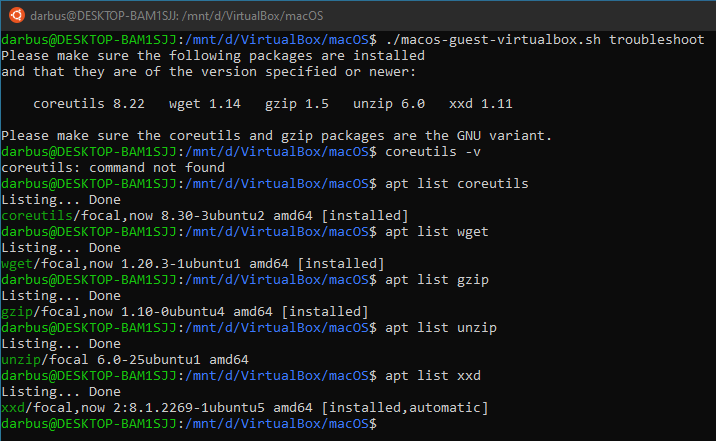
as you can see, I've checked the versions of the packages installed on my WSL, and they're all higher than the required versions. I don't know how to resolve the "GNU variant" problem, and I haven't found any help from the internet and on here (not sure if i missed something).
please help! thank you.
closed time in 16 days
darvyong
issue commentmyspaghetti/macos-virtualbox
how to get GNU variant coreutils and gzip
unzip is not installed
comment created time in 16 days
push eventmyspaghetti/macos-virtualbox
commit sha 083bde45c4f40ee3d25830a42c29dc0e5d4a60b6
forgot to close double-quotes
push time in 17 days
push eventmyspaghetti/macos-virtualbox
commit sha e7459198f1e05369a242dd370f1cc6ce0d6f31ad
documentation
push time in 17 days
issue closedmyspaghetti/macos-virtualbox
Stuck on Press Enter when the Language Window is Ready
Hi, I tried using this installer on my system today, and i get stuck on the following:

I'm not sure what's wrong, I tried repeating the process in another folder and it results in the same issue. Can you help with this?
I'm doing this on Ubuntu 20.04 LTS (Ryzen 5 2600 B450 Motherboard with 1TB NVMe SSD). I hope that something can be done about this :(
closed time in 17 days
darvyong
issue commentmyspaghetti/macos-virtualbox
Stuck on Press Enter when the Language Window is Ready
Duplicate of issue #8. See the documentation section CPU profiles and CPUID settings as instructed by the script.
comment created time in 17 days
issue commentmyspaghetti/macos-virtualbox
You could just shut down VirtualBox and continue on QEMU, that seems reasonable. You could even go back a little and run Catalina on QEMU and upgrade to Big Sur or install it on an empty APFS-formatted virtual disk image. Main point is that the script is used to bootstrap a working macOS virtual machine. You could make a Catalina vmdk or a Big Sur vmdk, but if you're gonna use QEMU I'd suggest both, saves time not having to go back-and-forth between QEMU and VirtualBox.
I've mentioned this on other issues, I mainly use the script to create bootable macOS installers to use on Macs with a failing recovery environment. VirtualBox is slow and kinda painful, but it works everywhere and with little to no manual configuration, which is why the script is designed for VirtualBox and not QEMU, even though QEMU is better.
comment created time in 17 days
issue commentmyspaghetti/macos-virtualbox
Sorry, no support is offered for QEMU. You get the vmdk by creating an empty vmdk and installing Big Sur onto it as described in the thread. Don't interrupt the installer, the initial setup loads after the installer completes.
comment created time in 18 days
issue commentmyspaghetti/macos-virtualbox
Sorry, no support is offered for QEMU. You get the vmdk by creating an empty vmdk and installing Big Sur onto it as described in the thread.
comment created time in 18 days