








Container Network Management
mbentley/docker-aws-manage-user 2
Script to add/remove AWS users
Docker image that uses crond from Alpine Linux
Debian packaging of Stratus_ss's aptitude-gui application for Overclockix
Docker image for bind-tools (dig, nslookup, etc)
Docker image with containerd from Docker, Inc.
mbentley/docker-context-root-example 1
Context root routing example w/nginx
harishjayakumar/Azure-DDC-CICD 0
Setting up a CI/CD pipeline using Jenkins with Docker Datacenter for Azure
issue closedmbentley/docker-omada-controller
Error Code -1 (General Error) on External Portal Server authorize API (Omada Controller v.4.1.5)
Omada Controller version : 4.1.5 Device Model: EAP225(US) v3.0 Firmware Version: 2.20.1 Build 20200630 Rel. 41064
Hi, I'm trying to implement external portal server based on this FAQ, and is currently stuck at Step 8.
I was able to login to the Omada Controller (Step 7) and received the CSRF Token.
But received an error when trying to authorize the client (Step 8):
URL: https://192.168.1.64:8043/api/v2/hotspot/extPortal/auth?token=05a5c488581148d7a17e0214f68ba0dc
Body:
{
    "clientMac" : "3C-15-C2-DE-D2-88",
    "ssidName" : "RUA",
    "apMac" : "50-D4-F7-5B-87-78",
    "radioId" : "1",
    "t" : "1600588644",
    "site" : "Default",
    "time" : "21600"
}
Note: Headers and Cookies have been set correctly as well
Response:
{
    "errorCode": -1,
    "msg": "General error."
}
server.log
2020-09-19 15:58:01 [qtp1976804832-1868] [ERROR]-[SourceFile:98] - java.lang.reflect.InvocationTargetException
java.lang.reflect.InvocationTargetException: null
	at sun.reflect.NativeMethodAccessorImpl.invoke0(Native Method) ~[?:1.8.0_265]
	at sun.reflect.NativeMethodAccessorImpl.invoke(NativeMethodAccessorImpl.java:62) ~[?:1.8.0_265]
	at sun.reflect.DelegatingMethodAccessorImpl.invoke(DelegatingMethodAccessorImpl.java:43) ~[?:1.8.0_265]
	at java.lang.reflect.Method.invoke(Method.java:498) ~[?:1.8.0_265]
	at com.tplink.omada.apigateway.dispatch.chain.a.a(SourceFile:79) [omada-api-gateway-4.1.5.jar:?]
	at com.tplink.omada.apigateway.dispatch.RestDispatcher.a(SourceFile:74) [omada-api-gateway-4.1.5.jar:?]
	at com.tplink.omada.web.controller.ApiController.a(SourceFile:57) [omada-web-4.1.5.jar:?]
	at sun.reflect.GeneratedMethodAccessor606.invoke(Unknown Source) ~[?:?]
	at sun.reflect.DelegatingMethodAccessorImpl.invoke(DelegatingMethodAccessorImpl.java:43) ~[?:1.8.0_265]
	at java.lang.reflect.Method.invoke(Method.java:498) ~[?:1.8.0_265]
	at org.springframework.web.method.support.InvocableHandlerMethod.doInvoke(InvocableHandlerMethod.java:189) [spring-web-5.1.6.RELEASE.jar:5.1.6.RELEASE]
	at org.springframework.web.method.support.InvocableHandlerMethod.invokeForRequest(InvocableHandlerMethod.java:138) [spring-web-5.1.6.RELEASE.jar:5.1.6.RELEASE]
	at org.springframework.web.servlet.mvc.method.annotation.ServletInvocableHandlerMethod.invokeAndHandle(ServletInvocableHandlerMethod.java:102) [spring-webmvc-5.1.6.RELEASE.jar:5.1.6.RELEASE]
	at org.springframework.web.servlet.mvc.method.annotation.RequestMappingHandlerAdapter.invokeHandlerMethod(RequestMappingHandlerAdapter.java:892) [spring-webmvc-5.1.6.RELEASE.jar:5.1.6.RELEASE]
	at org.springframework.web.servlet.mvc.method.annotation.RequestMappingHandlerAdapter.handleInternal(RequestMappingHandlerAdapter.java:797) [spring-webmvc-5.1.6.RELEASE.jar:5.1.6.RELEASE]
	at org.springframework.web.servlet.mvc.method.AbstractHandlerMethodAdapter.handle(AbstractHandlerMethodAdapter.java:87) [spring-webmvc-5.1.6.RELEASE.jar:5.1.6.RELEASE]
	at org.springframework.web.servlet.DispatcherServlet.doDispatch(DispatcherServlet.java:1038) [spring-webmvc-5.1.6.RELEASE.jar:5.1.6.RELEASE]
	at org.springframework.web.servlet.DispatcherServlet.doService(DispatcherServlet.java:942) [spring-webmvc-5.1.6.RELEASE.jar:5.1.6.RELEASE]
	at org.springframework.web.servlet.FrameworkServlet.processRequest(FrameworkServlet.java:1005) [spring-webmvc-5.1.6.RELEASE.jar:5.1.6.RELEASE]
	at org.springframework.web.servlet.FrameworkServlet.doPost(FrameworkServlet.java:908) [spring-webmvc-5.1.6.RELEASE.jar:5.1.6.RELEASE]
	at javax.servlet.http.HttpServlet.service(HttpServlet.java:707) [javax.servlet-api-3.1.0.jar:3.1.0]
	at org.springframework.web.servlet.FrameworkServlet.service(FrameworkServlet.java:882) [spring-webmvc-5.1.6.RELEASE.jar:5.1.6.RELEASE]
	at javax.servlet.http.HttpServlet.service(HttpServlet.java:790) [javax.servlet-api-3.1.0.jar:3.1.0]
	at org.eclipse.jetty.servlet.ServletHolder.handle(ServletHolder.java:873) [jetty-servlet-9.4.15.v20190215.jar:9.4.15.v20190215]
	at org.eclipse.jetty.servlet.ServletHandler$CachedChain.doFilter(ServletHandler.java:1623) [jetty-servlet-9.4.15.v20190215.jar:9.4.15.v20190215]
	at com.tplink.omada.web.filter.CacheControlFilter.doFilter(SourceFile:51) [omada-web-4.1.5.jar:?]
	at org.eclipse.jetty.servlet.ServletHandler$CachedChain.doFilter(ServletHandler.java:1610) [jetty-servlet-9.4.15.v20190215.jar:9.4.15.v20190215]
	at org.apache.shiro.web.servlet.ProxiedFilterChain.doFilter(ProxiedFilterChain.java:61) [shiro-web-1.4.0.jar:1.4.0]
	at org.apache.shiro.web.servlet.AdviceFilter.executeChain(AdviceFilter.java:108) [shiro-web-1.4.0.jar:1.4.0]
	at org.apache.shiro.web.servlet.AdviceFilter.doFilterInternal(AdviceFilter.java:137) [shiro-web-1.4.0.jar:1.4.0]
	at org.apache.shiro.web.servlet.OncePerRequestFilter.doFilter(OncePerRequestFilter.java:125) [shiro-web-1.4.0.jar:1.4.0]
	at org.apache.shiro.web.servlet.ProxiedFilterChain.doFilter(ProxiedFilterChain.java:66) [shiro-web-1.4.0.jar:1.4.0]
	at org.apache.shiro.web.servlet.AdviceFilter.executeChain(AdviceFilter.java:108) [shiro-web-1.4.0.jar:1.4.0]
	at org.apache.shiro.web.servlet.AdviceFilter.doFilterInternal(AdviceFilter.java:137) [shiro-web-1.4.0.jar:1.4.0]
	at org.apache.shiro.web.servlet.OncePerRequestFilter.doFilter(OncePerRequestFilter.java:125) [shiro-web-1.4.0.jar:1.4.0]
	at org.apache.shiro.web.servlet.ProxiedFilterChain.doFilter(ProxiedFilterChain.java:66) [shiro-web-1.4.0.jar:1.4.0]
	at org.apache.shiro.web.servlet.AdviceFilter.executeChain(AdviceFilter.java:108) [shiro-web-1.4.0.jar:1.4.0]
	at org.apache.shiro.web.servlet.AdviceFilter.doFilterInternal(AdviceFilter.java:137) [shiro-web-1.4.0.jar:1.4.0]
	at org.apache.shiro.web.servlet.OncePerRequestFilter.doFilter(OncePerRequestFilter.java:125) [shiro-web-1.4.0.jar:1.4.0]
	at org.apache.shiro.web.servlet.ProxiedFilterChain.doFilter(ProxiedFilterChain.java:66) [shiro-web-1.4.0.jar:1.4.0]
	at org.apache.shiro.web.servlet.AbstractShiroFilter.executeChain(AbstractShiroFilter.java:449) [shiro-web-1.4.0.jar:1.4.0]
	at org.apache.shiro.web.servlet.AbstractShiroFilter$1.call(AbstractShiroFilter.java:365) [shiro-web-1.4.0.jar:1.4.0]
	at org.apache.shiro.subject.support.SubjectCallable.doCall(SubjectCallable.java:90) [shiro-core-1.4.0.jar:1.4.0]
	at org.apache.shiro.subject.support.SubjectCallable.call(SubjectCallable.java:83) [shiro-core-1.4.0.jar:1.4.0]
	at org.apache.shiro.subject.support.DelegatingSubject.execute(DelegatingSubject.java:387) [shiro-core-1.4.0.jar:1.4.0]
	at org.apache.shiro.web.servlet.AbstractShiroFilter.doFilterInternal(AbstractShiroFilter.java:362) [shiro-web-1.4.0.jar:1.4.0]
	at org.apache.shiro.web.servlet.OncePerRequestFilter.doFilter(OncePerRequestFilter.java:125) [shiro-web-1.4.0.jar:1.4.0]
	at org.springframework.web.filter.DelegatingFilterProxy.invokeDelegate(DelegatingFilterProxy.java:357) [spring-web-5.1.6.RELEASE.jar:5.1.6.RELEASE]
	at org.springframework.web.filter.DelegatingFilterProxy.doFilter(DelegatingFilterProxy.java:270) [spring-web-5.1.6.RELEASE.jar:5.1.6.RELEASE]
	at org.eclipse.jetty.servlet.ServletHandler$CachedChain.doFilter(ServletHandler.java:1610) [jetty-servlet-9.4.15.v20190215.jar:9.4.15.v20190215]
	at org.eclipse.jetty.servlet.ServletHandler.doHandle(ServletHandler.java:540) [jetty-servlet-9.4.15.v20190215.jar:9.4.15.v20190215]
	at org.eclipse.jetty.server.handler.ScopedHandler.handle(ScopedHandler.java:146) [jetty-server-9.4.15.v20190215.jar:9.4.15.v20190215]
	at org.eclipse.jetty.security.SecurityHandler.handle(SecurityHandler.java:548) [jetty-security-9.4.15.v20190215.jar:9.4.15.v20190215]
	at org.eclipse.jetty.server.handler.HandlerWrapper.handle(HandlerWrapper.java:132) [jetty-server-9.4.15.v20190215.jar:9.4.15.v20190215]
	at org.eclipse.jetty.server.handler.ScopedHandler.nextHandle(ScopedHandler.java:257) [jetty-server-9.4.15.v20190215.jar:9.4.15.v20190215]
	at org.eclipse.jetty.server.session.SessionHandler.doHandle(SessionHandler.java:1701) [jetty-server-9.4.15.v20190215.jar:9.4.15.v20190215]
	at org.eclipse.jetty.server.handler.ScopedHandler.nextHandle(ScopedHandler.java:255) [jetty-server-9.4.15.v20190215.jar:9.4.15.v20190215]
	at org.eclipse.jetty.server.handler.ContextHandler.doHandle(ContextHandler.java:1345) [jetty-server-9.4.15.v20190215.jar:9.4.15.v20190215]
	at org.eclipse.jetty.server.handler.ScopedHandler.nextScope(ScopedHandler.java:203) [jetty-server-9.4.15.v20190215.jar:9.4.15.v20190215]
	at org.eclipse.jetty.servlet.ServletHandler.doScope(ServletHandler.java:480) [jetty-servlet-9.4.15.v20190215.jar:9.4.15.v20190215]
	at org.eclipse.jetty.server.session.SessionHandler.doScope(SessionHandler.java:1668) [jetty-server-9.4.15.v20190215.jar:9.4.15.v20190215]
	at org.eclipse.jetty.server.handler.ScopedHandler.nextScope(ScopedHandler.java:201) [jetty-server-9.4.15.v20190215.jar:9.4.15.v20190215]
	at org.eclipse.jetty.server.handler.ContextHandler.doScope(ContextHandler.java:1247) [jetty-server-9.4.15.v20190215.jar:9.4.15.v20190215]
	at org.eclipse.jetty.server.handler.ScopedHandler.handle(ScopedHandler.java:144) [jetty-server-9.4.15.v20190215.jar:9.4.15.v20190215]
	at org.eclipse.jetty.server.handler.ContextHandlerCollection.handle(ContextHandlerCollection.java:220) [jetty-server-9.4.15.v20190215.jar:9.4.15.v20190215]
	at org.eclipse.jetty.server.handler.HandlerWrapper.handle(HandlerWrapper.java:132) [jetty-server-9.4.15.v20190215.jar:9.4.15.v20190215]
	at org.eclipse.jetty.server.Server.handle(Server.java:502) [jetty-server-9.4.15.v20190215.jar:9.4.15.v20190215]
	at org.eclipse.jetty.server.HttpChannel.handle(HttpChannel.java:370) [jetty-server-9.4.15.v20190215.jar:9.4.15.v20190215]
	at org.eclipse.jetty.server.HttpConnection.onFillable(HttpConnection.java:267) [jetty-server-9.4.15.v20190215.jar:9.4.15.v20190215]
	at org.eclipse.jetty.io.AbstractConnection$ReadCallback.succeeded(AbstractConnection.java:305) [jetty-io-9.4.15.v20190215.jar:9.4.15.v20190215]
	at org.eclipse.jetty.io.FillInterest.fillable(FillInterest.java:103) [jetty-io-9.4.15.v20190215.jar:9.4.15.v20190215]
	at org.eclipse.jetty.io.ssl.SslConnection$DecryptedEndPoint.onFillable(SslConnection.java:427) [jetty-io-9.4.15.v20190215.jar:9.4.15.v20190215]
	at org.eclipse.jetty.io.ssl.SslConnection.onFillable(SslConnection.java:321) [jetty-io-9.4.15.v20190215.jar:9.4.15.v20190215]
	at org.eclipse.jetty.io.ssl.SslConnection$2.succeeded(SslConnection.java:159) [jetty-io-9.4.15.v20190215.jar:9.4.15.v20190215]
	at org.eclipse.jetty.io.FillInterest.fillable(FillInterest.java:103) [jetty-io-9.4.15.v20190215.jar:9.4.15.v20190215]
	at org.eclipse.jetty.io.ChannelEndPoint$2.run(ChannelEndPoint.java:117) [jetty-io-9.4.15.v20190215.jar:9.4.15.v20190215]
	at org.eclipse.jetty.util.thread.strategy.EatWhatYouKill.runTask(EatWhatYouKill.java:333) [jetty-util-9.4.15.v20190215.jar:9.4.15.v20190215]
	at org.eclipse.jetty.util.thread.strategy.EatWhatYouKill.doProduce(EatWhatYouKill.java:310) [jetty-util-9.4.15.v20190215.jar:9.4.15.v20190215]
	at org.eclipse.jetty.util.thread.strategy.EatWhatYouKill.tryProduce(EatWhatYouKill.java:168) [jetty-util-9.4.15.v20190215.jar:9.4.15.v20190215]
	at org.eclipse.jetty.util.thread.strategy.EatWhatYouKill.run(EatWhatYouKill.java:126) [jetty-util-9.4.15.v20190215.jar:9.4.15.v20190215]
	at org.eclipse.jetty.util.thread.ReservedThreadExecutor$ReservedThread.run(ReservedThreadExecutor.java:366) [jetty-util-9.4.15.v20190215.jar:9.4.15.v20190215]
	at org.eclipse.jetty.util.thread.QueuedThreadPool.runJob(QueuedThreadPool.java:765) [jetty-util-9.4.15.v20190215.jar:9.4.15.v20190215]
	at org.eclipse.jetty.util.thread.QueuedThreadPool$2.run(QueuedThreadPool.java:683) [jetty-util-9.4.15.v20190215.jar:9.4.15.v20190215]
	at java.lang.Thread.run(Thread.java:748) [?:1.8.0_265]
Caused by: java.lang.NullPointerException
	at com.tplink.omada.service.auth.impl.AuthServiceImpl.a(SourceFile:661) ~[omada-service-4.1.5.jar:?]
	at com.tplink.omada.service.auth.impl.AuthServiceImpl.a(SourceFile:150) ~[omada-service-4.1.5.jar:?]
	at com.tplink.omada.service.LockWrapperService.j(SourceFile:237) ~[omada-service-4.1.5.jar:?]
	at com.tplink.omada.service.LockWrapperService.n(SourceFile:119) ~[omada-service-4.1.5.jar:?]
	at com.tplink.omada.service.auth.impl.AuthServiceImpl.a(SourceFile:176) ~[omada-service-4.1.5.jar:?]
	at com.tplink.omada.service.api.impl.ClientApiServiceImpl.a(SourceFile:410) ~[omada-service-4.1.5.jar:?]
	... 84 more
closed time in 12 days
kevinp1005
issue commentmbentley/docker-omada-controller
Error Code -1 (General Error) on External Portal Server authorize API (Omada Controller v.4.1.5)
I can't say I've tried to set that up. I would suggest posting to https://community.tp-link.com/en/business/forum/582 as they should have visibility into the code as well.
comment created time in 12 days
issue commentmbentley/docker-omada-controller
Discovery requires network_mode: host
I'm pretty sure it was exactly what was posted in the original post of this issue.

comment created time in 13 days
issue commentmbentley/docker-timemachine
An image should be building here shortly on Docker Hub (https://hub.docker.com/r/mbentley/timemachine/tags?page=1&name=smb). Please check and let me know if that resolves the issues you were seeing.

comment created time in 13 days
push eventmbentley/docker-timemachine
commit sha 473f4df3fb9df107628668f1fa6c539bfe3626c7
Added '< /dev/null' to both smbd and nmbd; fixes #49 Signed-off-by: Matt Bentley <[email protected]>
commit sha 7ec9dd1109625bcca48caa7f7aad1e785aa877cc
Merge pull request #53 from mbentley/fix-49 Added '< /dev/null' to both smbd and nmbd; fixes #49
push time in 13 days
issue closedmbentley/docker-timemachine
Hello,
Thank you for maintaining this project. It is very nice to host a time machine as simple as deploying a container.
Unfortunately I cannot get it working and I'm not sure where I am doing wrong because the logs aren't so clear. I can see the server from the mac but the connection time out when I'm trying to connect to it. I've opened the ports 137/udp, 138/udp, 139/tcp, 445/tcp on the server.
This is the docker-compose I'm using:
version: '3.4'

services:
  timemachine:
    image: mbentley/timemachine:smb
    container_name: timemachine
    network_mode: "host"
#     ports:
#      - 137:137/udp
#      - 138:138/udp
#      - 139:139
#      - 445:445
    environment:
      - CUSTOM_SMB_CONF=false
      - CUSTOM_USER=false
      - DEBUG_LEVEL=1
      - MIMIC_MODEL=TimeCapsule8,119
      - EXTERNAL_CONF=
      - HIDE_SHARES=no
      - TM_USERNAME=timemachine
      - TM_GROUPNAME=timemachine
      - TM_UID=1000
      - TM_GID=1000
      - PASSWORD=timemachine
      - SET_PERMISSIONS=false
      - SHARE_NAME=TimeMachine
      - SMB_PORT=445
      - VOLUME_SIZE_LIMIT=0
      - WORKGROUP=WORKGROUP
    volumes:
      - ./data:/opt/timemachine
      - timemachine-var-lib-samba:/var/lib/samba
      - timemachine-var-cache-samba:/var/cache/samba
      - timemachine-run-samba:/run/samba
volumes:
  timemachine-var-lib-samba:
  timemachine-var-cache-samba:
  timemachine-run-samba:
Those are the logs:
Attaching to timemachine
 INFO: CUSTOM_SMB_CONF=false; generating [global] section of /etc/samba/smb.conf...
 INFO: Avahi - generating base configuration in /etc/avahi/services/smbd.service...
 INFO: Avahi - adding the 'dk0', 'TimeMachine' share txt-record to /etc/avahi/services/smbd.service...
 INFO: Group timemachine exists; skipping creation
 INFO: User timemachine exists; skipping creation
 INFO: CUSTOM_SMB_CONF=false; generating [TimeMachine] section of /etc/samba/smb.conf...
 INFO: Samba - Created User timemachine password set to none.
 INFO: Samba - Enabled user timemachine.
 INFO: Samba - setting password
 INFO: SET_PERMISSIONS=false; not setting ownership and permissions for /opt/timemachine
 INFO: Avahi - completing the configuration in /etc/avahi/services/smbd.service...
 INFO: dbus PID exists; removing...
 removed '/run/dbus.pid'
 INFO: avahi PID exists; removing...
 removed '/run/avahi-daemon/pid'
 INFO: entrypoint complete; executing 's6-svscan /etc/s6'
 Found user 'avahi' (UID 86) and group 'avahi' (GID 86).
 Successfully dropped root privileges.
 avahi-daemon 0.8 starting up.
 WARNING: No NSS support for mDNS detected, consider installing nss-mdns!
 Loading service file /etc/avahi/services/smbd.service.
 *** WARNING: Detected another IPv4 mDNS stack running on this host. This makes mDNS unreliable and is thus not recommended. ***
 Joining mDNS multicast group on interface docker0.IPv6 with address fe80::42:8dff:fea1:988d.
 New relevant interface docker0.IPv6 for mDNS.
 Joining mDNS multicast group on interface docker0.IPv4 with address 172.17.0.1.
 New relevant interface docker0.IPv4 for mDNS.
 Joining mDNS multicast group on interface enp2s0.IPv6 with address fe80::5886:8bb8:e2d:5d7.
 New relevant interface enp2s0.IPv6 for mDNS.
 Joining mDNS multicast group on interface enp2s0.IPv4 with address 192.168.1.101.
 New relevant interface enp2s0.IPv4 for mDNS.
 Joining mDNS multicast group on interface lo.IPv6 with address ::1.
 New relevant interface lo.IPv6 for mDNS.
 Joining mDNS multicast group on interface lo.IPv4 with address 127.0.0.1.
 New relevant interface lo.IPv4 for mDNS.
 Network interface enumeration completed.
 Registering new address record for fe80::42:8dff:fea1:988d on docker0.*.
 Registering new address record for 172.17.0.1 on docker0.IPv4.
 Registering new address record for fe80::5886:8bb8:e2d:5d7 on enp2s0.*.
 Registering new address record for 192.168.1.101 on enp2s0.IPv4.
 Registering new address record for ::1 on lo.*.
 Registering new address record for 127.0.0.1 on lo.IPv4.
 nmbd version 4.12.2 started.
 Copyright Andrew Tridgell and the Samba Team 1992-2020
 daemon_ready: daemon 'nmbd' finished starting up and ready to serve connections
 EOF on stdin
 Got SIGTERM: going down...
 smbd version 4.12.2 started.
 Copyright Andrew Tridgell and the Samba Team 1992-2020
 INFO: Profiling support unavailable in this build.
 daemon_ready: daemon 'smbd' finished starting up and ready to serve connections
 Failed to fetch record!
 Server startup complete. Host name is big.local. Local service cookie is 3547224719.
 nmbd version 4.12.2 started.
 Copyright Andrew Tridgell and the Samba Team 1992-2020
 daemon_ready: daemon 'nmbd' finished starting up and ready to serve connections
 EOF on stdin
 Got SIGTERM: going down...
 smbd version 4.12.2 started.
 Copyright Andrew Tridgell and the Samba Team 1992-2020
 INFO: Profiling support unavailable in this build.
 daemon_ready: daemon 'smbd' finished starting up and ready to serve connections
 Failed to fetch record!
 Service "big" (/etc/avahi/services/smbd.service) successfully established.
 nmbd version 4.12.2 started.
 Copyright Andrew Tridgell and the Samba Team 1992-2020
 daemon_ready: daemon 'nmbd' finished starting up and ready to serve connections
 EOF on stdin
 Got SIGTERM: going down...
# It's looping over and over
Have a nice day.
closed time in 13 days
Yeboster
PR merged mbentley/docker-timemachine
Signed-off-by: Matt Bentley [email protected]

pr closed time in 13 days
PR opened mbentley/docker-timemachine
Signed-off-by: Matt Bentley [email protected]
pr created time in 13 days
issue commentmbentley/docker-timemachine
So I am really not sure why I can't reproduce it but anyway, I am going to apply the < /dev/null workaround for both smbd and nmbd.
comment created time in 13 days
push eventmbentley/docker-healthcheck-demos
commit sha b0a147484cb97e45aeeb6e9da18ee6d48ab49a83
Updated the interval Signed-off-by: Matt Bentley <[email protected]>
push time in 14 days
push eventmbentley/docker-minecraft
commit sha edecc9f32da3b708e58da3dff3f641e7296597a7
Updated minecraft to 1.16.40.02 Signed-off-by: Matt Bentley <[email protected]>
push time in 16 days
push eventmbentley/docker-in-docker
commit sha df35014e7a4cd63869ce8070058ee921eb0c2b48
Updated repos and latest versions Signed-off-by: Matt Bentley <[email protected]>
push time in 20 days
issue commentmbentley/docker-timemachine
It is likely the container ports. With macvlan, there should be no port conflict. Regardless, try changing the SMB_PORT variable and expose the port specified. This will adjust the port inside the container and how discovery works as well. So it would be 446 in the port exposed inside and out as well as being defined in the env var.

comment created time in 22 days
issue commentmbentley/docker-timemachine
You need to set the container's hostname.
comment created time in 22 days
issue commentmbentley/docker-timemachine
The only reason there is no collision on the ports is because he's using macvlan and is assigning a unique IP address to each container.

comment created time in 22 days
issue commentmbentley/docker-timemachine
Oh wow...how did I not notice this. It's not the ports, it is that you're using one set of volumes when each container needs its own. It thinks that another copy is running because of the PID files.
comment created time in 22 days
push eventmbentley/docker-php7-fpm
commit sha ff893efdb959fd2e1407e82ee5a29bfb154d9320
Added php7-bcmath for nextcloud Signed-off-by: Matt Bentley <[email protected]>
push time in 24 days
fork mbentley/docker-postgres-upgrade
a PoC for using "pg_upgrade" inside Docker
https://hub.docker.com/r/tianon/postgres-upgrade/
fork in a month
push eventmirantis-field/pacman-nodejs
commit sha 088b9804ebf3de4b5dc05ad68c31f82460420d41
Update to deploy to AWS US cluster w/Istio ingress Signed-off-by: Matt Bentley <[email protected]>
push time in a month
push eventmirantis-field/simple-nginx
commit sha 86226600a168d1759726baa2209c1731fb626a2e
Updated date Signed-off-by: Matt Bentley <[email protected]>
push time in a month
issue commentmbentley/docker-timemachine
Sorry for the delay. Could you tell me a bit about the server you're running this on? If you have Samba or nbd running on your host, you might be seeing a conflict with the host's processes. That being said, I am not sure why just that process is terminating. Setting the environment variable to set the debug level to 3 could help get logs as to why the process would be terminating: - DEBUG_LEVEL=3
comment created time in a month
push eventmirantis-field/docker-get-dtr-cve-db
commit sha 2ec1039cfbad0fe9458570b06ec80426455748ed
Updated the URLs for communicating to the license server Signed-off-by: Matt Bentley <[email protected]>
commit sha 5abfc597d2629ef877e75765780862c831000196
Updated README Signed-off-by: Matt Bentley <[email protected]>
commit sha 0d13de87f054e30838a6cb70474773fe06b31e7e
Merge pull request #1 from mbentley/update-readme Update readme
push time in a month
PR merged mirantis-field/docker-get-dtr-cve-db
pr closed time in a month
PR opened mirantis-field/docker-get-dtr-cve-db
pr created time in a month
push eventmirantis-field/simple-nginx
commit sha cfdfe906b3d81df0e2dcfa25b5dd544ac2fd7ced
Updated to Mirantis branding
push time in a month
push eventmirantis-field/simple-nginx
push time in a month
push eventmirantis-field/simple-nginx
commit sha 0be587cb4d5cb628744444fcccd123d69eed7ee3
Updated to Mirantis branding
push time in a month
push eventmirantis-field/simple-nginx
commit sha 9ff391a1dcf57009531dfa84a8d2ccda3c190784
Updated last updated date Signed-off-by: Matt Bentley <[email protected]>
push time in a month
push eventmirantis-field/simple-nginx
commit sha 497a9fd7012f8c8897e5b42bf5aade8ab5872565
Update title of the application
push time in a month
push eventmirantis-field/pacman-nodejs
commit sha 74a093a4b68ae7d37a86d4e35a808b00b6a4784d
Added Swarm mode pacman deployment Signed-off-by: Matt Bentley <[email protected]>
commit sha 6a2fe13b542574f5cd8f44c4e938b5eb8ed755df
Merge pull request #12 from mirantis-field/mbentley Added Swarm mode pacman deployment
push time in a month
push eventmirantis-field/simple-nginx
commit sha 1574ae58cda6e8ac03ea7edd46f0360039a6a362
Updated last updated date
push time in a month
issue commentmbentley/docker-teamspeak
Knowing what you tried would be helpful. You should be able to follow the README section here about updating the parameters.
The quickstart guide specifically mentions that you need to pass both of these parameters if you're changing the port. Since you're running TS in a container, you still want to use file transfer IP 0.0.0.0.
• filetransfer_port (30033)
  TCP Port opened for file transfers. If you specify this parameter, you also need to specify the
  “filetransfer_ip” parameter!
  Default: The default file tranfer port is 30033.

• filetransfer_ip (0.0.0.0)
  IP on which the file transfers are bound to. If you specify this parameter, you also need to
  specify the “filetransfer_port” parameter!
  Default: File transfers are bound on any IP address.

comment created time in a month
push eventmbentley/docker-teamspeak
commit sha 6f081621fc2604d6e5a0203f447f250fd240d1a2
Added header to README Signed-off-by: Matt Bentley <[email protected]>
push time in a month
issue closedmbentley/docker-teamspeak
Error creating ephemeral license: EXPIRED
Hey, since today my TS Server on a QNAP NAS has an error.
here the log file:
2020-07-01 09:47:38.153182|ERROR | | |Error creating ephemeral license: EXPIRED
2020-07-01 16:27:48.305344|ERROR | | |Error creating ephemeral license: EXPIRED
2020-07-01 16:29:34.378105|ERROR | | |Error creating ephemeral license: EXPIRED
2020-07-01 16:30:24.267164|INFO |ServerMain | |Received signal SIGTERM, shutting down.
2020-07-01 16:30:24.343163|INFO |VirtualServerBase|1 |stopped
Found a license agreement method; launching TeamSpeak
2020-07-01 16:30:33.774825|INFO |ServerLibPriv | |TeamSpeak 3 Server 3.11.0 (2020-01-13 08:12:37)
2020-07-01 16:30:33.775733|INFO |ServerLibPriv | |SystemInformation: Linux 4.14.24-qnap #1 SMP Fri Dec 6 11:31:31 CST 2019 x86_64 Binary: 64bit
2020-07-01 16:30:33.779161|INFO |DatabaseQuery | |dbPlugin name: SQLite3 plugin, Version 3, (c)TeamSpeak Systems GmbH
2020-07-01 16:30:33.779513|INFO |DatabaseQuery | |dbPlugin version: 3.11.1
2020-07-01 16:30:33.779943|INFO |DatabaseQuery | |checking database integrity (may take a while)
2020-07-01 16:30:35.428419|WARNING |Accounting | |Unable to open licensekey.dat, falling back to limited functionality
2020-07-01 16:30:35.428728|CRITICAL|Accounting | |Failed loading default license file!
What can i do? thanks in advance maurice
closed time in a month
overfl0w72
created repositorymbentley/docker-minecraft
Docker image for Minecraft Server (Bedrock)
created time in a month
issue closedmbentley/docker-omada-controller
Unable to bind to cloud controller
When i want to bind the SDN Controller to the cloud Controller i get the message that the SDN controller is unable to connect to the server. In the logs i see the following error: 2020-08-14 19:56:25 [qtp1807648168-70] [ERROR]-[SourceFile:848] - Apply deviceId failed, errorCode is -7111, msg is Cannot get response from server.
closed time in 2 months
mquestier1
issue commentmbentley/docker-omada-controller
Unable to bind to cloud controller
That seems like a software issue. I would suggest posting to https://community.tp-link.com/en/business/forum/582 as I am not sure what that would be referring to. I'd suggest checking to see if you're doing any sort of ad blocking that could be interfering with the ability to communicate to the cloud service.
comment created time in 2 months
push eventmirantis-field/simple-nginx
commit sha d9c0d1eda8d1593aa8d159d2e37cf01a706c4ac6
Updated contest URL Signed-off-by: Matt Bentley <[email protected]>
push time in 2 months
push eventmirantis-field/simple-nginx
commit sha dd068a9085140c8aef4fd2cf9d02e58c71057aa6
Updated prize Signed-off-by: Matt Bentley <[email protected]>
push time in 2 months
issue commentmbentley/docker-timemachine
Could you describe how you're deploying the containers? You can't deploy two Samba containers on the same IP address so that could be part of it.
comment created time in 2 months
push eventmirantis-field/simple-nginx
commit sha 148595ffc9d3158141021ab8d1d7634e080f90e0
Updated description & added DE image Signed-off-by: Matt Bentley <[email protected]>
push time in 2 months
push eventmirantis-field/simple-nginx
commit sha 03535bdfa83cb4c7470c603ec118d88c631b178c
Temp changes to show Lens example Signed-off-by: Matt Bentley <[email protected]>
push time in 2 months
push eventmirantis-field/simple-nginx
commit sha 46961bacc1a74bb591ce23ddae95b5e64386eae4
Temp changes to show Lens example Signed-off-by: Matt Bentley <[email protected]>
push time in 2 months
issue closedmbentley/docker-omada-controller
Dockerfile.v4.1.x used Raspbian OS latest. Rasbpi 3 b+
root@omada:~/mydockerbuild# docker build - < Dockerfile.v4.1.x Sending build context to Docker daemon 4.096kB Step 1/10 : FROM ubuntu:18.04 18.04: Pulling from library/ubuntu db182fa07ba5: Pull complete 3e85650936bd: Pull complete 258b890879c4: Pull complete d0f858a12ece: Pull complete Digest: sha256:e5b0b89c846690afe2ce325ac6c6bc3d686219cfa82166fc75c812c1011f0803 Status: Downloaded newer image for ubuntu:18.04 ---> cd3a27be997b Step 2/10 : MAINTAINER Matt Bentley [email protected] ---> Running in f2fd2efe0e68 Removing intermediate container f2fd2efe0e68 ---> 4e94001814c8 Step 3/10 : RUN echo "**** Install Dependencies " && apt-get update && DEBIAN_FRONTEND="noninteractive" apt-get install --no-install-recommends -y gosu mongodb-server-core net-tools openjdk-8-jre-headless tzdata wget && rm -rf /var/lib/apt/lists/ && echo "* Download Omada Controller " && cd /tmp && wget -nv "https://static.tp-link.com/2020/202007/20200714/Omada_SDN_Controller_v4.1.5_linux_x64.tar.gz" && echo " Extract and Install Omada Controller " && tar zxvf Omada_SDN_Controller_v4.1.5_linux_x64.tar.gz && rm Omada_SDN_Controller_v4.1.5_linux_x64.tar.gz && cd Omada_SDN_Controller_ && mkdir /opt/tplink/EAPController -vp && cp bin /opt/tplink/EAPController -r && cp data /opt/tplink/EAPController -r && cp properties /opt/tplink/EAPController -r && cp webapps /opt/tplink/EAPController -r && cp keystore /opt/tplink/EAPController -r && cp lib /opt/tplink/EAPController -r && cp install.sh /opt/tplink/EAPController -r && cp uninstall.sh /opt/tplink/EAPController -r && ln -sf $(which mongod) /opt/tplink/EAPController/bin/mongod && chmod 755 /opt/tplink/EAPController/bin/ && echo "** Cleanup " && cd /tmp && rm -rf /tmp/Omada_SDN_Controller && echo "* Setup omada User Account ****" && groupadd -g 508 omada && useradd -u 508 -g 508 -d /opt/tplink/EAPController omada && mkdir /opt/tplink/EAPController/logs /opt/tplink/EAPController/work && chown -R omada:omada /opt/tplink/EAPController/data /opt/tplink/EAPController/logs /opt/tplink/EAPController/work ---> Running in 9ba4fb09a4e7 **** Install Dependencies **** Get:1 http://ports.ubuntu.com/ubuntu-ports bionic InRelease [242 kB] Get:2 http://ports.ubuntu.com/ubuntu-ports bionic-updates InRelease [88.7 kB] Get:3 http://ports.ubuntu.com/ubuntu-ports bionic-backports InRelease [74.6 kB] Get:4 http://ports.ubuntu.com/ubuntu-ports bionic-security InRelease [88.7 kB] Get:5 http://ports.ubuntu.com/ubuntu-ports bionic/main armhf Packages [1277 kB] Get:6 http://ports.ubuntu.com/ubuntu-ports bionic/multiverse armhf Packages [157 kB] Get:7 http://ports.ubuntu.com/ubuntu-ports bionic/universe armhf Packages [11.0 MB] Get:8 http://ports.ubuntu.com/ubuntu-ports bionic/restricted armhf Packages [12.5 kB] Get:9 http://ports.ubuntu.com/ubuntu-ports bionic-updates/main armhf Packages [834 kB] Get:10 http://ports.ubuntu.com/ubuntu-ports bionic-updates/universe armhf Packages [1170 kB] Get:11 http://ports.ubuntu.com/ubuntu-ports bionic-updates/restricted armhf Packages [11.0 kB] Get:12 http://ports.ubuntu.com/ubuntu-ports bionic-updates/multiverse armhf Packages [4408 B] Get:13 http://ports.ubuntu.com/ubuntu-ports bionic-backports/main armhf Packages [8247 B] Get:14 http://ports.ubuntu.com/ubuntu-ports bionic-backports/universe armhf Packages [8101 B] Get:15 http://ports.ubuntu.com/ubuntu-ports bionic-security/multiverse armhf Packages [1849 B] Get:16 http://ports.ubuntu.com/ubuntu-ports bionic-security/restricted armhf Packages [5504 B] Get:17 http://ports.ubuntu.com/ubuntu-ports bionic-security/universe armhf Packages [694 kB] Get:18 http://ports.ubuntu.com/ubuntu-ports bionic-security/main armhf Packages [567 kB] Fetched 16.2 MB in 9s (1776 kB/s) Reading package lists... Reading package lists... Building dependency tree... Reading state information... Package mongodb-server-core is not available, but is referred to by another package. This may mean that the package is missing, has been obsoleted, or is only available from another source
E: Package 'mongodb-server-core' has no installation candidate The command '/bin/sh -c echo "**** Install Dependencies " && apt-get update && DEBIAN_FRONTEND="noninteractive" apt-get install --no-install-recommends -y gosu mongodb-server-core net-tools openjdk-8-jre-headless tzdata wget && rm -rf /var/lib/apt/lists/ && echo "* Download Omada Controller " && cd /tmp && wget -nv "https://static.tp-link.com/2020/202007/20200714/Omada_SDN_Controller_v4.1.5_linux_x64.tar.gz" && echo " Extract and Install Omada Controller " && tar zxvf Omada_SDN_Controller_v4.1.5_linux_x64.tar.gz && rm Omada_SDN_Controller_v4.1.5_linux_x64.tar.gz && cd Omada_SDN_Controller_ && mkdir /opt/tplink/EAPController -vp && cp bin /opt/tplink/EAPController -r && cp data /opt/tplink/EAPController -r && cp properties /opt/tplink/EAPController -r && cp webapps /opt/tplink/EAPController -r && cp keystore /opt/tplink/EAPController -r && cp lib /opt/tplink/EAPController -r && cp install.sh /opt/tplink/EAPController -r && cp uninstall.sh /opt/tplink/EAPController -r && ln -sf $(which mongod) /opt/tplink/EAPController/bin/mongod && chmod 755 /opt/tplink/EAPController/bin/ && echo "** Cleanup " && cd /tmp && rm -rf /tmp/Omada_SDN_Controller && echo "* Setup omada User Account ****" && groupadd -g 508 omada && useradd -u 508 -g 508 -d /opt/tplink/EAPController omada && mkdir /opt/tplink/EAPController/logs /opt/tplink/EAPController/work && chown -R omada:omada /opt/tplink/EAPController/data /opt/tplink/EAPController/logs /opt/tplink/EAPController/work' returned a non-zero code: 100
closed time in 2 months
joopy
issue commentmbentley/docker-omada-controller
Fantastic, thank you for verifying!
comment created time in 2 months
push eventmbentley/docker-sabnzbd
commit sha 5ac378087474da349c44356332992fb699110827
Added build for sid Signed-off-by: Matt Bentley <[email protected]>
push time in 2 months
push eventmbentley/docker-get-dtr-cve-db
commit sha 2ec1039cfbad0fe9458570b06ec80426455748ed
Updated the URLs for communicating to the license server Signed-off-by: Matt Bentley <[email protected]>
push time in 2 months
issue openednextcloud/desktop
compat_ifmu_ulist: error 14 in Console logs on macOS Catalina
Expected behaviour
When running Nextcloud Desktop Client 2.6.5 on macOS Catalina 10.15.6, I am seeing error events being reported in Console. I wouldn't expect this to be happening.
Actual behaviour
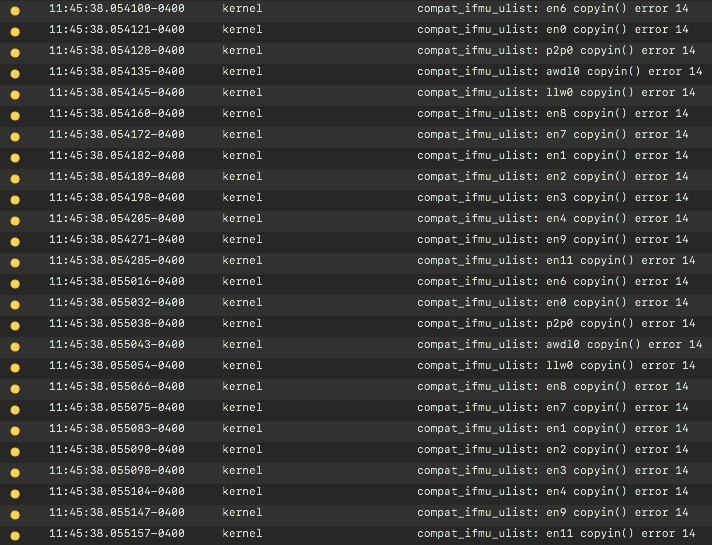
The error repeats every 10 seconds for all of the interfaces on my Mac:
compat_ifmu_ulist: <interface> copyin() error 14
This only happens when Nextcloud is open so I believe it is something related to the Nextcloud client.
Steps to reproduce
- Run Nextcloud client on macOS
- Look at the Console app
- See errors. Stop the Nextcloud client and the errors cease.
Client configuration
Client version: 2.6.5
Operating system: macOS Catalina 10.15.6
OS language: English
Qt version used by client package (Linux only, see also Settings dialog):
Client package (From Nextcloud or distro) (Linux only):
Installation path of client:/Applications
Server configuration
Nextcloud version:
Storage backend (external storage):
Logs
Please use Gist (https://gist.github.com/) or a similar code paster for longer logs.
- Client logfile: Output of
nextcloud --logwindowornextcloud --logfile log.txt(On Windows usingcmd.exe, you might need to firstcdinto the Nextcloud directory) (See also https://docs.nextcloud.com/desktop/2.3/troubleshooting.html#log-files)
I didn't see anything relevant in the logfiles but here is a sample from when the errors were repeated multiple times in Console: https://gist.github.com/mbentley/3029da9882e9184aafa3d0e5ad51a1cf. I also didn't see any specific correlation between when the Console errors were reported and when logs were output from the client.
-
Web server error log:
-
Server logfile: nextcloud log (data/nextcloud.log):
created time in 2 months
issue commentlensapp/lens
Work space view disappears after deleting a work-space
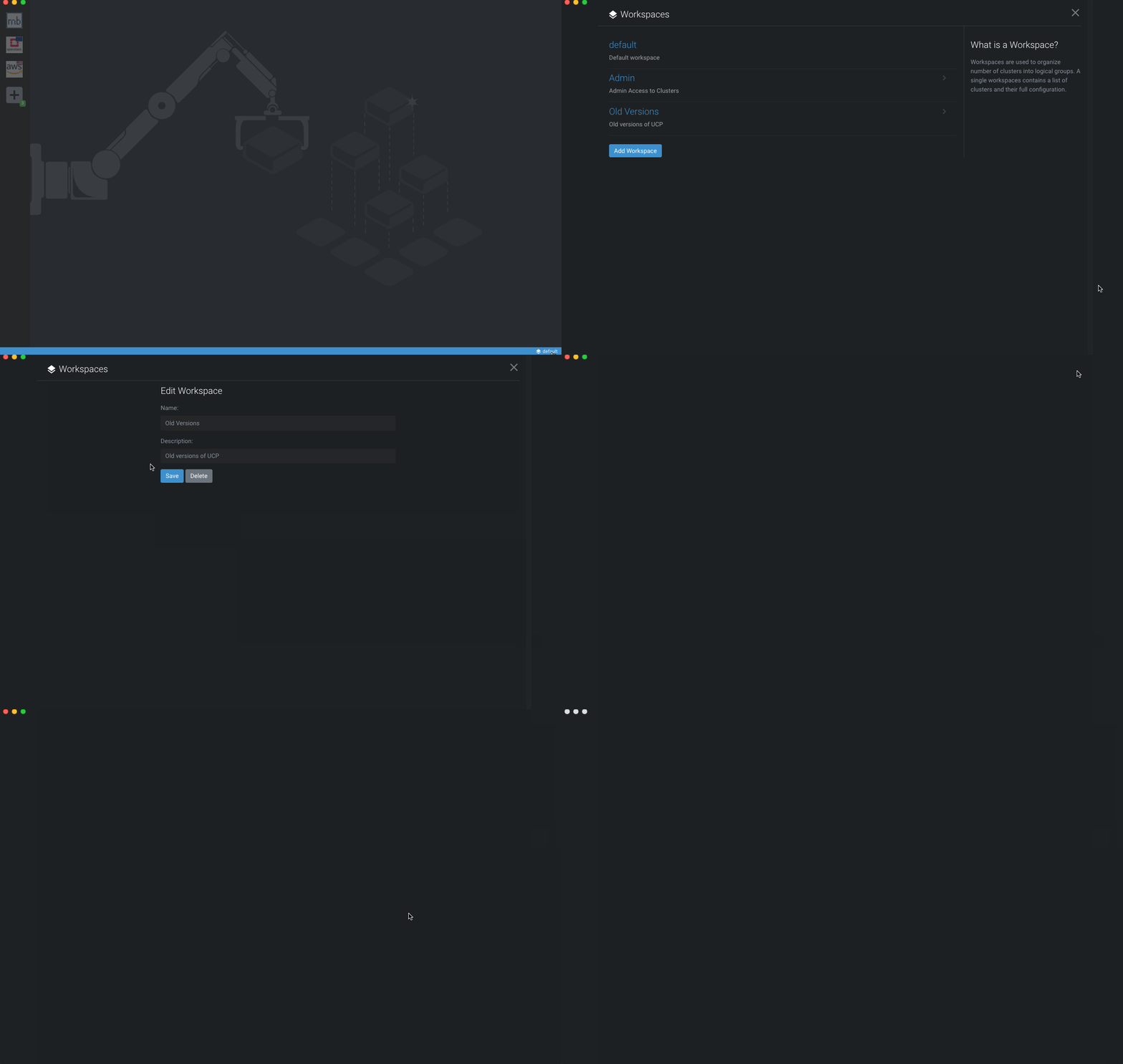
I see the same behavior occurring if I add or edit an existing workspace and then close out the UI in Lens 3.5.1 on MacOS Catalina 10.15.6:

comment created time in 2 months
push eventmbentley/docker-in-docker
commit sha 890015676d98d33b1892a4babdd92ca47cec26b1
Try to optimize Dockerfile for caching Signed-off-by: Matt Bentley <[email protected]>
push time in 2 months
push eventmbentley/prologue
commit sha 93b743696e84fc36c409c1e056f1bbffe6c2d7a9
Fixed picture and link Signed-off-by: Matt Bentley <[email protected]>
push time in 2 months
push eventmbentley/www.mbentley.net
commit sha fcf96c8338fd00baf3e6cfcfc4d3103e63006c46
Updated submodule Signed-off-by: Matt Bentley <[email protected]>
push time in 2 months
created repositorymbentley/prologue
Hugo theme; fork of sethmacleod/prologue
created time in 2 months
push eventmbentley/docker-omada-controller
commit sha a0cc211bccac400ce5d51df5444545c05d8a1c3f
Added custom cert names; fixes #60 Signed-off-by: Matt Bentley <[email protected]>
commit sha 74188951ab3159c8da39edf96f626c68f56de7ee
Backported the custom cert name support Signed-off-by: Matt Bentley <[email protected]>
commit sha 8f5d303bfe77b6eac2eaf0e287d18e40c9f54d06
Merge pull request #61 from mbentley/custom-cert-names Added custom cert names; fixes #60
push time in 2 months
delete branch mbentley/docker-omada-controller
delete branch : custom-cert-names
delete time in 2 months
issue closedmbentley/docker-omada-controller
Please add environment variables for customizing certificate names
closed time in 2 months
ulug79
PR merged mbentley/docker-omada-controller
pr closed time in 2 months
issue commentmbentley/docker-omada-controller
👍 Sounds good. #61 should resolve this and add the ability to have custom names.
comment created time in 2 months
push eventmbentley/docker-omada-controller
commit sha 74188951ab3159c8da39edf96f626c68f56de7ee
Backported the custom cert name support Signed-off-by: Matt Bentley <[email protected]>
push time in 2 months
PR opened mbentley/docker-omada-controller
pr created time in 2 months
create barnchmbentley/docker-omada-controller
created branch time in 2 months
issue commentmbentley/docker-omada-controller
Are you expecting to just be able to update the certificate name or the whole path?
comment created time in 2 months
issue commentmbentley/docker-omada-controller
Just curious, what's the use case where the certificate names are an issue?
comment created time in 2 months
push eventmbentley/docker-omada-controller
commit sha 486c9e11ea011281a961368b204c0f316ccda28c
Added note about upgrading on a Synology NAS; fixes #57 Signed-off-by: Matt Bentley <[email protected]>
commit sha 0e45ffe40e46d29d890b9196c30fee2d2fac0438
Merge pull request #59 from mbentley/synology-note Added note about upgrading on a Synology NAS; fixes #57
push time in 2 months
delete branch mbentley/docker-omada-controller
delete branch : synology-note
delete time in 2 months
issue closedmbentley/docker-omada-controller
Updated container on Synology NAS. Downloaded 'Latest' container Followed additional instruction; Stopped container, cleared out existing folders (logs, work, data) 'Cleared' container, Restarted container, get the following in the log errors:
INFO: Time zone set to 'Europe/London' INFO: Starting Omada Controller as user omada error: exec: "/opt/tplink/EAPController/jre/bin/java": stat /opt/tplink/EAPController/jre/bin/java: no such file or directory INFO: Time zone set to 'Europe/London'
And repeat!
I'm no expert so using the Docker GUI on DSM
Thanks,

closed time in 2 months
dougle03
PR merged mbentley/docker-omada-controller
pr closed time in 2 months
PR opened mbentley/docker-omada-controller
pr created time in 2 months
create barnchmbentley/docker-omada-controller
created branch time in 2 months
delete branch mbentley/docker-omada-controller
delete branch : add-port-info
delete time in 2 months
push eventmbentley/docker-omada-controller
commit sha b9e50560184328490d691e74c1ac34df5ee72bea
Added port 8843 to Dockerfile and note about healthcheck Signed-off-by: Matt Bentley <[email protected]>
commit sha fff28048f0850d33751a8c1b010e3a702ef6b4bb
Merge pull request #58 from mbentley/add-port-info Added port 8843 to Dockerfile and note about healthcheck
push time in 2 months
PR merged mbentley/docker-omada-controller
pr closed time in 2 months
PR opened mbentley/docker-omada-controller
pr created time in 2 months
create barnchmbentley/docker-omada-controller
created branch time in 2 months
issue commentmbentley/docker-omada-controller
Sounds plausible.
comment created time in 2 months
issue commentmbentley/docker-omada-controller
I verified that the latest tag has the correct CMD and ENTRYPOINT:
# docker inspect docker.io/mbentley/omada-controller:latest --format '{{json .ContainerConfig.Entrypoint}}' | jq .
[
  "/entrypoint.sh"
]

# docker inspect docker.io/mbentley/omada-controller:latest --format '{{json .ContainerConfig.Cmd}}' | jq .
[
  "/bin/sh",
  "-c",
  "#(nop) ",
  "CMD [\"/usr/bin/java\" \"-server\" \"-Xms128m\" \"-Xmx1024m\" \"-XX:MaxHeapFreeRatio=60\" \"-XX:MinHeapFreeRatio=30\" \"-XX:+HeapDumpOnOutOfMemoryError\" \"-cp\" \"/opt/tplink/EAPController/lib/*:\" \"com.tplink.omada.start.OmadaLinuxMain\"]"
]
I'm wondering if the Synology inspects the entrypoint and command from the image when it is originally deployed and essentially overrides the entrypoint and command on the container. It would have saved what was originally specified on the 3.2.x image as that's what I would expect for the older version. At least that would explain the behavior.
comment created time in 2 months
issue commentmbentley/docker-omada-controller
Yes, latest is tagged to 4.1. I'd suggest picking a version tag like 4.1 or 3.2 so you're locking yourself in on a version as I change out latest without notice. Especially in the case of 4.1, the breaking changes might be unexpected.
I'm not familiar with how Synology allows you to run containers but the 4.1 image has the correct entrypoint and command as defined in the Dockerfile. I'll double check to make sure there isn't something funky going on with the auto builds on Hub though.
comment created time in 2 months
issue commentmbentley/docker-omada-controller
How are you running the container? Are you specifying your own command instead of relying on the default? I'm assuming you're using the 4.1 image. The JRE is no longer included in the installed bundle so it is installed in the system path.
comment created time in 2 months
push eventmbentley/docker-omada-controller
commit sha dd399ee744ef7b340905deaa87c6b969fe4b7255
Updated notes for 4.1 section about ports Signed-off-by: Matt Bentley <[email protected]>
push time in 2 months
push eventmbentley/docker-omada-controller
commit sha 4efcd02d5377fd9137a2382e5b585b6c4500e475
Updated README examples and variable explanations Signed-off-by: Matt Bentley <[email protected]>
push time in 2 months
issue commentmbentley/docker-omada-controller
Unable to start docker image - port error - 8843 already in use
OK, new feature is in. You will not be able to modify the ports if the MongoDB has already been bootstrapped. The persistent data will need to be reset and then you can use the environment variables described in the README.

comment created time in 2 months
delete branch mbentley/docker-omada-controller
delete branch : change-ports-entrypoint
delete time in 2 months
push eventmbentley/docker-omada-controller
commit sha 579c48ccf91c6bfa85104d90f10ce1ff2457f3f4
Added ability to change ports on first run; fixes #55. allow user to set which logs to show on STDOUT Signed-off-by: Matt Bentley <[email protected]>
commit sha 49e5fff76914f54e948fa7adbe7a2ef3c4bd73a7
Merge pull request #56 from mbentley/change-ports-entrypoint Added ability to change ports on first run; fixes #55. allow user to set which logs to show on STDOUT
push time in 2 months
issue closedmbentley/docker-omada-controller
Unable to start docker image - port error - 8843 already in use
Hi All;)
I have little problem, i'm trying too run Omada on my server, but port 8443 is already in use, and Omada image won't start. But in Dockerfile exposed port is 8043. What part of controller is using port 8443?
M.
closed time in 2 months
skawikk
PR merged mbentley/docker-omada-controller
pr closed time in 2 months
PR opened mbentley/docker-omada-controller
pr created time in 2 months
create barnchmbentley/docker-omada-controller
branch : change-ports-entrypoint
created branch time in 2 months
issue commentmbentley/docker-omada-controller
Unable to start docker image - port error - 8843 already in use
Whew, OK, glad I wasn't going crazy :) I'll see if I can add an update to the entrypoint to be able to update those values on demand via environment variables.
comment created time in 2 months
issue commentmbentley/docker-omada-controller
Unable to start docker image - port error - 8443 already in use
Damn it, I read 8843 as 8443. 🤦
comment created time in 2 months
issue commentmbentley/docker-omada-controller
Unable to start docker image - port error - 8443 already in use
Ah ok, so I found some settings in the properties file:
#web config
manage.http.port=8088
manage.https.port=8043
portal.http.port=8088
portal.https.port=8843
manage should be the management console, portal is probably for portal authentication for guest networks. I imagine I should be able to make these settings configurable.
comment created time in 2 months
issue commentmbentley/docker-omada-controller
Unable to start docker image - port error - 8443 already in use
Huh, interesting. It is using 8843 on 4.1. Must be some new requirement as there isn't a ton of documentation on 4.1 yet.
comment created time in 2 months