








cURL with AWS request signing
Chef cookbook to install Microsoft Office 2013
Modularized Packer definitions for building Vagrant baseboxes
Development repository for Opscode Cookbook ark
A Python module to control JFrog Artifactory
Prometheus exporter for aws billing information
Lightweight Linux for Docker
legal90/boot2docker-vagrant-box 0
Packer scripts to build a Vagrant-compatible boot2docker box.
A systems integration framework, built to bring the benefits of configuration management to your entire infrastructure.
legal90/chef-consul-template 0
A Chef cookbook that installs and configures consul-template
issue commentgruntwork-io/terragrunt
AWS Auth for S3 backend enforces the profile and doesn't respect env variables
Thank you, @yorinasub17,
With that said, terragrunt should configure its credentials in a way that you can override that with env vars, like terraform. I suspect this routine isn't doing the right thing.
So, do I understand it correctly, that this is the issue which should be eventually fixed on terragrunt side?
Anyway, thanks for the workaround you suggested works. It fine for now 👍

comment created time in a day
issue openedgruntwork-io/terragrunt
AWS Auth for S3 backend enforces the profile and doesn't respect env variables
Hi, terragrunt maintainers! Thank you very much for creating this tool, bringing "DRY" to terraform is a really handy thing! However, I got an issue when I switched my pure terraform-managed infra stack to terragrunt.
The documentation says that terragrunt follows the "standart AWS SDK flow" for the AWS authentication: https://aws.amazon.com/blogs/security/a-new-and-standardized-way-to-manage-credentials-in-the-aws-sdks/
As I understand it, first it will try to use environment variables AWS_ACCESS_KEY_ID, AWS_SECRET_ACCESS_KEY (if they are provided) and only after that it will fall back to other methods, such as profile in files ~/.aws/config and ~/.aws/credentials
Problem description
My S3 backend includes the profile statement. Example:
# backend.tf
# Generated by Terragrunt. Sig: nIlQXj57tbuaRZEa
terraform {
  backend "s3" {
    profile = "my-profile-dev"       #  <--  The profile is hardcoded
    region  = "us-east-1"
    bucket  = "my-dev-terraform-state"
    encrypt = true
    key     = "dev/my-app"
  }
}
In my CI pipeline I don't have any ~/.aws/config and ~/.aws/credentials, so the profile is not available. But I have AWS_ACCESS_KEY_ID and AWS_SECRET_ACCESS_KEY env variables exported. However, both terragrunt init and terragrunt plan fails with:
# ...
[terragrunt] 2020/07/31 12:13:30 Generated file /path/to/workdir/.terragrunt-cache/oM9M1EUi8LIr7ypW3ioIlO-9eYo/nY19rdwnNrHEET77DIMGGXqSHiw/infrastructure-modules/my-app/backend.tf.
[terragrunt] 2020/07/31 12:13:36 Error finding AWS credentials (did you set the AWS_ACCESS_KEY_ID and AWS_SECRET_ACCESS_KEY environment variables?): NoCredentialProviders: no valid providers in chain. Deprecated.
	For verbose messaging see aws.Config.CredentialsChainVerboseErrors
[terragrunt] 2020/07/31 12:13:36 Unable to determine underlying exit code, so Terragrunt will exit with error code 1
It seems that terragrunt forcibly tries to use the specified profile name and doesn't use the provided env variables for S3 backend initialization. If I comment-out the profile line from the backend config, it works fine.
Other findings
The most interesting part is that pure terraform works just fine in this case. I can switch to the generated temp dir (inside .terragrunt-cache/) and run terraform init for the backend with profile hardcoded (but not-existing in ~/.aws/*). Then it uses the credentials from the env var, without a failure, as expected:
$ cd /path/to/workdir/.terragrunt-cache/oM9M1EUi8LIr7ypW3ioIlO-9eYo/nY19rdwnNrHEET77DIMGGXqSHiw/infrastructure-modules/my-app

$ terraform init
Initializing modules...

Initializing the backend...

Initializing provider plugins...

# <skipped>

Terraform has been successfully initialized!
Qustions
Is that a bug, or en expected behavior? If the latter - why does it behave differently than the plain terraform?
Are there any way how I can enforce picking credentials from the env vars and still keep profile name explicitly set in the backend.tf, because we still need it for the manual execution from workstations?
created time in 4 days
issue closedParallels/docker-machine-parallels
Docker Machine is not running properly after update to macOS Catalina
After the first generation of a new machine (in my case done by "dinghy", a reverse proxy solution) everything seems to work normal. But after stopping the machine and try to start it again, its not working anymore. The startup ends up with this error message
Unable to verify the Docker daemon is listening: Maximum number of retries (10) exceeded
Traceback (most recent call last):
	9: from /usr/local/bin/_dinghy_command:12:in `<main>'
	8: from /usr/local/Cellar/dinghy/4.6.5/cli/thor/lib/thor/base.rb:440:in `start'
	7: from /usr/local/Cellar/dinghy/4.6.5/cli/thor/lib/thor.rb:359:in `dispatch'
	6: from /usr/local/Cellar/dinghy/4.6.5/cli/thor/lib/thor/invocation.rb:126:in `invoke_command'
	5: from /usr/local/Cellar/dinghy/4.6.5/cli/thor/lib/thor/command.rb:27:in `run'
	4: from /usr/local/Cellar/dinghy/4.6.5/cli/cli.rb:93:in `up'
	3: from /usr/local/Cellar/dinghy/4.6.5/cli/cli.rb:271:in `start_services'
	2: from /usr/local/Cellar/dinghy/4.6.5/cli/dinghy/machine.rb:25:in `up'
	1: from /usr/local/Cellar/dinghy/4.6.5/cli/dinghy/machine.rb:126:in `system'
/usr/local/Cellar/dinghy/4.6.5/cli/dinghy/system.rb:18:in `system': Failure calling `docker-machine start dinghy` (System::Failure)
After starting the machine with debug option I get ten times this fault, before the upper error comes up again:
(dinghy) Calling .GetSSHHostname
(dinghy) DBG | executing: /usr/local/bin/prlctl list dinghy --output status --no-header
(dinghy) DBG | executing: /usr/local/bin/prlctl list -i dinghy
(dinghy) DBG | Found lease: 10.211.55.32 for MAC: 001C4208D8F8, expiring at 1571651690, leased for 1800 s.
(dinghy) DBG |
(dinghy) DBG | Found IP lease: 10.211.55.32 for MAC address 001C4208D8F8
(dinghy) DBG |
(dinghy) Calling .GetSSHPort
(dinghy) Calling .GetSSHKeyPath
(dinghy) Calling .GetSSHKeyPath
(dinghy) Calling .GetSSHUsername
Using SSH client type: external
Using SSH private key: /Users/alex/.docker/machine/machines/dinghy/id_rsa (-rw-------)
&{[-F /dev/null -o ConnectionAttempts=3 -o ConnectTimeout=10 -o ControlMaster=no -o ControlPath=none -o LogLevel=quiet -o PasswordAuthentication=no -o ServerAliveInterval=60 -o StrictHostKeyChecking=no -o UserKnownHostsFile=/dev/null [email protected] -o IdentitiesOnly=yes -i /Users/alex/.docker/machine/machines/dinghy/id_rsa -p 22] /usr/local/bin/ssh <nil>}
About to run SSH command:
if ! type netstat 1>/dev/null; then ss -tln; else netstat -tln; fi
SSH cmd err, output: <nil>: Active Internet connections (only servers)
Proto Recv-Q Send-Q Local Address           Foreign Address         State
tcp        0      0 0.0.0.0:22              0.0.0.0:*               LISTEN
tcp        0      0 :::22                   :::*                    LISTEN
Watching the bootup sequence by opening the miniature window inside the parallel controll panel I see several errors and warning during the first bootup:
...
unable to write 'random state'
...
unable to write 'random state'
...
Device "eth1" does not exists.
...
unable to write 'random state'
...
unable to write 'random state'
Independent of this messages the machine works as expected until I stop and start it again. If I doing this, I see only one warning during the bootup inside the parallels window:
warning: unable to find partition with the swap label (boot2dockerswap) or TYPE=swap (so Docker will likely complain about swap)
- this could also mean TCL already mounted it! (see 'free' or '/proc/swaps')
I have two macs (both already updated to macOS Catalina) with exact the same problem (after updating the system).
There is also an issue I posted at the dinghy repo, but the autor means the problem stuck inside docker-machine or this parallels connector: https://github.com/codekitchen/dinghy/issues/290
closed time in 25 days
mediaessenz
issue commentParallels/boot2docker-vagrant-box
Hi @antoniogermano , Yes, this box was not update for a while and de-facto deprecated because there was a simpler alternative: Docker Machine (https://docs.docker.com/machine/overview/) + Parallels driver for it (https://github.com/Parallels/docker-machine-parallels/).
However, as you correctly noticed both boot2docker and Docker Machine are deprecated now (July 2020):
- https://github.com/docker/machine/issues/4537
- https://github.com/boot2docker/boot2docker/pull/1408
I'm not sure what's the actual alternative for that now, but most likely Docker is encourage everyone to switch to "Docker for Mac" instead: https://docs.docker.com/docker-for-mac/install/ Although, it has nothing to do with Parallels Desktop, because it uses another hypervisor for macOS, xhyve (https://github.com/machyve/xhyve)

comment created time in 25 days
release legal90/awscurl
awscurl_0.1.1_Darwin_x86_64.tar.gz 3.62MB
awscurl_0.1.1_Linux_i386.tar.gz 3.30MB
awscurl_0.1.1_Linux_x86_64.tar.gz 3.47MB
awscurl_0.1.1_Windows_x86_64.zip 3.42MB
checksums.txt 0.39KB
released time in a month
push eventlegal90/awscurl
push time in a month
release legal90/awscurl
awscurl_0.1.0_Darwin_x86_64.tar.gz 3.62MB
awscurl_0.1.0_Linux_i386.tar.gz 3.29MB
awscurl_0.1.0_Linux_x86_64.tar.gz 3.47MB
awscurl_0.1.0_Windows_x86_64.zip 3.42MB
checksums.txt 0.39KB
released time in a month
push eventlegal90/awscurl
commit sha 3c67a452a6c523d8e693fcef712ad7819cff1226
Add support of reading data from the file using @
push time in a month
issue commentParallels/docker-machine-parallels
Docker Machine is not running properly after update to macOS Catalina
v19.03.12, the final release of boot2docker was published today: https://github.com/boot2docker/boot2docker/releases/tag/v19.03.12
It includes the fix boot2docker/boot2docker#1403 and this issue should be solved there. I checked it on the test vm by doing docker-machine restart several times and it works as expected - no "Maximum number of retries (10) exceeded" errors anymore.
@mediaessenz, please, verify it in your setup
comment created time in a month
pull request commentboot2docker/boot2docker
Remove haveged in favor of backported upstream kernel commit
Thank you, @tianon, for all your work you've done on boo2docker !

comment created time in a month
issue commentParallels/docker-machine-parallels
Docker Machine is not running properly after update to macOS Catalina
@romankulikov Building and releasing a custom boot2docker.iso might be an option, but in this case all users will have to specify the custom URL to it using --parallels-boot2docker-url flag.
I asked here if there is any chance for the patch to be released: https://github.com/boot2docker/boot2docker/pull/1403#issuecomment-648843520
comment created time in a month
pull request commentboot2docker/boot2docker
Remove haveged in favor of backported upstream kernel commit
Hi @tianon Does this patch have any chance to be released? Maybe at least as an RC / unstable ?
I see that is b2d has been deprecated (https://github.com/boot2docker/boot2docker/pull/1403), but this PR and its port to the branch 19.03.x is important for those users who still want to run Docker Machine with Parallels Desktop.
comment created time in a month
issue closedParallels/docker-machine-parallels
Should an deprecated-info added since docker-machine is only in maintenance mode anymore
closed time in 2 months
josefglatz
issue commentParallels/docker-machine-parallels
Should an deprecated-info added since docker-machine is only in maintenance mode anymore
Hi @josefglatz,
Despite the fact that Docker Machine itself is in the maintenance mode, it was not actually deprecated (https://github.com/docker/machine/issues/4537).
It could still be used. And, what's more important, libmachine library is not deprecated neither.
Our driver, which we traditionally call "docker machine driver" could also be used with other projects leveraging drivers based on libmachine. For example, with minikube:
- https://minikube.sigs.k8s.io/docs/
- https://minikube.sigs.k8s.io/docs/drivers/parallels/ It's a popular tool and it doesn't directly depend nor on docker-machine, neither on boot2docker.
So, I think we should not deprecate our driver now. Though, it makes sense to update or main README.md and project description to point that it could be also used with minikube (like it's done in https://github.com/machine-drivers/docker-machine-driver-xhyve).
comment created time in 2 months
issue commentParallels/docker-machine-parallels
Error with pre-create check: "Parallels Desktop edition could not be fetched!"
@tstromberg Thank you for pointing on this! I agree - we should update the error message and make it more helpful 👍

comment created time in 2 months
issue commentParallels/docker-machine-parallels
Docker Machine is not running properly after update to macOS Catalina
Well, it looks like boot2docker starting from 19.03.5 has a backported patch from Linux kernel 5.4 with entropy fixes. boot2docker
19.03.5was released from the earlier state, before that fix.
And, unfortunately, it seems there will be no releases anymore 😭 : https://github.com/boot2docker/boot2docker/pull/1408 That actually looks like the sunset of the entire Docker Machine project.
comment created time in 2 months
startedArthurHlt/terraform-provider-zipper
started time in 2 months
pull request commenthashicorp/terraform-provider-archive
archive_file: add regex to excludes
Thank you for for the PR, @manasouza! That is very useful feature. @appilon @findkim @paultyng Could you please review it?

comment created time in 2 months
issue closedParallels/docker-machine-parallels
Can't start minikube: HostIP not yet implemented for "parallels" driver
Minikube works with HyperKit and also VirtualBox, but does not work with the Parallels driver.
The issue is HostIP not yet implemented for "parallels" driver
I have installed the parallels driver with MacPorts, and then uninstalled that and installed with Homebrew, but it didn't make a difference, I get the same error message on either.
Here's the complete log:
Server:~ antoniogermano$ minikube start
😄  minikube v1.10.1 on Darwin 10.15.4
✨  Using the parallels driver based on user configuration
👍  Starting control plane node minikube in cluster minikube
🔥  Creating parallels VM (CPUs=2, Memory=3072MB, Disk=20000MB) ...
❗  This VM is having trouble accessing https://k8s.gcr.io
💡  To pull new external images, you may need to configure a proxy: https://minikube.sigs.k8s.io/docs/reference/networking/proxy/
🐳  Preparing Kubernetes v1.18.2 on Docker 19.03.8 ...
E0520 09:36:19.132217   60998 start.go:95] Unable to get host IP: HostIP not yet implemented for "parallels" driver

💣  failed to start node: startup failed: Failed to setup kubeconfig: HostIP not yet implemented for "parallels" driver

😿  minikube is exiting due to an error. If the above message is not useful, open an issue:
👉  https://github.com/kubernetes/minikube/issues/new/choose
I know the log asks to open the issue on the minikube project, but I've got the feeling that if I do, they will ask me to open an issue here.
Thank you in advance!
closed time in 2 months
antoniogermano
issue commentParallels/docker-machine-parallels
Can't start minikube: HostIP not yet implemented for "parallels" driver
kubernetes/minikube#8259 was merged
comment created time in 2 months
startedsentriz/fish-pipenv
started time in 2 months
startedgohugoio/hugo
started time in 2 months
pull request commentkubernetes/minikube
Add HostIP implementation for parallels driver
Thank you, @medyagh! I added the output before/after this PR to the top message and also renamed the variable, as you asked.
comment created time in 2 months
Pull request review commentkubernetes/minikube
Add HostIP implementation for parallels driver
func HostIP(host *host.Host) (net.IP, error) { re = regexp.MustCompile(`(?s)Name:\s*` + iface + `.+IPAddress:\s*(\S+)`) ip := re.FindStringSubmatch(string(ipList))[1] return net.ParseIP(ip), nil+ case driver.Parallels:+ cmd := "prlsrvctl"
Done. Renamed to bin
comment created time in 2 months
push eventlegal90/minikube
commit sha 2b8bac695ea706b77fd6f64b98afb7343fbdada0
Apply code review changes Rename "cmd*" var to "bin*" in the parallels-specific block
push time in 2 months
issue closedParallels/docker-machine-parallels
I see that issue like this has been filed several times, and is closed as fixed in Parallels 11.1.0. Unfortunately, I recently install docker-toolbox and parallel driver to Parallel 11.1.3, and I am still seeing the problem.
OSX: 10.11.3 Parallels version: 11.1.3 (32521) docker-machine version 0.6.0, build e27fb87 Docker version 1.10.3, build 20f81dd docker-compose version 1.6.2, build 4d72027
when do command: docker run -it centos /bin/bash
the result is: Unable to find image 'centos:latest' locally docker: Error response from daemon: Get https://registry-1.docker.io/v2/library/centos/manifests/latest: Get https://auth.docker.io/token?account=giulianolatini&scope=repository%3Alibrary%2Fcentos%3Apull&service=registry.docker.io: dial tcp: lookup auth.docker.io on 10.211.55.1:53: no such host. See 'docker run --help'.
Only when I add to /etc/resolv.conf: nameserver 8.8.8.8 docker and docker-compose do work.
closed time in 2 months
giulianolatini
issue commentParallels/docker-machine-parallels
Hi all, there was no activity in this issue for almost 4 years, so I'm closing it.
Feel free to open a new one if you will face that issue again on the latest version of Parallels Desktop for Mac
comment created time in 2 months
issue closedParallels/docker-machine-parallels
After updating to MacOS 10.15.4 (19E287_) Supplemental Update today cannot create docker machine anymore using parallels
docker-machine create --driver=parallels --parallels-memory=4096 --parallels-cpu-count=2 docker

Running pre-create checks...
Error with pre-create check: "Your Mac host is not connected to Shared network. Please, enable this option: 'Parallels Desktop' -> 'Preferences' -> 'Network' -> 'Shared' -> 'Connect Mac to this network'"
Yet the Parallels is working correctly
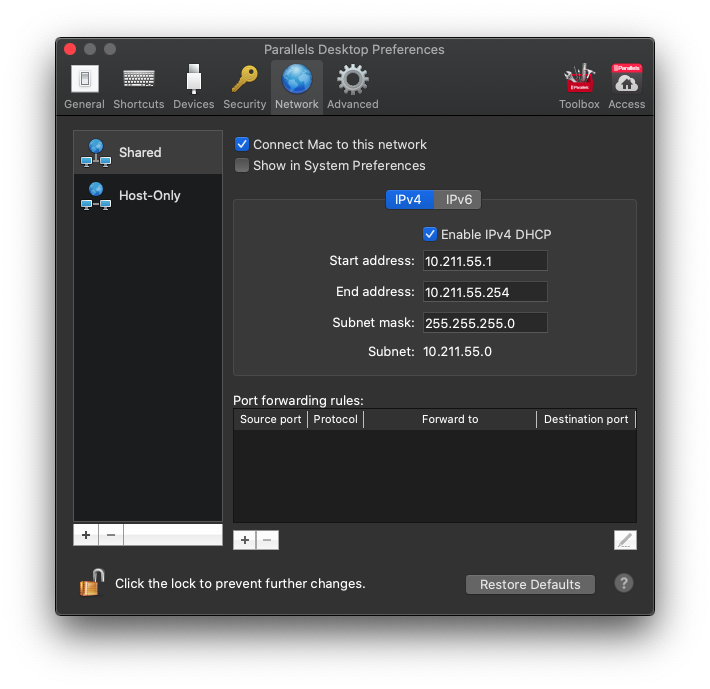
closed time in 2 months
pozgo
issue commentParallels/docker-machine-parallels
The last output you've posted does not contain the line Bound To: vnic0, which leaded to the error you got.
So, yes - usually, the reboot helps to solve it 👍
comment created time in 2 months
issue commentParallels/docker-machine-parallels
Can't start minikube: HostIP not yet implemented for "parallels" driver
I sent the PR to the minikube repo: https://github.com/kubernetes/minikube/pull/8259
comment created time in 2 months
issue commentkubernetes/minikube
parallels: `minikube mount`: attempted to get host ip address for unsupported driver
Hi all, Here is the fix for this issue: https://github.com/kubernetes/minikube/pull/8259

comment created time in 2 months
pull request commentkubernetes/minikube
Add HostIP implementation for parallels driver
It seems that these CI check failures are not related to this PR
functional_test_docker_windowsfunctional_test_hyperv_windows
comment created time in 2 months
push eventlegal90/minikube
commit sha c22a92f9bfb4e03d7318cb27f154d2ee56d25641
Add HostIP implementation for parallels driver
push time in 2 months
pull request commentkubernetes/minikube
Add HostIP implementation for parallels driver
I signed it
comment created time in 2 months
PR opened kubernetes/minikube
Fixes https://github.com/Parallels/docker-machine-parallels/issues/90 Fixes https://github.com/kubernetes/minikube/issues/4862
This PR does the following:
- adds the support of Parallels driver into
HostIPfunction, which actually fixes the entire compatibility of minikube with this driver. - removes the support of Parallels driver for Mac, because the driver and Parallels Desktop itself support only macOS.
Tested on macOS 10.15.4 with docker-machine-driver-parallels v1.4.0 and Parallels Desktop for Mac 15.1.4:
$ ./out/minikube start
😄  minikube v1.10.1 on Darwin 10.15.4
    ▪ KUBECONFIG=/Users/legal/.kube/config
✨  Automatically selected the parallels driver
👍  Starting control plane node minikube in cluster minikube
🔥  Creating parallels VM (CPUs=2, Memory=4000MB, Disk=20000MB) ...
🐳  Preparing Kubernetes v1.18.2 on Docker 19.03.8 ...
🔎  Verifying Kubernetes components...
🌟  Enabled addons: default-storageclass, storage-provisioner
🏄  Done! kubectl is now configured to use "minikube"
Implementation details
Just for the reviewer's information:
The function is supposed to run the command prlsrvctl net info Shared. Here is the output example:
Network ID: Shared
Type: shared
Bound To: vnic0
Parallels adapter:
	IPv4 address: 10.211.55.2
	IPv4 subnet mask: 255.255.255.0
	Host assign IP v6: off
	IPv6 address: fdb2:2c26:f4e4::1
	IPv6 subnet mask: ffff:ffff:ffff:ffff::
DHCPv4 server:
	Server address: 10.211.55.1
	IP scope start address: 10.211.55.1
	IP scope end address: 10.211.55.254
DHCPv6 server:
	Server address: fdb2:2c26:f4e4::
	IP scope start address: fdb2:2c26:f4e4::
	IP scope end address: fdb2:2c26:f4e4:0:ffff:ffff:ffff:ffff

NAT server:
Here we just parse this output to get the value of IPv4 address field, which is 10.211.55.2. The VM created by parallels driver is connected to the same virtual network and can access the host using this IP.
pr created time in 2 months
push eventlegal90/minikube
push time in 2 months
push eventlegal90/awscurl
commit sha 522f0d6882de386b8d1c419e478809a51eb6ff37
Add README.md
push time in 2 months
push eventlegal90/awscurl
commit sha ae8dbee4488a21fc1521f206b86a03e1d19c0d96
Create Cobra CLI skeleton
commit sha 30b09016908c2960940d8b8a33f1927e39d9cbf0
Add AWS request signing
commit sha 45dad10680586ba38d3b627ad7378421bff491c3
Compact everything to main.go
commit sha 08f78656dc0ca12c2ce940eb5fb20c30abce0c8d
Add formatted version
commit sha 1c6b46cd33d241ba9ce6d804d673e755f9f88ea5
Add .gitignore
commit sha c640507a9d5eb8c8c36d4560b24701c9d1bbcb3d
Add goreleaser configuration
commit sha 0f2b4246241ee17c130168491e0ae1624eb12245
Fix usage info
commit sha 522f0d6882de386b8d1c419e478809a51eb6ff37
Add README.md
push time in 2 months
push eventlegal90/awscurl
commit sha 0f2b4246241ee17c130168491e0ae1624eb12245
Fix usage info
commit sha 89a9ddc61be83216af2353c6258ed42733c79687
Add README.md
push time in 2 months
push eventlegal90/awscurl
commit sha bb07130ec17b4a26d3b7dc84486060acb4560473
Add README.md
commit sha 24a3426eaf30fe48a69bebbfe85ac1d746c4a55c
Fix usage info
push time in 2 months
startedmitchellh/gon
started time in 2 months
issue commentParallels/docker-machine-parallels
Can't start minikube: HostIP not yet implemented for "parallels" driver
Hi @antoniogermano,
libmachine doesn't provide a way to expose HostIP, so it seems it should be implemented on the minikube side. The error comes from here:
https://github.com/kubernetes/minikube/blob/522c746df4b653d4a77f98be737025bf23d10a5b/pkg/minikube/cluster/ip.go#L90
And there is an ongoing discussion about Parallels support for minikube: https://github.com/kubernetes/minikube/issues/4862
I think it should be pretty easy to do. I'll check if I can implement it and contribute there soon.
comment created time in 2 months
push eventlegal90/ec2-elastic-ip-manager
commit sha 7db79e1ab4364ce6bf5a9e411aafa89cfc7dbb36
Add terraform module "elastic-ip-manager" It allows to deploy "elastic-ip-manager" in any existing AWS infrastructure using terraform
commit sha 54b562a2c68782df3a632b00e97f704f2e4e852d
Add demo configuration for terraform It allows ti spin-up a demo stack using terraform
push time in 3 months
issue commentParallels/vagrant-parallels
vagrant-parallels installation fails with vagrant 2.2.8
Hi @ondrasek That is the issue of embedded ruby in Vagrant 2.2.8. It was fixed in Vagrant 2.2.9: hashicorp/vagrant-installers#163 (comment)
Please, upgrade to Vagrant 2.2.9 and try installing the plugin again.

comment created time in 3 months
PR opened binxio/ec2-elastic-ip-manager
Hi @mvanholsteijn,
Thank you for you work on elastic-ip-manager and the demo configuration you have published! It works great! 🎉
Since I don't use CloudFormation and prefer terraform instead, I created the terraform module which does pretty much the same as your CloudFormation stack in elastic-ip-manager.yaml.
I thought it might be useful for others as well, because with terraform it's quite easy to refer to the external modules. So I decided to send this PR to include the terraform stuff into your upstream repo.
But if you feel that it's not what you want to keep and maintain in your repo - no problem, I can publish it separately. Thanks again for your project! 👍
Details
This PR contains 2 logical parts:
- the generic terraform module
./terraform/modules/elastic-ip-manager, allowing to deploy "elastic-ip-manager" in any existing AWS infrastructure using terraform. - the demo stack
./terraform/demo, allowing to deploy the demo with EIPs and ASG, as well aselastic-ip-managerusing the module mentioned above.
pr created time in 3 months
fork legal90/ec2-elastic-ip-manager
Dynamic binding of AWS Elastic IP addresses to EC2 instances
fork in 3 months
issue commentokigan/awscurl
Does not support AssumeRole or MFA profiles
The issue was partially fixed by https://github.com/okigan/awscurl/pull/63. It works with env variables:
AWS_PROFILE=my-mfa-profile-with-assume-role awscurl $MY_HOST/test/v1/url
but doesn't work with CLI arg:
awscurl --profile my-mfa-profile-with-assume-role $MY_HOST/test/v1/url

Traceback (most recent call last):
  File "/Users/myuser/Library/Python/2.7/bin/awscurl", line 8, in <module>
    sys.exit(main())
  File "/Users/myuser/Library/Python/2.7/lib/python/site-packages/awscurl/awscurl.py", line 501, in main
    inner_main(sys.argv[1:])
  File "/Users/myuser/Library/Python/2.7/lib/python/site-packages/awscurl/awscurl.py", line 471, in inner_main
    args.profile)
  File "/Users/myuser/Library/Python/2.7/lib/python/site-packages/awscurl/awscurl.py", line 393, in load_aws_config
    access_key, secret_key, security_token = cred.access_key, cred.secret_key, cred.token
AttributeError: 'NoneType' object has no attribute 'access_key'

comment created time in 3 months
issue closedParallels/vagrant-parallels
Cannot do fresh install of Vagrant 2.2.7 and vagrant-parallels on MacOS 10.15.2
To preface Vagrant 2.2.6 works just fine.
When I install Vagrant 2.2.7 and then run vagrant plugin install vagrant-parallels I get the following
Installing the 'vagrant-parallels' plugin. This can take a few minutes...
Fetching: mini_portile2-2.4.0.gem (100%)
Fetching: nokogiri-1.10.7.gem (100%)
Building native extensions.  This could take a while...
Vagrant failed to properly resolve required dependencies. These
errors can commonly be caused by misconfigured plugin installations
or transient network issues. The reported error is:

ERROR: Failed to build gem native extension.

    current directory: /Users/markmitchell/.vagrant.d/gems/2.4.9/gems/nokogiri-1.10.7/ext/nokogiri
/opt/vagrant/embedded/bin/ruby -r ./siteconf20200130-3346-738d4e.rb extconf.rb
checking if the C compiler accepts -arch i386 -arch x86_64 -I/opt/vagrant/embedded/include -I/opt/vagrant/embedded/include/libxml2 -I /Library/Developer/CommandLineTools/SDKs/MacOSX.sdk/usr/include/libxml2... *** extconf.rb failed ***
Could not create Makefile due to some reason, probably lack of necessary
libraries and/or headers.  Check the mkmf.log file for more details.  You may
need configuration options.

Provided configuration options:
	--with-opt-dir
	--with-opt-include
	--without-opt-include=${opt-dir}/include
	--with-opt-lib
	--without-opt-lib=${opt-dir}/lib
	--with-make-prog
	--without-make-prog
	--srcdir=.
	--curdir
	--ruby=/opt/vagrant/embedded/bin/$(RUBY_BASE_NAME)
	--help
	--clean
/opt/vagrant/embedded/lib/ruby/2.4.0/mkmf.rb:457:in `try_do': The compiler failed to generate an executable file. (RuntimeError)
You have to install development tools first.
	from /opt/vagrant/embedded/lib/ruby/2.4.0/mkmf.rb:572:in `block in try_compile'
	from /opt/vagrant/embedded/lib/ruby/2.4.0/mkmf.rb:523:in `with_werror'
	from /opt/vagrant/embedded/lib/ruby/2.4.0/mkmf.rb:572:in `try_compile'
	from extconf.rb:138:in `nokogiri_try_compile'
	from extconf.rb:162:in `block in add_cflags'
	from /opt/vagrant/embedded/lib/ruby/2.4.0/mkmf.rb:630:in `with_cflags'
	from extconf.rb:161:in `add_cflags'
	from extconf.rb:416:in `<main>'

To see why this extension failed to compile, please check the mkmf.log which can be found here:

  /Users/markmitchell/.vagrant.d/gems/2.4.9/extensions/x86_64-darwin-19/2.4.0/nokogiri-1.10.7/mkmf.log

extconf failed, exit code 1

Gem files will remain installed in /Users/markmitchell/.vagrant.d/gems/2.4.9/gems/nokogiri-1.10.7 for inspection.
Results logged to /Users/markmitchell/.vagrant.d/gems/2.4.9/extensions/x86_64-darwin-19/2.4.0/nokogiri-1.10.7/gem_make.out
The output of gem_make.out is as follows
"clang -o conftest -I/opt/vagrant/embedded/include/ruby-2.4.0/x86_64-darwin19 -I/opt/vagrant/embedded/include/ruby-2.4.0/ruby/backward -I/opt/vagrant/embedded/include/ruby-2.4.0 -I. -I/opt/vagrant/embedded/include -I/opt/vagrant/embedded/include -D_XOPEN_SOURCE -D_DARWIN_C_SOURCE -D_DARWIN_UNLIMITED_SELECT -D_REENTRANT   -I/opt/vagrant/embedded/include -fno-common -pipe -arch i386 -arch x86_64 -I/opt/vagrant/embedded/include -I/opt/vagrant/embedded/include/libxml2 -I /Library/Developer/CommandLineTools/SDKs/MacOSX.sdk/usr/include/libxml2 conftest.c  -L. -L/opt/vagrant/embedded/lib -L/opt/vagrant/embedded/lib -L. -L/opt/vagrant/embedded/lib -fstack-protector -L/usr/local/lib -L/opt/vagrant/embedded/lib     -lruby.2.4.9  -lpthread -ldl -lobjc  "
In file included from conftest.c:1:
In file included from /opt/vagrant/embedded/include/ruby-2.4.0/ruby.h:33:
/opt/vagrant/embedded/include/ruby-2.4.0/ruby/ruby.h:102:37: error: 'ruby_check_sizeof_long' declared as an array with a negative size
typedef char ruby_check_sizeof_long[SIZEOF_LONG == sizeof(long) ? 1 : -1];
                                    ^~~~~~~~~~~~~~~~~~~~~~~~~~~~~~~~~~~~
/opt/vagrant/embedded/include/ruby-2.4.0/x86_64-darwin19/ruby/config.h:58:21: note: expanded from macro 'SIZEOF_LONG'
#define SIZEOF_LONG 8
                    ^
In file included from conftest.c:1:
In file included from /opt/vagrant/embedded/include/ruby-2.4.0/ruby.h:33:
/opt/vagrant/embedded/include/ruby-2.4.0/ruby/ruby.h:106:38: error: 'ruby_check_sizeof_voidp' declared as an array with a negative size
typedef char ruby_check_sizeof_voidp[SIZEOF_VOIDP == sizeof(void*) ? 1 : -1];
                                     ^~~~~~~~~~~~~~~~~~~~~~~~~~~~~~~~~~~~~~
/opt/vagrant/embedded/include/ruby-2.4.0/x86_64-darwin19/ruby/config.h:63:22: note: expanded from macro 'SIZEOF_VOIDP'
#define SIZEOF_VOIDP 8
                     ^
In file included from conftest.c:1:
In file included from /opt/vagrant/embedded/include/ruby-2.4.0/ruby.h:33:
/opt/vagrant/embedded/include/ruby-2.4.0/ruby/ruby.h:1615:5: error: __int128 is not supported on this target
    DSIZE_T c2 = (DSIZE_T)a * (DSIZE_T)b;
    ^
/opt/vagrant/embedded/include/ruby-2.4.0/ruby/ruby.h:1606:18: note: expanded from macro 'DSIZE_T'
# define DSIZE_T uint128_t
                 ^
/opt/vagrant/embedded/include/ruby-2.4.0/x86_64-darwin19/ruby/config.h:183:28: note: expanded from macro 'uint128_t'
#define uint128_t unsigned __int128
                           ^
In file included from conftest.c:1:
In file included from /opt/vagrant/embedded/include/ruby-2.4.0/ruby.h:33:
/opt/vagrant/embedded/include/ruby-2.4.0/ruby/ruby.h:1615:19: error: __int128 is not supported on this target
    DSIZE_T c2 = (DSIZE_T)a * (DSIZE_T)b;
                  ^
/opt/vagrant/embedded/include/ruby-2.4.0/ruby/ruby.h:1606:18: note: expanded from macro 'DSIZE_T'
# define DSIZE_T uint128_t
                 ^
/opt/vagrant/embedded/include/ruby-2.4.0/x86_64-darwin19/ruby/config.h:183:28: note: expanded from macro 'uint128_t'
#define uint128_t unsigned __int128
                           ^
In file included from conftest.c:1:
In file included from /opt/vagrant/embedded/include/ruby-2.4.0/ruby.h:33:
/opt/vagrant/embedded/include/ruby-2.4.0/ruby/ruby.h:1615:32: error: __int128 is not supported on this target
    DSIZE_T c2 = (DSIZE_T)a * (DSIZE_T)b;
                               ^
/opt/vagrant/embedded/include/ruby-2.4.0/ruby/ruby.h:1606:18: note: expanded from macro 'DSIZE_T'
# define DSIZE_T uint128_t
                 ^
/opt/vagrant/embedded/include/ruby-2.4.0/x86_64-darwin19/ruby/config.h:183:28: note: expanded from macro 'uint128_t'
#define uint128_t unsigned __int128
                           ^
In file included from conftest.c:1:
In file included from /opt/vagrant/embedded/include/ruby-2.4.0/ruby.h:33:
In file included from /opt/vagrant/embedded/include/ruby-2.4.0/ruby/ruby.h:2012:
In file included from /opt/vagrant/embedded/include/ruby-2.4.0/ruby/intern.h:35:
/opt/vagrant/embedded/include/ruby-2.4.0/ruby/st.h:58:45: error: 'st_check_for_sizeof_st_index_t' declared as an array with a negative size
typedef char st_check_for_sizeof_st_index_t[SIZEOF_VOIDP == (int)sizeof(st_index_t) ? 1 : -1];
                                            ^~~~~~~~~~~~~~~~~~~~~~~~~~~~~~~~~~~~~~~~~~~~~~~~
/opt/vagrant/embedded/include/ruby-2.4.0/x86_64-darwin19/ruby/config.h:63:22: note: expanded from macro 'SIZEOF_VOIDP'
#define SIZEOF_VOIDP 8
                     ^
6 errors generated.
checked program was:
/* begin */
1: #include "ruby.h"
2:
3: int main(int argc, char **argv)
4: {
5:   return 0;
6: }
/* end */
closed time in 3 months
carcus88
issue commentParallels/vagrant-parallels
Cannot do fresh install of Vagrant 2.2.7 and vagrant-parallels on MacOS 10.15.2
The issue has been fixed in Vagrant 2.2.9: https://github.com/hashicorp/vagrant-installers/issues/163#issuecomment-625503064
comment created time in 3 months
startedpalantir/bouncer
started time in 3 months
issue openedhashicorp/packer
amazon-ebs: The flag "-force" is ignored (HCL2)
Overview of the Issue
The implementation of amazon-ebs builder states that "-force" flag for packer build command should imitate the behavior of the setting force_register = true.
However, that doesn't happen:
$ packer build \
  -var='ami_name=my-existing-ami' \
  -force \
  -debug \
  ./
Debug mode enabled. Builds will not be parallelized.
amazon-ebs: output will be in this color.

==> amazon-ebs: Prevalidating any provided VPC information
==> amazon-ebs: Prevalidating AMI Name: my-existing-ami
==> amazon-ebs: Error: AMI Name: 'my-existing-ami' is used by an existing AMI: ami-02453ab91773d7bd8
Build 'amazon-ebs' errored: Error: AMI Name: 'my-existing-ami' is used by an existing AMI: ami-02453ab91773d7bd8

==> Some builds didn't complete successfully and had errors:
--> amazon-ebs: Error: AMI Name: 'my-existing-ami' is used by an existing AMI: ami-02453ab91773d7bd8

==> Builds finished but no artifacts were created.
It works only if I set force_register = true in my config (but then -force flag is not needed at all)
Reproduction Steps
I reproduce it with the simpliest config based on HCL2 syntax:
source "amazon-ebs" "main" {
  profile       = var.aws_profile
  instance_type = var.instance_type
  region        = var.region
  ssh_username  = var.ssh_username
  ssh_interface = "public_ip"
  source_ami    = var.source_ami
  ami_name      = var.ami_name
}

build {
  sources = [
    "source.amazon-ebs.main"
  ]
}
Packer version
Packer v1.5.6
Simplified Packer Buildfile
See the snippets above
Operating system and Environment details
macOS 10.15.4
Log Fragments and crash.log files
$ env PACKER_LOG=1 packer build \
    -var='ami_name=my-existing-ami' \
    -force \
    -debug \
    ./
2020/05/07 12:04:21 [INFO] Packer version: 1.5.6 [go1.14.2 darwin amd64]
2020/05/07 12:04:21 Checking 'PACKER_CONFIG' for a config file path
2020/05/07 12:04:21 'PACKER_CONFIG' not set; checking the default config file path
2020/05/07 12:04:21 Attempting to open config file: /Users/legal/.packerconfig
2020/05/07 12:04:21 [WARN] Config file doesn't exist: /Users/legal/.packerconfig
2020/05/07 12:04:21 Setting cache directory: /Users/legal/Workspace/my-project/deployment/packer/packer_cache
2020/05/07 12:04:21 Creating plugin client for path: /usr/local/bin/packer
2020/05/07 12:04:21 Starting plugin: /usr/local/bin/packer []string{"/usr/local/bin/packer", "plugin", "packer-builder-amazon-ebs"}
2020/05/07 12:04:21 Waiting for RPC address for: /usr/local/bin/packer
2020/05/07 12:04:21 packer-builder-amazon-ebs plugin: [INFO] Packer version: 1.5.6 [go1.14.2 darwin amd64]
2020/05/07 12:04:21 packer-builder-amazon-ebs plugin: Checking 'PACKER_CONFIG' for a config file path
2020/05/07 12:04:21 packer-builder-amazon-ebs plugin: 'PACKER_CONFIG' not set; checking the default config file path
2020/05/07 12:04:21 packer-builder-amazon-ebs plugin: Attempting to open config file: /Users/legal/.packerconfig
2020/05/07 12:04:21 packer-builder-amazon-ebs plugin: [WARN] Config file doesn't exist: /Users/legal/.packerconfig
2020/05/07 12:04:21 packer-builder-amazon-ebs plugin: Setting cache directory: /Users/legal/Workspace/my-project/deployment/packer/packer_cache
2020/05/07 12:04:21 packer-builder-amazon-ebs plugin: args: []string{"packer-builder-amazon-ebs"}
2020/05/07 12:04:21 packer-builder-amazon-ebs plugin: Plugin address: unix /var/folders/r_/04n660m11yb684259lnb0jnc0000gq/T/packer-plugin615871852
2020/05/07 12:04:21 packer-builder-amazon-ebs plugin: Waiting for connection...
2020/05/07 12:04:21 Received unix RPC address for /usr/local/bin/packer: addr is /var/folders/r_/04n660m11yb684259lnb0jnc0000gq/T/packer-plugin615871852
2020/05/07 12:04:21 packer-builder-amazon-ebs plugin: Serving a plugin connection...
2020/05/07 12:04:21 Build debug mode: true
2020/05/07 12:04:21 Force build: true
2020/05/07 12:04:21 On error:
Debug mode enabled. Builds will not be parallelized.
2020/05/07 12:04:21 Preparing build: amazon-ebs
2020/05/07 12:04:21 Debug enabled, so waiting for build to finish: amazon-ebs
amazon-ebs: output will be in this color.

2020/05/07 12:04:21 Starting build run: amazon-ebs
2020/05/07 12:04:21 Running builder:
2020/05/07 12:04:21 [INFO] (telemetry) Starting builder
2020/05/07 12:04:21 packer-builder-amazon-ebs plugin: Found region eu-central-1
2020/05/07 12:04:22 packer-builder-amazon-ebs plugin: [INFO] AWS Auth provider used: "AssumeRoleProvider"
2020/05/07 12:04:22 packer-builder-amazon-ebs plugin: [INFO] (aws): No AWS timeout and polling overrides have been set. Packer will default to waiter-specific delays and timeouts. If you would like to customize the length of time between retries and max number of retries you may do so by setting the environment variables AWS_POLL_DELAY_SECONDS and AWS_MAX_ATTEMPTS to your desired values.
==> amazon-ebs: Prevalidating any provided VPC information
==> amazon-ebs: Prevalidating AMI Name: my-existing-ami
==> amazon-ebs: Error: AMI Name: 'my-existing-ami' is used by an existing AMI: ami-02453ab91773d7bd8
2020/05/07 12:04:24 [INFO] (telemetry) ending
2020/05/07 12:04:24 Waiting on builds to complete...
2020/05/07 12:04:24 machine readable: error-count []string{"1"}
==> Some builds didn't complete successfully and had errors:
2020/05/07 12:04:24 machine readable: amazon-ebs,error []string{"Error: AMI Name: 'my-existing-ami' is used by an existing AMI: ami-02453ab91773d7bd8"}
==> Builds finished but no artifacts were created.
Build 'amazon-ebs' errored: Error: AMI Name: 'my-existing-ami' is used by an existing AMI: ami-02453ab91773d7bd8
2020/05/07 12:04:24 [INFO] (telemetry) Finalizing.

==> Some builds didn't complete successfully and had errors:
--> amazon-ebs: Error: AMI Name: 'my-existing-ami' is used by an existing AMI: ami-02453ab91773d7bd8

==> Builds finished but no artifacts were created.
2020/05/07 12:04:25 waiting for all plugin processes to complete...
2020/05/07 12:04:25 /usr/local/bin/packer: plugin process exited
created time in 3 months
startedbinxio/ec2-elastic-ip-manager
started time in 3 months
issue commentParallels/vagrant-parallels
Cannot do fresh install of Vagrant 2.2.7 and vagrant-parallels on MacOS 10.15.2
@adambreen Correct, that's the issue of embedded Vagrant ruby, which is managed within this project: https://github.com/hashicorp/vagrant-installers We can't do anything with that here, in vagrant-parallels.
Please refer to this issue and put your findings there: https://github.com/hashicorp/vagrant-installers/issues/163
comment created time in 3 months
issue commentdeitch/aws-asg-roller
Question: Rolling this into a Lambda
Hi @armenr, Your idea of having having it run ad-hoc on Lambda sounds good 👍 Did you manage to get it working so far? Do you have anything what you can share? Thank you!

comment created time in 3 months
starteddeitch/aws-asg-roller
started time in 3 months
issue commentParallels/docker-machine-parallels
@sbfkcel What you see in docker ps output is relevant to your DOCKER_HOST, which is your virtual machine created with docker-machine. The port is listened on the VM interface, not on your Mac.
If you want to access the port from your Mac, get the VM's IP by running docker-machine IP <vm name> and use it instead of 127.0.0.1. (ref: https://github.com/Parallels/docker-machine-parallels/issues/53#issuecomment-222762658)
In your case it will be something like this: 10.211.55.5:1081
And this is how you can run netstat (and any other command) in your docker-machine VM:
docker-machine ssh <vm_name> -- netstat -nat

comment created time in 3 months