








A bunch of simple powershell tool to make everyday work easier
Managing chocolatey with powershell
issue commentnextcloud/ios
date/time of uploaded pictures partly wrong
I found a screenshot that describes the problem:
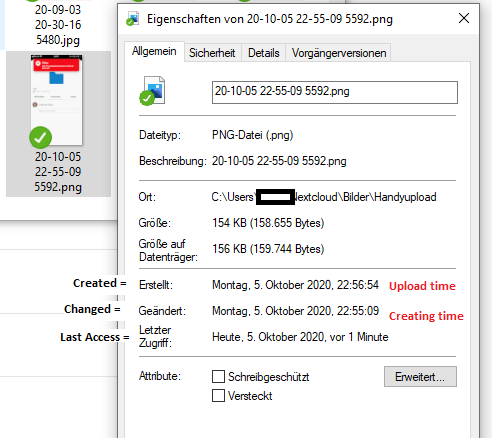
The iOS app sets the time of upload as "created" time, the time of creation as "changed" time. This leads to the odd behavior that the changed time is earlier than the creation time.
For photos, I would expect both to be the time the picture was taken. Bonus would be an altered "changed" time if the photo has been modified afterwards. For videos, I would expect the "created" time to be the time the video recording has been started, the "changed" time when the recording has ended (or, if it has been changed afterwards, then this time).

comment created time in 11 days
issue commentnextcloud/ios
404 when swiping to comments if server has comments app disabled
I opened a ticket on server to get a full list of apps over the API. As soon as this is implemented, we can go on with this matter.
comment created time in 20 days
issue openednextcloud/server
Enable to pull list of all enabled apps over API
<!-- Thanks for reporting issues back to Nextcloud!
Note: This is the issue tracker of Nextcloud, please do NOT use this to get answers to your questions or get help for fixing your installation. This is a place to report bugs to developers, after your server has been debugged. You can find help debugging your system on our home user forums: https://help.nextcloud.com or, if you use Nextcloud in a large organization, ask our engineers on https://portal.nextcloud.com. See also https://nextcloud.com/support for support options.
Nextcloud is an open source project backed by Nextcloud GmbH. Most of our volunteers are home users and thus primarily care about issues that affect home users. Our paid engineers prioritize issues of our customers. If you are neither a home user nor a customer, consider paying somebody to fix your issue, do it yourself or become a customer.
Guidelines for submitting issues:
-
Please search the existing issues first, it's likely that your issue was already reported or even fixed.
- Go to https://github.com/nextcloud and type any word in the top search/command bar. You probably see something like "We couldn’t find any repositories matching ..." then click "Issues" in the left navigation.
- You can also filter by appending e. g. "state:open" to the search string.
- More info on search syntax within github: https://help.github.com/articles/searching-issues
-
This repository https://github.com/nextcloud/server/issues is only for issues within the Nextcloud Server code. This also includes the apps: files, encryption, external storage, sharing, deleted files, versions, LDAP, and WebDAV Auth
-
SECURITY: Report any potential security bug to us via our HackerOne page (https://hackerone.com/nextcloud) following our security policy (https://nextcloud.com/security/) instead of filing an issue in our bug tracker.
-
The issues in other components should be reported in their respective repositories: You will find them in our GitHub Organization (https://github.com/nextcloud/) -->
<!--- Please keep this note for other contributors -->
How to use GitHub
- Please use the 👍 reaction to show that you are interested into the same feature.
- Please don't comment if you have no relevant information to add. It's just extra noise for everyone subscribed to this issue.
- Subscribe to receive notifications on status change and new comments.
Is your feature request related to a problem? Please describe. This is related to nextcloud/ios#1435. Currently, there is no way to pull a list of all enabled apps. However, this is needed in order to check whether the comments app is enabled. If this is not the case, the comment section shall be hidden in the ios app.
Describe the solution you'd like Something similar to https://cloud.example.com/ocs/v2.php/core/navigation/apps but for all apps (not only navigation).
Describe alternatives you've considered Trying to send a comment will trigger a 404. This could be catched and handled accordingly, but thats a huge technical debt.
Additional context nextcloud/ios#1435 Access to the list of all enabled apps should be limited to logged in users for security reasons.
created time in 22 days
issue commentnextcloud/ios
404 when swiping to comments if server has comments app disabled
There must be a way to find out which apps are installed/enabled over the API. The desktop app shows a list of available apps and those are specific the cloud instance the software is connected to. Maybe @nextcloud/desktop can tell how the list of available apps can be pulled over the API.
comment created time in 22 days
issue closednextcloud/ios
[TestFlight] - Can only create markdown text documents
Expected behaviour
Creating a new document with an extension should result in a blank document of the appropriate type. (ie. .txt, .conf, .bak, etc...)
Actual behaviour
All attempts to create a document result in an empty markdown text file, regardless of the extension used. All new documents have their extension changed to .md upon creation.
Additionally, the user cannot copy in plain text with markdown formatting; there’s no to break out of the wysiwyg markdown editor to paste in plaintext that has markdown notation in it.
Steps to reproduce
- Press the plus icon at the bottom of the screen.
- Select “Create text document”.
- Enter a file name, with or without an extension.
- Press Save.
- The text document editor will then open with the the new file’s name indicated at the top of the screen. This always results in a file with a
.mdextension. The text editor opens in markdown editing mode. - Upon pressing the back button, the user is returned to the file browser. The new document can be seen with the
.mdextension.
Reasoning or why should it be changed/implemented?
The user should be able to create blank documents of any type.
iOS version
13.4.1
App version
3.0.0+
Server configuration
Operating system: Debian, NextCloudPi Web server: Apache 2.4.x Database: MySQL 10.3.22 PHP version: 7.3.14 Nextcloud version: (see Nextcloud admin page) 18.0.3
closed time in 24 days
recurved
issue commentnextcloud/ios
[TestFlight] - Can only create markdown text documents
cant reproduce in v3.0.10 (10).
<code>.md</code> is the default file extension. However, it is possible to name the file myfile.txt
comment created time in 24 days
issue closednextcloud/ios
autoupload all files with ...\yy\mm\ subfolders - missing subfolders
Expected behaviour
Upload files to their subfolders and if the subfolder is not present, create it
Steps to reproduce
Autoupload files while a subfolder is missing (not sure what caused the missing subfolders thou)
Actual behaviour
upload starts, first rhe folder structure gets created, for some reasons some folders were missing and the client showed a red box error 404: respurce not found After a restart the client did upload some files just to stop again after a while. At this moment i did not yet realize when it stopped as there were 3000+ files to upload and it stopped at some files mids the list of transfers. When i scrolled down i found out that it always stopped at files of a specific month and that the subfolder was missing. So i manually created that subfolder and the upload process went through without interrupt.
Reasoning or why should it be changed/implemented?
seems like a combination of two issues, 1st it seems to sometimes not create all needed subfolders in the beginning 2nd it did not create the subfolders that were not present when it tried to upload
iOS version
13.5
App version
3.0.0
Server configuration
fresh imstall of nextcloudpi rpi4 4gig 4tb hdd btrfs Operating system: raspbian buster Web server: apache2 Database: mariadb PHP version: 7.3 Nextcloud version: (see Nextcloud admin page) 18.0.5
closed time in 24 days
FadeFx
issue commentnextcloud/ios
autoupload all files with ...\yy\mm\ subfolders - missing subfolders
probably because the folder was created on first file write (just a guess). since its fixed -> closed
comment created time in 24 days
issue closednextcloud/ios
+/- in media tab : too limited and little bug
Expected behaviour
When we press "-" it should display a line with 5 or even more pictures per line (it was 9 in NC 2.x)
Actual behaviour
It can display 4 pics per line maximum : we should be able to zoom out. Fun fact : when you run the app for the first time there is 5 items per line, if you modify it you can't get more than 4 after...
Steps to reproduce
uninstall the app, then run it, go to media tab -> 5 items per line. zoom in, then zoom out now you can't get more than 4 items per line
Reasoning or why should it be changed/implemented?
Because when you have more than 10 000 photos 4 items per line is ridiculous.
iOS version
13.4.1
App version
testflight 3.0.7.8
Operating system: NcVM
Nextcloud version: (see Nextcloud admin page) Nextcloud 19.0.2
closed time in 24 days
schmurtzm
issue closednextcloud/ios
Media view partially broken in new version (3.0.1)
Expected behaviour
Be able to adjust number of columns in media view (optimally 9, like before).
Actual behaviour
Only having 5 columns max per default after installing version 3.0.1, and if you press the "+", and want to go back via "-", it (the minus button) fades to gray when reaching 4 columns.
Steps to reproduce
Go to media view (ideally on a brand new installed instance) and do this: see that you have 5 columns, reduce the number of columns by pressing "+", for example until reaching 1 column, and then "zoom back out" by pressing "-". The "-" button fades to gray after reaching 4 columns, the 5 columns which were there at the beginning, you will never get them back (unless you un- and reinstall the app).
Reasoning or why should it be changed/implemented?
If you have a large number of images (25.000+), then the current version feels like a step back, since in older versions with max 9 columns, the overview was much better. Also it looks like in the new version previews for media view are not being generated automatically. In the older versions after making all files offline, you had preview for everything immediately, which made it easy to "visibly" scroll back for years and find the images you were looking for. Not possible at all with the new version. Also I liked it better, that days were separated in the old versions, now its all a "continuous flow" with no borders, hence no orientation, especially if the preview images are missing (everything is gray, also if declared "offline"). Another aspect which appears since this version is that it seems to "crash" pretty often when syncing a large amount of files (seen on iPad as well as iPhone).
iOS version
13.5.1
App version
3.0.1
Server configuration
Operating system: Ubuntu 18.04.2 LTS
Web server: Apache 7.3.18
Database: mysql 5.7.30
PHP version: PHP 7.3.18
Nextcloud version: (see Nextcloud admin page) 19.0.0snap1
closed time in 24 days
lukasmaurer83
issue commentnextcloud/ios
Media view partially broken in new version (3.0.1)
mediaview has been set to max. 6 in v3.0.10
comment created time in 24 days
issue commentnextcloud/ios
404 when swiping to comments if server has comments app disabled
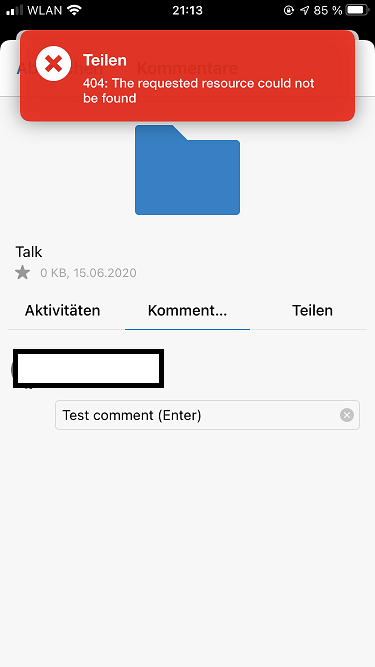
Just checked on v3.0.10 (10). The error message when swiping onto comments is gone. However, it is still possible to write comments and when hitting enter, another 404 is received. see screenshot.
I recommend to hide this section completely, if the comment app is disabled.
comment created time in 24 days
issue commentnextcloud/ios
+/- in media tab : too limited and little bug
Fixed in v3.0.10 (7)
comment created time in 24 days
issue openednextcloud/ios
date/time of uploaded pictures partly wrong
Expected behaviour
When uploading a picture (manually or automatically), then change and creation date should both be the date and time when the pciture has been taken. They should both match with the EXIF date/time.
Actual behaviour
Creation date/time is set to upload date/time Modified date/time is set to actual time of picture taken (together with EXIF)
Steps to reproduce
upload a picture automatically
Reasoning or why should it be changed/implemented?
files shouldnt be changed. that also involves their time of creating and modify.
iOS version
14.0.1
App version
testflight 3.0.10 (6)
Server configuration
nc 19.0.3, nothing uncommon
created time in 25 days
issue openednextcloud/ios
404 when swiping to comments if server has comments app disabled
Expected behaviour
No comment section in details if "comments" app is disabled on server
Actual behaviour
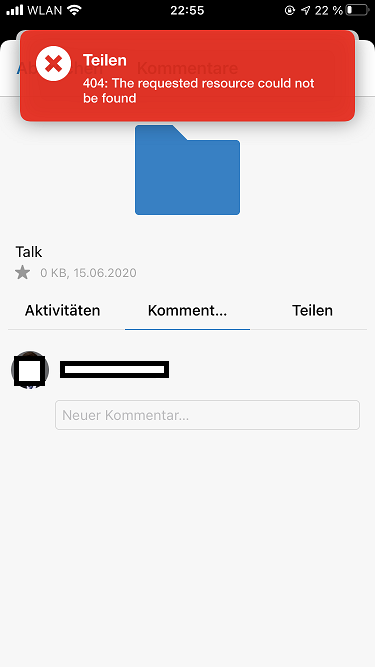
comment section present, every time it is opened a 404 error occurs
Steps to reproduce
- set up NC 19.0.3 and disable the comment app
- set up iOS device
- open details of any file/folder, swipe to comment section
- get 404
Reasoning or why should it be changed/implemented?
misleading, not user friendly, not necessary
iOS version
14.0.1
App version
testflight 3.0.10 (6)
Server configuration
nc 19.0.3 without comments app
created time in 25 days
issue commentnextcloud/ios
+/- in media tab : too limited and little bug
confirmed in testflight v3.0.10 (6) with iOS 14.0.1
comment created time in 25 days
issue closednextcloud/ios
Link sharing only possible to Air Drop
In the latest Testflight (Version 3.0.1.10) i can only share links to airdrop. Copy the Link to Clibboard don't work.
closed time in 25 days
Happyfeet01
issue commentnextcloud/ios
Link sharing only possible to Air Drop
Works with v3.0.10 and iOS 14.0.1
comment created time in 25 days
issue closednextcloud/ios
Expected behaviour
Click on the three dots to open the menu of the offline folder
Actual behaviour
App crashes
Steps to reproduce
- Open the Nextcloud IOS App and mark a folder as offline available
- Go to „more“ > „manage offline files“ > Click on the three dots of the previous marked folder
Reasoning or why should it be changed/implemented?
iOS Version
13.5.1
App version
3.0.0.76
Server configuration
Operating system: Ubuntu 20.04
Web server: Nginx
Database: MySQL 8.0.20
PHP version: 7.7.4
Nextcloud version: (see Nextcloud admin page) 19.0.0
closed time in 25 days
mammutserver
issue closednextcloud/ios
Feature request: Share folder via iOS client / Manage “File Drops”
Hi! Currently only file sharing is supported on iOS. I’d like to see support for folder sharing added.
- folder sharing, even if empty, from iOS client
- ability to define folder as a file drop from iOS
-
- Upload only
-
- read and write
-
- optional password
-
- optional expiration
closed time in 25 days
sunjam
issue commentnextcloud/ios
Feature request: Share folder via iOS client / Manage “File Drops”
Folder sharing is implemented in v3.0.10 (or earlier) with all possible settings. For swiping options, please open a new ticket.
comment created time in 25 days
issue closednextcloud/ios
At the moment u can't copy text from pdf files to the clipboard.
closed time in 25 days
cal940
issue closednextcloud/ios
The space for the account switch is IMHO way to big, especially if you have only one account in use. Maybe this section can be reworked to use the space more efficient.
See attached screenshots of v2.17 (31) on iPhone 7 iOS 10.2


closed time in 25 days
timbru31
issue commentnextcloud/ios
Use natural sort order for files
Problem persists. I checked other sort orders, like "sort from new to old". If this sort order is selected, then the gallery view is in the same order. However, if "sort by name" is selected, then the sort order of the file list is natural, but the gallery is still the wrong way (1>10>11>12>13>2>...).
I also checked "sort by name (Z to A)". In this case, the file list is using reverted natural sort order, but the gallery view is still in wrong order, in this case 9>8>...>2>13>12>11>10>1.

comment created time in 25 days
issue commentnextcloud/ios
Use natural sort order for files
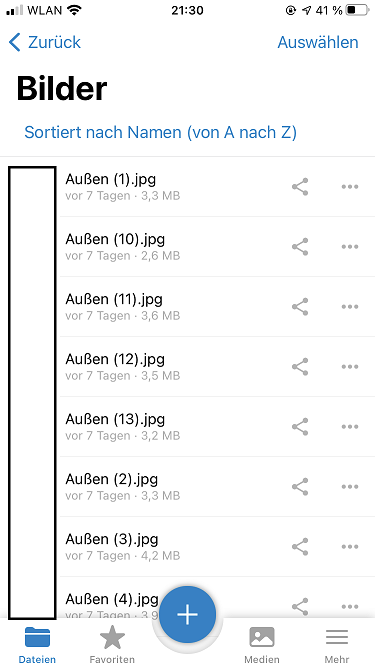
See the screenshot of the folder I have posted above. It is filled with photos. When I tap on "Außen (1).jpg", it is opened in full screen (within the app). Then, I swipe left. Next photo shown is "Außen (10).jpg", and not "Außen (2).jpg", as I would expect. Even thought the listing of files is in natural order in v3.0.10, the swiping through the photos isn't.
I hope that was understandable. 😀
comment created time in 25 days
issue commentnextcloud/ios
Use natural sort order for files
Tested 3.0.10: The sort order is correct, but when swiping through the pictures, the old order remains: 1 -> 11 -> 12 -> 13 -> 2 -> 3 ...
Please use the natural sort order also for the image viewer.
comment created time in 25 days
issue openednextcloud/server
Strange folder icon on share web view
<!-- Thanks for reporting issues back to Nextcloud!
Note: This is the issue tracker of Nextcloud, please do NOT use this to get answers to your questions or get help for fixing your installation. This is a place to report bugs to developers, after your server has been debugged. You can find help debugging your system on our home user forums: https://help.nextcloud.com or, if you use Nextcloud in a large organization, ask our engineers on https://portal.nextcloud.com. See also https://nextcloud.com/support for support options.
Nextcloud is an open source project backed by Nextcloud GmbH. Most of our volunteers are home users and thus primarily care about issues that affect home users. Our paid engineers prioritize issues of our customers. If you are neither a home user nor a customer, consider paying somebody to fix your issue, do it yourself or become a customer.
Guidelines for submitting issues:
-
Please search the existing issues first, it's likely that your issue was already reported or even fixed.
- Go to https://github.com/nextcloud and type any word in the top search/command bar. You probably see something like "We couldn’t find any repositories matching ..." then click "Issues" in the left navigation.
- You can also filter by appending e. g. "state:open" to the search string.
- More info on search syntax within github: https://help.github.com/articles/searching-issues
-
This repository https://github.com/nextcloud/server/issues is only for issues within the Nextcloud Server code. This also includes the apps: files, encryption, external storage, sharing, deleted files, versions, LDAP, and WebDAV Auth
-
SECURITY: Report any potential security bug to us via our HackerOne page (https://hackerone.com/nextcloud) following our security policy (https://nextcloud.com/security/) instead of filing an issue in our bug tracker.
-
The issues in other components should be reported in their respective repositories: You will find them in our GitHub Organization (https://github.com/nextcloud/)
-
You can also use the Issue Template app to prefill most of the required information: https://apps.nextcloud.com/apps/issuetemplate -->
<!--- Please keep this note for other contributors -->
How to use GitHub
- Please use the 👍 reaction to show that you are affected by the same issue.
- Please don't comment if you have no relevant information to add. It's just extra noise for everyone subscribed to this issue.
- Subscribe to receive notifications on status change and new comments.
Steps to reproduce
- Share a folder
- Open that shared folder in your web browser
Expected behaviour
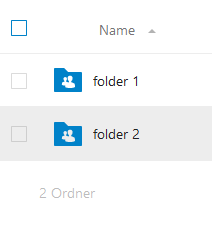
Same folder icons as in the nextcloud
Actual behaviour
Strange grey folder icons
See:
 vs.
vs. 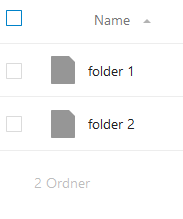 (left is nextcloud, right is share)
Can be reproduced for Firefox and Chrome
(left is nextcloud, right is share)
Can be reproduced for Firefox and Chrome
Server configuration
Operating system: Ubuntu 20.04
Web server: Apache 2
Database: MySQL
PHP version: 7.4
Nextcloud version: 19.0.3
Updated from an older Nextcloud/ownCloud or fresh install: updated from 19.0.0
Where did you install Nextcloud from: nextcloud.com
Signing status: No errors
Are you using external storage, if yes which one: none, but data folder is on a nfs share (system level)
Are you using encryption: no
Are you using an external user-backend, if yes which one: LDAP (UCS)
Client configuration
Browser: Firefox 81.0.1 and current Chrome
Operating system: Win 10 x64 de
created time in a month
issue commentnextcloud/server
Disable / Enable users with LDAP
Currently, there are several ways to do this:
- You can deactivate the user by hand using the user settings in Nextcloud
- You can disable the whole LDAP account. He will not be able to use Nextcloud (or any other LDAP-connected service) anymore.
- You can limit the access to your Nextcloud to a group and remove that user from this group
maybe @nextcloud/ldap sees this differently, however I think your case is covered.

comment created time in a month
issue openednextcloud/desktop
Don't show sharing icon for deleted or ignored files
<!-- Thanks for reporting issues back to Nextcloud!
Note: This is the issue tracker of Nextcloud, please do NOT use this to get answers to your questions or get help for fixing your installation. This is a place to report bugs to developers, after your server has been debugged. You can find help debugging your system on our home user forums: https://help.nextcloud.com or, if you use Nextcloud in a large organization, ask our engineers on https://portal.nextcloud.com. See also https://nextcloud.com/support for support options.
Nextcloud is an open source project backed by Nextcloud GmbH. Most of our volunteers are home users and thus primarily care about issues that affect home users. Our paid engineers prioritize issues of our customers. If you are neither a home user nor a customer, consider paying somebody to fix your issue, do it yourself or become a customer.
Please understand that at the moment, we are very busy with customer issues and some high priority development work. A lot of issues are getting reported. We can't always keep up and timely respond to all of them, but we try!
Guidelines for submitting issues:
-
Please search the existing issues first, it's likely that your issue was already reported or even fixed.
- Go to https://github.com/nextcloud and type any word in the top search/command bar. You probably see something like "We couldn’t find any repositories matching ..." then click "Issues" in the left navigation.
- You can also filter by appending e. g. "state:open" to the search string.
- More info on search syntax within github: https://help.github.com/articles/searching-issues
-
Please fill in as much of the template below as possible. We know it is a pain sometimes, but especially without logs there is often not much we can do: really, if we would have seen the issue you encoutered before, we would already have fixed it. So we did NOT see it, and we will need YOUR help to find out what is wrong and fix it. The logs are absoutely crucial for that. Expect us to quickly close issues without logs or other information we need. If you don't have time to gather the required information, we don't either.
Please also note that we have a https://nextcloud.com/contribute/code-of-conduct/ that applies on Github. To summarize it: please, be kind. We try our best to be nice, too. If you can't be bothered to be polite, please just don't bother to report issues as we won't feel motivated to help you. Remember, we don't get paid to help you! -->
<!--- Please keep the note below for others who read your bug report -->
How to use GitHub
- Please use the 👍 reaction to show that you are affected by the same issue.
- Please don't comment if you have no relevant information to add. It's just extra noise for everyone subscribed to this issue.
- Subscribe to receive notifications on status change and new comments.
Expected behaviour
In the list of recent actions, the sharing icon should only be shown when the file can be shared. This is not the case for ignored or deleted files (other cases may also apply). Here, the sharing icon should not be shown.
Actual behaviour
see:
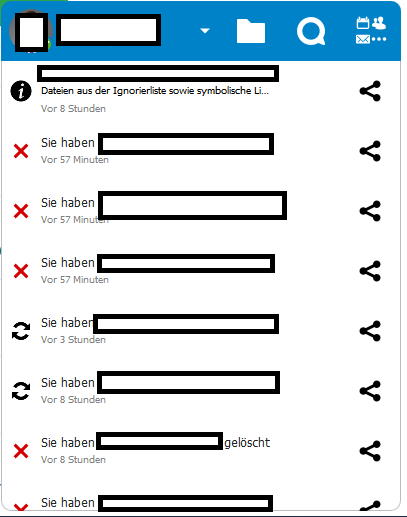 First line is an ignored file, second line is a deleted file. Sharing icon is shown, but nothing happens when clicking it.
Steps to reproduce
Delete any file. Check the recent activities of nextcloud desktop.
Client configuration
Client version: 3.0.2 <!--- Please try to only report a bug if it happens with the latest version The latest version can be seen by checking https://nextcloud.com/install/#install-clients In the case of end-to-end encryption bug reports the client must be at least 3.0 and the server at least 19 with the end to end encryption app version at least 1.5.2. --->
Operating system: Win 10 Pro x64
OS language: de
Server configuration
<!--- Optional section. It depends on the issue. ---> Nextcloud version: 19.0.3
created time in a month
issue commentnextcloud/talk-ios
App token login doesn't let me scan QR code
@Ivansss @mario When using TOTP as a second factor and the TOTP generator is on the phone you want to set up, then the process becomes very complicated. A user needs to enter his server URL, then username/password, then he has to switch to the Google Authenticator app, remember the code and then he has to switch back to the talk app and enter it (within 30 seconds). That's not very user friendly. The files app already uses the code, which contains the server URL, username and password/token all in one. So, the user has no need to type anything by hand. In fact, I would propose to make QR code the default login, and the "normal" way should be listed as "configure manually".

comment created time in a month
issue closednextcloud/ios
Expected behaviour
Documents named with numbers should show up in order on all platforms.
Actual behaviour
On Browsers, documents show in correct order. (IE, Firefox, Safari and Chrome)
On Android App, documents show in correct order.
On IOS App, documents do not show in correct order.
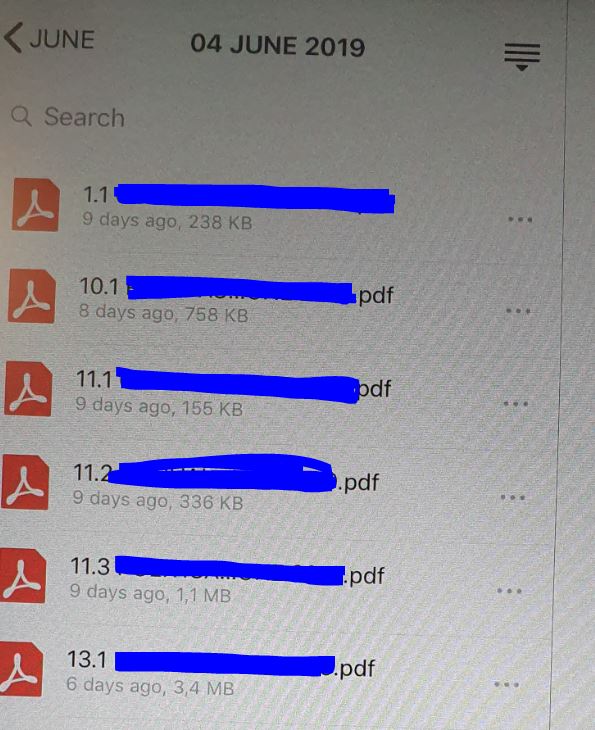
Shows all docs with number 1 before showing number 2.
So shows 1, 10, 11, 12, etc. before showing 2, 3, 4, etc.
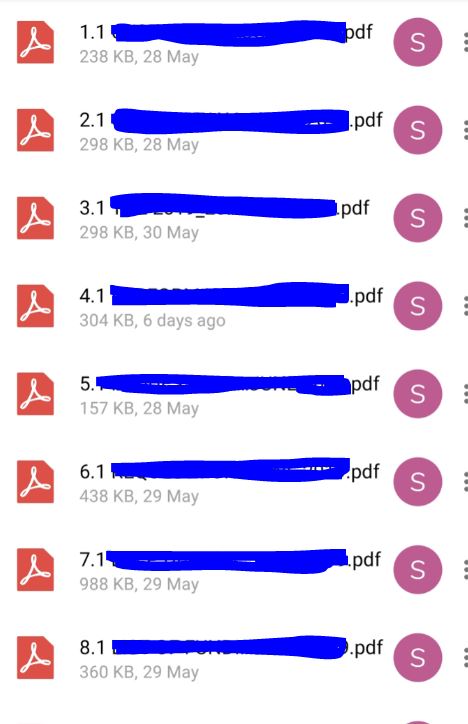
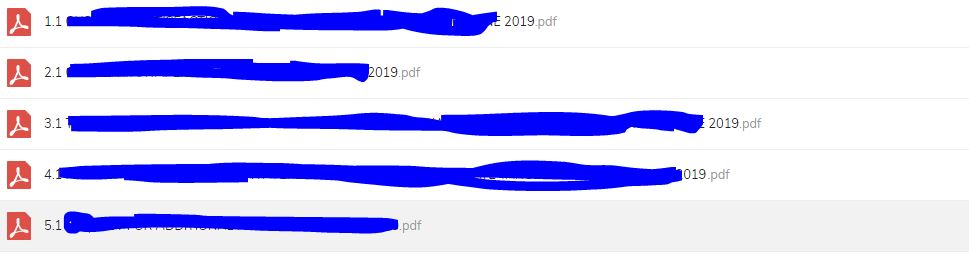
Steps to reproduce
Have multiple documents starting with numbers and points. Eg. 1.1, 2.1, 2.3, etc
iOS version
12.3.1
App version
2.23.6.15
Server configuration
Operating system: Ubuntu 18.04 Web server: Apache Database: Mysql/MariaDB PHP version: 7.3.5 Nextcloud version: (see Nextcloud admin page) 15.0.8
closed time in a month
roguezombi
issue commentnextcloud/ios
Closed duplicate. Please continue to discuss this issue in #580
comment created time in a month
issue commentnextcloud/ios
I can reproduce this issue on the current version 3.0.8. I would be happy to see this fixed soon. Windows does it the "natural" way for at least 10 years.
comment created time in a month
issue commentnextcloud/ios
auto upload created and modified date get set to upload date/time
This bug is still present in v3.0.7 and it is pretty annoying. Are there any steps planned to fix this soon? I just uploaded 3000 images and the image order on the nextcloud web interface is completely messed up.

comment created time in a month
startednextcloud/ios
started time in 2 months