








Example Blog app written with Redwood
dwalkr/hugo-json-api-component 3
Hugo Theme Component to add a JSON API for your content
dwalkr/franz-recipe-intercom 1
Franz 5 Intercom plugin
Base theme for the Civil Rights and Labor History Consortium
WordPress boilerplate with modern development tools, easier configuration, and an improved folder structure
create-static-site demo
Create static websites with no build configuration.
Documentation of Vercel and other services
Pull request review commenttinacms/tinacms
feat: InlineWysiwyg default image upload function
export function InlineWysiwyg({ name, children, focusRing = true,+ imageProps: passedInImageProps, ...wysiwygProps }: InlineWysiwygFieldProps) { const cms = useCMS() + const imageProps: ImageProps = React.useMemo(() => {+ return {+ async upload(files: File[]) {+ const allMedia = await cms.media.store.persist(+ files.map(file => ({+ directory: passedInImageProps?.directory || '',+ file,+ }))+ )++ return allMedia.map(media => `${media.directory}${media.filename}`)+ },+ ...passedInImageProps,+ }+ }, [cms.media.store])
maybe we're memoizing the wrong thing then
const defaultUpload = React.useCallback((files: File[]) => {
  //...
}, [cms.media.store])

const imageProps = {
  upload: defaultUpload,
  ...passedInImageProps
}

comment created time in a day
issue commenttinacms/tinacms
@tinacms/git-client: `undefined` on upload when image already exists.
We had issues around overwriting images before: https://github.com/tinacms/tinacms/issues/1250
couple of things to check:
- using the latest release of
react-tinacms-github - devtools network tab: check the result of the upload request and see if it's returning
409 conflictor something else

comment created time in a day
create barnchtinacms/tinacms.org
branch : package-docs-incremental-only
created branch time in a day
push eventtinacms/tinacms.org
commit sha ac73ad280f6d675d1bc59f9db9b8b037bf70eef9
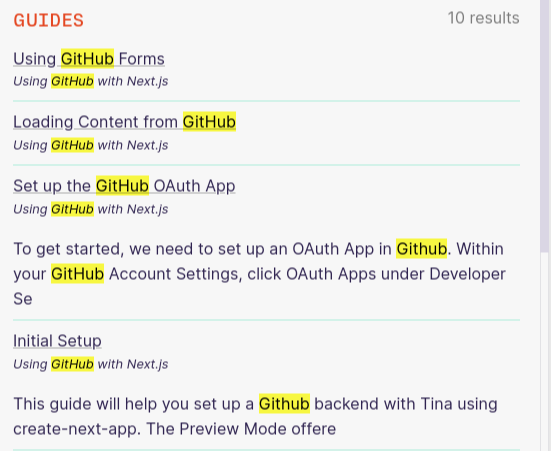
add guide results to search results
commit sha 16ad928a4614f9b5d5edcbb3285b0e99923754a7
add guide title to guides index entries
commit sha 9ab526805fabbcb2da17c4214d40b0bdc503a155
include guide title in search results
commit sha 077e52a0bfadfe98a66884e4ecfff6d9425704d9
remove unnecessary space
commit sha ecdea51133219fd480a04a59fe18d90b98d7e0c7
guide title styles
commit sha 7eb0db0570b0837339caf8333462e697ce99db7a
Merge pull request #642 from tinacms/add-guides-to-search Add guides to search
push time in a day
issue commenttinacms/tinacms.org
package docs: GitHub rate limit causes builds to occasionally fail
since we're now using incremental static generation for these pages, we might be better off not grabbing them at build time at all. should speed up builds as a side benefit

comment created time in a day
push eventtinacms/tinacms.org
commit sha 42742091e90412ee2d688e7169da18effec580f0
added packages to dynamic paths
commit sha 69d2b9226bfd12576b1993be0f1641266cf05f10
Merge pull request #640 from tinacms/fix/added-packages-path added packages to dynamic paths
push time in a day
PR merged tinacms/tinacms.org
It was annoying me that the page had to refresh every time I was clicking on a new package page so I fixed it.

pr closed time in a day
issue openedtinacms/tinacms.org
package docs: GitHub rate limit causes builds to occasionally fail
Since we're loading the package docs from GitHub, running too many builds in a short timeframe will cause us to hit the rate limit and fail the build
Error occurred prerendering page "/packages/react-tinacms-date". Read more: https://err.sh/next.js/prerender-error
Error: Request failed with status code 403
    at createError (/home/runner/work/tinacms.org/tinacms.org/node_modules/axios/lib/core/createError.js:16:15)
    at settle (/home/runner/work/tinacms.org/tinacms.org/node_modules/axios/lib/core/settle.js:17:12)
    at IncomingMessage.handleStreamEnd (/home/runner/work/tinacms.org/tinacms.org/node_modules/axios/lib/adapters/http.js:236:11)
    at IncomingMessage.emit (events.js:203:15)
    at endReadableNT (_stream_readable.js:1145:12)
    at process._tickCallback (internal/process/next_tick.js:63:19)
created time in a day
push eventtinacms/tinacms.org
commit sha 077e52a0bfadfe98a66884e4ecfff6d9425704d9
remove unnecessary space
push time in a day
push eventtinacms/tinacms.org
commit sha 16ad928a4614f9b5d5edcbb3285b0e99923754a7
add guide title to guides index entries
commit sha 9ab526805fabbcb2da17c4214d40b0bdc503a155
include guide title in search results
push time in a day
Pull request review commenttinacms/tinacms
feat: InlineWysiwyg default image upload function
export function InlineWysiwyg({ name, children, focusRing = true,+ imageProps: passedInImageProps, ...wysiwygProps }: InlineWysiwygFieldProps) { const cms = useCMS() + const imageProps: ImageProps = React.useMemo(() => {+ return {+ async upload(files: File[]) {+ const allMedia = await cms.media.store.persist(+ files.map(file => ({+ directory: passedInImageProps?.directory || '',+ file,+ }))+ )++ return allMedia.map(media => `${media.directory}${media.filename}`)+ },+ ...passedInImageProps,+ }+ }, [cms.media.store])
}, [cms.media.store, passedInImageProps])
should we add this here?
comment created time in a day
push eventtinacms/tinacms.org
commit sha b5b23095ca929e5862bf16c52791f69a0c6e5c9f
chore: upgrade algoliasearch to v4
commit sha 6b180a4525f1ff0d3843d2b2751a66f99a894012
remove stale entries after updating search indices
commit sha e914533fce1edaab5b9ee8e270ea3b0745a2463c
no async in batch function
commit sha e347cb6acb2cb76dcc0764cea9558103dbe41f32
Merge branch 'master' into cleanup-after-indexing
commit sha 5cda76dd253fd8ef8e286ea808d73a9898c29d6d
Merge pull request #638 from tinacms/cleanup-after-indexing Add cleanup task to createIndices
push time in 2 days
PR merged tinacms/tinacms.org
After an index is updated, the index is searched for entries that no longer exist on the site and they are deleted.
$ tsc --project ./indices/tsconfig.json --outDir ./indices/out && node ./indices/out/indices/createIndices.js
Tina-Docs-Next: added/updated 68 entries
Tina-Docs-Next: removed 57 entries
Tina-Blogs-Next: added/updated 24 entries
Tina-Blogs-Next: removed 16 entries
Tina-Guides-Next: added/updated 47 entries
Tina-Guides-Next: removed 16 entries
indices created
Done in 4.80s.
pr closed time in 2 days
push eventtinacms/tinacms.org
commit sha b731b508b9ca661ed3432085eb5f5364ef08ae34
guides: removes index cards
commit sha b89da29e9c1fc1f6d3781f1b6aa8cf9c07677907
style(guides): padding top matches docs
commit sha 5dfdfba58b73b138b8c651b252f146d5e8d66e7a
feat(guides): adds docs nav to guides index
commit sha 8709ee43c2b9d6ab1072f4cda40d71c4c0201104
chore(docsNav): removes guide category slugs
commit sha 3e4e4e556f5e3a1efc77e82ef4f4005622f6ab49
chore(guides): basic guide index outline
commit sha 3701a8623353c84bb2d3b0f74600878633896bb2
feat(guides): adds toc & docs layout
commit sha 786f39536aa119ac1a3a38c08e7acaefce6d03d9
feat(docs-nav): scrolls to guides on index
commit sha 2bce73ab861390c8677c9160f454628e72e057bb
chore: removes old TODO comment
commit sha 745e74c7521daa8a3fec862b04f1efaa515a2fd1
chore: removes unused component
commit sha bb08fc819933aedf88cb7f8fd52fa05129c08cd3
Merge branch 'master' into guide-updates
commit sha 05086de6752783457d72719195268c64fd907e2e
fix: fills in guide title
commit sha 6f70783e235325871197a5b1912cb2daf740eb2e
Added placeholder to list of options closes #629
commit sha 52d48049b573e5a706f6a043f15ea431b167f72a
Merge branch 'master' into guide-updates
commit sha 29097e10c591cda65608d3a626abdb74ea16b1ee
fix: import from proper file
commit sha 19672f8b6ca1fc4f1403df3342526d70b02ec227
chore: refactor nav props
commit sha 88bd31a63071b8bede7a4ba32be5907ab87e8f29
Merge pull request #632 from tinacms/inline-text-placeholder Added placeholder to list of options
commit sha 1642b0ae534b280b8c61ae71fbf22cf027997871
chore: upgrade algoliasearch to v4
commit sha edc6114cdb4bdd2ea1d82121bd77a745218402ab
Merge pull request #628 from tinacms/guide-updates Guide Index template updates
commit sha f5dfec0fca3c392aa7a353a3aad4af96cb696d4f
if a codeblock's tags contain "copy" then a copy button will be rendered needs styling
commit sha 1c8e42fd2687919b2dc9b51561389685c5e0cb08
first could be copy too
push time in 2 days
push eventtinacms/tinacms.org
commit sha e914533fce1edaab5b9ee8e270ea3b0745a2463c
no async in batch function
push time in 2 days
PR opened tinacms/tinacms.org
After an index is updated, the index is searched for entries that no longer exist on the site and they are deleted.
pr created time in 2 days
PR opened tinacms/tinacms.org
This is normally a significant upgrade, but bumping the version is all that's required for us. This is due to the fact that we're using react-instantsearch instead of rolling our own, and the fact that our createIndices script appears to be written against the v4 API but fortuitously seems to work well enough on v3
this upgrade is a prerequisite to further work on the search index, so any potential indexing issues will be addressed in a later pull request
pr created time in 2 days
push eventtinacms/tinacms.org
commit sha 9cce78741fa2e60371b3bb2e18b22a33edf8868b
simplify hit components
commit sha 1b526fba9da401b04984dce7272782b1d45bf741
swap snippet for highlight
commit sha 89cf42a4e5b1ab8074588827f428a794d083a4c4
only show excerpt if there is a hit
commit sha fc5ad355d642ad19f923e0974dcb18ca3c738bee
change excerpt length, strip markdown
commit sha 9b682a89299ecb537fdc5ae6a5d7765d8720fe08
add promises to createIndices
commit sha e90b963d363267c0bc43e081d069542ae69c671d
fix promise in createIndices
commit sha 7c5635c4f95690b6dfab1a7d17c6f3ac6bbfc43c
export stripMarkdown
commit sha a5f3e6403a8af501878a7f273803b2171fa94471
remove console log Co-authored-by: Kendall Strautman <[email protected]>
commit sha 1404702e8fc4f651686b7489edf6ab31ffeb8d93
Merge pull request #617 from tinacms/search Improve Nav Search
push time in 3 days
PR merged tinacms/tinacms.org
- Adds working excerpt to search results
- Hides excerpts for title hits
- Reduce excerpt generation from 3000 to 200 characters
- Strip markdown from excerpts
- Improve hit components
Todo: fix issue with out of date index data (@dwalkr is on it)

pr closed time in 3 days
pull request commenttinacms/tinacms.org
I bet something else trigged a regen of the indices. They're stored externally (algolia). I can trigger a regen right now and see if that fixes the preview.
until this is merged, any push to master will rebuild the indices with the old rules.
comment created time in 3 days
Pull request review commenttinacms/tinacms.org
+---+title: Frequently Asked Questions+---++## General++### Why do you say "Tina is not a CMS?"++Tina is a suite of packages that enable developers to build highly customized content management systems. A conventional CMS provides a fully-realized editing interface, requiring you to create an edit content within its bounds. Tina takes an "inside-out" approach, helping developers craft their own CMS according to their specific content needs.
Yeah, I was thinking along those lines as well. Maybe we need to elaborate a little more
comment created time in 4 days
issue openedtinacms/tinacms.org
search: old entries are not cleaned up when indices are created
createIndices creates and updates entries based on the content that is currently in the repo, and entry IDs are based on the content's slug
When content is moved, it gains a new slug, and a new entry is created in the index. The old entry persists in the index and will remain unchanged.
When content is deleted, its entry persists in the index and will remain unchanged.
We should add a cleanup task to createIndices to remove stale entries.
created time in 4 days
Pull request review commenttinacms/tinacms.org
+---+title: Working with Backends+prev: /docs/getting-started/edit-content+next: null+---++You may have noticed that content changes don't persist on refresh. Every time the page loads, the `data` populates with the form's initial values. In order for the CMS to be useful, it needs to track and persist data changes with some sort of backend.++## Loading Content from an external API++For this example, we will use a [fake API](https://jsonplaceholder.typicode.com/) to fetch content and post changes. We will use the `loadInitialValues` function to fetch content.++**src/App.js**++```diff+//..+
- const pageData = {
-   title: 'Tina is not a CMS',
-   body: 'It is a toolkit for creating a custom CMS.',
- }
(hopefully that will render correctly)
We could consider removing this chunk of code in the diff in case people have an eslint rule that causes a compile error for unused code

comment created time in 4 days
Pull request review commenttinacms/tinacms.org
+---+title: Working with Backends+prev: /docs/getting-started/edit-content+next: null+---++You may have noticed that content changes don't persist on refresh. Every time the page loads, the `data` populates with the form's initial values. In order for the CMS to be useful, it needs to track and persist data changes with some sort of backend.++## Loading Content from an external API++For this example, we will use a [fake API](https://jsonplaceholder.typicode.com/) to fetch content and post changes. We will use the `loadInitialValues` function to fetch content.++**src/App.js**++```diff+//..++function PageContent() {+ const formConfig = {+ id: 'tina-tutorial-index',+ label: 'Edit Page',+ fields: [+ //...+ ],+- initialValues: pageData,++ loadInitialValues() {++ return fetch(++ 'https://jsonplaceholder.typicode.com/posts/1'++ ).then((response) => response.json());++ },+ onSubmit: async () => {+ window.alert('Saved!');+ },+ }++ //...+}++//...+```++Notice how we removed `initialValues` in lieu of `loadInitialValues`, which fetches data asynchronously on form creation.++You can use `initialValues` when your data has already been fetched or defined. For example frameworks like Next.js will load the data for you and pass it to the page component as props.++## Saving Content++Next we'll adjust the `onSubmit` function. When the editor clicks the 'Save' button in the sidebar, `onSubmit` will be called, sending the updated data back to the API:++**src/App.js**++```diff+function PageContent() {+ const formConfig = {+ id: 'tina-tutorial-index',+ label: 'Edit Page',+ fields: [+ //...+ ],+ loadInitialValues() {+ return fetch(+ 'https://jsonplaceholder.typicode.com/posts/1'+ ).then(response => response.json())+ },+- onSubmit: async () => {+- window.alert('Saved!');+- },++ onSubmit(formData) {++ fetch('https://jsonplaceholder.typicode.com/posts/1', {++ method: 'PUT',++ body: JSON.stringify({++ id: 1,++ title: formData.title,++ body: formData.body,++ userId: 1,++ }),++ headers: {++ 'Content-type': 'application/json; charset=UTF-8',++ },++ })++ .then(response => response.json())++ .then(data => console.log(data))++ .catch(e => console.error(e))++ },+ }++ //...+}+```++Note that this `onSubmit` function won't actually save those new values on the server — it is a fake API after all. But the response will act as if it did. This example just puts the response in the console to show what was returned.++## Adding Alerts++While our form is functional in terms of retrieving and saving content, the editing experience could be improved by additional feedback. What if the form failed to save? Currently, the editor would need to check the console to see that there was an error.++[CMS Alerts](/docs/ui/alerts) are useful for displaying quick, short feedback to the editor. Let's add a few to improve the feedback for saving content.++### The Steps++1. Access the CMS object through the `useCMS` hook.+2. Use the `info`,`success`, & `error` methods to trigger alerts with a custom messages.++**src/App.js**++```diff+//...++function PageContent() {++ const cms = useCMS();+ const formConfig = {+ id: 'tina-tutorial-index',+ label: 'Edit Page',+ fields: [+ //...+ ],+ loadInitialValues() {+ //...+ },+ onSubmit(formData) {++ cms.alerts.info('Saving Content...')+ fetch('https://jsonplaceholder.typicode.com/posts/1', {+ //...+ })+ .then((response) => response.json())+- .then(json => console.log(json))++ .then((json) => {++ cms.alerts.success('Saved Content!');++ console.log(json);++ })+- .catch(e => console.error(e))++ .catch((e) => {++ cms.alerts.error('Error Saving Content');++ console.error(e);++ });+ },+ };++ //...+}++//...+```++> _Tip:_ Dispatching alerts can be powerful in combination with [CMS Events](/docs/events).++## Other backends++Tina is fairly un-opinionated about how it receives data to edit, or where that data is stored. The backend you choose depends on your project and the React meta-framework you may be using. Currently, there are numerous packages to support Git & GitHub workflows, but Tina is designed to potentially work with any data source. We have also made working prototypes to source data from [Strapi](/guides/nextjs/tina-with-strapi/overview) and Contentful (not yet documented).
Tina is fairly unopinionated about how it receives data to edit, or where that data is stored. The backend you choose depends on your project and the React meta-framework you may be using. Currently, there are numerous packages to support Git & GitHub workflows, but Tina is designed to potentially work with any data source. We have also made working prototypes to source data from [Strapi](/guides/nextjs/tina-with-strapi/overview) and Contentful (not yet documented).
comment created time in 4 days
Pull request review commenttinacms/tinacms.org
+---+title: Working with Backends+prev: /docs/getting-started/edit-content+next: null+---++You may have noticed that content changes don't persist on refresh. Every time the page loads, the `data` populates with the form's initial values. In order for the CMS to be useful, it needs to track and persist data changes with some sort of backend.++## Loading Content from an external API++For this example, we will use a [fake API](https://jsonplaceholder.typicode.com/) to fetch content and post changes. We will use the `loadInitialValues` function to fetch content.++**src/App.js**++```diff+//..++function PageContent() {+ const formConfig = {+ id: 'tina-tutorial-index',+ label: 'Edit Page',+ fields: [+ //...+ ],+- initialValues: pageData,++ loadInitialValues() {++ return fetch(++ 'https://jsonplaceholder.typicode.com/posts/1'++ ).then((response) => response.json());++ },+ onSubmit: async () => {+ window.alert('Saved!');+ },+ }++ //...+}++//...+```++Notice how we removed `initialValues` in lieu of `loadInitialValues`, which fetches data asynchronously on form creation.++You can use `initialValues` when your data has already been fetched or defined. For example frameworks like Next.js will load the data for you and pass it to the page component as props.++## Saving Content++Next we'll adjust the `onSubmit` function. When the editor clicks the 'Save' button in the sidebar, `onSubmit` will be called, sending the updated data back to the API:++**src/App.js**++```diff+function PageContent() {+ const formConfig = {+ id: 'tina-tutorial-index',+ label: 'Edit Page',+ fields: [+ //...+ ],+ loadInitialValues() {+ return fetch(+ 'https://jsonplaceholder.typicode.com/posts/1'+ ).then(response => response.json())+ },+- onSubmit: async () => {+- window.alert('Saved!');+- },++ onSubmit(formData) {++ fetch('https://jsonplaceholder.typicode.com/posts/1', {++ method: 'PUT',++ body: JSON.stringify({++ id: 1,++ title: formData.title,++ body: formData.body,++ userId: 1,++ }),++ headers: {++ 'Content-type': 'application/json; charset=UTF-8',++ },++ })++ .then(response => response.json())++ .then(data => console.log(data))++ .catch(e => console.error(e))++ },+ }++ //...+}+```++Note that this `onSubmit` function won't actually save those new values on the server — it is a fake API after all. But the response will act as if it did. This example just puts the response in the console to show what was returned.++## Adding Alerts++While our form is functional in terms of retrieving and saving content, the editing experience could be improved by additional feedback. What if the form failed to save? Currently, the editor would need to check the console to see that there was an error.++[CMS Alerts](/docs/ui/alerts) are useful for displaying quick, short feedback to the editor. Let's add a few to improve the feedback for saving content.++### The Steps++1. Access the CMS object through the `useCMS` hook.+2. Use the `info`,`success`, & `error` methods to trigger alerts with a custom messages.++**src/App.js**++```diff+//...++function PageContent() {++ const cms = useCMS();+ const formConfig = {+ id: 'tina-tutorial-index',+ label: 'Edit Page',+ fields: [+ //...+ ],+ loadInitialValues() {+ //...+ },+ onSubmit(formData) {++ cms.alerts.info('Saving Content...')+ fetch('https://jsonplaceholder.typicode.com/posts/1', {+ //...+ })+ .then((response) => response.json())+- .then(json => console.log(json))++ .then((json) => {++ cms.alerts.success('Saved Content!');++ console.log(json);
+ console.log(data);
comment created time in 4 days
Pull request review commenttinacms/tinacms.org
+---+title: Working with Backends+prev: /docs/getting-started/edit-content+next: null+---++You may have noticed that content changes don't persist on refresh. Every time the page loads, the `data` populates with the form's initial values. In order for the CMS to be useful, it needs to track and persist data changes with some sort of backend.++## Loading Content from an external API++For this example, we will use a [fake API](https://jsonplaceholder.typicode.com/) to fetch content and post changes. We will use the `loadInitialValues` function to fetch content.++**src/App.js**++```diff+//..++function PageContent() {+ const formConfig = {+ id: 'tina-tutorial-index',+ label: 'Edit Page',+ fields: [+ //...+ ],+- initialValues: pageData,++ loadInitialValues() {++ return fetch(++ 'https://jsonplaceholder.typicode.com/posts/1'++ ).then((response) => response.json());++ },+ onSubmit: async () => {+ window.alert('Saved!');+ },+ }++ //...+}++//...+```++Notice how we removed `initialValues` in lieu of `loadInitialValues`, which fetches data asynchronously on form creation.++You can use `initialValues` when your data has already been fetched or defined. For example frameworks like Next.js will load the data for you and pass it to the page component as props.++## Saving Content++Next we'll adjust the `onSubmit` function. When the editor clicks the 'Save' button in the sidebar, `onSubmit` will be called, sending the updated data back to the API:++**src/App.js**++```diff+function PageContent() {+ const formConfig = {+ id: 'tina-tutorial-index',+ label: 'Edit Page',+ fields: [+ //...+ ],+ loadInitialValues() {+ return fetch(+ 'https://jsonplaceholder.typicode.com/posts/1'+ ).then(response => response.json())+ },+- onSubmit: async () => {+- window.alert('Saved!');+- },++ onSubmit(formData) {++ fetch('https://jsonplaceholder.typicode.com/posts/1', {++ method: 'PUT',++ body: JSON.stringify({++ id: 1,++ title: formData.title,++ body: formData.body,++ userId: 1,++ }),++ headers: {++ 'Content-type': 'application/json; charset=UTF-8',++ },++ })++ .then(response => response.json())++ .then(data => console.log(data))++ .catch(e => console.error(e))++ },+ }++ //...+}+```++Note that this `onSubmit` function won't actually save those new values on the server — it is a fake API after all. But the response will act as if it did. This example just puts the response in the console to show what was returned.++## Adding Alerts++While our form is functional in terms of retrieving and saving content, the editing experience could be improved by additional feedback. What if the form failed to save? Currently, the editor would need to check the console to see that there was an error.++[CMS Alerts](/docs/ui/alerts) are useful for displaying quick, short feedback to the editor. Let's add a few to improve the feedback for saving content.++### The Steps++1. Access the CMS object through the `useCMS` hook.+2. Use the `info`,`success`, & `error` methods to trigger alerts with a custom messages.++**src/App.js**++```diff+//...++function PageContent() {++ const cms = useCMS();+ const formConfig = {+ id: 'tina-tutorial-index',+ label: 'Edit Page',+ fields: [+ //...+ ],+ loadInitialValues() {+ //...+ },+ onSubmit(formData) {++ cms.alerts.info('Saving Content...')+ fetch('https://jsonplaceholder.typicode.com/posts/1', {+ //...+ })+ .then((response) => response.json())+- .then(json => console.log(json))++ .then((json) => {
+ .then((data) => {
comment created time in 4 days
Pull request review commenttinacms/tinacms.org
+---+title: Working with Backends+prev: /docs/getting-started/edit-content+next: null+---++You may have noticed that content changes don't persist on refresh. Every time the page loads, the `data` populates with the form's initial values. In order for the CMS to be useful, it needs to track and persist data changes with some sort of backend.++## Loading Content from an external API++For this example, we will use a [fake API](https://jsonplaceholder.typicode.com/) to fetch content and post changes. We will use the `loadInitialValues` function to fetch content.++**src/App.js**++```diff+//..++function PageContent() {+ const formConfig = {+ id: 'tina-tutorial-index',+ label: 'Edit Page',+ fields: [+ //...+ ],+- initialValues: pageData,++ loadInitialValues() {++ return fetch(++ 'https://jsonplaceholder.typicode.com/posts/1'++ ).then((response) => response.json());++ },+ onSubmit: async () => {+ window.alert('Saved!');+ },+ }++ //...+}++//...+```++Notice how we removed `initialValues` in lieu of `loadInitialValues`, which fetches data asynchronously on form creation.++You can use `initialValues` when your data has already been fetched or defined. For example frameworks like Next.js will load the data for you and pass it to the page component as props.++## Saving Content++Next we'll adjust the `onSubmit` function. When the editor clicks the 'Save' button in the sidebar, `onSubmit` will be called, sending the updated data back to the API:++**src/App.js**++```diff+function PageContent() {+ const formConfig = {+ id: 'tina-tutorial-index',+ label: 'Edit Page',+ fields: [+ //...+ ],+ loadInitialValues() {+ return fetch(+ 'https://jsonplaceholder.typicode.com/posts/1'+ ).then(response => response.json())+ },+- onSubmit: async () => {+- window.alert('Saved!');+- },++ onSubmit(formData) {++ fetch('https://jsonplaceholder.typicode.com/posts/1', {
+ return fetch('https://jsonplaceholder.typicode.com/posts/1', {
if we return a promise here the loading state on the save button will work properly (hard to notice since the API responds so fast)
comment created time in 4 days
Pull request review commenttinacms/tinacms.org
+---+title: Working with Backends+prev: /docs/getting-started/edit-content+next: null+---++You may have noticed that content changes don't persist on refresh. Every time the page loads, the `data` populates with the form's initial values. In order for the CMS to be useful, it needs to track and persist data changes with some sort of backend.++## Loading Content from an external API++For this example, we will use a [fake API](https://jsonplaceholder.typicode.com/) to fetch content and post changes. We will use the `loadInitialValues` function to fetch content.++**src/App.js**++```diff+//..++function PageContent() {+ const formConfig = {+ id: 'tina-tutorial-index',+ label: 'Edit Page',+ fields: [+ //...+ ],+- initialValues: pageData,++ loadInitialValues() {++ return fetch(++ 'https://jsonplaceholder.typicode.com/posts/1'++ ).then((response) => response.json());++ },+ onSubmit: async () => {+ window.alert('Saved!');+ },+ }++ //...+}++//...+```++Notice how we removed `initialValues` in lieu of `loadInitialValues`, which fetches data asynchronously on form creation.++You can use `initialValues` when your data has already been fetched or defined. For example frameworks like Next.js will load the data for you and pass it to the page component as props.
> You can use `initialValues` when your data has already been fetched or defined before your components mount. Typically you would use this if you prefer to fetch your initial data server-side, as we do in our [Next.js + GitHub example](https://tinacms.org/guides/nextjs/github/initial-setup)
comment created time in 4 days
Pull request review commenttinacms/tinacms.org
+---+title: Working with Backends+prev: /docs/getting-started/edit-content+next: null+---++You may have noticed that content changes don't persist on refresh. Every time the page loads, the `data` populates with the form's initial values. In order for the CMS to be useful, it needs to track and persist data changes with some sort of backend.++## Loading Content from an external API++For this example, we will use a [fake API](https://jsonplaceholder.typicode.com/) to fetch content and post changes. We will use the `loadInitialValues` function to fetch content.++**src/App.js**++```diff+//..++function PageContent() {+ const formConfig = {+ id: 'tina-tutorial-index',+ label: 'Edit Page',+ fields: [+ //...+ ],+- initialValues: pageData,++ loadInitialValues() {++ return fetch(++ 'https://jsonplaceholder.typicode.com/posts/1'++ ).then((response) => response.json());++ },+ onSubmit: async () => {+ window.alert('Saved!');+ },+ }++ //...+}++//...+```++Notice how we removed `initialValues` in lieu of `loadInitialValues`, which fetches data asynchronously on form creation.
Notice how we removed `initialValues` in favor of `loadInitialValues`, which fetches data asynchronously on form creation.
comment created time in 4 days
Pull request review commenttinacms/tinacms.org
+---+title: Editing Content+prev: /docs/getting-started/cms-set-up+next: /docs/getting-started/backends+---++The purpose of a CMS is to allow editors to change content. [Forms](/docs/plugins/forms) are a fundamental part of this as they define the editing interface for your content. In this step, we will **create and register a form to edit data** rendered on this page.++## Create & Register a Form++We will use the `useForm` hook to [create the form](/docs/plugins/forms#creating-forms).++Calling `useForm` won't automatically make our form appear in the sidebar. There are multiple ways to use forms with Tina, and the sidebar is merely one option.++Although it doesn't automatically appear in the sidebar, the form returned by `useForm` is pre-configured to work as a sidebar plugin. To add this form to the sidebar, all we have to do is pass it into the `usePlugin` hook.+++> _Fun Fact:_ Forms are a type of [plugin](/docs/plugins) in Tina.++### The Steps++1. Import the `useForm` and `usePlugin` hooks+2. Define the [form configuration](/docs/plugins/forms#form-configuration)+3. Create a form with `useForm` and the config object+4. Register the form with `usePlugin`+5. Render the data returned from `useForm`++**src/App.js**++```js+// 1. Import `useForm` and `usePlugin`+import { TinaProvider, TinaCMS, useCMS, useForm, usePlugin } from 'tinacms'++//...++const pageData = {+ title: 'Tina is not a CMS',+ body: 'It is a toolkit for creating a custom CMS.',+}++function PageContent() {+ // 2. Define the form configuration object+ const formConfig = {+ id: 'tina-tutorial-index',+ label: 'Edit Page',+ fields: [+ {+ name: 'title',+ label: 'Title',+ component: 'text',+ },+ {+ name: 'body',+ label: 'Body',+ component: 'textarea',+ },+ ],+ initialValues: pageData,+ onSubmit: async () => {+ window.alert('Saved!')+ },+ }++ // 3. Create the form+ const [editableData, form] = useForm(formConfig)++ // 4. Register it with the CMS+ usePlugin(form)++ return (+ <section className="App-header">+ <img src={logo} className="App-logo" alt="logo" />+ {/**+ * 5. Render the `editableData` returned from `useForm`+ */}+ <h1>{editableData.title}</h1>+ <p>{editableData.body}</p>+ <EditButton />+ </section>+ )+}++//...+```++## Edit the data++Head back to http://localhost:3000, enable the CMS, open the sidebar and try to update the content. You should now be able to edit the title and body copy on the demo!++++## Form Configuration++To gain a little clarity into how this is working, let's look closer at the `formConfig`.++`useForm` needs a [form configuration object](/docs/plugins/forms#form-configuration) with properties that determine how the form behaves on load and save, what fields are available, and other metadata.++While there are other form config properties, the key ones to examine in the example above are `id`, `fields`, `initialValues`, and `onSubmit`. We'll look closely at each of these now.++### _id_++The `id` is unique identifier for the form. For this simple example the `id` is hard-coded, however it is good practice to set `id` to as a unique identifier from the content being edited.++### _fields_++The `fields` array is comprised of [field definitions](/docs/plugins/fields#field-definition). All fields share a common [base configuration](docs/plugins/fields#field-config). Field definitions need at least two properties: a `name` or the path to the data and a `component` to edit that data from.++You will be working with fields a lot in Tina. To get more familiar, try to adjust the `label` property or add a new field to the array. Reference [the documentation](/docs/plugins/fields) for a full list of default field plugins.++### _initialValues_++`initialValues` contains the data used to populate the form. If you do need to load data asynchronously on form creation, you'd use a function called `loadInitialValues` (we'll get to that soon).
`initialValues` contains the data used to populate the form. If you need to load data asynchronously on form creation, you can instead use a function called `loadInitialValues` (we'll get to that soon).
comment created time in 4 days
Pull request review commenttinacms/tinacms.org
+---+title: Editing Content+prev: /docs/getting-started/cms-set-up+next: /docs/getting-started/backends+---++The purpose of a CMS is to allow editors to change content. [Forms](/docs/plugins/forms) are a fundamental part of this as they define the editing interface for your content. In this step, we will **create and register a form to edit data** rendered on this page.++## Create & Register a Form++We will use the `useForm` hook to [create the form](/docs/plugins/forms#creating-forms).++Calling `useForm` won't automatically make our form appear in the sidebar. There are multiple ways to use forms with Tina, and the sidebar is merely one option.++Although it doesn't automatically appear in the sidebar, the form returned by `useForm` is pre-configured to work as a sidebar plugin. To add this form to the sidebar, all we have to do is pass it into the `usePlugin` hook.+++> _Fun Fact:_ Forms are a type of [plugin](/docs/plugins) in Tina.++### The Steps++1. Import the `useForm` and `usePlugin` hooks+2. Define the [form configuration](/docs/plugins/forms#form-configuration)+3. Create a form with `useForm` and the config object+4. Register the form with `usePlugin`+5. Render the data returned from `useForm`++**src/App.js**++```js+// 1. Import `useForm` and `usePlugin`+import { TinaProvider, TinaCMS, useCMS, useForm, usePlugin } from 'tinacms'++//...++const pageData = {+ title: 'Tina is not a CMS',+ body: 'It is a toolkit for creating a custom CMS.',+}++function PageContent() {+ // 2. Define the form configuration object+ const formConfig = {+ id: 'tina-tutorial-index',+ label: 'Edit Page',+ fields: [+ {+ name: 'title',+ label: 'Title',+ component: 'text',+ },+ {+ name: 'body',+ label: 'Body',+ component: 'textarea',+ },+ ],+ initialValues: pageData,+ onSubmit: async () => {+ window.alert('Saved!')+ },+ }++ // 3. Create the form+ const [editableData, form] = useForm(formConfig)++ // 4. Register it with the CMS+ usePlugin(form)++ return (+ <section className="App-header">+ <img src={logo} className="App-logo" alt="logo" />+ {/**+ * 5. Render the `editableData` returned from `useForm`+ */}+ <h1>{editableData.title}</h1>+ <p>{editableData.body}</p>+ <EditButton />+ </section>+ )+}++//...+```++## Edit the data++Head back to http://localhost:3000, enable the CMS, open the sidebar and try to update the content. You should now be able to edit the title and body copy on the demo!++++## Form Configuration++To gain a little clarity into how this is working, let's look closer at the `formConfig`.++`useForm` needs a [form configuration object](/docs/plugins/forms#form-configuration) with properties that determine how the form behaves on load and save, what fields are available, and other metadata.++While there are other form config properties, the key ones to examine in the example above are `id`, `fields`, `initialValues`, and `onSubmit`. We'll look closely at each of these now.++### _id_++The `id` is unique identifier for the form. For this simple example the `id` is hard-coded, however it is good practice to set `id` to as a unique identifier from the content being edited.++### _fields_++The `fields` array is comprised of [field definitions](/docs/plugins/fields#field-definition). All fields share a common [base configuration](docs/plugins/fields#field-config). Field definitions need at least two properties: a `name` or the path to the data and a `component` to edit that data from.
The `fields` array is comprised of [field definitions](/docs/plugins/fields#field-definition). All fields share a common [base configuration](docs/plugins/fields#field-config). Field definitions need at least two properties:

 - a `name`, indicating the path to access the data from the values object, and
 - a `component` that displays the interface for editing the data.
comment created time in 4 days
Pull request review commenttinacms/tinacms.org
+---+title: Editing Content+prev: /docs/getting-started/cms-set-up+next: /docs/getting-started/backends+---++The purpose of a CMS is to allow editors to change content. [Forms](/docs/plugins/forms) are a fundamental part of this as they define the editing interface for your content. In this step, we will **create and register a form to edit data** rendered on this page.++## Create & Register a Form++We will use the `useForm` hook to [create the form](/docs/plugins/forms#creating-forms).++Simply creating the form doesn't make it render in the sidebar, we also need to [register it](/docs/plugins/forms#registering-forms) with the CMS. With the `usePlugin` hook, we'll register the form so it will be rendered in the sidebar.++<!-- Todo provide explanation of why these are two steps -->++> _Fun-Fact:_ Forms are a type of [plugin](/docs/plugins) in Tina.++### The Steps++1. Import the `useForm` and `usePlugin` hooks+2. Define the [form configuration](/docs/plugins/forms#form-configuration)+3. Create a form with `useForm` and the config object+4. Register the form with `usePlugin`+5. Render the data returned from `useForm`++**src/App.js**++```js+// 1. Import `useForm` and `usePlugin`+import { TinaProvider, TinaCMS, useCMS, useForm, usePlugin } from 'tinacms'++//...++const pageData = {+ title: 'Tina is not a CMS',+ body: 'It is a toolkit for creating a custom CMS.',+}++function PageContent() {+ // 2. Define the form configuration object+ const formConfig = {+ id: 'tina-tutorial-index',+ label: 'Edit Page',+ fields: [+ {+ name: 'title',+ label: 'Title',+ component: 'text',+ },+ {+ name: 'body',+ label: 'Body',+ component: 'textarea',+ },+ ],+ initialValues: pageData,+ onSubmit: async () => {+ window.alert('Saved!')+ },+ }++ // 3. Create the form+ const [editableData, form] = useForm(formConfig)++ // 4. Register it with the CMS+ usePlugin(form)++ return (+ <section className="App-header">+ <img src={logo} className="App-logo" alt="logo" />+ {/**+ * 5. Render the `editableData` returned from `useForm`+ */}+ <h1>{editableData.title}</h1>+ <p>{editableData.body}</p>+ <ExitButton />+ </section>+ )+}++//...+```++## Edit the data++Head back to http://localhost:3000, enable the CMS, open the sidebar and try to update the content. You should now be able to edit the title and body copy on the demo!++++## Form Configuration++To gain a little clarity into how this is working, let's look closer at the `formConfig`.++`useForm` needs a [form configuration object](/docs/plugins/forms#form-configuration) with properties that determine how the form behaves on load and save, what fields are available, and other metadata.++While there are other form config properties, the key ones to examine in the example above are `id`, `fields`, `initialValues`, and `onSubmit`. We'll look closely at each of these now.++### _id_++The `id` is unique identifier for the form. For this simple example the `id` is hard-coded, however it is good practice to set `id` to as a unique identifier from the content being edited.
The `id` is a **unique identifier** for the form. The `id` is hard-coded in our example, which is OK because the `PageContent` component is only used to render the home page. When you create a form inside of a component that is used on multiple pages, you will want to take care to ensure the form's `id` uniquely identifies the content currently being edited. Typically, you would use the content's filename, or a unique key returned from a content API.
I want to be a little stronger than just saying "good practice", as certain things will not work right if IDs aren't unique
comment created time in 4 days
Pull request review commenttinacms/tinacms.org
+---+title: Editing Content+prev: /docs/getting-started/cms-set-up+next: /docs/getting-started/backends+---++The purpose of a CMS is to allow editors to change content. [Forms](/docs/plugins/forms) are a fundamental part of this as they define the editing interface for your content. In this step, we will **create and register a form to edit data** rendered on this page.++## Create & Register a Form++We will use the `useForm` hook to [create the form](/docs/plugins/forms#creating-forms).++Simply creating the form doesn't make it render in the sidebar, we also need to [register it](/docs/plugins/forms#registering-forms) with the CMS. With the `usePlugin` hook, we'll register the form so it will be rendered in the sidebar.++<!-- Todo provide explanation of why these are two steps -->++> _Fun-Fact:_ Forms are a type of [plugin](/docs/plugins) in Tina.++### The Steps++1. Import the `useForm` and `usePlugin` hooks+2. Define the [form configuration](/docs/plugins/forms#form-configuration)+3. Create a form with `useForm` and the config object+4. Register the form with `usePlugin`+5. Render the data returned from `useForm`++**src/App.js**++```js+// 1. Import `useForm` and `usePlugin`+import { TinaProvider, TinaCMS, useCMS, useForm, usePlugin } from 'tinacms'++//...++const pageData = {+ title: 'Tina is not a CMS',+ body: 'It is a toolkit for creating a custom CMS.',+}++function PageContent() {+ // 2. Define the form configuration object+ const formConfig = {+ id: 'tina-tutorial-index',+ label: 'Edit Page',+ fields: [+ {+ name: 'title',+ label: 'Title',+ component: 'text',+ },+ {+ name: 'body',+ label: 'Body',+ component: 'textarea',+ },+ ],+ initialValues: pageData,+ onSubmit: async () => {+ window.alert('Saved!')+ },+ }++ // 3. Create the form+ const [editableData, form] = useForm(formConfig)++ // 4. Register it with the CMS+ usePlugin(form)++ return (+ <section className="App-header">+ <img src={logo} className="App-logo" alt="logo" />+ {/**+ * 5. Render the `editableData` returned from `useForm`+ */}+ <h1>{editableData.title}</h1>+ <p>{editableData.body}</p>+ <ExitButton />
<EditButton />
comment created time in 4 days
Pull request review commenttinacms/tinacms.org
+---+title: Editing Content+prev: /docs/getting-started/cms-set-up+next: /docs/getting-started/backends+---++The purpose of a CMS is to allow editors to change content. [Forms](/docs/plugins/forms) are a fundamental part of this as they define the editing interface for your content. In this step, we will **create and register a form to edit data** rendered on this page.++## Create & Register a Form++We will use the `useForm` hook to [create the form](/docs/plugins/forms#creating-forms).++Simply creating the form doesn't make it render in the sidebar, we also need to [register it](/docs/plugins/forms#registering-forms) with the CMS. With the `usePlugin` hook, we'll register the form so it will be rendered in the sidebar.++<!-- Todo provide explanation of why these are two steps -->
can remove if previous suggestion is accepted
comment created time in 4 days
Pull request review commenttinacms/tinacms.org
+---+title: Editing Content+prev: /docs/getting-started/cms-set-up+next: /docs/getting-started/backends+---++The purpose of a CMS is to allow editors to change content. [Forms](/docs/plugins/forms) are a fundamental part of this as they define the editing interface for your content. In this step, we will **create and register a form to edit data** rendered on this page.++## Create & Register a Form++We will use the `useForm` hook to [create the form](/docs/plugins/forms#creating-forms).++Simply creating the form doesn't make it render in the sidebar, we also need to [register it](/docs/plugins/forms#registering-forms) with the CMS. With the `usePlugin` hook, we'll register the form so it will be rendered in the sidebar.
Calling `useForm` won't automatically make our form appear in the sidebar. There are multiple ways to use forms with Tina, and the sidebar is merely one option.

Although it doesn't automatically appear in the sidebar, the form returned by `useForm` is pre-configured to work as a sidebar plugin. To add this form to the sidebar, all we have to do is pass it into the `usePlugin` hook.
comment created time in 4 days
Pull request review commenttinacms/tinacms.org
+---+title: Editing Content+prev: /docs/getting-started/cms-set-up+next: /docs/getting-started/backends+---++The purpose of a CMS is to allow editors to change content. [Forms](/docs/plugins/forms) are a fundamental part of this as they define the editing interface for your content. In this step, we will **create and register a form to edit data** rendered on this page.++## Create & Register a Form++We will use the `useForm` hook to [create the form](/docs/plugins/forms#creating-forms).++Simply creating the form doesn't make it render in the sidebar, we also need to [register it](/docs/plugins/forms#registering-forms) with the CMS. With the `usePlugin` hook, we'll register the form so it will be rendered in the sidebar.++<!-- Todo provide explanation of why these are two steps -->++> _Fun-Fact:_ Forms are a type of [plugin](/docs/plugins) in Tina.
> _Fun Fact:_ Forms are a type of [plugin](/docs/plugins) in Tina.
comment created time in 4 days
Pull request review commenttinacms/tinacms.org
+---+title: Set Up the CMS+prev: /docs/getting-started/introduction+next: /docs/getting-started/edit-content+---++In this step we will install `tinacms`, create a CMS instance, wrap our app in the `TinaProvider`, and configure the CMS options.++## Install _tinacms_++Install the `tinacms` package. This is the main package that you will use to create your CMS. You'll also need to install `styled-components` to render the editing UI properly.++```bash+yarn add tinacms styled-components+```++## Create a CMS instance, add _TinaProvider_++The first step to setting up Tina is to create an [instance of `TinaCMS`](/docs/cms). Once created, this [CMS object](/docs/cms#setting-up-the-cms-object) allows us to manage [Plugins](/docs/plugins), [APIs](/docs/apis), [Media Stores](/docs/media), [Events](/docs/events), [Editing UI](/docs/ui) and other key aspects of content management.++Next, wrap your site in the `TinaProvider`. This [provider](https://github.com/tinacms/tinacms/blob/master/packages/tinacms/src/components/TinaProvider.tsx) sets up the editing UI, and provides a [context](https://reactjs.org/docs/context.html) from which we can access the CMS throughout the app.++Head to `App.js` and follow these steps:++### The Steps++1. Import `TinaProvider` & `TinaCMS`+2. Create an instance of `TinaCMS`+3. Wrap `TinaProvider` around the contents of `App`, pass the `cms`.++**src/App.js**++```diff+import React from 'react';++import { TinaProvider, TinaCMS } from 'tinacms';+import logo from './Icon.svg';+import './App.css';++function App() {++ const cms = new TinaCMS();+ return (++ <TinaProvider cms={cms}>+ <div className="App">+ <PageContent />+ </div>++ </TinaProvider>+ );+}++export default App;++//...+```++> _Note:_ After this step, the CMS will still not be accessible. We will enable the CMS in a few steps.++## Configure the CMS object++When instantiating the CMS, you can pass a [CMS options](/docs/cms#cms-configuration) to configure how the CMS object works.++Update your CMS instance with the `sidebar` option:++**src/App.js**++```js+function App() {+ const cms = new TinaCMS({+ sidebar: true,+ })+ return (+ //...+ )+}+```++### Sidebar++The [CMS options](/docs/cms#cms-configuration) are a **key part of constructing the CMS**. The `sidebar` property controls the _Sidebar UI_ — which renders forms, menus, and other UI that connect with content editing actions. It will not render unless the CMS is enabled.++## Enabling the CMS++The CMS is _disabled by default_. We need to enable the CMS to edit content.++There are various approaches to enable the CMS. One way is to set the `enabled` option in the [CMS configuration](/docs/cms#cms-configuration). Another is to use a `toggle` method to [enable / disable](/docs/cms#disabling--enabling-the-cms) the CMS.++Let's **wire up the 'Edit This Site' button** to use the `toggle` method. We'll use the `useCMS` hook to get the CMS object from the `TinaProvider`. This hook can be useful throughout your App when needing to [access or update](/docs/cms#accessing-the-cms-object) the CMS. Once we can access the `cms`, we can toggle the enabled state.
Our demo contains an **"Edit this Site"** button, but you may have noticed that it doesn't do anything right now. Let's wire up this button to enable Tina using the CMS' `toggle` method.

We'll use the `useCMS` hook to get the CMS object from the `TinaProvider`. This hook can be useful throughout your App when needing to [access or update](/docs/cms#accessing-the-cms-object) the CMS. Once we can access the `cms`, we can toggle the enabled state.
comment created time in 4 days
Pull request review commenttinacms/tinacms.org
+---+title: Set Up the CMS+prev: /docs/getting-started/introduction+next: /docs/getting-started/edit-content+---++In this step we will install `tinacms`, create a CMS instance, wrap our app in the `TinaProvider`, and configure the CMS options.++## Install _tinacms_++Install the `tinacms` package. This is the main package that you will use to create your CMS. You'll also need to install `styled-components` to render the editing UI properly.++```bash+yarn add tinacms styled-components+```++## Create a CMS instance, add _TinaProvider_++The first step to setting up Tina is to create an [instance of `TinaCMS`](/docs/cms). Once created, this [CMS object](/docs/cms#setting-up-the-cms-object) allows us to manage [Plugins](/docs/plugins), [APIs](/docs/apis), [Media Stores](/docs/media), [Events](/docs/events), [Editing UI](/docs/ui) and other key aspects of content management.++Next, wrap your site in the `TinaProvider`. This [provider](https://github.com/tinacms/tinacms/blob/master/packages/tinacms/src/components/TinaProvider.tsx) sets up the editing UI, and provides a [context](https://reactjs.org/docs/context.html) from which we can access the CMS throughout the app.++Head to `App.js` and follow these steps:++### The Steps++1. Import `TinaProvider` & `TinaCMS`+2. Create an instance of `TinaCMS`+3. Wrap `TinaProvider` around the contents of `App`, pass the `cms`.++**src/App.js**++```diff+import React from 'react';++import { TinaProvider, TinaCMS } from 'tinacms';+import logo from './Icon.svg';+import './App.css';++function App() {++ const cms = new TinaCMS();+ return (++ <TinaProvider cms={cms}>+ <div className="App">+ <PageContent />+ </div>++ </TinaProvider>+ );+}++export default App;++//...+```++> _Note:_ After this step, the CMS will still not be accessible. We will enable the CMS in a few steps.++## Configure the CMS object++When instantiating the CMS, you can pass a [CMS options](/docs/cms#cms-configuration) to configure how the CMS object works.
When instantiating the CMS, you can pass [options](/docs/cms#cms-configuration) to configure how the CMS object works.
comment created time in 4 days
Pull request review commenttinacms/tinacms.org
+---+title: Set Up the CMS+prev: /docs/getting-started/introduction+next: /docs/getting-started/edit-content+---++In this step we will install `tinacms`, create a CMS instance, wrap our app in the `TinaProvider`, and configure the CMS options.++## Install _tinacms_++Install the `tinacms` package. This is the main package that you will use to create your CMS. You'll also need to install `styled-components` to render the editing UI properly.++```bash+yarn add tinacms styled-components+```++## Create a CMS instance, add _TinaProvider_++The first step to setting up Tina is to create an [instance of `TinaCMS`](/docs/cms). Once created, this [CMS object](/docs/cms#setting-up-the-cms-object) allows us to manage [Plugins](/docs/plugins), [APIs](/docs/apis), [Media Stores](/docs/media), [Events](/docs/events), [Editing UI](/docs/ui) and other key aspects of content management.++Next, wrap your site in the `TinaProvider`. This [provider](https://github.com/tinacms/tinacms/blob/master/packages/tinacms/src/components/TinaProvider.tsx) sets up the editing UI, and provides a [context](https://reactjs.org/docs/context.html) from which we can access the CMS throughout the app.++Head to `App.js` and follow these steps:
Open up `src/App.js` and follow these steps:
comment created time in 4 days
Pull request review commenttinacms/rfcs
+---+rfc: 0010+title: API Events+submitter: ncphillips+reviewers:+pull_request: 11+---++In RFC 0009 we introduced `cms.events` which gives the ability to listen for events happening within the CMS.++There are some core events that are used (i.e. `cms:enabled`) but there are also some events defined by:++- UI elements (i.e. `sidebar:opened`)+- API clients (i.e. `git:commit`).++Before the introduction of `cms.events` these objects were totally decoupled from the `cms`. They+defined their own behaviour and knew nothing of the `cms` itself or of any other part. However, in order+for them to define their own events they would have to be aware of `cms.events`.++This RFC attempts to address the above issue for API clients by proposing a change to the way APIs+are registered with the CMS. The current `CMS#registerApi` method is incredibly simple:++```ts+class CMS {+ registerApi(name: string, api: any): void {+ this.api[name] = api;+ }+}+```++## Proposal++> If an `api` object has an `events` attribute that is an instance of `EventBus` it will subscribe+> to all events from that object and pass them through to all subscribers of `cms.events`++The change to the `CMS` class would essentially be as follows:++```diff+class CMS {+ registerApi(name: string, api: any): void {++ if (api.events instanceof EventBus) {++ api.events.subscribe(this.events.dispatch);++ }+ this.api[name] = api;+ }+}+```+
I can't make code fences work inside a suggestion
comment created time in 5 days
Pull request review commenttinacms/rfcs
+---+rfc: 0010+title: API Events+submitter: ncphillips+reviewers:+pull_request: 11+---++In RFC 0009 we introduced `cms.events` which gives the ability to listen for events happening within the CMS.++There are some core events that are used (i.e. `cms:enabled`) but there are also some events defined by:++- UI elements (i.e. `sidebar:opened`)+- API clients (i.e. `git:commit`).++Before the introduction of `cms.events` these objects were totally decoupled from the `cms`. They+defined their own behaviour and knew nothing of the `cms` itself or of any other part. However, in order+for them to define their own events they would have to be aware of `cms.events`.++This RFC attempts to address the above issue for API clients by proposing a change to the way APIs+are registered with the CMS. The current `CMS#registerApi` method is incredibly simple:++```ts+class CMS {+ registerApi(name: string, api: any): void {+ this.api[name] = api;+ }+}+```++## Proposal++> If an `api` object has an `events` attribute that is an instance of `EventBus` it will subscribe+> to all events from that object and pass them through to all subscribers of `cms.events`++The change to the `CMS` class would essentially be as follows:++```diff+class CMS {+ registerApi(name: string, api: any): void {++ if (api.events instanceof EventBus) {++ api.events.subscribe(this.events.dispatch);++ }+ this.api[name] = api;+ }+}+```+
API clients that wish to broadcast events to the CMS could do the following:
import { EventBus } from '@tinacms/core'

export class MyApiClient {
  public events: EventBus
  constructor() {
    this.events = new EventBus()
  }
}
thought this might be useful too
comment created time in 5 days
Pull request review commenttinacms/rfcs
+---+rfc: 0010+title: API Events+submitter: ncphillips+reviewers:+pull_request: 11+---++In RFC 0009 we introduced `cms.events` which gives the ability to listen for events happening within the CMS.++There are some core events that are used (i.e. `cms:enabled`) but there are also some events defined by:++- UI elements (i.e. `sidebar:opened`)+- API clients (i.e. `git:commit`).++Before the introduction of `cms.events` these objects were totally decoupled from the `cms`. They+defined their own behaviour and knew nothing of the `cms` itself or of any other part. However, in order+for them to define their own events they would have to be aware of `cms.events`.++This RFC attempts to address the above issue for API clients by proposing a change to the way APIs+are registered with the CMS. The current `CMS#registerApi` method is incredibly simple:++```ts+class CMS {+ registerApi(name: string, api: any): void {+ this.api[name] = api;+ }+}+```++## Proposal++> If an `api` object has an `events` attribute that is an instance of `EventBus` it will subscribe+> to all events from that object and pass them through to all subscribers of `cms.events`++The change to the `CMS` class would essentially be as follows:++```diff+class CMS {+ registerApi(name: string, api: any): void {++ if (api instanceof EventBus) {
+ if (api.events instanceof EventBus) {
should be this, correct?
comment created time in 5 days
Pull request review commenttinacms/rfcs
+---+rfc: 0010+title: API Events+submitter: ncphillips+reviewers:+pull_request: 11+---++In RFC 0009 we introduced `cms.events` which gives the ability to listen for events happening within the CMS.++There are some core events that are used (i.e. `cms:enabled`) but there are also some events defined by:++- UI elements (i.e. `sidebar:opened`)+- API clients (i.e. `git:commit`).++Before the introduction of `cms.events` these objects were totally decoupled from the `cms`. They+defined their own behaviour and knew nothing of the `cms` itself or of any other part. However, in order+for them to define their own events they would havebe aware of the `cms.events`.
for them to define their own events they would have to be aware of `cms.events`.
comment created time in 5 days
push eventtinacms/tinacms.org
commit sha 1600e30d05595e652dc6771e442ef11e463fc256
wip: adding toc
commit sha e4a1c077363e210081d47ecc6af3e0a5c91805c1
wip: adding toc
commit sha 25f7fc12f3c11c4767c1e2f72c0d315639e9eeac
fixed build error
commit sha bbb2f82d8541db924324b0abb9b88dfbf3adb6c1
repositioned TOC
commit sha 82348a57f41ef1844fb3ba7ba203ef6995ccc438
started a "packages" page
commit sha 28c78debbbc70749d924ee9ac159ea33651d750d
docs: converts gatsby custom email field to guide
commit sha 8f7ffa465e0e09fec5338d8fde23d3cf133053bb
docs: update gatsby initial guide
commit sha c8f59d90d068d3b6f34e76c95c509eb77d9c6d39
Docs: removes quickstart and manual setup
commit sha 95aad746b0c69b1e9b491c7d7b28c3003281966f
docs: converts creating new files doc to guide
commit sha ff80fe2b5ef1a1d14ad78a8f154d891fbdbd3ce3
docs: adds configure git plugin docs
commit sha 51ab3d920f823a851536f5a113c43693c9d87bc0
docs: convert gatsby markdown info to guide
commit sha d0ca6e1624c25b5c727a14a57e3d8aa186e54d1d
docs: add ending links to git guide
commit sha 249280fe6b37e7b7bbe1b8d9a68cb0b068409661
docs: converts gatsby json to guide
commit sha 5c1f0ea05779896e60c91a74a755f0d9c07ad0f2
docs: remove old gatsby docs
commit sha 90fd64bd05d5b28ac471e9a1c31c0c5a56b6f8d9
docs: edits
commit sha 81f31ec41a8f723b306a4b4030d6ae2ee8953c45
style: removes h3 from guides titles
commit sha 1beb59923b3af771b6fc85fcefcfeedd8d96d7f5
chore: update old links
commit sha a17460f042a2e40992986d91721c9687bbbdc623
Merge branch 'master' into move-gatsby
commit sha 7b94a4800ec97007384ae3ff38ed827d88928c0c
docs: minor text changes
commit sha 5de4d01f7d0d802c810e725519b41379a50113fc
Merge pull request #545 from tinacms/move-gatsby-changes docs: minor text changes
push time in 5 days
PR opened tinacms/tinacms.org
This should make the guides index work correctly when in edit mode
pr created time in 8 days
push eventtinacms/tinacms.org
commit sha dc5bb755ac8208556e706be5984606b76451b388
trigger Vercel builder to provide all content to lambdas
push time in 8 days
push eventtinacms/tinacms.org
commit sha eeef844541f602599a19f375a39a375120640384
test preview mode fastglob
push time in 8 days
push eventtinacms/tinacms.org
commit sha 9c7be3cc4c68afcfea9ec489ffe0c27e63501b5c
Update from TinaCMS
push time in 8 days
push eventtinacms/tinacms.org
commit sha 6df3a455382c2af297b87b76612f49eaedf76a26
Update from TinaCMS
push time in 8 days
issue commenttinacms/tinacms.org
502 Error when editing site and navigating to Guides
We pushed a fix for this yesterday. Can you let me know if you're still having this problem?

comment created time in 8 days
Pull request review commenttinacms/tinacms.org
+---+title: Set-up the CMS+prev: /docs/getting-started/introduction+next: /docs/getting-started/edit-content+---++In this step, we will install `tinacms`, create a CMS instance, wrap our app in the `TinaProvider`, and configure the CMS options.++## Install _tinacms_++Install the `tinacms` package. This is the core package that you will need anytime you're using Tina. You'll also need to install `styled-components` to render the editing UI properly.
This is the core package that you will need anytime you're using Tina.
I think this is slightly inaccurate, but I'm not sure if it would be worth explaining the nuance in this beginner-level tutorial
comment created time in 8 days
Pull request review commenttinacms/tinacms.org
+---+title: Set-up the CMS
title: Set Up the CMS
comment created time in 8 days
Pull request review commenttinacms/tinacms.org
----title: Tina is Not a CMS+title: Introductory Tutorial id: introduction prev: null-next: /docs/cms+next: /docs/getting-started/cms-set-up --- -Tina is a toolkit for building content management systems.+Tina is a toolkit for building content management systems. This tutorial will **walk you through Tina's fundamental building blocks** by setting-up editing on a _very simple_ `create-react-app` [demo](https://github.com/tinacms/tina-intro-tutorial). To get the most from Tina, you should have a good **working knowledge of JavaScript and React**. -Tina surfaces superpowers for developers to create intuitive interfaces for real-time content editing directly into their website.+## Why _create-react-app_? -+Tina's UI is built with React. Using Tina in a _plain_ React App is the simplest way to get familiar Tina, without helper packages or meta-frameworks. **Understanding the core concepts** introduced in this tutorial will set you up for success later down the line. -## Get Started+But **if it's your first time working with Tina**, we suggest going through this short tutorial. -To get the most from Tina, you should have a good working knowledge of JavaScript and React.+## Overview -If you want to get started with some code right away, check out the [Next.js Tutorial](/guides/nextjs/adding-tina/overview) or [Gatsby Quickstart](/guides/gatsby/adding-tina/project-setup).+These are the general steps we will cover. -Tina's modular design means it can work with most frameworks. Whether you're site is static, dynamic, or somewhere in between, Tina gives you the tools you need. For more information on how to use TinaCMS with a React framework, checkout the following these pages:+1. [Installing `tinacms`](/docs/getting-started/cms-set-up#install-tinacms)+2. [Creating a CMS instance and adding the `TinaProvider`](/docs/getting-started/cms-set-up#create-a-cms-instance-add-tinaprovider)+3. [Configuring the CMS object](/docs/getting-started/cms-set-up#configure-the-cms-object)+4. [Enabling the CMS](/docs/getting-started/cms-set-up#enabling-the-cms)+5. [Creating and registering a form plugin](/docs/getting-started/edit-content#create--register-a-form)+6. [Loading content from an external API](/docs/getting-started/backends#loading-content-from-an-external-api)+7. [Saving content changes](/docs/getting-started/backends#saving-content)+8. [Adding alerts](/docs/getting-started/backends#adding-alerts) -- [Next.js Integration](/docs/integrations/nextjs)-- [Gatsby Integration](/docs/integrations/gatsby)+## Clone the demo -## Get Involved+To get started, clone the [demo](https://github.com/tinacms/tina-intro-tutorial), install its dependencies, and start the dev server. -Want to help out with Tina's development? Please visit our [Contributing](/docs/contributing/guidelines) section in our docs to learn more.+```bash+git clone [email protected]:tinacms/tina-intro-tutorial.git my-tina-app+cd my-tina-app+yarn install+yarn start+``` -Looking for help with Tina, or want to stay on top of the latest developments? Checkout the [Tina Community Forum](https://community.tinacms.org/) to get answers, help, and llama-humor.+--> TODO: image here++> If at any point _you feel lost or confused_ during this tutorial, checkout the [Tina Community Forum](https://community.tinacms.org/) to get answers, help, and llama-humor.
> If at any point you feel lost or confused during this tutorial, checkout the [Tina Community Forum](https://community.tinacms.org/) to get answers, help, and llama-humor.
comment created time in 8 days
Pull request review commenttinacms/tinacms.org
----title: Tina is Not a CMS+title: Introductory Tutorial id: introduction prev: null-next: /docs/cms+next: /docs/getting-started/cms-set-up --- -Tina is a toolkit for building content management systems.+Tina is a toolkit for building content management systems. This tutorial will **walk you through Tina's fundamental building blocks** by setting-up editing on a _very simple_ `create-react-app` [demo](https://github.com/tinacms/tina-intro-tutorial). To get the most from Tina, you should have a good **working knowledge of JavaScript and React**. -Tina surfaces superpowers for developers to create intuitive interfaces for real-time content editing directly into their website.+## Why _create-react-app_? -+Tina's UI is built with React. Using Tina in a _plain_ React App is the simplest way to get familiar Tina, without helper packages or meta-frameworks. **Understanding the core concepts** introduced in this tutorial will set you up for success later down the line. -## Get Started+But **if it's your first time working with Tina**, we suggest going through this short tutorial.
**If this is your first time working with Tina**, we suggest going through this short tutorial.
comment created time in 8 days
Pull request review commenttinacms/tinacms.org
----title: Tina is Not a CMS+title: Introductory Tutorial id: introduction prev: null-next: /docs/cms+next: /docs/getting-started/cms-set-up --- -Tina is a toolkit for building content management systems.+Tina is a toolkit for building content management systems. This tutorial will **walk you through Tina's fundamental building blocks** by setting-up editing on a _very simple_ `create-react-app` [demo](https://github.com/tinacms/tina-intro-tutorial). To get the most from Tina, you should have a good **working knowledge of JavaScript and React**. -Tina surfaces superpowers for developers to create intuitive interfaces for real-time content editing directly into their website.+## Why _create-react-app_? -+Tina's UI is built with React. Using Tina in a _plain_ React App is the simplest way to get familiar Tina, without helper packages or meta-frameworks. **Understanding the core concepts** introduced in this tutorial will set you up for success later down the line.
Tina's UI is built with React. Using Tina in a plain React App is the simplest way to get familiar with Tina, without relying on helper packages or meta-frameworks. Understanding the core concepts introduced in this tutorial will set you up for success later down the line.
comment created time in 8 days
Pull request review commenttinacms/tinacms.org
----title: Tina is Not a CMS+title: Introductory Tutorial id: introduction prev: null-next: /docs/cms+next: /docs/getting-started/cms-set-up --- -Tina is a toolkit for building content management systems.+Tina is a toolkit for building content management systems. This tutorial will **walk you through Tina's fundamental building blocks** by setting-up editing on a _very simple_ `create-react-app` [demo](https://github.com/tinacms/tina-intro-tutorial). To get the most from Tina, you should have a good **working knowledge of JavaScript and React**.
Tina is a toolkit for building content management systems. This tutorial will walk you through Tina's fundamental building blocks by setting up editing on a basic `create-react-app` [demo](https://github.com/tinacms/tina-intro-tutorial). **To get the most from Tina, you should have a good working knowledge of JavaScript and React**.
motivations for this change:
- Avoiding emphasis fatigue
- Trying to avoid referring to things as "simple" or "easy"
comment created time in 8 days
Pull request review commenttinacms/tinacms
-[](https://twitter.com/intent/tweet?url=https%3A%2F%2Ftinacms.org&text=I%20just%20checked%20out%20@tina_cms%20on%20GitHub%20and%20it%20is%20saweet%21&hashtags=TinaCMS%2Cjamstack%2Cheadlesscms)-[](https://tinacms.slack.com)-[](https://lerna.js.org/)<!-- ALL-CONTRIBUTORS-BADGE:START - Do not remove or modify this section -->+[](https://github.com/tinacms/tinacms/blob/master/LICENSE) [](https://www.npmjs.com/package/tinacms)  [](https://lerna.js.org/)<!-- ALL-CONTRIBUTORS-BADGE:START - Do not remove or modify this section -->
just the first image URL
comment created time in 8 days
Pull request review commenttinacms/tinacms
-[](https://twitter.com/intent/tweet?url=https%3A%2F%2Ftinacms.org&text=I%20just%20checked%20out%20@tina_cms%20on%20GitHub%20and%20it%20is%20saweet%21&hashtags=TinaCMS%2Cjamstack%2Cheadlesscms)-[](https://tinacms.slack.com)-[](https://lerna.js.org/)<!-- ALL-CONTRIBUTORS-BADGE:START - Do not remove or modify this section -->+[](https://github.com/tinacms/tinacms/blob/master/LICENSE) [](https://www.npmjs.com/package/tinacms)  [](https://lerna.js.org/)<!-- ALL-CONTRIBUTORS-BADGE:START - Do not remove or modify this section -->
[](https://github.com/tinacms/tinacms/blob/master/LICENSE) [](https://www.npmjs.com/package/tinacms)  [](https://lerna.js.org/)<!-- ALL-CONTRIBUTORS-BADGE:START - Do not remove or modify this section -->
comment created time in 8 days
issue commenttinacms/tinacms.org
All pages must pass `preview` state thru `getStaticProps` for edit mode to work correctly
https://github.com/tinacms/tinacms/pull/1362
comment created time in 8 days
push eventtinacms/tinacms.org
commit sha 4b085db51c8aa6f3b37b5087dffe154a79adf414
bypass webpack parsing for path import This is a temporary fix for the Vercel builder. We should revert this once they solve the issue.
commit sha 554647d0b4bb5c801df749115ce6de524175c661
path.join -> path.resolve
push time in 9 days
PR opened tinacms/tinacms.org
There is a bug in the Vercel builder that is preventing some files from being accessed in preview mode lambdas, causing errors when trying to edit the site. This workaround should solve the problem until they implement a long-term fix.
pr created time in 9 days
push eventtinacms/tinacms.org
commit sha c20df4b2216bfdfef3d488b0d6845bfa99923e99
test non_webpack_require
push time in 9 days
push eventtinacms/tinacms.org
commit sha 5b29dc74b6553a6ebb951437de9ad8d8b6dadf5a
tryin some stuff
push time in 9 days
push eventtinacms/tinacms.org
commit sha d9f40ae73b81f684edfe0fc320378ea70aca9a1b
code shuffle
push time in 9 days
push eventtinacms/tinacms.org
commit sha 115dabe44382d54bd7c2383f838b7d970d591141
read file differently
push time in 9 days
push eventtinacms/tinacms.org
commit sha 7bb671092af9a9d9eb0485bcd380b4664b0e7d8b
pls
push time in 9 days
push eventtinacms/tinacms.org
commit sha 6ede0196199eb265b6e6c0216459fcf07cd62c73
oof
push time in 9 days
issue openedtinacms/tinacms.org
All pages must pass `preview` state thru `getStaticProps` for edit mode to work correctly
While setting up a test page I noticed that the edit mode toggle doesn't work right on certain pages. The cms is initialized as enabled/disabled depending on whether preview is passed in the page's inital props. This can cause problems trying to enter/exit edit mode on pages that aren't passing that var.
We can either make sure all pages pass the preview var or fix the initialization to handle cases where preview does not exist in pageProps
created time in 9 days
PR merged tinacms/tinacms.org
this should hopefully fix the file access errors in lambdas
pr closed time in 10 days
push eventtinacms/tinacms.org
commit sha 0acacdb5bcdcf5611cedac4f76d3391765c5b25f
prefix filepaths with process.cwd
commit sha 02d2981814a1368a674db5745c136fafce5b542d
load content in serverless
commit sha b1e054131342e74a13ae0152e263896d3124657f
Merge pull request #595 from tinacms/vercel-compat Vercel compat
push time in 10 days
PR opened tinacms/tinacms.org
this should hopefully fix the file access errors in lambdas
pr created time in 10 days
push eventtinacms/tinacms.org
commit sha 02d2981814a1368a674db5745c136fafce5b542d
load content in serverless
push time in 10 days
PR opened tinacms/tinacms.org
it's not working right and is breaking edit mode
pr created time in 10 days
push eventtinacms/tinacms.org
commit sha cf2b5cd64f59b2e3ddb9561d10672401212aaf61
fix: hooks error in toc
commit sha a195fff0f55616f18f62feac5f53d5b2bc86262c
Merge pull request #589 from tinacms/fix-toc-hooks-error fix: hooks error in toc
push time in 11 days
PR opened tinacms/tinacms.org
this was to support editing locally via filesystem; we're not using it anymore.
pr created time in 11 days