








dahjelle/Programming-Worksheets 61
Simple Programming Worksheets for Learning
Datalog query engine for PouchDB.
An implementation of the datalog query language with user-provided indexes.
Ajax.org Cloud9 Editor
Make any web page a desktop application
dahjelle/2013.cascadiajs.com 0
This is the official repo for the CascadiaJS 2013 conference.
:rocket: A simple caching client for any GraphQL server and UI framework
:earth_africa: GraphQL server for Express, Connect, hapi and Koa, written in TypeScript
issue commentNativeScript/nativescript-plugin-seed
Running `npm run postclone` fails
Been facing exactly what you've describe above @dahjelle . I too arrived here from the same link. Did you manage to fix it with the newer one?
@theGeekyLad No, I ended up just using an empty directory and then putting contents in it based off of the NativeScript plugin reference. That's worked well for me. I'm not sure what I may or may not be missing from the plugin seed — perhaps some recommended dependencies or a sample app? But, for my purpose — building a plugin simply to add a native library to my app, not a plugin to distribute by itself — it's worked well.

comment created time in 4 days
issue commentalin23/Lunar
Lunar Diagnostics Report [F1A0E09867E2A3B6EBBF1680C3D07DFD1B6A003CFAD0F904FC1E9393D02FADE7] [3.2.3]
I do have the cursor on the monitor I'm trying to control. I do have my MacBook open, too. I get the same response regardless of which monitor my cursor is on.
I see I have "Debug Mode" turned on … but I don't know if there are logs sent anywhere that I could supply?
comment created time in 8 days
issue commentalin23/Lunar
Lunar Diagnostics Report [F1A0E09867E2A3B6EBBF1680C3D07DFD1B6A003CFAD0F904FC1E9393D02FADE7] [3.2.3]
Yup!
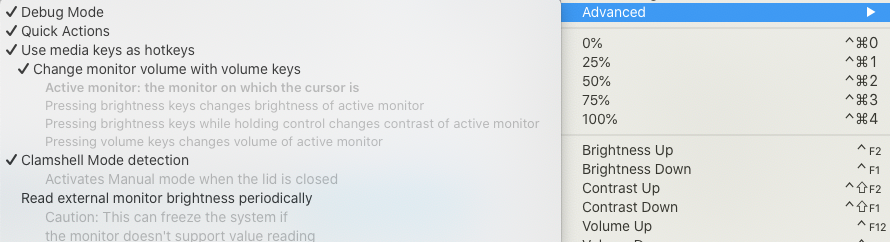
comment created time in 8 days
issue openedalin23/Lunar
Lunar Diagnostics Report [F1A0E09867E2A3B6EBBF1680C3D07DFD1B6A003CFAD0F904FC1E9393D02FADE7] [3.2.3]
Issue details
-
Was the diagnostics process able to change the brightness on your external monitor(s)? Yes.
-
Mac device where Lunar is installed (Macbook Pro 2019, iMac, Mac Mini, Hackintosh etc.): MacBook Pro (Retina, 15-inch, Mid 2014)
-
Monitor connection to the Mac device (HDMI-to-USB-C, USB-C-to-USB-C, miniDisplayPort-to-DisplayPort etc.): miniDisplayPort-to-DisplayPort
-
Using an USB Docking Station or Hub: no
-
Lunar mode used (check it in the top-right corner of the Lunar interface) manual
-
Monitor model ASUS PB278
Issue description:
I was hoping the volume controls would work. The media keys bring up the HUD with a ⍉. The menu items don't do anything.
Is there something I'm missing?
created time in 8 days
issue commentreact-native-community/bob
`yarn bootstrap` fails on `yarn --cwd example` on new project
I'd used npm login to save NPM credentials into my .npmrc file. That seems to have confused the tool…perhaps this is actually a yarn bug? If I comment out the pertinent lines in .npmrc, things seem to work.
comment created time in 24 days
issue commentreact-native-community/bob
`yarn bootstrap` fails on `yarn --cwd example` on new project
I think it may have something to do with saved credentials in ~/.npmrc…investigating
comment created time in 24 days
issue openedreact-native-community/bob
`yarn bootstrap` fails on `yarn --cwd example` on new project
Bug report
Summary
On a brand-new project, following the instructions from theReact Native docs, the yarn bootstrap command fails.
Environment info
<!--
Run react-native info in your terminal and paste the results here. Also, include the precise version number of this library that you are using in the project.
-->
react-native info output:
react-native info
info Fetching system and libraries information...
System:
    OS: macOS 10.15.6
    CPU: (8) x64 Intel(R) Core(TM) i7-4870HQ CPU @ 2.50GHz
    Memory: 761.96 MB / 16.00 GB
    Shell: 3.2.57 - /bin/bash
  Binaries:
    Node: 14.12.0 - ~/.nodebrew/current/bin/node
    Yarn: 1.22.10 - ~/.nodebrew/current/bin/yarn
    npm: 6.14.8 - ~/.nodebrew/current/bin/npm
    Watchman: 4.9.0 - /usr/local/bin/watchman
  Managers:
    CocoaPods: 1.9.3 - /usr/local/bin/pod
  SDKs:
    iOS SDK:
      Platforms: iOS 14.0, DriverKit 19.0, macOS 10.15, tvOS 14.0, watchOS 7.0
    Android SDK:
      API Levels: 23, 25, 26, 28
      Build Tools: 22.0.1, 23.0.1, 23.0.3, 25.0.0, 25.0.1, 25.0.2, 25.0.3, 26.0.1, 26.0.2, 28.0.3, 29.0.2
      System Images: android-23 | Google APIs Intel x86 Atom, android-26 | Google APIs Intel x86 Atom, android-26 | Google Play Intel x86 Atom, android-28 | Google Play Intel x86 Atom
      Android NDK: 20.0.5594570
  IDEs:
    Android Studio: 3.5 AI-191.8026.42.35.5791312
    Xcode: 12.0.1/12A7300 - /usr/bin/xcodebuild
  Languages:
    Java: 1.8.0_262 - /usr/bin/javac
    Python: 2.7.16 - /usr/bin/python
  npmPackages:
    @react-native-community/cli: Not Found
    react: 16.13.1 => 16.13.1
    react-native: 0.63.3 => 0.63.3
    react-native-macos: Not Found
  npmGlobalPackages:
    *react-native*: Not Found
Library version: 0.16.2
Steps to reproduce
<!--
- You must provide a clear list of steps and code to reproduce the problem.
- Keep the code reproducing the bug as simple as possible, with the minimum amount of code required to reproduce the issue. See https://stackoverflow.com/help/mcve.
- If this library has additional install steps, describe them (e.g., pod install? jetify? etc).
- Either re-create the bug using the repository's example app or link to a GitHub repository with code that reproduces the bug.
- Explain the steps we need to take to reproduce the issue: -->
npx @react-native-community/bob create react-native-awesome-module(using all defaults, adding a description, choosing Kotlin & Objective-C)cd react-native-awesome-module/yarn bootstrap- This error appears:
$ yarn bootstrap
yarn run v1.22.10
$ yarn example && yarn && yarn pods
$ yarn --cwd example
error An unexpected error occurred: "Cannot create property 'email' on string '{\"username\":\"dahjelle\",\"email\":\"REDACTED\"}'".
info If you think this is a bug, please open a bug report with the information provided in "/Users/dahjelle/Downloads/mobile-test/react-native-awesome-module/example/yarn-error.log".
info Visit https://yarnpkg.com/en/docs/cli/install for documentation about this command.
error Command failed with exit code 1.
info Visit https://yarnpkg.com/en/docs/cli/run for documentation about this command.
error Command failed with exit code 1.
info Visit https://yarnpkg.com/en/docs/cli/run for documentation about this command.
Describe what you expected to happen:
- No error.
Reproducible sample code
See steps above.
Is there something I'm obviously doing wrong?
created time in 24 days
issue commentNativeScript/nativescript-plugin-seed
Running `npm run postclone` fails
I ended up here from the https://docs.nativescript.org/plugins/building-plugins#the-nativescript-plugin-seed page — but, now that I see the recent blog post, I wonder if this is out-of-date as compared to https://github.com/nativescript/plugin-seed/ ?
comment created time in 24 days
issue commentNativeScript/nativescript-plugin-seed
Running `npm run postclone` fails
If I'm not mistaken, there is the same/a similar issue with the CI builds: https://travis-ci.org/github/NativeScript/nativescript-plugin-seed/jobs/730818948
comment created time in 24 days
issue openedNativeScript/nativescript-plugin-seed
Running `npm run postclone` fails
Which platform(s) does your issue occur on?
- installation using macOS
Please, provide the following version numbers that your issue occurs with:
- CLI: 7.0.8
- Cross-platform modules: (check the 'version' attribute in the
node_modules/tns-core-modules/package.jsonfile in your project) - Runtime(s): (look for the
"tns-android"and"tns-ios"properties in thepackage.jsonfile of your project) - Plugin(s): (look for the version numbers in the
package.jsonfile of your project and paste your dependencies and devDependencies here)
Please, tell us how to recreate the issue in as much detail as possible.
As per the instructions:
git clone https://github.com/NativeScript/nativescript-plugin-seed nativescript-yourplugincd nativescript-yourplugin/srcnpm run postclone
But I get the following output:
% npm run postclone

> [email protected] postclone /Users/dahjelle/Downloads/mobile-test/nativescript-yourplugin/src
> npm i && node scripts/postclone.js


> @nativescript/[email protected] postinstall /Users/dahjelle/Downloads/mobile-test/nativescript-yourplugin/src/node_modules/@nativescript/core
> node cli-hooks/postinstall.js

npm notice created a lockfile as package-lock.json. You should commit this file.
added 71 packages from 76 contributors in 8.902s

2 packages are looking for funding
  run `npm fund` for details

NativeScript Plugin Seed Configuration
prompt: What is your GitHub username (used for updating package.json)? Example: NathanWalker:  (node:74431) Warning: Accessing non-existent property 'padLevels' of module exports inside circular dependency
(Use `node --trace-warnings ...` to show where the warning was created)
dahjelle
prompt: What will be the name of your plugin? Use lowercase characters and dashes only. Example: yourplugin / google-maps / bluetooth:  yourplugin
Using Yourplugin as the TypeScript Class name..
Will now rename some files..
prompt: Do you want to include a "TypeScript NativeScript" application linked with your plugin to make development easier (y/n)?:  (y)
prompt: Do you want to include an "Angular NativeScript" application linked with your plugin to make development easier (y/n)?:  (n)
Creating 'TypeScript' application from latest published template...
You are using the deprecated nsconfig.json file. Just be aware that NativeScript 7 has an improved nativescript.config.(js|ts) file for when you're ready to upgrade this project.
The "path" argument must be of type string. Received null
TypeScript-NativeScript application created at: ../demo
Adjusting scripts..
Installing plugin to ../demo ...
Error: Command failed: cd ../demo && tns plugin add ../src
/bin/sh: line 0: cd: ../demo: No such file or directory

    at ChildProcess.exithandler (child_process.js:308:12)
    at ChildProcess.emit (events.js:314:20)
    at maybeClose (internal/child_process.js:1047:16)
    at Socket.<anonymous> (internal/child_process.js:438:11)
    at Socket.emit (events.js:314:20)
    at Pipe.<anonymous> (net.js:672:12) {
  killed: false,
  code: 1,
  signal: null,
  cmd: 'cd ../demo && tns plugin add ../src'
}
I'm brand-new to NativeScript — is this related to #179 ?
created time in 24 days
startedjonathantribouharet/BRLMPrinterKit
started time in a month
starteddanburzo/percollate
started time in a month
startedsusam/mintotp
started time in 2 months
startedalin23/Lunar
started time in 2 months
starteddexterleng/vimac
started time in 2 months
startedhediet/vscode-debug-visualizer
started time in 2 months
startedzawys/vscode-as-git-mergetool
started time in 2 months
startedsamsonmking/epaper.js
started time in 2 months
issue openedish-app/ish
Segfault when trying to install SMLNJ
<!--
If you're reporting a crash, please include a crash dump. You can find them in Settings -> Privacy -> Analytics -> Analytics Data on iOS 12, or Settings -> Privacy -> Diagnostics and Usage on iOS 11.
If this is a "Bad system call", "Illegal instruction", or "Segmentation fault", run dmesg to get a dump of the log messages and include the relevant output.
-->
I tried installing SMLNJ from their instructions, but got:
# config/install.sh
config/install.sh: Using shell /bin/sh.
config/install.sh: SML root is /root.
config/install.sh: Installation directory is /root.
config/install.sh: Installing version 110.98.
config/install.sh: URL of source archive is http://smlnj.cs.uchicago.edu/dist/working/110.98/.
config/install.sh: installing /root/bin/.arch-n-opsys
config/install.sh: Script /root/bin/.arch-n-opsys reports ARCH=x86; OPSYS=linux; HEAP_SUFFIX=x86-linux.
config/install.sh: installing /root/bin/.run-sml
config/install.sh: installing /root/bin/.link-sml
config/install.sh: installing /root/bin/ml-makedepend
config/install.sh: installing /root/bin/heap2exec
config/install.sh: Run-time system already exists.
/root/config/unpack: The bootfiles tree already exists.
config/install.sh: CM metadata directory name is ".cm"
Segmentation fault
config/install.sh !!! Boot code failed, no heap image (sml.x86-linux).
dmesg reports:
# dmesg
56 page fault on 0x5655cd0b at 0xf7fc4f93
114 page fault on 0x5655cd0b at 0xf7fc4f93
created time in 2 months
issue openedyobacca/natural-orderby
"2-020-00" treated as a Date in Chrome, but not Firefox or Safari
I was using natural-orderby to try compare "2-020-00" and "3-000-00", and found that Firefox produced the expected ordering, while Chrome did not.
compare()("2-020-00", "3-000-00"); // 1 in Chrome, -1 in Firefox and Safari
I believe this is because Date.parse('2-020-00'); yields 951026400000 in Chrome, but NaN in Firefox and Safari.
I realize this is a browser difference that would be rather hard to fix. MDN even recommends against Date.parse for presumably that reason. But in case you had any ideas, I thought I'd post it here. :-D
created time in 2 months
startedmicrosoft/fast
started time in 3 months