





SB Admin 2 template for python framework flask
w84miracle/freeradius-server 1
The FreeRADIUS Server. RADIUS, DHCP, and VMPS.
Project Icequeen
🇫🇷 Oh My Tmux! Pretty & versatile tmux configuration made with ❤️ (imho the best tmux configuration that just works)
w84miracle/52-technologies-in-2016 0
Let's learn a new technology every week. A new technology blog every Sunday in 2016.
A curated list of awesome Flask resources and plugins
A map of every single object in Zelda: Breath of the Wild.
The Chrome Web Lab for Makers, Hackers and everyone
Django Example
Gate One is an HTML5-powered terminal emulator and SSH client
issue commentmrdoob/three.js
Adding interactive and generative music using webaudio api
I think we would add a new AudioSynth class that would be compatible with the current PositionalAudio and AudioListener classes. The audio synth class would be a wrapper of WebAudio api; allowing someone to make a custom synth in a simple manner. Pretty much a simpler version of this repo: https://github.com/pparocza/generative-music-web-audio
It would be cool to have it within threejs, so that we could have visual events happening in conjunction with audio synthesis. Having multimodal / audio-visual events are common in various creative coding practices.
We are more interested in lightweight audio synth approaches, as in the early games, such as using pure synthesis and wavetables. Hence, this new class would not include any audio file playback, which is already included in threejs.
Concretely, the AudioSynth class would be a separate .js file in audio folder. So, it wouldn't affect the rest of threejs code.
What are your thoughts?

comment created time in 29 minutes
issue commentopenlayers/openlayers
Features floating on map in Android 4.4.2/4.0.4 webview
The layers are not moving out of sync, the vector layer is at the wrong scale. Compare the cluster locations in your image with, for example Chrome on Windows, where there are no earthquakes near northern Norway. You may see a similar problem with https://openlayers.org/en/latest/examples/modify-features.html (I do not have any way of debugging on my old device). A workaround may be to set the map pixelRatio option to 1.

comment created time in 2 hours
issue openedopenlayers/openlayers
heatmap-earthquakest example broken in production build
Describe the bug In production builds the earthquake heatmap example does not run.
To Reproduce Steps to reproduce the behavior:
- Go to https://openlayers.org/en/main/examples/heatmap-earthquakes.html
- The map remains empty
The error happens in this line, not sure why, getChangeEventType seems to be missing
https://github.com/openlayers/openlayers/blob/e82a86f56337cfa394235df7528da032a5afbf30/src/ol/layer/Heatmap.js#L89-L92
Expected behavior The map should load and show the heatmap clusters.
created time in 2 hours
issue commentmrdoob/three.js
Line2 mesh clipped when starting point is outside camera view on three.js version 118 and up
Are you seeing the issue in https://threejs.org/examples/webgl_lines_fat.html?
Can you provide a simple three.js-only example that replicates the issue?

comment created time in 3 hours
pull request commentmrdoob/three.js
I have just released verion 1.0.0: https://www.npmjs.com/package/three-wtm

comment created time in 3 hours
issue openedmrdoob/three.js
Line2 mesh clipped when starting point is outside camera view on three.js version 118 and up
<!-- Ignoring this template may result in your bug report getting deleted -->
Describe the bug
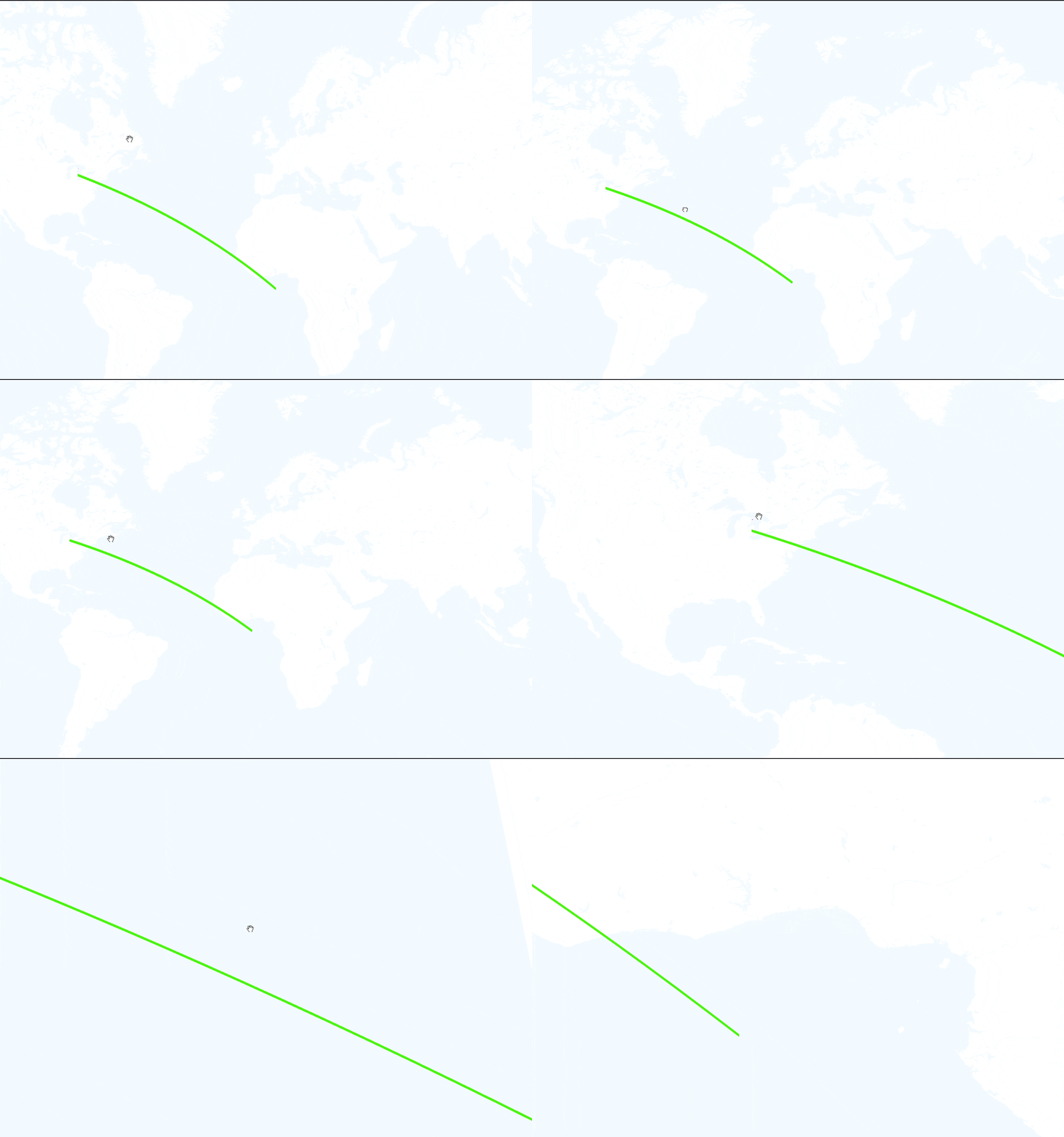
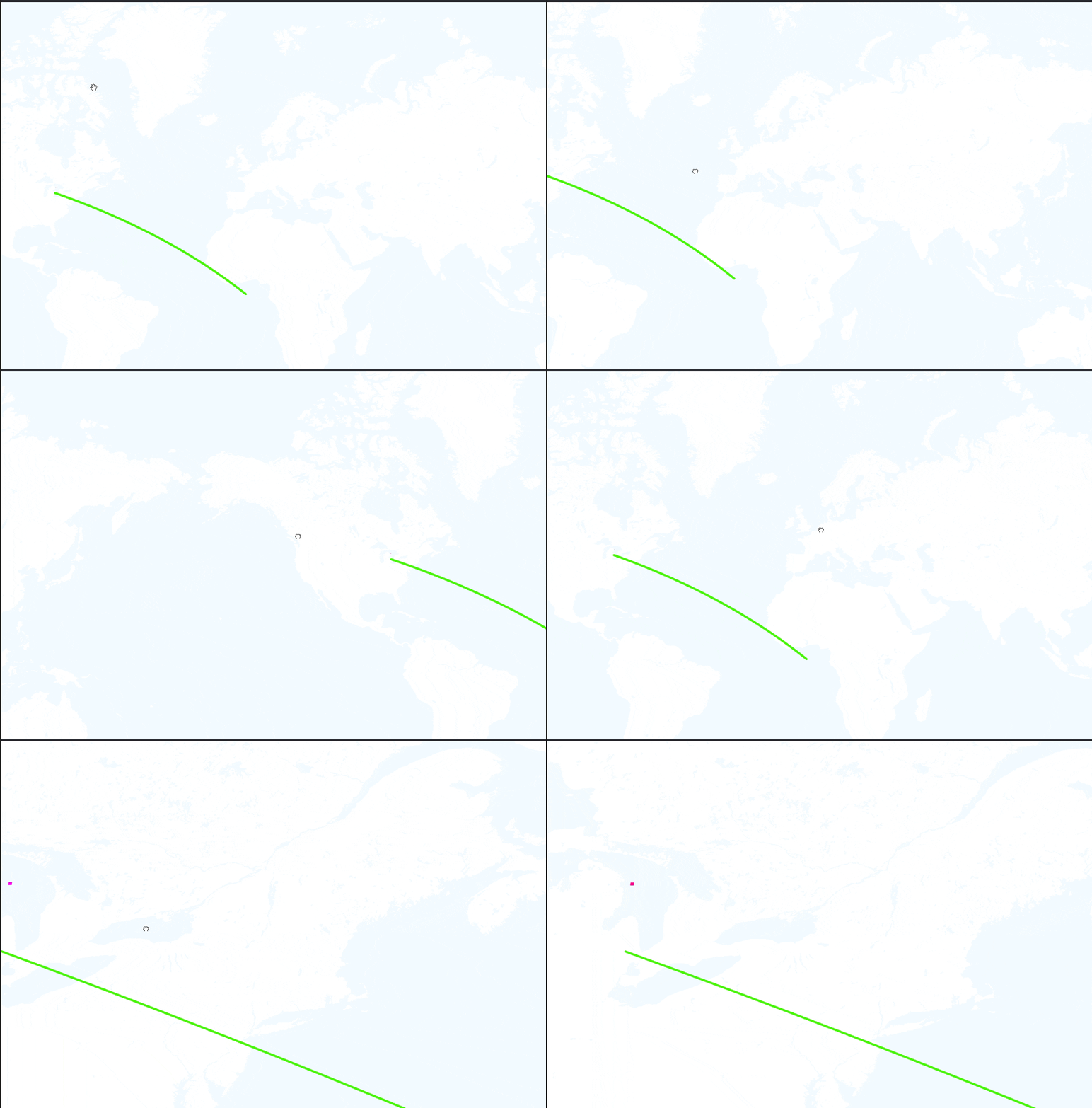
Line2 mesh is being culled/clipped (not sure right term) from the view when the starting point it outside the camera view on three.js versions r118 and up. When using three.js r117, this issue does not happen. I am seeing this issue using Mapbox + Three.js via a CustomLayer, but I don't think it's related to the Mapbox integration.
Code
import * as THREE from "three";
import mapboxgl from "mapbox-gl";
import * as turf from "@turf/turf";
import { Line2 } from "three/examples/jsm/lines/Line2";
import { LineMaterial } from "three/examples/jsm/lines/LineMaterial";
import { LineGeometry } from "three/examples/jsm/lines/LineGeometry";

...

addLine(start: [number, number], end: [number, number], height: number) {
  const mid = turf.midpoint(start, end);

  const startMerc = mapboxgl.MercatorCoordinate.fromLngLat(start, 0);
  const midMerc = mapboxgl.MercatorCoordinate.fromLngLat(
	  [mid.geometry?.coordinates[0] ?? 0, mid.geometry?.coordinates[1] ?? 0],
	  0
  );
  const endMerc = mapboxgl.MercatorCoordinate.fromLngLat(end, 0);

  const startVec = new THREE.Vector3(startMerc.x, startMerc.y, 0);
  const midVec = new THREE.Vector3(midMerc.x, midMerc.y, height / 10);
  const endVec = new THREE.Vector3(endMerc.x, endMerc.y, 0);

  const positions: number[] = [];

  const spline = new THREE.QuadraticBezierCurve3(startVec, midVec, endVec);
  const points = spline.getPoints(50);

  points.forEach((p) => positions.push(p.x, p.y, p.z));

  const geo = new LineGeometry();
  geo.setPositions(positions);

  const mat = new LineMaterial({
	  color: 0x0ff000,
	  linewidth: 5,
	  side: THREE.FrontSide,
  });
    mat.clipping = false;
  const line = new Line2(geo, mat);
  line.scale.set(1, 1, 1);
  mat.resolution.copy(this.resolution ?? new THREE.Vector2(1920, 1080));
  line.position.set(0, 0, 0);
  this.lineGroup?.add(line);
}

...

private rendererSetup(map: mapboxgl.Map, gl: WebGLRenderingContext) {
  const renderer = new THREE.WebGLRenderer({
	  canvas: map.getCanvas(),
	  context: gl,
	  antialias: true,
  });
  renderer.setPixelRatio(window.devicePixelRatio);
  renderer.setSize(map.getCanvas().clientWidth, map.getCanvas().clientHeight);
  renderer.outputEncoding = THREE.sRGBEncoding;
  renderer.autoClear = false;
  return renderer;
}

private sceneSetup(map: mapboxgl.Map) {
  const camera = new THREE.PerspectiveCamera(
	  90,
	  map.getCanvas().clientWidth / map.getCanvas().clientHeight,
	  0.001,
	  1e21
  );

  const scene = new THREE.Scene();

  scene.add(new THREE.AmbientLight(0xffffff, 10));

  return { scene, camera };
}

...

this.animate = () => {
  if (this.mapMatrix) {
  this.camera!.projectionMatrix = new THREE.Matrix4().fromArray(
	  this.mapMatrix
  );
  }

  if (this.uniforms.time.value > 1.0) {
  this.uniforms.time.value = 0.0;
  } else {
  this.uniforms.time.value += 0.01;
  }
  this.renderer!.state.reset();
  this.renderer!.render(this.scene!, this.camera!);
  this.map?.triggerRepaint();
};

this.renderer.compile(this.scene, this.camera);

this.renderer.setAnimationLoop(this.animate);

this.resolution = new THREE.Vector2(window.innerWidth, window.innerHeight);
map.on("resize", () => this.onResize());
Expected behavior
The Line2 mesh should behave like three.js version r117 on all versions and not clip the mesh
Screenshots
three.js r117
three.js r118
Platform:
- Device: Desktop
- OS: Windows, Linux
- Browser: Chrome, Firefox, Edge
- Three.js version: r117, r118 and up
created time in 3 hours
issue commentmrdoob/three.js
Adding interactive and generative music using webaudio api
@ktatar What new classes would you be adding? How would the API look like?
comment created time in 5 hours
pull request commentmrdoob/three.js
@donmccurdy I'll let you decide what to do with this 🤔
comment created time in 5 hours
push eventmrdoob/three.js
commit sha 84ce6ddb9c4aaf8282198ea7bfdb2ae283fdcdff
PCD Loader Example: Clean up (#22019) * Clean up * Update screenshot * Clean up * Update screenshot
push time in 5 hours
PR merged mrdoob/three.js
I added the Axes Helper temporarily because the model is inverted or flipped and I was trying to get a frame-of-reference.
You can remove the helper if you want. :-)
I did not otherwise alter the functionality of the example.

pr closed time in 5 hours
Pull request review commentmrdoob/three.js
+import {+ GridHelper,+ EllipseCurve,+ BufferGeometry,+ Line,+ LineBasicMaterial,+ Raycaster,+ Group,+ Object3D,+ Box3,+ Sphere,+ Quaternion,+ Vector2,+ Vector3,+ Matrix4,+ MathUtils+} from '../../../build/three.module.js';+import {} from 'https://cdnjs.cloudflare.com/ajax/libs/hammer.js/2.0.8/hammer.js'
The problem here is having high level cross-browser support for touch gestures and mouse interaction and, as far as I know, right now, there is no clear way to do it easily without an external library.
Yes there is. Pointer Events API unifies mouse events and touch events in a single API.

comment created time in 5 hours
Pull request review commentmrdoob/three.js
import * as THREE from '../build/three.module.js'; - import Stats from './jsm/libs/stats.module.js';-- import { TrackballControls } from './jsm/controls/TrackballControls.js';+ import { OrbitControls } from './jsm/controls/OrbitControls.js'; import { PCDLoader } from './jsm/loaders/PCDLoader.js'; - let container, stats;- let camera, controls, scene, renderer;+ let camera, scene, renderer; init();- animate();- function init() {-- scene = new THREE.Scene();- scene.background = new THREE.Color( 0x000000 );-- camera = new THREE.PerspectiveCamera( 15, window.innerWidth / window.innerHeight, 0.01, 40 );- camera.position.x = 0.4;- camera.position.z = - 2;- camera.up.set( 0, 0, 1 );+ render(); - scene.add( camera );+ function init() { renderer = new THREE.WebGLRenderer( { antialias: true } ); renderer.setPixelRatio( window.devicePixelRatio ); renderer.setSize( window.innerWidth, window.innerHeight ); document.body.appendChild( renderer.domElement ); - const loader = new PCDLoader();- loader.load( './models/pcd/binary/Zaghetto.pcd', function ( points ) {-- scene.add( points );- const center = points.geometry.boundingSphere.center;- controls.target.set( center.x, center.y, center.z );- controls.update();+ scene = new THREE.Scene(); - } );+ camera = new THREE.PerspectiveCamera( 30, window.innerWidth / window.innerHeight, 0.01, 40 );+ camera.position.set( 0, 0, 1 );+ scene.add( camera ); - container = document.createElement( 'div' );- document.body.appendChild( container );- container.appendChild( renderer.domElement );+ const controls = new OrbitControls( camera, renderer.domElement );+ controls.addEventListener( 'change', render ); // use if there is no animation loop+ controls.minDistance = 0.5;+ controls.maxDistance = 10; - controls = new TrackballControls( camera, renderer.domElement );+ //scene.add( new THREE.AxesHelper( 1 ) );
I just did that...
comment created time in 5 hours
Pull request review commentmrdoob/three.js
import * as THREE from '../build/three.module.js'; - import Stats from './jsm/libs/stats.module.js';-- import { TrackballControls } from './jsm/controls/TrackballControls.js';+ import { OrbitControls } from './jsm/controls/OrbitControls.js'; import { PCDLoader } from './jsm/loaders/PCDLoader.js'; - let container, stats;- let camera, controls, scene, renderer;+ let camera, scene, renderer; init();- animate();- function init() {-- scene = new THREE.Scene();- scene.background = new THREE.Color( 0x000000 );-- camera = new THREE.PerspectiveCamera( 15, window.innerWidth / window.innerHeight, 0.01, 40 );- camera.position.x = 0.4;- camera.position.z = - 2;- camera.up.set( 0, 0, 1 );+ render(); - scene.add( camera );+ function init() { renderer = new THREE.WebGLRenderer( { antialias: true } ); renderer.setPixelRatio( window.devicePixelRatio ); renderer.setSize( window.innerWidth, window.innerHeight ); document.body.appendChild( renderer.domElement ); - const loader = new PCDLoader();- loader.load( './models/pcd/binary/Zaghetto.pcd', function ( points ) {-- scene.add( points );- const center = points.geometry.boundingSphere.center;- controls.target.set( center.x, center.y, center.z );- controls.update();+ scene = new THREE.Scene(); - } );+ camera = new THREE.PerspectiveCamera( 30, window.innerWidth / window.innerHeight, 0.01, 40 );+ camera.position.set( 0, 0, 1 );+ scene.add( camera ); - container = document.createElement( 'div' );- document.body.appendChild( container );- container.appendChild( renderer.domElement );+ const controls = new OrbitControls( camera, renderer.domElement );+ controls.addEventListener( 'change', render ); // use if there is no animation loop+ controls.minDistance = 0.5;+ controls.maxDistance = 10; - controls = new TrackballControls( camera, renderer.domElement );+ //scene.add( new THREE.AxesHelper( 1 ) );
I guess the screenshot needs to be updated now 😅
comment created time in 5 hours
Pull request review commentmrdoob/three.js
case '+': points.material.size *= 1.2;- points.material.needsUpdate = true;+ //points.material.needsUpdate = true;
Done!
comment created time in 6 hours
Pull request review commentmrdoob/three.js
case '+': points.material.size *= 1.2;- points.material.needsUpdate = true;+ //points.material.needsUpdate = true;
I guess we can just remove these?
comment created time in 6 hours
pull request commentmrdoob/three.js
Render HTML/CSS in Texture (for VR UIs)
MrDoob, this is done. Plug in pretty much any code for a working website in VR.
I should not implement something like an "htmlMesh". This texture can be applied to any mesh, including instancedMesh, skinnedMesh, LOD, etc. Extending base Mesh would be a mistake.
Devs will want a convenient way to turn raycaster / controller into pointer XY.
I can math write code to intersect a mesh and extract UV coordinates, but where should that code live? Advice needed.

comment created time in 6 hours
pull request commentmrdoob/three.js
temporary link: https://raw.githack.com/westlangley/three.js/dev_pcd/examples/webgl_loader_pcd.html
comment created time in 6 hours
pull request commentmrdoob/three.js
Render HTML/CSS in Texture (for VR UIs)
Added two methods, addPointer( vec2, down ) and updatePointer( vec2, down ) to simulate a mouse.
Supports click event per https://www.w3.org/TR/uievents/#event-type-click Supports mouse events per https://w3c.github.io/uievents/#dom-mouseevent-mouseevent Supports pointer events per https://w3c.github.io/pointerevents/#pointerevent-interface Supports multitouch via pointer events.
Not going to support hover, must simulate behavior with onmouseover / onmouseout Not going to support focus, must simulate behavior with onclick Not going to support pointercapture. Simulate behavior by directly firing events on target. Not going to support pointercancel, since no hardware requirements exist.
No plans to support 'dblclick', can support if desired.
<button onclick="console.log('hi there!'); this.style.color='red';">Click Me</button>
let myPointer = new THREE.Vector2( 10 , 10 );

htmlTexture.addPointer( myPointer, true ); //mouse down
htmlTexture.updatePointer( myPointer, false ); //mouse up

//>hi there!
comment created time in 6 hours
PR opened mrdoob/three.js
I added the Axes Helper temporarily because the model is inverted or flipped and I was trying to get a frame-of-reference.
You can remove the helper if you want. :-)
pr created time in 7 hours
push eventopenlayers/openlayers
commit sha 3791dee358c0a145521057957baff5ce116b540d
Fix immediate render with pixel ratio != 1
commit sha c55366d35e36dea8d24c41721a97998de29717cf
use correct stride for draw image
commit sha 5ba833a82c834dcfda2d9ecf4323146029e1b622
remove unused argument from function call
commit sha 74db0e7d21d7ef8b4995f9a0fbaba083e40ec4ba
Add render test for immediate render with pixel ratio 2
commit sha e82a86f56337cfa394235df7528da032a5afbf30
Merge pull request #12194 from MoonE/immediate-pixel-ratio Respect pixel ratio with immediate render
push time in 7 hours
PR merged openlayers/openlayers
Fixes #12192
Also fixes rendering of icons when the stride is not 2.

pr closed time in 7 hours
issue closedopenlayers/openlayers
pixelRatio not applied to lineDash in Canvas Immediate
When setting pixelRatio in ol/render.toContext() to give a sharp image on high device pixel ratio displays when rendering to Canvas Immediate, although pixel coordinates are correctly scaled, lineDash is not scaled as it is when rendering to a map. Thus it renders very differently depending on the device pixel ratio, typically blurring dashed lines into continuous lines (especially if the default "round" lineCap is used).
To demonstrate, the full code at the bottom of this post renders a dashed line on a map canvas and also (with exactly the same style) using canvas immediate rendering:
     var vectorContext = ol.render.toContext(ctx, {
        size: [500, 250],
        pixelRatio: ol.has.DEVICE_PIXEL_RATIO
      });
If viewed on a device with pixelratio > 1.0, the dashes and gaps in the canvas immediate line become much shorter in proportion to the line width. If the values in the lineDash array are scaled by pixelRatio, the problem is solved for CanvasImmediate, though this would require making a copy of the style if it is to also be used in a map.
Full code:
<!doctype html>
<html lang="en">
  <head>
    <link rel="stylesheet" href="https://cdn.jsdelivr.net/gh/openlayers/openlayers.github.io@master/en/v6.5.0/css/ol.css" type="text/css">
    <style>
      #immediate canvas {
        border: solid 1px grey;
      }
      .map {
        border: solid 1px grey;
        height: 400px;
        width: 100%;
      }
    </style>
    <script src="https://cdn.jsdelivr.net/gh/openlayers/openlayers.github.io@master/en/v6.5.0/build/ol.js"></script>
  </head>
  <body>
    <h4>Map rendering:</h4>
    <div id="map" class="map"></div>
    <h4>CanvasImmediate rendering:</h4>
    <div id="immediate">
      <canvas id="testCanvas">
    </div>
    <script type="text/javascript">

      // Common line style
      var lineStyle = new ol.style.Style({
        stroke: new ol.style.Stroke({
          color: 'red',
          width: 40,
          lineCap: "butt",
          lineDash: [50, 50]
        }),
      });

      // Map rendering
      var wkt = 'LINESTRING(10.689 -25.092, 38.814 -35.639)';
      var format = new ol.format.WKT();
      var feature = format.readFeature(wkt, {
        dataProjection: 'EPSG:4326',
        featureProjection: 'EPSG:3857',
      });
      var vector = new ol.layer.Vector({
        source: new ol.source.Vector({
          features: [feature],
        }),
        style: lineStyle
      });
      var raster = new ol.layer.Tile({
        source: new ol.source.OSM(),
      });
      var map = new ol.Map({
        layers: [raster, vector],
        target: 'map',
        view: new ol.View({
          center: [2952104.0199, -3277504.823],
          zoom: 4,
        }),
      });

      // CanvasImmediate rendering
      var testCanvas = document.getElementById('testCanvas');
      var ctx = testCanvas.getContext('2d');
      var lineGeom = new ol.geom.LineString([[120, 80], [450,200]]);
      var vectorContext = ol.render.toContext(ctx, {
        size: [500, 250],
        pixelRatio: ol.has.DEVICE_PIXEL_RATIO
      });
      vectorContext.setStyle(lineStyle);
      vectorContext.drawGeometry(lineGeom);

    </script>
  </body>
</html>
closed time in 7 hours
richard-thomas
issue commentmrdoob/three.js
Possible TypeError with NRRDLoader
I don't believe these lines of code have not been touched during the fix of the transformation of slices. We can do a deeper dive and clean out more of the assumptions made within the logic, but from what I understand this is a pre-existing issue and can be considered a separate investigation from issue #21898
There's definite room for improvement for the NRRDLoader and am excited to help it grow!

comment created time in 7 hours
issue commentmrdoob/three.js
Possible TypeError with NRRDLoader
@geoffkflee @IsseiMori @stity looks good?
comment created time in 7 hours
issue openedmrdoob/three.js
Possible TypeError with NRRDLoader
Description
scan(type, chunks) from NRRDLoader returns entity with type Array or number
https://github.com/mrdoob/three.js/blob/a5ce030b9c692125e88f01cb978351766e5da590/examples/js/loaders/NRRDLoader.js#L116-L118
https://github.com/mrdoob/three.js/blob/a5ce030b9c692125e88f01cb978351766e5da590/examples/js/loaders/NRRDLoader.js#L127-L131
but then .length is called over scan result
https://github.com/mrdoob/three.js/blob/a5ce030b9c692125e88f01cb978351766e5da590/examples/js/loaders/NRRDLoader.js#L294-L298
that can produce undefined value to _length variable.
Also .subarray could be called over number and throw an Error. https://github.com/mrdoob/three.js/blob/a5ce030b9c692125e88f01cb978351766e5da590/examples/js/loaders/NRRDLoader.js#L319
created time in 8 hours
issue commentmrdoob/three.js
Antialiasing has artifacts when logarithmic depth buffer is enabled
Do you mind sharing a live link that demonstrates the aliasing?

comment created time in 8 hours
issue openedmrdoob/three.js
Antialiasing has artifacts when logarithmic depth buffer is enabled
When the logarithmic depth buffer is enabled, antialiasing fails in areas where geometry intersects or lines up. See screenshot below. It feels like this would be a common issue, but I couldn't find any other post on it.
With logarithmic depth buffer enabled. Notice the jagged, aliased lines.

With logarithmic depth buffer disabled.

I've encountered this on desktop computers. I've seen it on both Linux Ubuntu and Fedora, in the Chrome browser. I don't remember how it looks in Windows, but it seems a bit strange if it would be different there?
Right now we're at version 0.129.0 of threejs, but it's always been like this since we started using logarithmic depth (1-2 years ago), and it happens with all geometry.
Is it like this for everyone else? Any idea how to fix it, or is it something we just have to live with?
Thanks.
created time in 8 hours
issue commentopenlayers/openlayers
Features floating on map in Android 4.4.2/4.0.4 webview
@M393 Unfortunately the page does not work on my Android 4.0.4, some problem with https (like many other pages with https). I can try to get hold of the Android 4.4.2 device next week and see if that can handle https better.
comment created time in 9 hours
push eventmrdoob/three.js
commit sha a5ce030b9c692125e88f01cb978351766e5da590
Use clamped material.emissiveIntensity at GLTF export (#22007) * Use clamped material.emissiveIntensity at GLTF export * Revert build * Revert build (for real) * Third time's the charm * Limit the emissive value after multiplying by emissiveIntensity * Better readability (as suggested by WestLangley)
push time in 10 hours