





vlachoudis/bCNC 1156
GRBL CNC command sender, autoleveler and g-code editor
LibreCAD 3 is a next generation 2D CAD application written to be modular, with a core independent from GUI toolkits. Scripting is possible with Lua.
brexx classic rexx implementation
Very simple synchronization tool based on ssh keeping track of the file changes in a remote and a local system
Floating point rounding error estimation library
Direct Accelerated Geometry Monte Carlo Toolkit
Postscript output from tkinter.Text() widget
LibreCAD is a 2D CAD drawing tool based on the community edition of QCad. LibreCAD has been re-structured and ported to Qt 4/5 and works natively cross platform between OSX, Windows and Linux. It can read DWG and DXF files; and it can write DXF, SVG, PDF and more!
Record images through a webcam and detect motion creating a video
startedvlachoudis/bCNC
started time in 11 hours
startedvlachoudis/bCNC
started time in a day
startedvlachoudis/bCNC
started time in 2 days
startedvlachoudis/bCNC
started time in 3 days
startedvlachoudis/bCNC
started time in 4 days
startedvlachoudis/bCNC
started time in 4 days
startedvlachoudis/bCNC
started time in 5 days
issue commentvlachoudis/bCNC
Problem with engraving and autoleveling
@kfmut good to know
thnx a lot for help, will try it tomorrow

comment created time in 6 days
startedvlachoudis/bCNC
started time in 6 days
issue commentvlachoudis/bCNC
Problem with engraving and autoleveling
@roor
don't apply it to gcode, and just run cycle with with probe data left on screen?
Works for me, just don't delete probe info between different files(tracks, copper etc)
comment created time in 6 days
issue commentvlachoudis/bCNC
Problem with engraving and autoleveling
@kfmut exactly Just was going to write the same, so proper actions should be
- either apply it to gcode, and clean probe data ? or
- don't apply it to gcode, and just run cycle with with probe data left on screen?
comment created time in 6 days
issue commentvlachoudis/bCNC
Problem with engraving and autoleveling
@roor
Looks like you have applied autolevel to g-code file and didn't delete probe information. Right?
comment created time in 6 days
issue commentvlachoudis/bCNC
Problem with engraving and autoleveling
@roor
what is wrong?
Nothing wrong here:
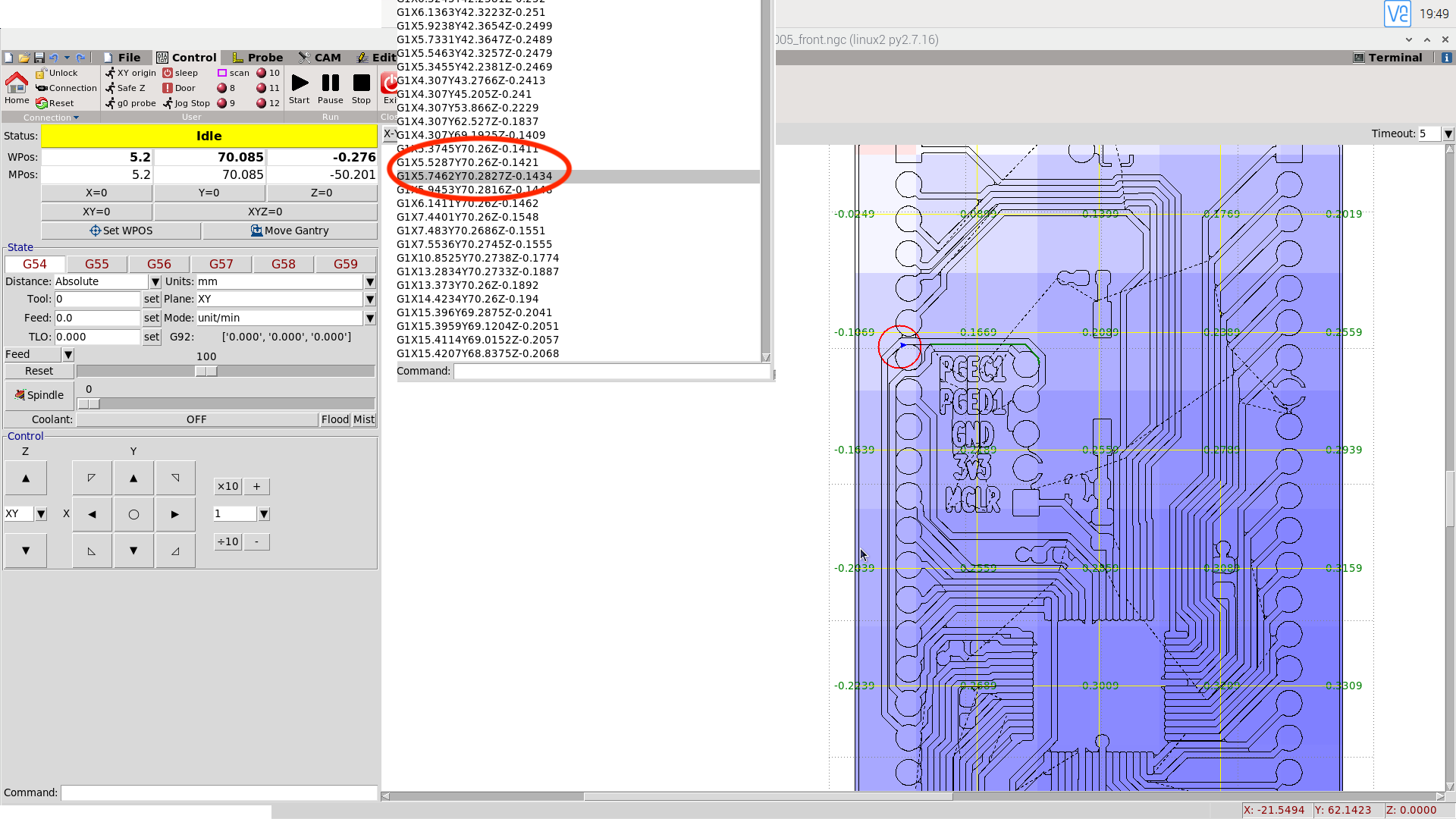
Z height from autolevel is between -0.107 and -0.167, let's say it's something like -0.13mm. Z-height from g-code is -0.143. Result is -0.273mm.
comment created time in 6 days
issue commentvlachoudis/bCNC
Problem with engraving and autoleveling
I have used autoleveler and as you can see on screenshot: z height should be -0.1434 but in fact it is -0.276 and it looks like it in real life (engraving to deep, should be -0.005 before autoleveling) what is wrong?
i have set z before starting autoleveling and starting cycle, so z it properly configured
comment created time in 6 days
startedvlachoudis/bCNC
started time in 7 days
issue commentvlachoudis/bCNC
BCNC and PLC Mduino42+:Not connected
Hi, As I said,"VOILA "my return after my last tries and hardware connections:all is OK now! Last step to see:6 hours of uninterrupted production without alarms.Let's cross our fingers...

comment created time in 10 days
issue closedvlachoudis/bCNC
BCNC and PLC Mduino42+:Not connected
Hi,
I have a problem to connect PLC industrialshields Mduino 42+ and BCNC (it seemed a good idea to do that ,before I had only an Arduino mega without the package found inside the Mduino42+ ( separed power supply,optocouplers,etc) .You can see on below pictures the connection and the messages in return:
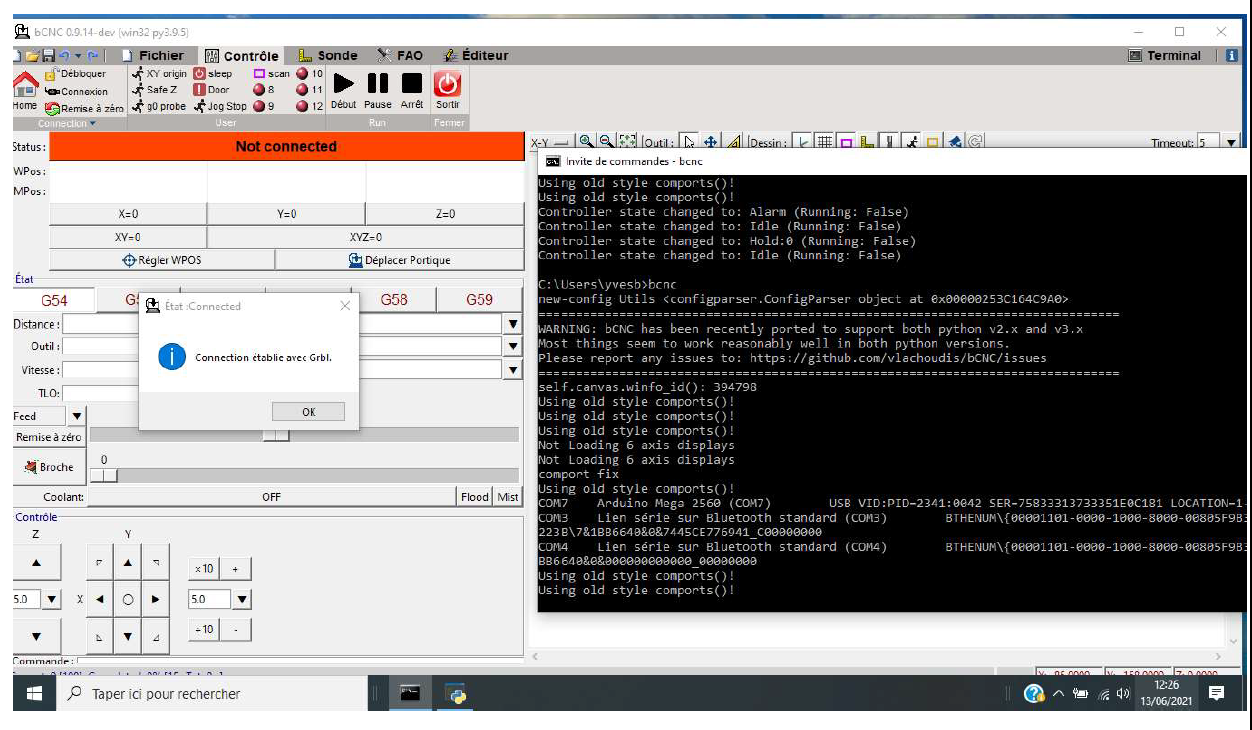
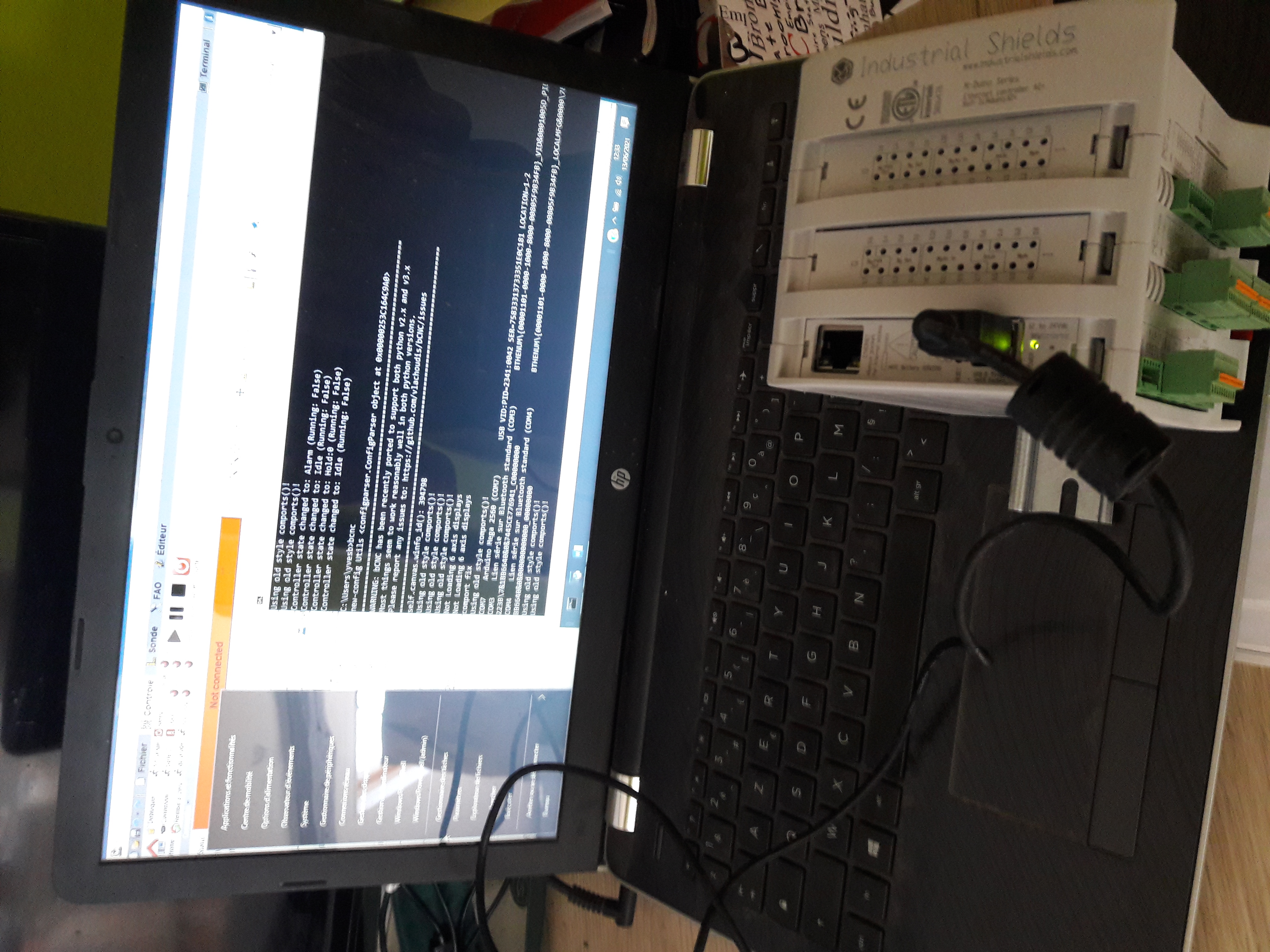 I can read the arduino mega card number but it's impossible to connect the PLC and BCNC together ("Not connected" message )as you can see
The compiling process with Arduino IDE (1.8.15 version) done before is good with no errors messages (Librairies for Mduino installed, file Cpu_map modified according with Mduino42+ environnment).
My version for Python is 3.9.15 ,for Pip is pip-21.1.2,for Grbl is grbl-Mega-1.1f .
Could you help me ,I think it'is a good case to solve (PLC Industrialshields provide an industriel environnement around Arduino products ) but for the moment no issue to pilot my DIY CNC.
Thanks per advance
I can read the arduino mega card number but it's impossible to connect the PLC and BCNC together ("Not connected" message )as you can see
The compiling process with Arduino IDE (1.8.15 version) done before is good with no errors messages (Librairies for Mduino installed, file Cpu_map modified according with Mduino42+ environnment).
My version for Python is 3.9.15 ,for Pip is pip-21.1.2,for Grbl is grbl-Mega-1.1f .
Could you help me ,I think it'is a good case to solve (PLC Industrialshields provide an industriel environnement around Arduino products ) but for the moment no issue to pilot my DIY CNC.
Thanks per advance
closed time in 10 days
yvesbel
issue commentvlachoudis/bCNC
BCNC and PLC Mduino42+:Not connected
Hi, Thanks for your answer. I have found last morning the solution of my problem.In fact ,on the PLC industrialshieds Mduino (you have to read with a lot of thoroughness the userguide ,see website on this spanish company) ,you have a button to put on « OFF » after the flashing process and it was the BUG !!I will send you a global return after my first tries on my DIY CNC. Thanks you. See you later.
comment created time in 10 days
issue commentvlachoudis/bCNC
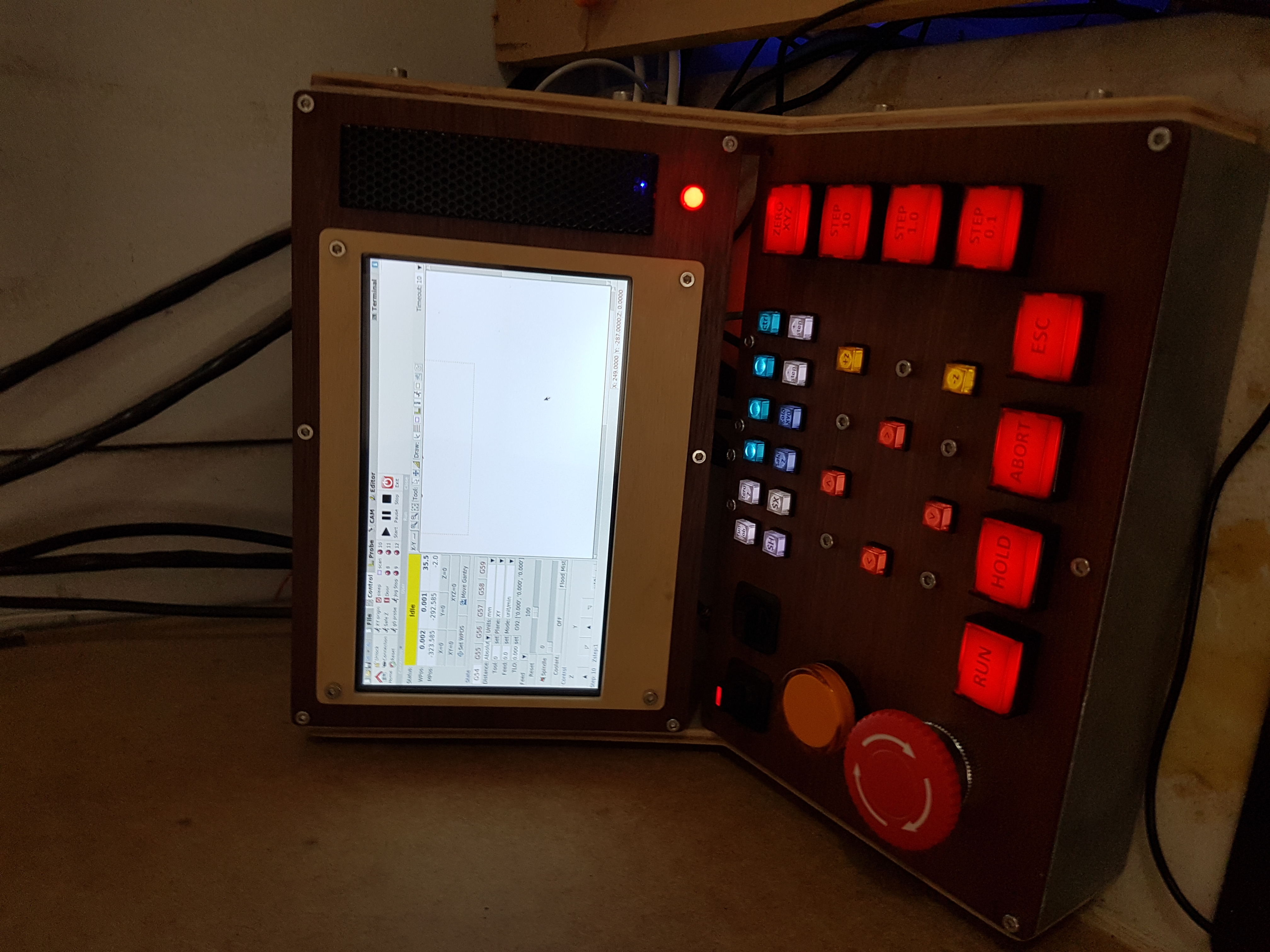
I think the other issue is the screen resolution. It looks like you have the raspberry pi 7" monitor which is only 800x480
I also run a raspberry pi - Here is mine on a waveshare 7" - but its res is 1024×600
If I hide the State section, I can see the entire Control section. But for me I don't use the mouse controls.
Then if you want to undecorate + full screen bCNC automatically on opening, you can add this to your lxde-pi-rc file under pi.config\openbox
<applications><application class="Toplevel"><maximized>true</maximized><decor>no</decor></application></applications>
"Toplevel" is the reference to the main bCNC window

comment created time in 10 days
startedvlachoudis/bCNC
started time in 10 days
startedvlachoudis/bCNC
started time in 11 days
issue commentvlachoudis/bCNC
BCNC and PLC Mduino42+:Not connected
If your plc has actual "Arduino Mega" board in it, you can just swap it for "Arduino Due", which will run grblHAL.
comment created time in 11 days
issue commentvlachoudis/bCNC
BCNC and PLC Mduino42+:Not connected
Hello, i am not sure about grbl-Mega compatibility. Technicaly it is not a GRBL and there might be slight variations in communication. Can you please try with original GRBL to see if there is a difference? If there is some issue in grbl-Mega compatibility we might try to fix it in bCNC. They might even want to fix that in grbl-Mega.
TBH i would strongly reccomend you to use grblHal for new builds. But i am not sure if that can be used with your hardware, maybe you can replace the "arduino" board in your PLC box for something more recent (32b), while keeping the isolators and stuff. There are boards with 32b microcontrollers with same pinout as arduino boards, so grblHal can be used on that. Boards are very reasonably priced (comparable to arduinos). 8bit grbl is mostly dead, so we really should move on.
comment created time in 11 days
issue openedvlachoudis/bCNC
Skipping a line of gcode then stopping at "idle" right before the next Z move
I have had this issue a few times now. I can confirm its not the gcode as I can run the same program through its entirety and its fine.
What happens is the machine will skip a line of gcode and just move to the next coords. It will then carry on from there until it reaches the next Z movement and then stops at "idle".
If I try and press RUN nothing happens.
Is this normal behavior? My thought maybe that bCNC is detecting that a line is "skipped" or doesn't reach the grbl controller and carries on until it reaches the next Z movement?
Unfortunately each time its happened I haven't checked on the terminal to see what was going on. I tried running the same job but I wasn't able to replicate the problem.
I'm running 9.14 on a raspberry pi4
created time in 11 days
issue openedvlachoudis/bCNC
BCNC and PLC Mduino42+:Not connected
Hi,
I have a problem to connect PLC industrialshields Mduino 42+ and BCNC (it seemed a good idea to do that ,before I had only an Arduino mega without the package found inside the Mduino42+ ( separed power supply,optocouplers,etc) .You can see on below pictures the connection and the messages in return:
I can read the arduino mega card number but it's impossible to connect the PLC and BCNC together ("Not connected" message )as you can see
The compiling process with Arduino IDE (1.8.15 version) done before is good with no errors messages (Librairies for Mduino installed, file Cpu_map modified according with Mduino42+ environnment).
My version for Python is 3.9.15 ,for Pip is pip-21.1.2,for Grbl is grbl-Mega-1.1f .
Could you help me ,I think it'is a good case to solve (PLC Industrialshields provide an industriel environnement around Arduino products ) but for the moment no issue to pilot my DIY CNC.
Thanks per advance
created time in 12 days