








lrs-lang/lib 206
An experimental standard library
mahkoh/comm 65
Communication primitives
Rudimentary DNS library
The lrs build system
The lrs compiler driver
Align text
select area with mouse
Small, fast and powerful console music player for Unix-like operating systems.
The lrs documentation generator
issue commentcmus/cmus
Depends on a station, but yeah I found this as a problem as well on one station, problem is that I really like that one. tag title is empty for this one, that's why there's only a . shown, but I guess it's very easy for devs to fix this with a check if that tag is empty then show url instead.

comment created time in 7 hours
issue closedcmus/cmus
As a listener, when I add a song to a playlist, I almost always want to add the currently playing song to a playlist.
Currently I press <kbd>3<space>1iy</kbd>. Also, this often has no feedback when I add to the playlist because I often have only 1 song in an album.
Would love to press <kbd>3<c-y></kbd> (or similar) instead to add the currently playing song to the currently highlighted playlist
closed time in 12 hours
jchook
issue closedcmus/cmus
Can't change the volume,which keeps being the biggest!
<!-- Please fill the following if you have found an issue, delete if otherwise. -->
uname -a:
Linux ykc 5.9.8-arch1-1 #1 SMP PREEMPT Tue, 10 Nov 2020 22:44:11 +0000 x86_64 GNU/Linux
cmus --version:
cmus v2.8.0
Copyright 2004-2006 Timo Hirvonen
Copyright 2008-2016 Various Authors
cmus --plugins:
Input Plugins: /usr/lib/cmus/ip
  flac:
    Priority: 50
    File Types: flac fla
    MIME Types:
  vorbis:
    Priority: 50
    File Types: ogg oga ogx
    MIME Types: application/ogg audio/x-ogg
  modplug:
    Priority: 50
    File Types: mod s3m xm it 669 amf ams dbm dmf dsm far mdl med mtm okt
ptm stm ult umx mt2 psm
    MIME Types:
  cue:
    Priority: 50
    File Types:
    MIME Types: application/x-cue
  wav:
    Priority: 50
    File Types: wav
    MIME Types:
  ffmpeg:
    Priority: 30
    File Types: aa aac ac3 aif aifc aiff ape au fla flac m4a m4b mka mkv m
p+ mp2 mp3 mp4 mpc mpp ogg shn tak tta wav webm wma wv
    MIME Types:

Output Plugins: /usr/lib/cmus/op
  pulse
  alsa
  oss
  jack
When I change the volume, cmus will do it without any effect just changing the number.
 The volume keep being the biggest,not to be bigger or smaller.But,I can just watch video on Chromium and can change the volume there.
I set the sound system from arch wiki,which is alsa and some basic configuration.And I use pacman to install cmus.
The volume keep being the biggest,not to be bigger or smaller.But,I can just watch video on Chromium and can change the volume there.
I set the sound system from arch wiki,which is alsa and some basic configuration.And I use pacman to install cmus.
closed time in 5 days
Onetopabove
issue commentcmus/cmus
Can't change the volume,which keeps being the biggest!
Yes, you're supposed to be right. In my PC, pulseaudio isn't necessary and is not invoked by cmus.There would be whatever problems I not clear about, so It needs more learning to configure the sound system correctly. Thanks for your comments.
comment created time in 5 days
issue commentcmus/cmus
Can't change the volume,which keeps being the biggest!
I'm not sure what the root cause of your issue is. IMHO your audio system being misconfigured and a bug in cmus are just as likely. In your pulsemixer screenshot, cmus is not using pulseaudio. Here's what pulsemixer looks like when pulseaudio clients are using it: https://snapforum.s3.amazonaws.com/original/1X/3f89e81fc84d9b2b70c6de08c3061cb2397a3c67.png As cmus is unmaintained and you're unlikely to resolve your issue here, I suggest you ask in the IRC for whichever distro you are using.
comment created time in 5 days
issue commentcmus/cmus
Can't change the volume,which keeps being the biggest!
Does anything happen when you press
-(should decrease volume) or+/=(should increase volume)? Can you change the volume with alsamixer? If you use pulseaudio does the issue still happen?
Nothing happend but just the number indicating the volum changed, when I press -or+/=.
If I change the volume in alsamixer,the volume number changes as well in cmus.Meanwhile,If I change the volume in cmus,the volume number changes as well in alsamixer.But, it won't take effect.
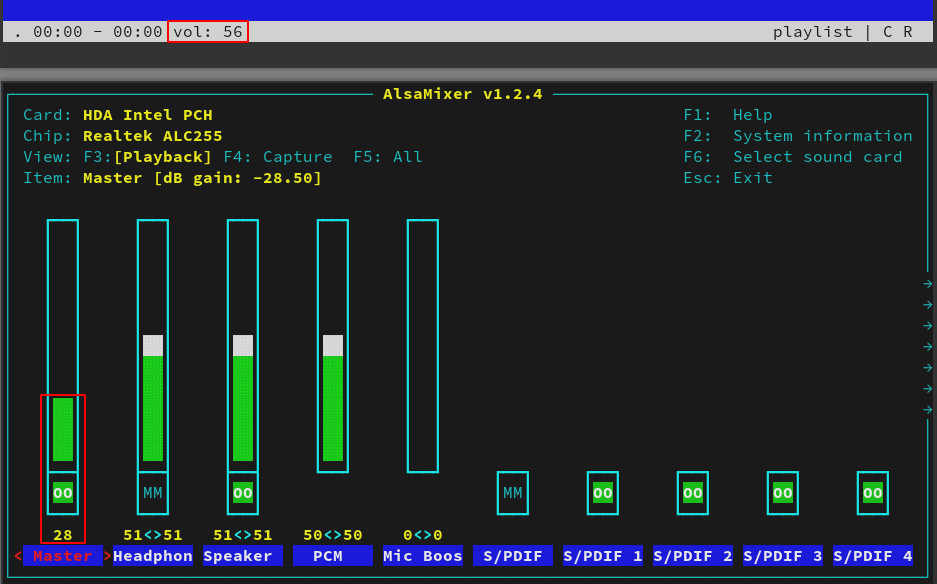 The volume numbers above synchronize from 0 to 100 but don't equal.
I installed pulseaudio/pulseaudio-alsa/pulsemixer when I read the arch wiki(some may not be needed),and then type pulsemixer in terminal.Then, I see:
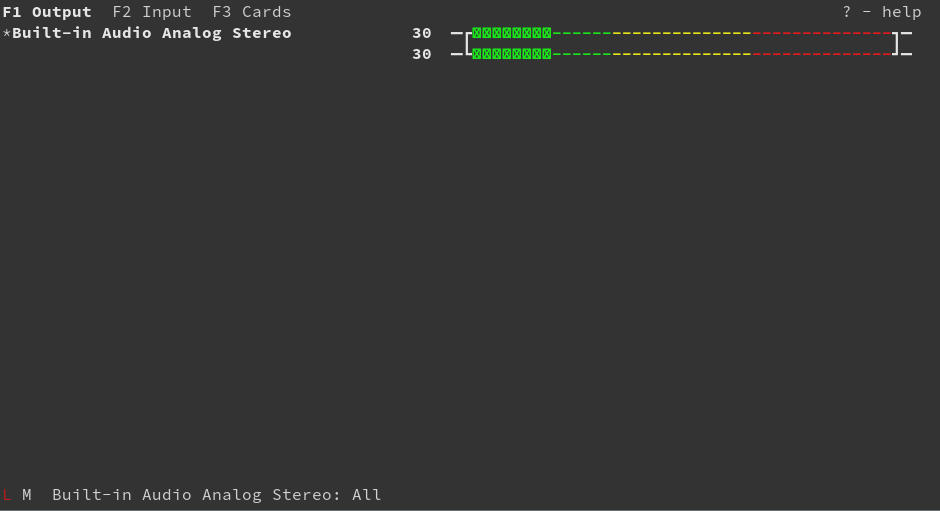 Now, I have no idea what to do next.It should be that I'm not ready to configure the sound system in Linux.
comment created time in 6 days
issue commentcmus/cmus
Did you select the playlist by hitting enter?
I tried to reproduce this, and initially thought that it wasn't working, but once I selected a playlist with enter, cmus-remote -c successfully cleared it.

comment created time in 6 days
issue commentcmus/cmus
Can't change the volume,which keeps being the biggest!
Does anything happen when you press - (should decrease volume) or +/= (should increase volume).
Can you change the volume with alsamixer?
If you use pulseaudio does the issue still happen?
comment created time in 6 days
issue openedcmus/cmus
Can't change the volume,which keeps being the biggest!
<!-- Please fill the following if you have found an issue, delete if otherwise. -->
uname -a:
Linux ykc 5.9.8-arch1-1 #1 SMP PREEMPT Tue, 10 Nov 2020 22:44:11 +0000 x86_64 GNU/Linux
cmus --version:
cmus v2.8.0
Copyright 2004-2006 Timo Hirvonen
Copyright 2008-2016 Various Authors
cmus --plugins:
Input Plugins: /usr/lib/cmus/ip
  flac:
    Priority: 50
    File Types: flac fla
    MIME Types:
  vorbis:
    Priority: 50
    File Types: ogg oga ogx
    MIME Types: application/ogg audio/x-ogg
  modplug:
    Priority: 50
    File Types: mod s3m xm it 669 amf ams dbm dmf dsm far mdl med mtm okt
ptm stm ult umx mt2 psm
    MIME Types:
  cue:
    Priority: 50
    File Types:
    MIME Types: application/x-cue
  wav:
    Priority: 50
    File Types: wav
    MIME Types:
  ffmpeg:
    Priority: 30
    File Types: aa aac ac3 aif aifc aiff ape au fla flac m4a m4b mka mkv m
p+ mp2 mp3 mp4 mpc mpp ogg shn tak tta wav webm wma wv
    MIME Types:

Output Plugins: /usr/lib/cmus/op
  pulse
  alsa
  oss
  jack
When I change the volume, cmus will do it without any effect just changing the number.
The volume keep being the biggest,not to be bigger or smaller.But,I can just watch video on Chromium and can change the volume there.
I set the sound system from arch wiki,which is alsa and some basic configuration.And I use pacman to install cmus.
created time in 7 days
PR opened cmus/cmus
There is a small typo in expr.c.
Should read special rather than speacial.
pr created time in 7 days
issue openedcmus/cmus
<!-- Please fill the following if you have found an issue, delete if otherwise. -->
uname -a:
archlinux 5.9.8-arch1-1 #1 SMP PREEMPT Tue,10 Nov 2020 22:44:11 +0000 x86_64 GNU/Linux
cmus --version:
2.8.0
cmus --plugins:
none
clear command can't clear playlist
created time in 11 days
issue commentcmus/cmus
cmus closes after re-attaching HDMI cable to inactive output.
I suspect when the cable is disconnected, the HDMI audio output is removed, then when the cable is reconnected, an HDMI output is added, which somehow causes cmus to quit, even though I'm using my motherboard's Starship/Mantisse HD Audio Controller.

comment created time in 12 days
issue openedcmus/cmus
Crash after re-attaching HDMI cable to inactive output.
uname -a:
Linux myhostname 5.4.72-gentoo #1 SMP Tue Oct 27 11:52:50 -00 2020 x86_64 AMD Ryzen 7 3700X 8-Core Processor AuthenticAMD GNU/Linux
cmus --version:
cmus v2.8.0
Copyright 2004-2006 Timo Hirvonen
Copyright 2008-2016 Various Authors
cmus --plugins:
Input Plugins: /usr/lib64/cmus/ip
  mad:
    Priority: 55
    File Types: mp3 mp2
    MIME Types: audio/mpeg audio/x-mp3 audio/x-mpeg
  cue:
    Priority: 50
    File Types:
    MIME Types: application/x-cue
  vorbis:
    Priority: 50
    File Types: ogg oga ogx
    MIME Types: application/ogg audio/x-ogg
  flac:
    Priority: 50
    File Types: flac fla
    MIME Types:
  wav:
    Priority: 50
    File Types: wav
    MIME Types:

Output Plugins: /usr/lib64/cmus/op
  pulse
I have 2 GPUs, one attached to my host system, and one passed through via VFIO to a libvirtd VM.
My host WM, sway, is configured to idle the output after 10 minutes.
Previously, I had a cable from each GPU to my monitor, and used the monitor buttons to switch. This worked without issues.
Recently, to save the inconvenience of navingating the monitor menus, I switched to an HDMI switch (so a Y configuration) to outpus with less effort.
Since doing this, when switching from the guest output back to the host output, after the host output has beeen idled causes cmus to crash.
I built sway with the debug USE flag, and generated a cmus-debug.txt:
...
do_open:
  frames: 128939, br: 102944 b/s, sr: 32000 Hz, ch: 2, layer: 3, joint stereo: 1
  dual channel: 0, vbr: 1, duration: 4641.8 s, xing: 1
ip_setup: pcm convert: scale=1 convert=0 convert_in_place=0
_pa_context_running_cb: pulse: context state has changed to PA_CONTEXT_TERMINATED
_pa_stream_running_cb: pulse: stream state has changed to PA_STREAM_TERMINATED
_pa_context_running_cb: pulse: context state has changed to PA_CONTEXT_CONNECTING
_pa_context_running_cb: pulse: context state has changed to PA_CONTEXT_AUTHORIZING
_pa_context_running_cb: pulse: context state has changed to PA_CONTEXT_SETTING_NAME
_pa_context_running_cb: pulse: context state has changed to PA_CONTEXT_READY
_pa_stream_running_cb: pulse: stream state has changed to PA_STREAM_CREATING
_pa_stream_running_cb: pulse: stream state has changed to PA_STREAM_READY
main_loop: vol changed
created time in 12 days
startedmahkoh/spotblock
started time in 13 days
startedmahkoh/posix.rs
started time in 17 days
startedmahkoh/uapi
started time in 23 days
issue commentcmus/cmus
Bit Perfect Playback (dsp.alsa.resample=false)
@nefthy
The Xonar card advertises support for 24bit audio (https://www.asus.com/us/Essence-Hi-Fi-Audio/Xonar_Essence_STX/specifications/). Although I can't playback 24but audio files unless I use "plughw:0,0", which zero pads it to 32bit for some reason. I remember using arecord to check the available modes, and it listed "S16_LE" and "S32_LE" for my Xonar card. My new Topping D50s which supports 32bit, zero pads everything to 32bit audio, and only lists "S32_LE".

comment created time in a month
issue commentcmus/cmus
Bit Perfect Playback (dsp.alsa.resample=false)
On my Xonar Essence card, I could use "hw:0,0" with 16bit audio, but needed to use "plughw:0,0" for 24bit files. if you do not use plughw alsa can only playback bit depths and sampling rates directly supported by the hardware. In your case 24 bit is not supported in hardware, so you'd need plughw to convert that something your card can play.
comment created time in a month
issue commentcmus/cmus
Bit Perfect Playback (dsp.alsa.resample=false)
@fdf92441 The big setting that was causing that issue, is "dsp.alsa.device". So heres whats going on, depending on what sound card/DAC you have, what it does is use "zero padding" to playback 24bit audio using 32-bit. My last sound card, the ASUS Xonar Essence STX had a burr brown DAC, i cant remember which one, but it played 24bit audio at 32bits using "zero padding".
My new Topping D50s has a ESS Sabre DAC, and even zero pads 16bit audio to 32bit. This is still technically bit perfect, so its nothing to worry about. Its just very odd. On my Xonar Essence card, I could use "hw:0,0" with 16bit audio, but needed to use "plughw:0,0" for 24bit files.
The best way to test your DAC if it uses zero padding, and for which bits, is to play files with aplay. Using "aplay", are you talking directly to your sound card. Read the man page for aplay (man aplay) for more info. I do remember using the "--disable-resample" launch option for aplay to attempt to play audio files back without zero padding.
comment created time in a month
issue commentcmus/cmus
Bit Perfect Playback (dsp.alsa.resample=false)
Now it works, but I had to put this setting.
output_plugin=alsa dsp.alsa.device=default mixer.alsa.channel=Master mixer.alsa.device=default softvol=false
I think with this I no longer have a bitperfect.
But I have a problem that haunts me for a long time.
Whenever I turn on my computer I must add my music directory. Because all my music is on an HHD hard drive and Ubuntu is on an SSD. And I don't know how to prevent this from happening.
comment created time in a month
issue commentcmus/cmus
Bit Perfect Playback (dsp.alsa.resample=false)
@fdf92441 Which setting?
comment created time in a month
issue commentcmus/cmus
Bit Perfect Playback (dsp.alsa.resample=false)
Try to add this setting but damage my cmus and now I get this error: Error: opening audio device: No such file or directory.
comment created time in a month
issue commentcmus/cmus
Add the ability to speed up and slow down replay of a track without changing pitch
The flying spaghetti monster brought me here.

comment created time in a month
pull request commentcmus/cmus
Disable mad plugin per default
Seeking code should be fixed.
This is not true. I can't see any commit since 2.8.0 that addresses this issue and I have just built from master, having the exact same issue as before.
./cmus --version
cmus v2.8.0-24-gd1290d5
Copyright 2004-2006 Timo Hirvonen
Copyright 2008-2016 Various Authors
./cmus --plugins
Input Plugins: /home/m4110c/opt/cmus/lib/cmus/ip
  mad:
    Priority: 55
    File Types: mp3 mp2
    MIME Types: audio/mpeg audio/x-mp3 audio/x-mpeg
  mp4:
    Priority: 50
    File Types: mp4 m4a m4b
    MIME Types:
  cue:
    Priority: 50
    File Types:
    MIME Types: application/x-cue
  wav:
    Priority: 50
    File Types: wav
    MIME Types:
  cdio:
    Priority: 50
    File Types:
    MIME Types: x-content/audio-cdda
  aac:
    Priority: 50
    File Types: aac
    MIME Types: audio/aac audio/aacp
  vorbis:
    Priority: 50
    File Types: ogg oga ogx
    MIME Types: application/ogg audio/x-ogg
  flac:
    Priority: 50
    File Types: flac fla
    MIME Types:
  ffmpeg:
    Priority: 30
    File Types: aa aac ac3 aif aifc aiff ape au fla flac m4a m4b mka mkv mp+ mp2 mp3 mp4 mpc mpp ogg opus shn tak tta wav webm wma wv
    MIME Types:

Output Plugins: /home/m4110c/opt/cmus/lib/cmus/op
  pulse
  alsa
  oss
  ao
Disabling libmad is probably a bad idea: even though there are issues with it, it is really stable. FFMPEG is much more likely to break random stuff from time to time, which is a maintenance nightmare and not a good default plugin IMO.
After reading some issues I get it that you don't like ffmpeg (which I'm totally fine with) but please fix this fast-forward seek somehow. Cmus is not an option anymore, otherwise.

comment created time in a month
issue commentcmus/cmus
Another "fix" is to convert the file with ffmpeg. This does not rencode or change the file in any way.
ffmpeg -i input.opus -c copy output.ogg

comment created time in a month
issue closedmahkoh/dotfiles
Hi @mahkoh,
I would like to request a transfer of the clock crate on crates.io so that I can take over ownership.
There doesn't appear to be any contact info, and I have reached out to the crates.io team but haven't received a response so forgive me for raising an issue here.
closed time in a month
joshleeb
issue commentmahkoh/dotfiles
Looks like this has just been actioned by the crates.io team :tada:
comment created time in a month
startedmahkoh/trait-union
started time in a month
issue openedmahkoh/dotfiles
Hi @mahkoh,
I would like to request a transfer of the clock crate on crates.io so that I can take over ownership.
There doesn't appear to be any contact info, and I have reached out to the crates.io team but haven't received a response so forgive me for raising an issue here.
created time in a month
startedmahkoh/trait-union
started time in a month