








formium/formik 25080
Build forms in React, without the tears 😭
🖥 CLI for finding good first issues
Bootstrap Extension Features - Colors, Loaders and more to come.
Colors Palette
Clean :shower: all node dependencies i.e. node_modules
BLOG without database
akansharsh/akansharsh.github.io 0
Our Wedding Website
IndexedDB Examples
Web Workers Examples
Facilitating joint collaboration amongst the TSC and CommComm
starteddai-shi/use-context-selector
started time in 2 days
issue closedformium/formik
How do I prevent a `@typescript-eslint/unbound-method` error when using `useFormikContent()`?
I have just updated some @typescript-eslint modules to the latest versions:
"@typescript-eslint/eslint-plugin": "3.4.0", "@typescript-eslint/parser": "3.4.0", and am now getting the following error
22:9 error Avoid referencing unbound methods which may cause unintentional scoping of this @typescript-eslint/unbound-method
for the code
const { setFieldTouched } = useFormikContext(); which is in the same form as in the Formik docs
How do I get around this error?
closed time in 3 days
brendangibson
issue commentformium/formik
How do I prevent a `@typescript-eslint/unbound-method` error when using `useFormikContent()`?
Closing as should be fixed with the latest release
comment created time in 3 days
issue closedformium/formik
Calling formik.submitForm() resolves with undefined
🐛 Bug report
Current Behavior
Calling formik.submitForm() promise manually resolves always with undefined regardless of what my handler returns.
Expected behavior
Promise throw reject in case of validation error
Reproducible example
https://codesandbox.io/s/formik-codesandbox-template-forked-yrdh4?file=/index.js
Suggested solution(s)
it happens because combinedErrors is not an Error and it doesn't throw it.
Additional context
temp workaround: use validateForm to check if there are any errors.
the issue discussed more there https://github.com/formium/formik/issues/2057
Your environment
| Software | Version(s) |
|---|---|
| Formik | 2.2 |
| React | 16.13.1 |
| Browser | chrome 86 |
closed time in 4 days
oleksii-ivanov
issue commentformium/formik
Calling formik.submitForm() resolves with undefined
Closing in favour of - https://github.com/formium/formik/issues/2057
comment created time in 4 days
issue commentformium/formik
Manually calling formik.submitForm() resolves with undefined
re-opening as one more issue is reported - https://github.com/formium/formik/issues/2831

comment created time in 4 days
pull request commentformium/formik
Add generic type to FieldArray types.
Hey @IronSean sorry for the late response, can you please rebase with the latest master and also resolve the conflict
would be pleasured to review

comment created time in 4 days
issue commentformium/formik
Right sub-navigation not fully responsive
Hey, @benjaminsuch thanks for raising this issue. Would love if you can raise a PR fixing this

comment created time in 4 days
issue commentformium/formik
getIn returns given value instead of fallback value when path is undefined
weird 🤔 no clue why the PR was closed. cc @jaredpalmer

comment created time in 4 days
Pull request review commentClearTax/engines-ok
suggestion: prefer global / one-off execution
package.json ```js "scripts": {- "preinstall": "npm i engines-ok@latest -D && engines-ok"+ "preinstall": "npx engines-ok"
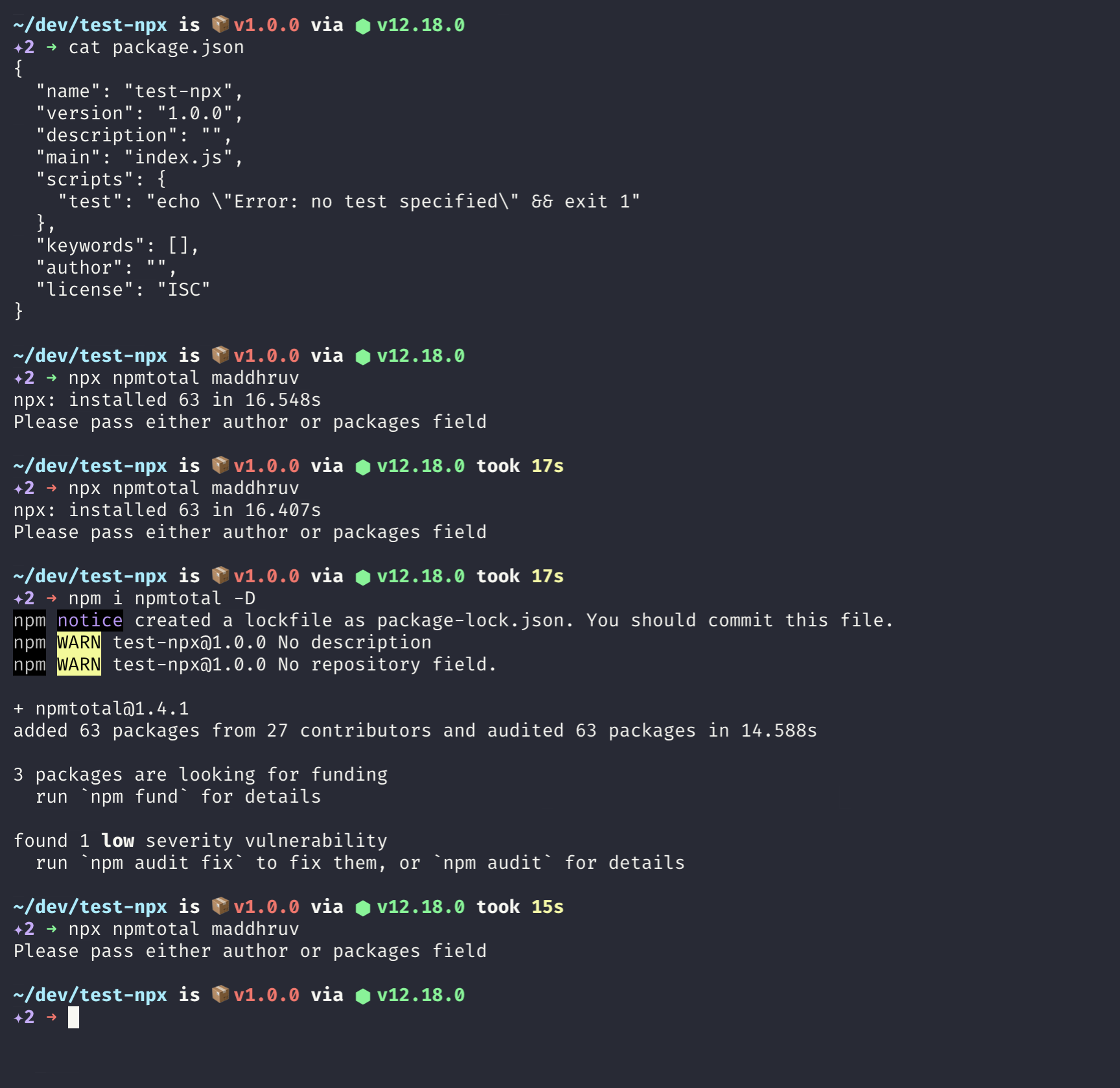
As you can see, in the above screenshot, the package test-npx doesn't has npmtotal as a devDep, and when I run npx npmtotal it takes the same 17s time consecutively (note: npmtotal in not globally installed, because it is not supposed to be), but when I added the package as a devDep (native to the package test-npx) and ran npx npmtotal it took less than a second.
My point here, installing engines-ok as a devDep make sure that the dependency is available to the package and there is no need for npx to fetch it (from registry) everytime.
installing this every time a CI system
I think for CIs, this can be acceptable to install a small package before running anything else to work with, suppose if engines-ok is not a dependency for the package, and maybe we are running it in other commands as well (prebuild/prepublish) than again npx will try to fetch it
packaging system runs an npm install
I am not sure about this, just a question - preinstall won't run when I do npm i package which has engines-ok as preinstall hook. will it?

comment created time in 4 days
Pull request review commentClearTax/engines-ok
suggestion: prefer global / one-off execution
package.json ```js "scripts": {- "preinstall": "npm i engines-ok@latest -D && engines-ok"+ "preinstall": "npx engines-ok"
I would still emphasis on installing the package locally as it will have a reference in the package.json/ package dependencies. why am I saying that.
Let's take a case - the project is being forked by someone (viz A), not familiar with engines-ok and the project doesn't has engines-ok as a devDependency, so every time the person A, ends up running preinstall (hook) he needs to keep on fetching engines-ok, because neither is engines-ok installed as a global package nor as a devDependency.
comment created time in 5 days
issue commentformium/formik
Update Local Setup Tutorial in v2.1.4 Docs
Hey @auginator would you like to raise a PR for the same? would be really appreciated.

comment created time in 5 days
issue closedformium/formik
How to use 'when' with validateschema?
❓Question
In using Yup independently of Formik, I can pass options during the validation process. Something like
yupSchema.validate(sampleObjectToValidate, {context: {options})
This is very handy when you use 'when' (want to conditionally change your schema with different code paths). How do I pass this context when using formik's validationSchema.
closed time in 5 days
Enzyoh
issue commentformium/formik
How to use 'when' with validateschema?
You can find more info on using yup.when here - https://www.npmjs.com/package/yup#mixedwhenkeys-string--arraystring-builder-object--value-schema-schema-schema
And also the validationSchema accepts a yup schema directly, more info - https://formik.org/docs/api/withFormik#validationschema-schema--props-props--schema
Feel free to re-open the issue, if you need more help around this.
comment created time in 5 days
issue closedformium/formik
Reference error using validationSchema with "hyphen-name"
🐛 Bug report
Current Behavior
<!-- If applicable, add screenshots to help explain your problem. -->
A reference error is thrown when using validationSchema feature with a field's name containing an hyphen.
Expected behavior
<!-- A clear and concise description of what you expected to happen. --> I wanted my validation process to express all fields as required as soon as one of the three fields is set. I inspired myself from this example.
Reproducible example
<!-- Use one of the Codesandbox templates: --> Just set any field in the following Codesandbox example.
If you pause on caught exceptions with Chrome devtool, you can see those information:
(function anonymous(data) {
  return (data.birthdate-year) // ReferenceError: year is not defined
})
I wonder why it's not data["birthdate-year"] instead, but I have no clue how it happened.
Here's the call stack:

Here's the error:
Uncaught ReferenceError: year is not defined
    at Reference.eval [as getter] (eval at module.exports.getter (index.js:NaN), <anonymous>:3:24)
    at Reference.getValue (Reference.js:41)
    at eval (Condition.js:56)
    at Array.map (<anonymous>)
    at Condition.resolve (Condition.js:55)
    at eval (mixed.js:157)
    at Array.reduce (<anonymous>)
    at NumberSchema.resolve (mixed.js:156)
    at eval (object.js:155)
    at Array.forEach (<anonymous>)
    at ObjectSchema._cast (object.js:145)
    at ObjectSchema._validate (mixed.js:215)
    at ObjectSchema._validate (object.js:187)
    at ObjectSchema.validate (mixed.js:260)
    at validateYupSchema (formik.cjs.development.js:944)
    at eval (formik.cjs.development.js:336)
    at eval (formik.cjs.development.js:380)
    at eval (formik.cjs.development.js:396)
    at Object.unstable_runWithPriority (scheduler.development.js:818)
    at eval (formik.cjs.development.js:395)
    at eval (formik.cjs.development.js:1033)
    at eval (formik.cjs.development.js:647)
    at eval (formik.cjs.development.js:1033)
    at eval (formik.cjs.development.js:668)
    at eval (formik.cjs.development.js:676)
    at HTMLUnknownElement.callCallback (react-dom.development.js:336)
    at Object.invokeGuardedCallbackDev (react-dom.development.js:385)
    at invokeGuardedCallback (react-dom.development.js:440)
    at invokeGuardedCallbackAndCatchFirstError (react-dom.development.js:454)
    at executeDispatch (react-dom.development.js:584)
    at executeDispatchesInOrder (react-dom.development.js:609)
    at executeDispatchesAndRelease (react-dom.development.js:713)
    at executeDispatchesAndReleaseTopLevel (react-dom.development.js:722)
    at forEachAccumulated (react-dom.development.js:694)
    at runEventsInBatch (react-dom.development.js:739)
    at runExtractedPluginEventsInBatch (react-dom.development.js:880)
    at handleTopLevel (react-dom.development.js:5807)
    at batchedEventUpdates$1 (react-dom.development.js:24368)
    at batchedEventUpdates (react-dom.development.js:1419)
    at dispatchEventForPluginEventSystem (react-dom.development.js:5898)
    at attemptToDispatchEvent (react-dom.development.js:6014)
    at dispatchEvent (react-dom.development.js:5918)
    at unstable_runWithPriority (scheduler.development.js:818)
    at runWithPriority$2 (react-dom.development.js:12130)
    at discreteUpdates$1 (react-dom.development.js:24384)
    at discreteUpdates (react-dom.development.js:1442)
    at dispatchDiscreteEvent (react-dom.development.js:5885)
Suggested solution(s)
<!-- How could we solve this bug? What changes would need to made to Formik? --> The error disappear when I replace the key from "birthdate-year" to "birthdateYear"
Additional context
<!-- Add any other context about the problem here. --> It is really strange that only the "year" key produce a bug, because "day" and "month" keys also have an hyphen in their name.
Your environment
<!-- PLEASE FILL THIS OUT -->
| Software | Version(s) |
|---|---|
| Formik | 2.0.4 |
| React | 16.11.0 |
| Browser | Google Chrome - Version 77.0.3865.90 (Official Build) (64-bit) |
| npm/Yarn | yarn 1.19.1 |
| Operating System | Ubuntu Bionic |
N.B. It's possibly just a misuse of myself with the two libraries. I apologize in advance if this is the case.
Thanks in advance.
closed time in 5 days
RemyMachado
issue commentformium/formik
Reference error using validationSchema with "hyphen-name"
Hey @RemyMachado this seems to be an issue with yup, request you to please raise an issue at their end.
Always happy to help otherwise
comment created time in 5 days
issue closedformium/formik
getSelectedValues throws an error when using a select-multiple
🐛 Bug report
Current Behavior
getSelectedValues throws an error because options is a HTMLOptionsCollection and not an array. getSelectedValues tries to do a .filter on the options, but since it isn't an array, that call fails.
Expected behavior
I would expect the function to complete without error. Thereby making select multiple lists work properly.
Reproducible example
This can actually be demonstrated by running the Checkbox example form from the examples folder in Github
Suggested solution(s)
If you convert the options object to an array, it works properly. The following code works, but there may be a better way:
return Array.apply(null, options).filter(function (el) {
    return el.selected;
  }).map(function (el) {
    return el.value;
  });
Additional context
None
Your environment
<!-- PLEASE FILL THIS OUT -->
| Software | Version(s) |
|---|---|
| Formik | 2.0.1-rc.13 |
| React | 16.9.0 |
| TypeScript | Not using |
| Browser | All |
| npm/Yarn | 6.11.3 |
| Operating System | OSX - Mojave |
closed time in 5 days
bmccord
issue commentformium/formik
getSelectedValues throws an error when using a select-multiple
With the recent edition, the getSelectedValues accepts an array a param and should now cause any problem. I see you are using formik rc which is not supposed to be a stable release, can you try with the latest formik release (probably 2.2.0)
comment created time in 5 days
issue closedformium/formik
Hi there!
I might have found a bug, let me describe it.
Steps
- Open the following form https://codesandbox.io/s/formik-example-yyo9j with FieldArray used and validationOnBlur=false and validateOnChange=false set on the Formik.
- Focus the text input field.
- Click the "Add new" that adds a value using push() to the FieldArray.
Result Validation is triggered and an error for the email field is shown.
Expected Validation should not be triggered and email field error should not be shown.
Could you please check that? Thanks.
closed time in 5 days
f3ngi
issue commentformium/formik
I see, you are using very old and outdated react and formik versions, would recommend you to upgrade your react to 16.8 and formik to the latest stable
comment created time in 5 days
issue closedformium/formik
Confusing validate schema behavior
🐛 Bug report
Current Behavior
validateYupSchema casts empty strings to undefined. Moreover, it does so inconsistently (#1125, #1520)
Expected behavior
I have a yup schema which treats empty strings and undefined values differently. I had to debug and found this out. So technically validationSchema prop is not strictly yup schema. Why is that so? Current workaround is to use your own validateYupSchema but without this casting.
<!-- A clear and concise description of what you expected to happen. -->
Reproducible example
<!-- Use one of the Codesandbox templates: -->
<!-- Formik template: https://codesandbox.io/s/91q6rxmmrp -->
<!-- withFormik template: https://codesandbox.io/s/437wy20rx4 -->
Suggested solution(s)
I think validateYupSchema should pass values to yup without alterations. Yup is totally capable of dealing with empty strings, undefined values and nulls on its own. Or at least this unexpected behavior should be mentioned in docs.
<!-- How could we solve this bug? What changes would need to made to Formik? -->
Additional context
<!-- Add any other context about the problem here. -->
Your environment
<!-- PLEASE FILL THIS OUT -->
| Software | Version(s) |
|---|---|
| Formik | ^2.0.1-rc.12 |
| React | |
| TypeScript | |
| Browser | |
| npm/Yarn | |
| Operating System |
closed time in 5 days
doomsower
issue commentformium/formik
Confusing validate schema behavior
Hey @doomsower can you try with the latest stable release, and if problem still persists, revert back so that we can help.
Closing for now
comment created time in 5 days
issue closedformium/formik
Reset form not working when call this.props
I want to reset form in componentWillReceiveProps with code " this.props.resetForm();" but not any reset.
`import React, { Component } from "react"; import { connect } from "react-redux"; import { Link } from "react-router-dom"; import { Formik, withFormik } from "formik"; import * as yup from "yup"; import moment from "moment"; import { Button, Form, Input, Select, Row, Col, message, Spin, DatePicker, Transfer, Alert } from "antd"; import { GeneralStyledContent } from "../../../../styled/common-styled"; import * as actions from "../actions"; import * as uiActions from "../../../../modules/ui/actions";
const FormItem = Form.Item; const Option = Select.Option;
class Forms extends Component { state = { name: "", code: "" }; componentDidMount() { if (this.props.match.params.id != undefined) { this.props.getLocation(this.props.match.params.id); } else { // console.log("test"); }
/// console.log(this.props);
}
componentWillReceiveProps = nextProps => { if (nextProps.location.dataLocation.name.length > 0) { const { dataLocation: { name, code } } = nextProps.location; this.setState({ name, code }); }
if (nextProps.location.status != this.props.location.status) {
  this.props.setFlashMessage("เพิ่มสถานที่", nextProps.location.status);
  //this.props.resetForm();
  //this.props.setValues({ ...this.props.values, name: "" });

  this.props.resetForm();//can' not reset form

  // console.log(this.props);
}
};
render() { // const { // dataLocation: { name, code } // } = this.props.location;
const { createLocation, updateLocation, getLocationByID } = this.props;

const formItemLayout = {
  labelCol: {
    xs: { span: 24 },
    sm: { span: 8 }
  },
  wrapperCol: {
    xs: { span: 24 },
    sm: { span: 10 }
  }
};

return (
  <GeneralStyledContent>
    {this.props.flash && (
      <Alert
        message="Warning Text Warning Text Warning TextW arning Text Warning Text Warning TextWarning Text"
        type="warning"
        closable
      />
    )}

    <h3>Create Location</h3>
    <Spin spinning={this.props.location.locationLoading} size="large">
      <Formik
        enableReinitialize={true}
        initialValues={{
          name: this.state.name,
          code: this.state.code
        }}
        validationSchema={yup.object().shape({

        })}
        onSubmit={(values) => {
          const loading = true;
          if (this.props.match.params.id != undefined) {
            this.props.updateLocation(values, loading);
          } else {
            this.props.createLocation(values, loading);
          }
        }}
        render={({
          values,
          errors,
          touched,
          handleChange,
          handleBlur,
          handleSubmit,
          handleFocus,
          setFieldValue,
          resetForm
        }) => (
          <Form onSubmit={handleSubmit}>
            <FormItem
              {...formItemLayout}
              label="Name"
              validateStatus={touched.name && errors.name && "error"}
              help={touched.name && errors.name}
            >
              <Input
                placeholder="name"
                name="name"
                onChange={handleChange}
                onBlur={handleBlur}
                value={values.name}
              />
            </FormItem>

            <FormItem
              {...formItemLayout}
              label="Code"
              validateStatus={touched.code && errors.code && "error"}
              help={touched.code && errors.code}
            >
              <Input
                placeholder="code"
                name="code"
                onChange={handleChange}
                onBlur={handleBlur}
                value={values.code}
              />
            </FormItem>
            <FormItem>
              <Row gutter={8}>
                <Col span={3} offset={8}>
                  <Button type="defualt" block>
                    <Link to="/location">Cancel</Link>
                  </Button>
                </Col>
                <Col span={3}>
                  <Button type="primary" htmlType="submit" block>
                    Save
                  </Button>
                </Col>
              </Row>
            </FormItem>
          </Form>
        )}
      />
    </Spin>
  </GeneralStyledContent>
);
} } const mapStateToProps = ({ location, auth: { profile }, ui: { flash } }) => ({ location, profile, flash });
const mapDispatchToProps = { createLocation: actions.createLocation.request, updateLocation: actions.updateLocation.request, getLocation: actions.getLocationByID.request, setFlashMessage: uiActions.setFlashMessage };
export default connect( mapStateToProps, mapDispatchToProps )(withFormik({})(Forms)); `
closed time in 5 days
wkpuy
issue commentformium/formik
Reset form not working when call this.props
closing due to long in-activity
comment created time in 5 days
issue closedformium/formik
Clearing individual field throws Warning
❓Question
Is there a way I can conditionally clear out a field based on two radio button group of 2 items?
The first item renders the field. Clicking the seond one should remove the field, along with the content of the field. I did the follow formikProps.setFieldValue("FieldName", ""), when the second button is clicked.
But this is throwing the following warning:
Warning: Cannot update during an existing state transition (such as withinrender). Render methods should be a pure function of props and state.
closed time in 5 days
ZeroDarkThirty
issue commentformium/formik
Clearing individual field throws Warning
closing due to long inactivity. If the problem still persists, we recommend you to use the new hooks API for setFieldValue
comment created time in 5 days
issue closedformium/formik
`isObject` should be defined to narrow the type automatically
isObject should be defined to narrow the type automatically, like:
type NonObject = string | number | boolean | symbol | null | undefined;
const isObject = <T extends object>(maybeObject: NonObject | T): maybeObject is T =>
    typeof value === 'object'; // or whatever isObject's test really is, maybe check for array?
// then
if (isObject(propsOrFieldName)) { // propsOrFieldName is inferred as FieldAttributes<Val> }
ref: https://stackoverflow.com/questions/54192291/generic-type-narrowing-via-the-is-operator-and-conditional-types
Originally posted by @johnrom in https://github.com/jaredpalmer/formik/pull/1555
closed time in 5 days
johnrom
issue commentformium/formik
`isObject` should be defined to narrow the type automatically
closing as the PR is already merged 💯
comment created time in 5 days
issue closedformium/formik
My formik component has a enableReinitalize property and my form has initial values set as follows:
initialValues={{
      firstName: userInfo.firstName || '',
      lastName: userInfo.lastName || '',
      companyName: userInfo.companyName || ''
    }}
userInfo is coming from redux.
In my handle submit function I'm making an API call. If the call succeeds everything is good, however if the call fails I need to add errors to the fields (these are returned by the API).
In my catch method I'm trying to do formik.setFieldError, however the form does not show these errors because it is prestine since the userInfo has also changed. Any way to force the form to show these errors?
closed time in 5 days
maganuk
issue commentformium/formik
Hey @maganuk setting enableReinitalize will cause the whole form to reset when the props change. There is no way to keep the errors safely stored somewhere and represent again.
Closing as there is no workaround or way to do this right now, feel free to re-open for further discussions
comment created time in 5 days
issue closedformium/formik
Warning in console when testing Formik v2 with RTL,
🐛 Bug report
Current Behavior
The Formik v2 is showing warnings in the console when testing with react-testing-library. This is not a thing on Formik v1.
Expected behavior
The console should be clear.
Reproducible example
The same component tested in the same way in both versions: Formik v1.5.8 Formik v2.1.1
Your environment
<!-- PLEASE FILL THIS OUT -->
| Software | Version(s) |
|---|---|
| Formik | 2.1.1 |
| React | 16.12.0 |
| TypeScript | |
| Browser | |
| npm/Yarn | |
| Operating System |
closed time in 5 days
lourenci
issue commentformium/formik
Warning in console when testing Formik v2 with RTL,
Hey @lourenci I ran test in the formik repo, which is using @testing-library/react(react-testing-library) as testing framework, I am not able to observe any unexpected console warnings.
can you be more specific on what warnings are show, maybe share a screenshot or log snippet?
closing this for now, feel free to re-open
comment created time in 5 days
issue closedformium/formik
How to clear field after field hide?
❓Question
I have conditional input: a radio button and a text area.
If I turn radio button ON, the TextArea appears. And If I turn radio button OFF, the text area disappears.
[ ON | x ]
<TextArea>...</TextArea>

[ x | OFF ]
// no TextArea
Problem with Formik now is that if I populate a TextArea when radio button is ON, and then I hide a TextArea (click radio button OFF) I expect TextArea to be clear. But it is not. It keeps user input. So how to clear TextArea on hide?
Here is algorithm:
- Turn radio button ON.
- <TextArea> appears.
- Fill in TextArea with text
- Turn radio button OFF
- Turn radio button ON
- BOOM. Text in TextArea remains. Must disappear.
closed time in 5 days
wzup
issue commentformium/formik
How to clear field after field hide?
In formik 2, you can easily use the setValues hook to change the values of certain fields. So, in your case - where you are handling the logic for textarea hide/unhide with radio handler, just try setting the textarea value to null/empty string to achieve your expected behaviour
comment created time in 5 days
issue closedformium/formik
How to write unit test case for FieldArray?
HI
I'm writing Unit Test case for my application. I used formik in my application. I'm facing a case how to write unit test case for FieldArray Component. I'm sharing my component code, unit test case and console message:-
My component code is:-
` import React, { Component } from "react" import PropTypes from "prop-types" import Grid from "@material-ui/core/Grid" import { withStyles } from "@material-ui/core/styles" import { Field, FieldArray } from "formik" import FieldTypeSelector from "./components/FieldTypeSelector" import FormikCheckbox from "components/forms/formikFields/FormikCheckbox" import { settingStyles } from "../../../../../common/Styles" import EditableField from "./components/EditableField"
export class AdditionalCustomFields extends Component { renderFields = () => { const { classes, values } = this.props const { additionalData } = values
return (
  <FieldArray
    name="additionalData"
    render={props => {
      return additionalData.map((field, index) => {
        return (
          <Grid item md={3} key={field.id} className="pt-0">
            <Field
              name={`additionalData.${index}.flag_active`}
              component={FormikCheckbox}
              className="my-3 mb-0"
              inputprops={{ maxLength: 80 }}
            />
            <EditableField
              field={field}
              index={index}
              classes={classes}
              additionalData={additionalData}
            />
            <FieldTypeSelector
              field={field}
              index={index}
              {...this.props}
            />
          </Grid>
        )
      })
    }}
  />
)
}
render() { return ( <Grid container> {this.renderFields()} </Grid> ) } }
AdditionalCustomFields.propTypes = { classes: PropTypes.object.isRequired }
export default withStyles(settingStyles)(AdditionalCustomFields)
`
Test case for above component:- ` import React from "react" import { shallow } from "enzyme" import { AdditionalCustomFields } from "./index" import { additionalData, customFieldData} from "../../../../mockData" import { settingStyles } from "../../../../../common/Styles" import { withStyles } from "@material-ui/core/styles" import PropTypes from "prop-types"
const props = { values : { additionalData, customFieldData } }
const Composer = ({ classes}) =>{ return <AdditionalCustomFields classes={classes} {...props}/> }
Composer.propTypes = { classes: PropTypes.object.isRequired }
const Composition = withStyles(settingStyles)(Composer)
describe("Composer",()=>{ const wrapper = shallow(<Composition />).dive().find(AdditionalCustomFields).shallow()
 it("Describe CustomFieldForm component",()=>{
     console.log("sub component========>", wrapper.debug())

})
})
`
console showing
` Test Suites: 1 failed, 4 passed, 5 total Tests: 1 failed, 7 passed, 8 total Snapshots: 0 total Time: 12.114s Ran all test suites related to changed files.
PASS src/pages/Settings/components/Application/components/CustomFields/components/CustomFieldForm/component/AdditionalCustomFields/AdditionalCustomFields.test.js ● Console
console.log src/pages/Settings/components/Application/components/CustomFields/components/CustomFieldForm/component/AdditionalCustomFields/AdditionalCustomFields.test.js:31
  sub component========> <WithStyles(ForwardRef(Grid)) container={true}>
    <FormikConnect(FieldArrayInner) name="additionalData" render={[Function: render]} />
  </WithStyles(ForwardRef(Grid))>
PASS src/pages/Settings/components/Application/components/CustomFields/CustomFieldsQyery.test.js (11.856s) PASS src/pages/Settings/components/Application/components/CustomFields/CustomFields.test.js (8.129s) PASS src/pages/Settings/components/Application/components/CustomFields/components/CustomFieldForm/CustomFieldsForm.test.js PASS src/pages/Settings/components/Application/components/CustomFields/components/CustomFieldForm/component/CustomFields/CustomFields.test.js
Test Suites: 5 passed, 5 total Tests: 8 passed, 8 total Snapshots: 0 total Time: 14.029s Ran all test suites related to changed files. `
closed time in 5 days
vineet-agrawal96
issue commentformium/formik
How to write unit test case for FieldArray?
we've certain test cases already written in the repo for FieldArray can you give them a try - https://github.com/formium/formik/blob/master/packages/formik/test/FieldArray.test.tsx
comment created time in 5 days
issue closedformium/formik
isValid incorrectly set to true after checkbox change
🐛 Bug report
I'm not sure if this is a bug, or expected behaviour, but it caught me out when trying to disable a submit button when my form was invalid.
Current Behavior
When toggling a boolean checkbox, an invalid form is has a isValid prop set to true. This only happens when validateOnChange is false
Expected behavior
isValid should not be set to true upon checkbox state change
Reproducible example
https://codesandbox.io/s/formik-codesandbox-template-rykht
Your environment
<!-- PLEASE FILL THIS OUT -->
| Software | Version(s) |
|---|---|
| Formik | 1.2 |
| React | 16.5 |
| TypeScript | |
| Browser | |
| npm/Yarn | |
| Operating System |
closed time in 5 days
lnpbk
issue commentformium/formik
isValid incorrectly set to true after checkbox change
closing due to long in-activity. We would recommend you to migrate to 2.x and enjoy the benefits to using the new APIs and hooks. Also, you can follow this example for more reference - https://codesandbox.io/s/formik-v2-tutorial-final-ge1pt?file=/src/index.js
More info on migrating - https://formik.org/docs/migrating-v2
comment created time in 5 days
issue closedformium/formik
Formik bad initialValues between 2 forms react native
🐛 Bug report
The bug is explained well here https://stackoverflow.com/questions/59392023/formik-bad-initialvalues-between-2-forms
Your environment
<!-- PLEASE FILL THIS OUT -->
| Software | Version(s) |
|---|---|
| Formik | 2.0.8 |
| React | 16.9.0 |
| TypeScript | - |
| Browser | andriod/ios |
| npm/Yarn | npm |
| Operating System | macos mojave |
closed time in 5 days
anthowm
issue commentformium/formik
Formik bad initialValues between 2 forms react native
closing due to long in-activity. Feel free to re-open if the problem still persists
comment created time in 5 days
issue closedformium/formik
Better way to change value of custom input
🚀 Feature request
Introduce an easiest way to define the value of a custom field. When your custom input is not using the default event, you'll need to call setValues on the form. What if we could call setValue on field?
Current Behaviour
const CustomField = ({ name }) => {
  return (
    <Field name={name}>
      {fieldApi => {
        return <input name={name} onChange={e => fieldApi.form.setValues(name, 'value')} />;
      }}
    </Field>
  );
};
Desired Behaviour
const CustomField = ({ name }) => {
  return (
    <Field name={name}>
      {fieldApi => {
        return <input name={name} onChange={e => fieldApi.field.setValue("VALUE")} />;
      }}
    </Field>
  );
};
Suggested Solution
Add a new function to FormikBag that include this new method
Who does this impact? Who is this for?
It impacts every person creating custom input without using the default event and allows them to easily change a field value without duplication the field's name
Describe alternatives you've considered
Using the setValues on the form :(
closed time in 5 days
nicolas-besnard
issue commentformium/formik
Better way to change value of custom input
Hey @nicolas-besnard with the new setValues API you can directly pass the value as the first param
If you have not yet migrated to 2.x, please give it a shot
comment created time in 5 days
issue closedformium/formik
Not Receiving update values instead receiving all valus passed to initialValues
🐛 Bug report
Current Behavior
import React, { useState } from "react"
...
import { withFormik } from "formik"
...

import BasicInformation from "./BasicInformation/BasicInformation"

const ProductEdit = props => {
  const {
    values,
    handleSubmit,
    handleChange,
    handleBlur,
    setFieldValue,
  } = props
  return (
    <View style={{ backgroundColor: "#eee", flex: 1 }}>
          <BasicInformation
            values={values}
            handleChange={handleChange}
            handleBlur={handleBlur}
          />
          <View style={{ alignItems: "center" }}>
            <Button rounded onPress={handleSubmit} text="Update Product" />
          </View>
    </View>
  )
}

export default withFormik({
  mapPropsToValues: ({ product }) => product,
  handleSubmit: (values, ...rest) => {
    const updateValues = { ...values }
    console.log({ updateValues, rest })
  },
  enableReinitialize: true,
})(ProductEdit)


updatedValue outputs=>
{
  "comments": {
    "cjyqq5n0c000f0744moem3kng": {
      "id": "cjyqq5n0c000f0744moem3kng",
      "title": "Awesome Fabrics",
      "body": "awesome products  inodo western touch and feel good and affordable in prices.",
      "rating": 4,
      "createdAt": "2019-07-31T04:02:50.913Z",
      "user": {
        "name": "Mike Henry",
        "image": "/users/cjy41zhvg00ws0714jp9z7p84.jpg",
        "__typename": "User"
      },
      "__typename": "Comment"
    },
    "cjyqq94mc000r0744909owez6": {
      "id": "cjyqq94mc000r0744909owez6",
      "title": "Good in Fabrics",
      "body": "Good products and affordable i prices",
      "rating": 5,
      "createdAt": "2019-07-31T04:05:33.731Z",
      "user": {
        "name": "Mike Henry",
        "image": "/users/cjy41zhvg00ws0714jp9z7p84.jpg",
        "__typename": "User"
      },
      "__typename": "Comment"
    },
    "cjyqqd6mr001607444pqmkuvf": {
      "id": "cjyqqd6mr001607444pqmkuvf",
      "title": "Fabircs Good!!",
      "body": "Affordable price and fabrics good as i expected",
      "rating": 5,
      "createdAt": "2019-07-31T04:08:42.963Z",
      "user": {
        "name": "Danny's",
        "image": "/users/cjybvfx28001s0714ssf836rejpg",
        "__typename": "User"
      },
      "__typename": "Comment"
    },
    "cjyqqf1eb001i0744ux9edtiv": {
      "id": "cjyqqf1eb001i0744ux9edtiv",
      "title": "Just Good!",
      "body": "Price is good but fabrics is not too good but it is as i expected",
      "rating": 2,
      "createdAt": "2019-07-31T04:10:09.490Z",
      "user": {
        "name": "Danny's",
        "image": "/users/cjybvfx28001s0714ssf836rejpg",
        "__typename": "User"
      },
      "__typename": "Comment"
    },
    "cjyqqjdgl00280744ptono3cm": {
      "id": "cjyqqjdgl00280744ptono3cm",
      "title": "Good Products",
      "body": "Gooo facbircs touch and feel good and came as i expectedi",
      "rating": 5,
      "createdAt": "2019-07-31T04:13:31.726Z",
      "user": {
        "name": "Danny's",
        "image": "/users/cjybvfx28001s0714ssf836rejpg",
        "__typename": "User"
      },
      "__typename": "Comment"
    }
  },
  "selectedVariation": {
    "id": "cjytn7n3d009o0744q9yxp357",
    "color": "White",
    "sizes": [
      {
        "id": "cjytn7n7p009p0744bf0fc606",
        "name": "S",
        "quantity": 2,
        "__typename": "Size"
      },
      {
        "id": "cjytn7n84009q07449e1kfq3h",
        "name": "M",
        "quantity": 5,
        "__typename": "Size"
      }
    ],
    "images": [
      "/products/kurti/indo-western-kurti/white-rose-indo-western-design-kurti-rose-red.jpg",
      "/products/kurti/indo-western-kurti/white-rose-indo-western-design-kurti-rose-red.jpg"
    ],
    "__typename": "Variation"
  },
  "id": "cjympfor400hp0744jr9wuct4",
  "name": "White Rose Indo Western Design Kurti",
  "price": 2500,
  "sellerPrice": "2000",
  "discountPercent": 4,
  "returnableSKMoney": 40,
  "description": "Some Description",
  "deliveryWithin": "All Nepal",
  "isSkMoneyUsable": false,
  "category": {
    "name": "kurti",
    "__typename": "Category"
  },
  "subCategory": {
    "name": "indo-western",
    "__typename": "SubCategory"
  },
  "dispatchDuration": "WITHIN_24_HOURS",
  "deliveryDuration": "WITHIN_2_DAYS",
  "tags": [
    {
      "name": "hot",
      "__typename": "Tag"
    },
    {
      "name": "trending",
      "__typename": "Tag"
    }
  ],
  "variations": [
    {
      "id": "cjytn7n3d009o0744q9yxp357",
      "color": "White",
      "sizes": [
        {
          "id": "cjytn7n7p009p0744bf0fc606",
          "name": "S",
          "quantity": 2,
          "__typename": "Size"
        },
        {
          "id": "cjytn7n84009q07449e1kfq3h",
          "name": "M",
          "quantity": 5,
          "__typename": "Size"
        }
      ],
      "images": [
        "/products/kurti/indo-western-kurti/white-rose-indo-western-design-kurti-rose-red.jpg",
        "/products/kurti/indo-western-kurti/white-rose-indo-western-design-kurti-rose-red.jpg"
      ],
      "__typename": "Variation"
    },
    {
      "id": "cjytn7n8b009r0744z0sf0pws",
      "color": "Hot Pink",
      "sizes": [
        {
          "id": "cjytn7n8p009s07444m10h7fs",
          "name": "S",
          "quantity": 8,
          "__typename": "Size"
        },
        {
          "id": "cjytn7n8x009t07445ybb3nva",
          "name": "L",
          "quantity": 3,
          "__typename": "Size"
        }
      ],
      "images": [
        "/products/kurti/indo-western-kurti/white-rose-indo-western-design-kurti-rose-red.jpg",
        "/products/kurti/indo-western-kurti/white-rose-indo-western-design-kurti-rose-red.jpg"
      ],
      "__typename": "Variation"
    }
  ],
  "__typename": "Product"
}
Expected behavior
Since i changed only the price field so i should get
updateValeus =>
{
  price: 1850,
}
Suggested solution(s)
provide another argument to handleSubmit function that tracks only updated fields.
...
handleSubmit = (allValues, { updatedValues, props }) => {

}
...
Your environment
<!-- PLEASE FILL THIS OUT -->
| Software | Version(s) |
|---|---|
| Formik | 1.5.8 |
| React | 16.8.6 |
| TypeScript | No |
| Browser | Chrome |
| npm/Yarn | Yarn |
| Operating System | Ubuntu 18.04 |
closed time in 5 days
developerk786
issue commentformium/formik
Not Receiving update values instead receiving all valus passed to initialValues
Hey @developerk786 we highly recommend you to not share any kind of data in open github issues, if the data you shared in the above description is a sensitive information.
Although I tried reproducing the above snippet, but I am getting all the form values, which is the expected scenario, feel free to re-open if there is still an issue.
For more info, refer - https://formik.org/docs/api/withFormik#handlesubmit-values-values-formikbag-formikbag--void--promiseany
comment created time in 5 days
issue closedformium/formik
Can't resetForm within react navigation header using withFormik
🐛 Bug report
I'm trying to have resetForm from a button that is placed in the header of my application
Since react navigation accepts a component as a header, i've created a hoc for the header and im using withFormik wrapping everyone.
Current Behavior
const initialValues = {
    animal_name: '',
    species: '',
    race: '',
    coat: '',
    gender: '',
    gestation: '',
    birth_year: '',
    number_registration: '',
}
const formik = withFormik({
    mapPropsToValues: props => initialValues,
    handleSubmit: (values, actions) => {
        alert(JSON.stringify(values));
        setTimeout(() => {
            actions.setSubmitting(false);
            actions.resetForm(initialValues)
        }, 1000)
    }
});

class FilterAnimals extends React.PureComponent {
    componentWillMount() {
        this.props.navigation.setParams({
            rightButton: <Button title="limpar" onPress={() => {
                this.props.resetForm(initialValues);
            }} />,
        })
    }
    render() {
        return (
            <ScrollView>
                <MainLayout>
                    <View>
                        <Field
                            name="animal_name"
                            component={TextInput}
                            placeholder={'Nome do Animal'}
                            label="Nome do Animal"
                        />
                    </View>
                </MainLayout>
            </ScrollView >

        )
    }
}

export default formik(withHeader(
    'Filtros',
    'icon-arrow-left',
)(FilterAnimals));
import React from 'react';
import HeaderComponent from '../components/Header';
import { withNavigation } from 'react-navigation';

const withHeader = (title, icon, rightButton) => WrappedComponent => {
    class Header extends React.Component {
        render() {
            return <WrappedComponent {...this.props} />
        }
    }

    Header.navigationOptions = ({ navigation }) => {
        return {
            header: <HeaderComponent
                title={title}
                iconSize={14}
                icon={icon}
                renderRightButton={navigation.state.params &&  navigation.state.params.rightButton}
                onPress={() => navigation.goBack(null)}
            />,
            headerRight: rightButton,
        }
    }

    return withNavigation(Header);
}


export default withHeader;
<!-- If applicable, add screenshots to help explain your problem. -->
Expected behavior
I want resetForm call and clear the form when the button placed in header is triggered
<!-- PLEASE FILL THIS OUT -->
| Software | Version(s) |
|---|---|
| Formik | 1.4.0 |
| React | 16.8.3 |
closed time in 5 days
jorgefernandes
issue commentformium/formik
Can't resetForm within react navigation header using withFormik
closing due to long in-activity, please try to migrate to v2 for newer APIs and hooks
comment created time in 5 days
issue closedformium/formik
Validation on blur for certain <Field>s
Is it possible to tell a <Field> that it only validates on blur while all other <Field>s are validated by input change? As far as I can read in the documentation you can only specify it in the <Formik> element which would change it for all <Field>s
closed time in 5 days
X-Tender
issue commentformium/formik
Validation on blur for certain <Field>s
Hey @X-Tender there are currently two ways of handling onBlur events and validations:
- add the
validationOnBlurprop to theFormikprops - https://formik.org/docs/api/formik#validateonblur-boolean - and for a particular field specific handling, you can use the
onBlurhandler and call the validation method in the callback, more info here - https://formik.org/docs/api/useField#fieldinputpropsvalue
comment created time in 5 days
issue closedformium/formik
[v2] FormikBag no longer has `props`
Looking at the documentation and the code via v1.5.8 the Formik component would pass props along side the imperative methods to the action methods ex onRest. Those props were removed in the v2 refactor.
Was this intended? The documentation still states that a subset of props should be there.
Reason I ask is I currently have a need to when the onReset fires, check for dirty. If the form is dirty to then pop up a confirmation dialog for the user to accept the changes being reset and ultimately swap states of the form being editable to readonly.
closed time in 5 days
ZachStoltz
issue commentformium/formik
[v2] FormikBag no longer has `props`
closing due to long inactivity, feel free to re-open
comment created time in 5 days
issue closedformium/formik
Add a way to run Yup validation in strict mode
🚀 Feature request
Currently the code in validateYupSchema only sets the abortEarly and context options. I have a case where I need to mutate my form schema only on cast and not on every validation, so being able to set the strict option to yup validation would be useful.
Could it be possible to expose the validation options so that I can specify the validation needed? This could be as props to the formik component or with whatever method is easier.
Here is the yup docs that explain the validation options: https://github.com/jquense/yup#mixedvalidatevalue-any-options-object-promiseany-validationerror
And this is the code that would need to pass in the exposed options:
/**
 * Validate a yup schema.
 */
export function validateYupSchema<T extends FormikValues>(
  values: T,
  schema: any,
  sync: boolean = false,
  context: any = {}
): Promise<Partial<T>> {
  let validateData: FormikValues = {};
  for (let k in values) {
    if (values.hasOwnProperty(k)) {
      const key = String(k);
      validateData[key] = values[key] !== '' ? values[key] : undefined;
    }
  }
  return schema[sync ? 'validateSync' : 'validate'](validateData, {
    abortEarly: false,
    context: context,
  });
}
closed time in 5 days
PatoBeltran
issue commentformium/formik
Add a way to run Yup validation in strict mode
Not sure if exposing all the yup Options be right here, as more options can make things go complex around the core APIs.
For now, I would recommend you to use custom validation/form validation, more info here - https://formik.org/docs/guides/validation
where you can easily write custom yup validations and also pass the corresponding strict checks
comment created time in 5 days
issue closedformium/formik
Necessary to change the type of initialValues
🐛 Bug report
Current Behavior
<Formik initialValues={{ userLogin: 'user1', password: '11111', remember: false, }} .... I have error Type '{ userLogin: string; password: string; remember: boolean; }' is not assignable to type 'string'. TS2322

Expected behavior
initialValues must accept an object
Suggested solution(s)
src/types.tsx need change row 65 from
- readonly initialValues: Values; to
- readonly initialValues: FormikValues;
Additional context
Sorry if I did not by the rules. This is my first issue for a serious system.
Your environment
<!-- PLEASE FILL THIS OUT -->
| Software | Version(s) |
|---|---|
| Formik | 1.5.7 |
| React | 16.8.6 |
| TypeScript | 3.5.1 |
| Browser | Chrome 75 |
| npm/Yarn | yarn 1.12.3 |
| Operating System | Windows |
closed time in 5 days
Adisey
issue commentformium/formik
Necessary to change the type of initialValues
Hey @Adisey Can you try using the latest formik, I don't think this is an error anymore, the initialValues is of an inherit type, so object of any shape is accepted here.
Please try migrating to latest 2.x, more info here - https://formik.org/docs/migrating-v2 and let us know if there are still some issues.
Feel free to re-open
comment created time in 5 days
issue closedformium/formik
Remove non-free fonts from the repository to avoid copyright issue
I noticed that with https://github.com/jaredpalmer/formik/pull/1671 new fonts got pulled into the repository.
Looking at the contents of the .ttf fonts in website/static/fonts/, it looks like these are either derivative/modified or simply rebranded [Maison Neue typeface by Milieu Grotesque], that as far as I can see can only be obtained under a proprietary EULA, which seems to explicitly forbid modifying and/or publicly making the fonts available for download.
If this is indeed the case then it is likely that publication of these font files in this repository could constitute a copyright infringement and it would be very prudent to remove them from the repository.
closed time in 5 days
silverhook
issue commentformium/formik
Remove non-free fonts from the repository to avoid copyright issue
Closing due to long inactivity, feel free to re-open
comment created time in 5 days
issue closedformium/formik
Documentation grammar and spelling review.
📖 Documentation
Sentences like
Custom React Components will be passed FieldProps which is same render prop parameters of <Field render> plus any other props passed to directly to <Field>.
from https://jaredpalmer.com/formik/docs/api/field make the documentation hard to read.
closed time in 5 days
krichter722
issue commentformium/formik
Documentation grammar and spelling review.
With the latest documentations here - https://formik.org/docs/api/field We've more described the FieldProps and exactly which props are being passed to the child/custom react component
Custom React components will be passed onChange, onBlur, name, and value plus any other props passed to directly to <Field>.
comment created time in 5 days
issue closedformium/formik
Seems that FastField does not work properly with array field inside FieldArray
Do FastField supposed to inside FieldArray ?
            <FForm path={path} initialValues={{ barcode: '', wifiNames: ['', '', ''] }}>
                {({ handleSubmit, values }) => (
                    <FormStyled onSubmit={handleSubmit}>
                        <Flex justifyContent="space-between">
                            <Box w="200px">
                                <Field name="barcode">
                                    {props => <Input {...props} placeholder="Barcode" />}
                                </Field>
                            </Box>
                        </Flex>
                        <FieldArray name="wifiNames">
                            {() => (
                                <Map collection={values.wifiNames}>
                                    {(_, index) => (
                                        <Flex key={index} py={2} justifyContent="space-between">
                                            <Box w="200px">
                                                <FastField name={`wifiNames[${index}]`}>
                                                    {props => (
                                                        <Input {...props} placeholder="WIFI name" />
                                                    )}
                                                </FastField>
                                            </Box>
                                            <Button w="80px" className="btn btn-primary">
                                                Connect
                                            </Button>
                                        </Flex>
                                    )}
                                </Map>
                            )}
                        </FieldArray>

                        <Flex py={2}>
                            <Button
                                mx="auto"
                                w="200px"
                                type="submit"
                                className="btn btn-primary"
                                disabled={submitting}
                                loading={submitting}
                            >
                                Submit
                            </Button>
                        </Flex>
                    </FormStyled>
                )}
            </FForm>
closed time in 5 days
lishine
issue commentformium/formik
Seems that FastField does not work properly with array field inside FieldArray
Yes, @lishine you can use FastField inside a FieldArray more reference here - https://formik.org/docs/api/fastfield
Feel free to re-open if there is something unanswered
comment created time in 5 days
issue commentformium/formik
Is it possible to have a common general/default validation for all fields?
Hey @dineshrsharma can you explain a little more here, the motive behind the common validation that every field validates with
As I can look at the object you shared, I am not able to grasp a common pattern
{
    field1: "",
    field2: {
        field2A: []
        field2B: ""
    },
    field3: {
        [
            field3Ai: []
            field3Bi: ""
        ],
        [
            field3Aii: []
            field3Bii: ""
        ]
    }
}

comment created time in 5 days
issue closedformium/formik
version 2 migration guide does not include removal of setError
The version 2 migration guide does not document the removal of setError from form (not field) actions
Listing this as a breaking change may assist users migrating to version 2
https://github.com/jaredpalmer/formik/blob/master/packages/formik/MIGRATING-v2.md
closed time in 5 days
isoadam
issue commentformium/formik
version 2 migration guide does not include removal of setError
Thanks @jcolbyfisher for raising the wonderful PR 🎉 closing the issue now
comment created time in 5 days
issue commentformium/formik
Verifying mock function is called on button click when using withFormik's handleSubmit
Hey @sunilb0575 can you please verify that the rendered submit field is a button and is surely at the 0th index.

comment created time in 5 days
issue closedformium/formik
A working example of the MultistepWizard for react native
Hi, could someone provide me with a working example of the multistepwizard for react native ? https://github.com/jaredpalmer/formik/blob/master/examples/MultistepWizard.js I'm trying for a week now and still can't get a perfect result. I can go forth and back in steps. Still here are some of things I'm intending to achieve:
- update the state with value from TextInputs, pickers (custom) and other field types;
- a Yup validation of each step;
- get values after submit and process them and send them with an API call to server.
EXTRA : one step consist of inviting the user to take images with his camera, or select images from camero roll, and choose one of them as cover image (Radio button involved or a check on the selected image ?) Any help on that side would be highly appreciated too. Thanks in advance.
closed time in 5 days
sunviwo
issue commentformium/formik
A working example of the MultistepWizard for react native
Closing as being tracked in https://github.com/formium/formik/issues/1315
comment created time in 5 days
issue commentformium/formik
[docs] Improve props documentation
Hey @nicolas-besnard thanks for raising this issue and concern, yeah, I can understand the trouble when you are not able to locate certain definitions and references.
Feel 🤗 welcomed to raise a PR and write the required docs.
I would suggest you to add the section on the Field page itself - https://formik.org/docs/api/field
comment created time in 5 days
issue closedformium/formik
getIn returns given value instead of fallback value when path is undefined
🐛 Bug report
Current Behavior
If you use the following code snippet getIn(this.props.formik.values, this.props.name, undefined) and this.props.name happens to be undefined it returns the value of this.props.formik.values (here {}) instead of undefined
Expected behavior
I would expect that getIn method returns the fallback value undefined when the path is undefined
Reproducible example
Reproducible by using:
getIn(this.props.formik.values, undefined, undefined)
Suggested solution(s)
I would expect an exit early check in getIn would solve this problem e.g. if (!path) { return def }
Additional context
If you want to use getIn to check if a value at the given path in the object is available it will fail not as expected.
Your environment
<!-- PLEASE FILL THIS OUT -->
| Software | Version(s) |
|---|---|
| Formik | 1.3.1 |
| React | 16.5.2 |
| TypeScript | N/A |
| Browser | 70.0.3538.67 |
| npm/Yarn | 1.10.1 |
| Operating System | MacOS 10.14 (18A391) |
closed time in 5 days
weyert
issue commentformium/formik
getIn returns given value instead of fallback value when path is undefined
Thanks for raising this issue, I checked making path as an empty string and undefined. Seems like with undefined the default value is not returned, rather it returns the first param, which is the object passed as the first argument.
The solution you proposed seems to be working fine - if (!path) { return def } 👍
Would really appreciate a PR on this. 😄
Ref - https://github.com/formium/formik/blob/master/packages/formik/src/utils.ts#L75-L79 to add the snippet
comment created time in 5 days
issue closedformium/formik
Set default value Field Array in Formik
❓Question
My form has three text area and 1 select dropdown
For select dropdown, I used IssueSelect (as a FieldArray in Formik).
And IssueSelect, I used for both Create and Update Form.
My component looks like this:
const IssueSelect = ({ values }) => (


<FieldArray
    name="issues"
    render={({ remove, insert, push }) => (
      <div>
        {values.issues && values.issues.length > 0 ? (
          values.issues.map((iselected, index) => (
            <div key={uuidv1()}>
              <div>
                <Field
                  value={iselected.id}
                  component="select"
                  name={`issues.${index}`}
                >
                  {issues.map(issue => (
                    <option key={issue.id} value={issue.id}>
                      {issue.name}
                    </option>
                  ))}
                </Field>
              </div>

              <div>
                <button onClick={() => remove(index)}>
                  <b> - </b>
                </button>
                <button onClick={() => insert(index, issues[0].id)}>
                  <b> + </b>
                </button>
              </div>
            </div>
          ))
        ) : (
          <button onClick={() => push(issues[0].id)}>
            <b> + </b> Add new issue
          </button>
        )}
      </div>
    )}
  />
);

export default IssueSelect;
In Create Form, everything is work well.
But Update Form, I passing initialValue to IssueSelect component, it showed correctly data that I've passed. But I cannot change the option in the select box.
I've set default value by passing value={iselected.id} When I pass this props, In Create Form. It's doesn't work anymore.
You can check my codesand box to see exactly what I mean: https://codesandbox.io/s/rr1o8x3ppq
Thank You in Advance.
closed time in 5 days
phuongthuan
issue commentformium/formik
Set default value Field Array in Formik
Closing 🌂 , due to inactivity, please feel free to reopen
comment created time in 5 days
issue commentformium/formik
Values is change from array to object
Hey @kirusick I hope this is no more valid, as initialValues need to have at least one key:value pair, that refers to any of the Fields
e.g. initialValues={{foo: 'bar'}}

comment created time in 5 days
issue closedformium/formik
Values is change from array to object
If set array to initialValues. Values in props is array, but after changing values set to object.
Example: https://codesandbox.io/s/766rn18vx
closed time in 5 days
kirusick
issue closedformium/formik
can you explain this please, I don't see if it's using any component from Formik, as it takes Formik component props, also, typescript blaming me when I pass these props https://github.com/formium/formik/blob/559667c823331e8be85a50e8240e45f7c782fa3c/examples/MultistepWizard.js#L76
closed time in 5 days
mossa-Sammer
issue commentformium/formik
Closing as being tracked in https://github.com/formium/formik/issues/1315
comment created time in 5 days
issue closedformium/formik
MultistepWizard example validation broken
Current Behavior
If you edit the email field in the MultistepWizard storybook example, the favoriteColor field gets validated as well, because it is marked as touched (because pressing the Next button triggers submission).
Steps to Reproduce
Open the MultistepWizard storybook example, click the Next button, focus the email field and then blur (click elsewhere).
Expected behavior
Only the email field gets validated.
Suggested solution(s)
Only mark the registered fields as touched.
Additional context
I tried to solve it by calling forEach(field => formikBag.setFieldTouched(field, false, false), fields); in the handleSubmit method, but the form freezes for a while (it is not a very efficient solution, but it sort of works).
EDIT: Managed to find a better solution: calling formikBag.setTouched(map(F, values));, meaning that I pass the values object with each property set to false. This won't work for nested values, though. I still think that Formik should only flag the registered fields when submitting, it would be a more performant and elegant solution.
CodeSandbox Link: N/A
<!-- PLEASE FILL THIS OUT -->
- Formik Version: 1.0.1
- React Version: 16.4.1
- TypeScript Version: N/A
- Browser and Version: Google Chrome Version 67.0.3396.99 (Official Build) (64-bit)
- OS: macOS High Sierra
- Node Version: 8.11.3
- Package Manager and Version: yarn 1.7.0
closed time in 5 days
wafflepie
issue commentformium/formik
MultistepWizard example validation broken
Closing, as being tracked in https://github.com/formium/formik/issues/1315
comment created time in 5 days
issue closedformium/formik
Bug, Feature, or Question?
Feature
Current Behavior
formikBag.submitForm does not consider submit handlers that return promises.
Desired Behavior
formikBag.submitForm should return a Promise (ideally the submit handler's own Promise) so the developer can handle server API rejections accordingly in cases where it is not possible / desirable to handle them in the original submit handler.
Suggested Solutions
Would require changes in src/Formik.tsx. In it, methods submitForm and executeSubmit.
Additional Information
Commented here #42, but created a new issue for visibility as I think I have a valid use-case. To reiterate, I want to create a custom reusable form component that handles server API validation errors in a generic way.
Small example of what I want to do:
class LoginForm extends React.Component {
  async handleSubmit(values) {
    await axios.post('login', values) // no try/catch here
  }

  render() {
    return (
      <Formik
        onSubmit={this.handleSubmit}
        render={() => (
          <CustomGenericForm>
            ...stuff
          </CustomGenericForm>
        )}
      />
    )
  }
}

class CustomGenericForm extends React.Component {
  handleSubmit = async event => {
    event.preventDefault()
    const { formik } = this.context
    try {
      await formik.submitForm()
    } catch (error) {
      if (error.response && error.response.data && error.response.data.validationErrors) {
        formik.setErrors(error.response.data.validationErrors)
      } else {
        throw error
      }
    } finally {
      formik.setSubmitting(false)
    }
  }

  render() {
    const { children } = this.props
    return <form onSubmit={this.handleSubmit}>{children}</form>
  }
}

CustomGenericForm.contextTypes = {
  formik: PropTypes.object,
}
Or is there a way to achieve what I want with the current version?
<!-- PLEASE FILL THIS OUT -->
- Formik Version:1.0.0-alpha.2
- React Version: 16.2
closed time in 5 days
rhyek
issue commentformium/formik
Hey everyone, with the new edition, you can easily use async submission in formik. Ref - https://formik.org/docs/examples/async-submission
comment created time in 5 days
issue commentformium/formik
yes @revanth371 you can use any custom react component in formik Field by using the component prop

comment created time in 5 days
issue commentformium/formik
React formic conditional rendering initialValues
Hey @ChrisPotgieter as I can understand with the issue, the problem is with the re-rendering of the form when the initialValues changes, correct me if I am wrong 🙈
If that is the case, please try this prop - enableReinitialize, more info here - https://formik.org/docs/api/withFormik#enablereinitialize-boolean it can cause the form to reset with the newly provided/modified initialValues

comment created time in 5 days
issue commentformium/formik
Hey @tomaszs the FormikContext type that you are using here - formik: FormikContext; is being renamed to FormikContextType and the FormikContext actually refers to the React.Context for the form and is not a type/interface anymore.
Please migrate formik: FormikContext; to formik: FormikContextType;

comment created time in 5 days
issue commentformium/formik
a type mismatch between FormikHandlers.handleSubmit and onSubmit in types.d.ts of formik
Hey @BrutalHex ideally you don't even need to declare type for the onSubmit handler function.
I've created a basic sandbox to show that without declaring the type for onSubmit, it can still work fine - https://codesandbox.io/s/serene-bhabha-b9h77?file=/src/App.tsx:236-291
onSubmit={handleSubmit}
although, can you check the type of the handleSubmit function that you declared here.
And, when you are adding a ? in front of a property, you don't need to explicitly define undefined as a type value

comment created time in 5 days
issue commentformium/formik
Hey @revanth371 can you also confirm me the exact formik version, for better debugging, AFAIK the component Field doesn't has a prop called renderInput
comment created time in 6 days
issue commentformium/formik
Hey @mossa-Sammer it feels like the MultistepWizard example is not complete yet, the intention behind this component viz. WizardStep seems to be handling form submission - validation and error handling at each step, but is not fully implemented.
I would cc @jaredpalmer to know, if there was an intention on leaving this like this or is it in TODO
comment created time in 6 days
issue commentformium/formik
Hey @revanth371 can you brief a little bit more on the issue or maybe create an issue as a Bug, helping us understand better with reproduce-able code.
Also, I am not sure what formik-autocomplete is??
comment created time in 6 days
push eventmaddhruv/graphql-en-devtools
commit sha c4eb429ba169aa3510b1b689ed4273d40b5afb06
ci: add build job
push time in 6 days
push eventmaddhruv/graphql-en-devtools
commit sha 4c3ad77aef72aa3da2c6c5946157175201938757
fix: font-size and lint
push time in 6 days
pull request commentmaddhruv/graphql-en-devtools
Thanks @prateekvijayvergiya for this wonderful PR

comment created time in 6 days
push eventmaddhruv/graphql-en-devtools
commit sha b89e4cf7177063b218952a62be01341ab4d31947
Changed the bg color for selected div
commit sha b5e7d62797208b0f2546681915d38059cd001a4c
removed active css for operation
commit sha dc45baa4065a0154d2a8792b1478593c011bd09b
removed my bad selection
commit sha 5266b4f50be8608adb24b9de51e5822e65cf38c9
Merge pull request #2 from prateekvijayvergiya/Fix-the-selected-div-bg-color Fix the selected div bg color
push time in 6 days
PR merged maddhruv/graphql-en-devtools
Issue: When user selects any item from operation list then that item was not shown in different color, so it becomes difficult for user to identify which one is currently selected.
Changes: I have added selected as a prop to Operation style, so if an item is selected then color will be changed for that.
pr closed time in 6 days
Pull request review commentmaddhruv/graphql-en-devtools
export const Body = styled.div` padding: 6px; `; -export const Operation = styled.div`+export const Operation = styled.div<{ selected: boolean }>` padding-left: 6px; padding: 3px; border-bottom: 1px solid #000; cursor: pointer; font-size: 18px; &:hover,- &:focus,- &:active {
is there a reason why :active is removed?
comment created time in 8 days