





Colossus — An example microservice architecture for Kubernetes using Bazel, Go, Java, Docker, Kubernetes, Minikube, Gazelle, gRPC, Prometheus, Grafana, and more
Tu Ayuda en Tiempos de Crisis
lloydchang/actions-on-google 0
Actions on Google
lloydchang/amazon-ec2-auto-scaling-user-guide 0
The open source version of the Amazon EC2 Auto Scaling User Guide
lloydchang/amazon-ecr-continuous-scan 0
Example container image re-scan with Amazon ECR
lloydchang/amazon-ecr-cross-region-replication 0
Cross region replicate docker images in Amazon ECR automatically
joinme app for "reinvent
A curated list for awesome GitOps resources
Shiny bar Repository
issue commentmicrosoft/vscode-remote-release
Unable to attach VS code to container on remote server
I have Docker installed on both local and remote machines.
Below are my findings in case other fellow containerists find them useful.
I tried to figure something out for a while, and then I found the following in VS Code logs (/home/{user}/.config/Code/logs/{yyyyddmmThhmmss}/exthost1/ms-vscode-remote.remote-containers/remoteContainers-{yyyy-mm-ddThh-mm-ss.000Z.log):
[2021-06-18T23:14:21.663Z] Start: Run: docker version --format {{.Server.APIVersion}}
[2021-06-18T23:14:21.663Z] Remote-Containers 0.183.0 in VS Code 1.57.1 (507ce72a4466fbb27b715c3722558bb15afa9f48).
[2021-06-18T23:14:22.068Z] Stop (405 ms): Run: docker version --format {{.Server.APIVersion}}
[2021-06-18T23:14:22.072Z] error during connect: Get "http://docker/v1.24/version": command [ssh -- {user}@{host} docker system dial-stdio] has exited with exit status 127, please make sure the URL is valid, and Docker 18.09 or later is installed on the remote host: stderr=zsh:1: command not found: docker
At least that was something to work on and that lead to https://github.com/docker/for-mac/issues/4382#issuecomment-603031242 that helped me to solve the alert "Docker version 17.12.0 or later required." and the underlaying error zsh:1: command not found: docker with the following actions on remote machine:
-
edit
/etc/ssh/sshd_configto change#PermitUserEnvironment notoPermitUserEnvironment yes; -
restart
sshdto apply configuration changes:sudo killall sshdor disable and reenable "Remote Login" in System Preferences > Sharing; -
create
~/.ssh/environmentthat contains:PATH=/usr/local/bin:$PATHin my case
sshdwas compiled withPATH=/usr/bin:/bin:/usr/sbin:/sbintherefore the Docker binary could not be found when VS Code executed the commandssh -- {user}@{host} docker system dial-stdio.

comment created time in 6 minutes
issue commentmicrosoft/vscode
For me it also seem to be from 1.57, but i'm not sure .

comment created time in 24 minutes
issue commentmicrosoft/vscode
@roblourens i never did run search when this happened .
comment created time in 25 minutes
issue openedmicrosoft/vscode
<!-- ⚠️⚠️ Do Not Delete This! bug_report_template ⚠️⚠️ -->
<!-- Please read our Rules of Conduct: https://opensource.microsoft.com/codeofconduct/ -->
<!-- 🕮 Read our guide about submitting issues: https://github.com/microsoft/vscode/wiki/Submitting-Bugs-and-Suggestions -->
<!-- 🔎 Search existing issues to avoid creating duplicates. -->
<!-- 🧪 Test using the latest Insiders build to see if your issue has already been fixed: https://code.visualstudio.com/insiders/ -->
<!-- 💡 Instead of creating your report here, use 'Report Issue' from the 'Help' menu in VS Code to pre-fill useful information. -->
<!-- 🔧 Launch with code --disable-extensions to check. -->
Does this issue occur when all extensions are disabled?: Yes
<!-- 🪓 If you answered No above, use 'Help: Start Extension Bisect' from Command Palette to try to identify the cause. --> <!-- 📣 Issues caused by an extension need to be reported directly to the extension publisher. The 'Help > Report Issue' dialog can assist with this. -->
- VS Code Version: VS Code Insiders Build 1.58.0 (Most Recent From Today 2021.06.18, and prior version found from 2021.06.14)
- OS Version: Windows 10 Insider Build 21390 and Windows 10 21H1 (Build 19043.1023)
Note: VS Code v1.57.1 stable still works when configured this way. Some Code Insiders change introduced between the version on 5/13 and the 6/14 v1.58.0 version likely the culprit.
Updated VS Code Insider build today and it hangs on start/launch with a blank window, never showing anything more. (Attached screenshot)
- Last time it worked was on May 13, with the latest VS Code insiders then.
- I've been using VS Code Insiders in portable mode from a symlink folder structure for a couple years now with no issues.
- Started VS Code Insider today, let it auto-update, where this issue then showed after.
Found that this can be easily reproduced with the vanilla extract of VS Code Insiders when run from a symlink folder
This was tested both in portable mode as well as non-portable (with no prior user profile / appdata folders).
Steps to Reproduce:
- Create folder: D:\Tools\Editors\VSCode\Insiders\App
- Create folder: D:\Tools\Editors\VSCode\Insiders\App\Data
- Extract contents of "VSCode-win32-x64-1.58.0-insider.zip" into "D:\Tools\Editors\VSCode\Insiders\App"
- Launch VS Code Insiders: Run "D:\Tools\Editors\VSCode\Insiders\App\Code - Insiders.exe" (or .\bin\code-insiders.cmd)
- LAUNCH WORKS NORMALLY.
- Create symlink folder: mklink /d D:\VSCode D:\Tools\Editors\VSCode
- Launch VS Code Insiders from the symlink folder: Run "D:\VSCode\Insiders\App\Code - Insiders.exe" (or .\bin\code-insiders.cmd)
- LAUNCH HANGS SHOWING ONLY WINDOW BACKGROUND.
- NOTE: Removed the ".\Data" folder to also eliminate running in portable mode being part of the issue (validated prior no user profile / appdata folders existed as well)
Note: Launching from the symlink folder using ".\bin\code-insiders.cmd --open-devtools" does result in the dev tools part of the window being displayed. Note: Launching elevated/non-elevated yields same results

created time in 37 minutes
issue openedsdkman/sdkman-cli
Hi! I updated my mac to BigSur and the OS messed the jdk path, so I tried to reinstall jdk using sdk command. But I'm getting the following message:
zsh: permission denied: sdk
Then I removed .sdkman directory and all the snippets for sdkman in the following files:
- .bashrc
- .bash_profile
- .profile
- .zshrc
But I'm still getting this error, even reinstalling sdk.
created time in 38 minutes
issue commentmicrosoft/vscode
Another clarification --
- the issue 1. is about certainty/scope of the controls (this shortly/temporally can be improved even by changing texts),
- and 2. is about that the security is negated due to inconsistency -- one of all possible harmful items can easily get inserted or not searched-for in a Trusted workspace, while the user is not provided resources to determine what items that may be and all given options is: disable all features that may have risk, or enable all risky features to get even only 1. that is needed .
comment created time in an hour
issue openedmicrosoft/vscode
Logitech Options Mouse Shortcut/Hotkeys Do not work
Issue Type: <b>Bug</b>
Using a Logitech MX Master 2 Mouse and the latest version of Logitech Options software, I have assigned the copy and paste functions to button on my mouse. The copy and paste shortcuts when activated via mouse do not work. They do not copy or paste as they do in other programs.
VS Code version: Code - Insiders 1.58.0-insider (012b14606f75ec4fed90d7ab4154f63dffab9503, 2021-06-11T05:14:11.473Z) OS version: Windows_NT x64 10.0.19041 Restricted Mode: No
<details> <summary>System Info</summary>
| Item | Value |
|---|---|
| CPUs | Intel(R) Core(TM) i9-9900K CPU @ 3.60GHz (16 x 3600) |
| GPU Status | 2d_canvas: enabled<br>gpu_compositing: enabled<br>multiple_raster_threads: enabled_on<br>oop_rasterization: enabled<br>opengl: enabled_on<br>rasterization: enabled<br>skia_renderer: enabled_on<br>video_decode: enabled<br>vulkan: disabled_off<br>webgl: enabled<br>webgl2: enabled |
| Load (avg) | undefined |
| Memory (System) | 31.92GB (15.09GB free) |
| Process Argv | |
| Screen Reader | no |
| VM | 0% |
</details><details><summary>Extensions (15)</summary>
| Extension | Author (truncated) | Version |
|---|---|---|
| Bookmarks | ale | 13.1.0 |
| vscode-eslint | dba | 2.1.23 |
| cors | gs3 | 0.4.2 |
| vscode-nuget-package-manager | jmr | 1.1.6 |
| vscode-github | Kni | 0.30.6 |
| vscode-docker | ms- | 1.13.0 |
| csharp | ms- | 1.23.12 |
| python | ms- | 2021.5.926500501 |
| vscode-pylance | ms- | 2021.6.1 |
| jupyter | ms- | 2021.7.935223353 |
| cpptools | ms- | 1.4.1 |
| debugger-for-chrome | msj | 4.12.12 |
| material-icon-theme | PKi | 4.7.0 |
| unique-window-colors | stu | 1.0.51 |
| vscodeintellicode | Vis | 1.2.14 |
</details> <!-- generated by issue reporter -->
created time in 2 hours
issue closedmicrosoft/vscode
MacOS Touchbar "Run without debugging" / "Start debuging" are mapped incorrectly
Issue Type: <b>Bug</b>
Arrow button without bug icon works as "Start debuging" Arrow button with bug icon works as "Run without debugging"
That is quite confusing. Could you please fix up the mapping?
VS Code version: Code 1.57.0 (Universal) (b4c1bd0a9b03c749ea011b06c6d2676c8091a70c, 2021-06-09T17:22:31.215Z) OS version: Darwin arm64 20.5.0 Restricted Mode: No
<details> <summary>System Info</summary>
| Item | Value |
|---|---|
| CPUs | Apple M1 (8 x 24) |
| GPU Status | 2d_canvas: enabled<br>gpu_compositing: enabled<br>metal: disabled_off<br>multiple_raster_threads: enabled_on<br>oop_rasterization: enabled<br>opengl: enabled_on<br>rasterization: enabled<br>skia_renderer: disabled_off_ok<br>video_decode: enabled<br>webgl: enabled<br>webgl2: enabled |
| Load (avg) | 3, 4, 5 |
| Memory (System) | 16.00GB (0.16GB free) |
| Process Argv | --crash-reporter-id d031a4cc-97b3-4f0f-95bf-7a9047dc5e4a |
| Screen Reader | no |
| VM | 0% |
</details><details><summary>Extensions (4)</summary>
| Extension | Author (truncated) | Version |
|---|---|---|
| rest-client | hum | 0.24.5 |
| vscode-docker | ms- | 1.13.0 |
| csharp | ms- | 1.23.12 |
| remote-containers | ms- | 0.183.0 |
</details><details> <summary>A/B Experiments</summary>
vsliv368:30146709
vsreu685:30147344
python383:30185418
pythonvspyt602:30300191
vspor879:30202332
vspor708:30202333
vspor363:30204092
pythonvspyt639:30300192
pythontb:30283811
pythonvspyt551cf:30311713
vspre833:30321513
pythonptprofiler:30281270
vshan820:30294714
pythondataviewer:30285071
vscus158:30321503
pythonvsuse255cf:30319632
vscorehov:30309549
vscod805:30301674
binariesv615:30323119
vsccppwtct:30322537
</details>
<!-- generated by issue reporter -->
closed time in 2 hours
PashaPash
issue commentmicrosoft/vscode
MacOS Touchbar "Run without debugging" / "Start debuging" are mapped incorrectly
Thanks for creating this issue! We figured it's covering the same as another one we already have. Thus, we closed this one as a duplicate. You can search for existing issues here. See also our issue reporting guidelines.
Happy Coding!
comment created time in 2 hours
issue commentmicrosoft/vscode
MacOS Touchbar "Run without debugging" / "Start debuging" are mapped incorrectly
/duplicate #126195
comment created time in 2 hours
issue commentmicrosoft/vscode
MacOS Touchbar "Run without debugging" / "Start debuging" are mapped incorrectly
Already fixed in Insiders.
comment created time in 2 hours
push eventmicrosoft/vscode
commit sha c200dc4909ae269c81865162a2f3461e9b10dbed
fix isNoCorsEnvironment (#126718)
push time in 2 hours

issue commentmicrosoft/vscode
[Test UI] Timings output should be int if using milliseconds
Recommend @connor4312

comment created time in 2 hours
pull request commentbazelbuild/intellij
Minor code restructure/cleanup.
We found a Contributor License Agreement for you (the sender of this pull request), but were unable to find agreements for all the commit author(s) or Co-authors. If you authored these, maybe you used a different email address in the git commits than was used to sign the CLA (login here to double check)? If these were authored by someone else, then they will need to sign a CLA as well, and confirm that they're okay with these being contributed to Google.
In order to pass this check, please resolve this problem and then comment @googlebot I fixed it.. If the bot doesn't comment, it means it doesn't think anything has changed.
ℹ️ Googlers: Go here for more info.
<!-- need_author_cla -->

comment created time in 2 hours
PR opened bazelbuild/intellij
Minor code restructure/cleanup.
Two minor simplifications:
-
Early exit from an if statement: we don't do anything if we are processing a module that corresponds to the WORKSPACE_RESOURCES_TARGET_KEY. This reduces a level of nesting.
-
Move all variable definitions closer to where they are actually used.
pr created time in 2 hours
push eventmicrosoft/vscode
commit sha 4f10e915113a956e7c663439f528fe2c39b87531
fix isNoCorsEnvironment
push time in 2 hours
issue commentmicrosoft/vscode
Settings Need Multiline TextBox
The others I saw which may be beyond the 2.5k top:
ctf0.laravel-goto-view:laravelGotoView.viewDefaultValue(default text for a file)flydreame.docblocker:docBlocker.defaultTpl(a template value)kortina.vscode-markdown-notes:vscodeMarkdownNotes.newNoteTemplatevscodeMarkdownNotes.newNoteFromSelectionReplacementTemplatelooks similar
mikey.vscode-fileheader:fileheader.tpl(file header template)neptune-design.vs-html-to-css:vs-html-to-css.append(text to insert)- A few template-type things in
seancheung.wxapp-helper skip1.go-swagger:swagger.tplTaoKlerks.poor-mans-t-sql-formatter-vscode:poor-mans-t-sql-formatter.errorOutputPrefix
And several that are configuring line endings and are just \n

comment created time in 2 hours
issue commentmicrosoft/vscode
Settings Need Multiline TextBox
I downloaded the top 2.5k extensions and did a search to see how string settings with \n as part of the default value were being used. The settings are being used in one of three ways:
Snippets or actual executable code
"wxapp-helper.component.script": {
	"type": [
	"string",
	"null"
	],
	"default": "Component({\n  data: {},\n  properties: {},\n  methods: {}\n})",
	"description": "%ext.config.component.script%"
}
Another example is jupyter.runStartupCommands, which could take in a block of Python commands.
In this case, we want to render a Monaco editor.
Hover labels and templates
"todo.file.defaultContent": {
	"type": "string",
	"description": "New todo files default content",
	"default": "\nTodo:\n  ☐ Item\n"
}
Other examples include gitlens.hovers.detailsMarkdownFormat and gitstash.explorer.labels.stashTooltipFormat.
In this case, we want to render a multiline textarea.
Line-break settings
"npm-intellisense.importLinebreak": {
	"type": "string",
	"default": ";\r\n",
	"description": "For import command. The linebreak used after the snippet"
}
In this case, we want to render the \r and \n explicitly, rather than display a textarea with a trailing newline.
comment created time in 2 hours
issue commentmicrosoft/vscode-remote-release
Choose different remote installation directory for SSH
+1. No permission on root so i can't use this

comment created time in 2 hours
pull request commentjenkinsci/git-client-plugin
JENKINS-28335 - GSOC-2021 Git username and password binding
@arapoch the most recent change introduces a findbugs warning that needs to be corrected.
Possible null pointer dereference in org.jenkinsci.plugins.gitclient.GitCredentialBindings.gitToolName(Run, TaskListener) due to return value of called method

comment created time in 3 hours
issue openedmicrosoft/vscode
[Test UI] Timings output should be int if using milliseconds
Issue Type: <b>Bug</b>
The timing shows point time on millisecond tests. I don't think anyone is optimizing for sub-millisecond timing and given the darker color its far easier to accidentally see it as "20" instead of 2.
It may help to switch to a unsigned int and add a "humanize" suffix to these, e.g. 50ms, 2s, 5m, etc.
VS Code version: Code - Insiders 1.58.0-insider (a81fff00c9dab105800118fcf8b044cd84620419, 2021-06-17T05:17:34.858Z) OS version: Windows_NT x64 10.0.19043 Restricted Mode: No
<details> <summary>System Info</summary>
| Item | Value |
|---|---|
| CPUs | AMD Ryzen 7 4700U with Radeon Graphics (8 x 1996) |
| GPU Status | 2d_canvas: enabled<br>gpu_compositing: enabled<br>multiple_raster_threads: enabled_on<br>oop_rasterization: enabled<br>opengl: enabled_on<br>rasterization: enabled<br>skia_renderer: enabled_on<br>video_decode: enabled<br>vulkan: disabled_off<br>webgl: enabled<br>webgl2: enabled |
| Load (avg) | undefined |
| Memory (System) | 15.36GB (1.74GB free) |
| Process Argv | --crash-reporter-id 4453efaa-0821-4555-88e2-3de8bad9109e |
| Screen Reader | no |
| VM | 0% |
</details><details><summary>Extensions (1)</summary>
| Extension | Author (truncated) | Version |
|---|---|---|
| powershell-preview | ms- | 2021.6.1 |
</details><details> <summary>A/B Experiments</summary>
vsliv695:30137379
vsins829:30139715
vsliv368cf:30146710
vsreu685:30147344
python383cf:30185419
vspor879:30202332
vspor708:30202333
vspor363:30204092
pythonvspyt639:30291487
pythontb:30258533
vspre833:30321513
vshan820:30294714
vscus158:30321503
pythonvsuse255:30319630
vscorehov:30301224
3f5j7703:30294757
vscod805cf:30301675
vscextlangct:30310089
vsccppwtct:30312693
</details>
<!-- generated by issue reporter -->
created time in 3 hours
issue commentmicrosoft/vscode
No keyboard hotkey for Save dialog
@Hadakajime can you share a screen shot of which save dialog you mean?

comment created time in 3 hours
issue commentmicrosoft/vscode
Invisible codicons on selected cell
This affects breakpoints
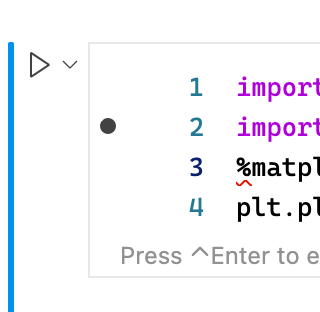
which get their styling from a simpler rule:
https://github.com/microsoft/vscode/blob/f523f65f3985eb6493cae5d219de35f1d7ba6f7a/src/vs/workbench/contrib/debug/browser/breakpointEditorContribution.ts#L672-L672
Instead of finding different instances of codicons in lists and opting them out of this special rule, could we have lists opt into this behavior? Or, have a list opt out of this behavior but do it by setting or not setting a class on the list itself. Otherwise it feels like we will keep running into this

comment created time in 3 hours
pull request commentbazelbuild/intellij
Put async computation of application id behind a flag
We found a Contributor License Agreement for you (the sender of this pull request), but were unable to find agreements for all the commit author(s) or Co-authors. If you authored these, maybe you used a different email address in the git commits than was used to sign the CLA (login here to double check)? If these were authored by someone else, then they will need to sign a CLA as well, and confirm that they're okay with these being contributed to Google.
In order to pass this check, please resolve this problem and then comment @googlebot I fixed it.. If the bot doesn't comment, it means it doesn't think anything has changed.
ℹ️ Googlers: Go here for more info.
<!-- need_author_cla -->
comment created time in 3 hours