





React is a declarative, efficient, and extremely flexible JavaScript library for building user interfaces.
In-browser code editor
Babel is a compiler for writing next generation JavaScript.
jsoup: Java HTML Parser, with best of DOM, CSS, and jquery
A declarative framework for building efficient UIs on Android.
A decentralised, secure file storage, sharing and social network that's surveillance resistant and doesn't expose your friend network.
React Bridge to the ART Drawing Library
Specs & docs for potential future and experimental React APIs and JavaScript syntax.
issue commentfacebook/create-react-app
Moderate vulnerabilities when running npx create-react-app
when the hell its gonna resolve any update regarding this?


comment created time in 40 minutes
issue commentfacebook/create-react-app
Moderate vulnerabilities when running npx create-react-app
Need to install the following packages: create-react-app Ok to proceed? (y) y
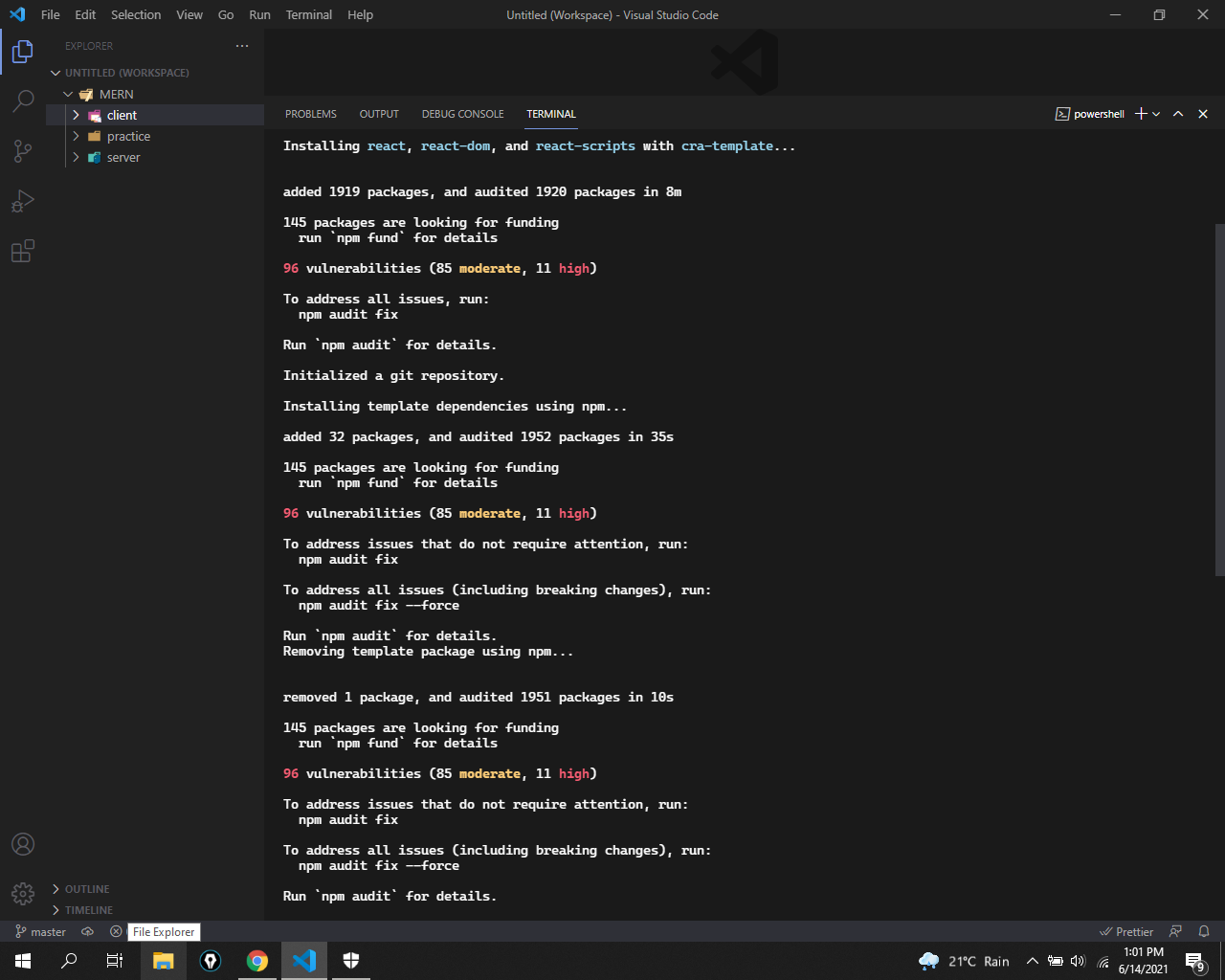
Creating a new React app in C:\Users\Hamza\Desktop\MERN\client.
Installing packages. This might take a couple of minutes. Installing react, react-dom, and react-scripts with cra-template...
added 1919 packages, and audited 1920 packages in 8m
145 packages are looking for funding
run npm fund for details
96 vulnerabilities (85 moderate, 11 high)
To address all issues, run: npm audit fix
Run npm audit for details.
Initialized a git repository.
Installing template dependencies using npm...
added 32 packages, and audited 1952 packages in 35s
145 packages are looking for funding
run npm fund for details
96 vulnerabilities (85 moderate, 11 high)
To address issues that do not require attention, run: npm audit fix
To address all issues (including breaking changes), run: npm audit fix --force
Run npm audit for details.
Removing template package using npm...
removed 1 package, and audited 1951 packages in 10s
145 packages are looking for funding
run npm fund for details
96 vulnerabilities (85 moderate, 11 high)
To address issues that do not require attention, run: npm audit fix
To address all issues (including breaking changes), run: npm audit fix --force
Run npm audit for details.
Created git commit.
Success! Created client at C:\Users\Hamza\Desktop\MERN\client Inside that directory, you can run several commands:
npm start Starts the development server.
npm run build Bundles the app into static files for production.
npm test Starts the test runner.
npm run eject Removes this tool and copies build dependencies, configuration files and scripts into the app directory. If you do this, you can’t go back!
We suggest that you begin by typing:
cd client npm start
Happy hacking!
comment created time in 41 minutes
issue commentfacebook/create-react-app
Okay, say I have a png-sequence of 1500 images that I need to load and play back. Not really practical to add 1500 import statements to the code. This would be simple to do with images in the public folder - not in the src. And why use build ressources on copying images from src to public if they are already optimized once and for all?
I think this is a pretty common scenario thats been overlooked.

comment created time in an hour
issue openedfacebook/create-react-app
https://github.com/facebook/create-react-app/blob/master/packages/babel-preset-react-app/dependencies.js#L88-L89
// This will need to change once we upgrade to corejs@3
corejs: 3,
Was the change not really that needed?
created time in 6 hours
issue commentfacebook/create-react-app
Here is a patch-package you can use until the PR is merged
diff --git a/node_modules/react-scripts/config/paths.js b/node_modules/react-scripts/config/paths.js
index 67ba927..767cbcb 100644
--- a/node_modules/react-scripts/config/paths.js
+++ b/node_modules/react-scripts/config/paths.js
@@ -72,7 +72,7 @@ module.exports = {
   appJsConfig: resolveApp('jsconfig.json'),
   yarnLockFile: resolveApp('yarn.lock'),
   testsSetup: resolveModule(resolveApp, 'src/setupTests'),
-  proxySetup: resolveApp('src/setupProxy.js'),
+  proxySetup: resolveApp('src/setupProxy.cjs'),
   appNodeModules: resolveApp('node_modules'),
   swSrc: resolveModule(resolveApp, 'src/service-worker'),
   publicUrlOrPath,
@@ -95,7 +95,7 @@ module.exports = {
   appJsConfig: resolveApp('jsconfig.json'),
   yarnLockFile: resolveApp('yarn.lock'),
   testsSetup: resolveModule(resolveApp, 'src/setupTests'),
-  proxySetup: resolveApp('src/setupProxy.js'),
+  proxySetup: resolveApp('src/setupProxy.cjs'),
   appNodeModules: resolveApp('node_modules'),
   swSrc: resolveModule(resolveApp, 'src/service-worker'),
   publicUrlOrPath,
@@ -131,7 +131,7 @@ if (
     appJsConfig: resolveOwn(`${templatePath}/jsconfig.json`),
     yarnLockFile: resolveOwn(`${templatePath}/yarn.lock`),
     testsSetup: resolveModule(resolveOwn, `${templatePath}/src/setupTests`),
-    proxySetup: resolveOwn(`${templatePath}/src/setupProxy.js`),
+    proxySetup: resolveOwn(`${templatePath}/src/setupProxy.cjs`),
     appNodeModules: resolveOwn('node_modules'),
     swSrc: resolveModule(resolveOwn, `${templatePath}/src/service-worker`),
     publicUrlOrPath,

comment created time in 6 hours
pull request commentfacebook/create-react-app
Support setupProxy.mjs, cjs, ts, tsx, etc
Now that ES is stable in Node 14, one cannot use setupProxy and "type": "module" together without this patch. Anything I can do to help unblock this PR?

comment created time in 6 hours
issue commentfacebook/create-react-app
Moderate vulnerabilities when running npx create-react-app
Having the same issue here, but with 96 vulnerabilities (85 moderate, 11 high). After running npm audit fix, this error comes up:
npm ERR! code ERESOLVE npm ERR! ERESOLVE unable to resolve dependency tree npm ERR! npm ERR! Found: [email protected] npm ERR! node_modules/type-fest npm ERR! type-fest@"^0.21.3" from [email protected] npm ERR! node_modules/ansi-escapes npm ERR! ansi-escapes@"^4.2.1" from @jest/[email protected] npm ERR! node_modules/@jest/core npm ERR! @jest/core@"^26.6.0" from [email protected] npm ERR! node_modules/jest npm ERR! peer jest@"^26.0.0" from [email protected] npm ERR! node_modules/jest-watch-typeahead npm ERR! 1 more (react-scripts) npm ERR! 1 more (jest-cli) npm ERR! ansi-escapes@"^4.3.1" from [email protected] npm ERR! node_modules/jest-watch-typeahead npm ERR! jest-watch-typeahead@"0.6.1" from [email protected] npm ERR! node_modules/react-scripts npm ERR! react-scripts@"^4.0.3" from the root project npm ERR! 2 more (jest-watcher, terminal-link) npm ERR! npm ERR! Could not resolve dependency: npm ERR! peerOptional type-fest@"^0.13.1" from @pmmmwh/[email protected] npm ERR! node_modules/@pmmmwh/react-refresh-webpack-plugin npm ERR! @pmmmwh/react-refresh-webpack-plugin@"0.4.3" from [email protected] npm ERR! node_modules/react-scripts npm ERR! react-scripts@"^4.0.3" from the root project npm ERR! npm ERR! Fix the upstream dependency conflict, or retry npm ERR! this command with --force, or --legacy-peer-deps npm ERR! to accept an incorrect (and potentially broken) dependency resolution.
I'd ask for help on stack overflow, but people have already posted questions about it and they're getting downvoted, so I'm not sure what to do next. Any help would be great.
comment created time in 12 hours
issue commentfacebook/create-react-app
tsconfig.json gets overwritten the moment the CRA typescript project is closed and opened in VSCode
Here's your work around, but before I get there...
Dear Maintainers: Occasionally, people need to work around things by modifying aliases. Its a tsconfig file... its my config, not yours. It's committed code. If you don't like it, throw a warning, hell, even throw an error with an override flag. This is just dumb. Really wanna get aggressive? Write out a new fixed.tsconfig.json. That would get our attention.
Now, workaround.
create a tsconfig.base.json - add your changes there. In my case it was typing overrides because yup wasn't happy with what I was using.
{
  "compilerOptions": {
    "paths": {
      "*": [
        "../node_modules/@types/*", // types at package in my mono repo. Note, I set base url to ./src, so I need to back up a directory
        "../../../node_modules/@types/*", // types at the root of my mono repo
        "./*"
      ]
    }
  }
}
On your tsconfig.json, pull it in as an import.
{
  "extends": "./tsconfig.base.json",

comment created time in 15 hours
issue commentfacebook/create-react-app
mini-css-extract-plugin throws "Conflicting order" errors during build
I just experienced this issue and I fixed it by removing Lazy loading on React routes. Importing the pages without React.lazy fixed the issue.
I know is not a perfect solution but I spent the last two days messing around with import orders without success.
I must dig into it... Hope can help someone!

comment created time in 17 hours
issue commentfacebook/create-react-app
npx create-react-app is not working
completely deinstall node.js and install new worked for me. Thanks.

comment created time in 20 hours
issue commentfacebook/create-react-app
start fails right after create-react-app
any idea what is the root cause of this? I'm getting this error outside of CRA, and I'm trying to figure it out. What changed in 4.0.2 that caused it?

comment created time in 20 hours
issue commentfacebook/create-react-app
Moderate vulnerabilities when running npx create-react-app
found 86 vulnerabilities (82 moderate, 4 high)
comment created time in 21 hours
issue commentfacebook/create-react-app
npx create-react-app is not working
I solved this using the following command.
npm uninstall -g create-react-appthen
npm install -g create-react-app
Thank you worked for me also.
comment created time in a day
issue openedfacebook/create-react-app
create-react-app error handling in development environment
I've been developing a JS project that from a while ago the React was added to that. I want to use error handling in the development environment the same as the thing that exists when a project creates a npx create-react-app command.
I have installed react-scripts and its dependencies but I couldn't fix my issue.
How can I configure my project to reaches error handling in a project that creates via the npx create-react-app command?
created time in a day
issue commentfacebook/create-react-app
Moderate vulnerabilities when running npx create-react-app
Same here. A newly made react app using the typescript template will get you 96 vulnerabilities (85 moderate, 11 high) right off the bat.
comment created time in a day
issue commentfacebook/create-react-app
@perjacks that depends on your usecase;
- This is a limited set of images used to represent the status of an item:
import ActiveImage from 'src/img/active.png';
import DeletedImage from 'src/img/deleted.png';
import ArchivedImage from 'src/img/archived.png';

function ItemStatus({status}) {
    let img = '';
    swtich (status) {
    case 'active':
        img = ActiveImage;
        break;
    ...
    }
    return (<img stc={img} />)
}
- This is a dynamic image like user profiles/product images - in this case, the images should be stored in an external storage (aws/gcp) and not be bundled as part of your app
comment created time in a day
issue commentfacebook/create-react-app
Yep, npm 7.17.0 failed, yarn 1.22.10 worked. I actually prefer npm, sad day, but I have to roll with what works and spend my time debugging my own mess.
os: Pop!_OS 20.04 LTS (ubuntu 20.04 LTS) node: v14.17.0 npm: 7.17.0 yarn: 1.22.10
"react": "^17.0.2", "react-dom": "^17.0.2", "react-scripts": "4.0.3",
Attempted to install chockidar with npm. $ npm i chokidar npm ERR! code EBADPLATFORM npm ERR! notsup Unsupported platform for [email protected]: wanted {"os":"darwin"} (current: {"os":"linux","arch":"x64"}) npm ERR! notsup Valid OS: darwin npm ERR! notsup Valid Arch: undefined npm ERR! notsup Actual OS: linux npm ERR! notsup Actual Arch: x64
Hope this helps, someone get around it and the npm or chockidar guys can fix it for the next release.

comment created time in a day
issue commentfacebook/create-react-app
Moderate vulnerabilities when running npx create-react-app
Same, 86 vulnerabilities(82 moderate, 4 high) on a freshly created project.
audit fixdoes nothing.
I get the exact results.
comment created time in a day
issue commentfacebook/create-react-app
96 vulnerabilities after running npx create-react-app my-app command
The problems encountered during the two days of learning this step (win10, nodejsv14.17.0):
- Prompt 404 1.1 Install create-react-app globally, and then execute npx
- The file idealTree already exists 2.1 Create file A, run npx in folder A
- Prompt that there are vulnerabilities 3.1 Upgrade npm to 7, automatically install dependencies
- After the npx command is executed, it prompts that folder A lacks package.json 4.1 Before executing npx, execute npm init first, manually create package.json, and then execute npx 4.2 Or before executing npx, install yarn globally, and then execute npx.
Supplement: 4.2 Unresolved errors: When the installation reaches 3/4, there will be two error messages, and no solution has been found yet.
这两天学习这一步遇到的问题(win10,nodejsv14.17.0):
1.提示404 1.1 全局安装 create-react-app,然后再执行 npx 2. 文件 idealTree 已存在 2.1 创建文件A,在文件夹A中运行 npx 3. 提示存在漏洞 3.1 升级npm 到7,自动安装依赖 4. npx命令执行后,提示文件夹A 缺少package.json 4.1 在执行 npx 之前,先执行 npm init ,手动创建 package.json,然后再执行 npx 4.2 或者在执行 npx 之前,先全局安装 yarn,然后再执行 npx。
补充:4.2 未解决的错误: 安装到3/4时,会有两个错误提示,暂未找到解决办法。

comment created time in a day
issue commentfacebook/create-react-app
96 vulnerabilities after running npx create-react-app my-app command
感谢所有评论的人, 似乎每个人都面临着同样的问题。这个问题的解决方案是什么
Upgrade npm to npm7
comment created time in a day
issue commentfacebook/create-react-app
Moderate vulnerabilities when running npx create-react-app
I also get the same, 86 vulnerabilities(82 moderate, 4 high) on a freshly created project. audit fix does nothing. I suppose I will just ignore them for now.
comment created time in 2 days
issue commentfacebook/create-react-app
96 vulnerabilities after running npx create-react-app my-app command
Node JS version 14.16.1 npm version 6.14.12 found 89 vulnerabilities (1 low, 82 moderate, 6 high)
comment created time in 2 days
issue commentfacebook/create-react-app
96 vulnerabilities after running npx create-react-app my-app command
@DancingColors Got it. Thank you.
comment created time in 2 days
issue commentfacebook/create-react-app
96 vulnerabilities after running npx create-react-app my-app command
@bcagarwal The more comments, the more visibility to the issue. Asking again is useless.
comment created time in 2 days
issue commentfacebook/create-react-app
96 vulnerabilities after running npx create-react-app my-app command
Thanks to everyone who commented and it seems everyone is facing the same issue. What is the solution to this issue?
comment created time in 2 days
Pull request review commentfacebook/create-react-app
chore: migrate to @babel/eslint-parser
module.exports = { parserOptions: { ecmaVersion: 2018, sourceType: 'module',- ecmaFeatures: {- jsx: true,+ requireConfigFile: false,+ babelOptions: {
I've updated this to reference our Babel config, which is now a peer dependency.

comment created time in 2 days
pull request commentfacebook/create-react-app
chore: migrate to @babel/eslint-parser
Thanks @JLHwung, I've made a few updates as discussed, and this should be good to go now.
CC @ianschmitz @iansu.
comment created time in 2 days
issue commentfacebook/create-react-app
[Package Update] Switch from babel-eslint to @babel/eslint-parser to get latests fixes
I'll close this off as I'm working on this right now and it will be released in 4.1.
Sorry it took us a while to get this out!

comment created time in 2 days
issue closedfacebook/create-react-app
[Package Update] Switch from babel-eslint to @babel/eslint-parser to get latests fixes
Hello there,
I ran eslint on my project and got an error, I searched on the internet and found that this was fixed in the latest version of the babel eslint parser but that they moved to another package name.
It went from babel-eslint to @babel/eslint-parser.
Could eslint-config-react-app switch to this new version ?
Here's a link that explain babel's decision: Babel Blog
Thanks for any answers...
MrNossiom
closed time in 2 days
MrNossiom
Pull request review commentfacebook/create-react-app
chore: migrate to @babel/eslint-parser
function build(previousFileSizes) { messages.warnings.length ) { // Ignore sourcemap warnings in CI builds. See #8227 for more info.- const filteredWarnings = messages.warnings.filter(w => !/Failed to parse source map/.test(w));+ const filteredWarnings = messages.warnings.filter(+ w => !/Failed to parse source map/.test(w)+ );
This seems to have come from Prettier, we can leave it in.
comment created time in 2 days