








dpopov/ALCameraViewController 0
A camera view controller with custom image picker and image cropping.
CocoaPod repository for MobileAppTracking iOS library
Crusoe Ventures Code Challenge
Passcode screen with Touch ID support
Used to integrate iOS apps with Facebook Platform.
Command-line syntax highlighter
issue commentmopub/mopub-ios-sdk
stuck when playing rewarded videos on iOS 13 and iPhone X devices
@LongJiangSB, your zipped app doesn't do anything on launch. I'm seeing a black screen:
2020-12-03 12:54:17.494397-0500 mopubTest[35997:16300455] [Application] The app delegate must implement the window property if it wants to use a main storyboard file.Are you able to share a screen recording of the behavior you are seeing? Thanks!
Vu Chau MoPub Team
this is new demo + screen recording, thanks for your reply. mopubTest+video.zip

comment created time in 3 hours
issue commentmopub/mopub-ios-sdk
stuck when playing rewarded videos on iOS 13 and iPhone X devices
mopubTest+video.zip this is new demo + screen recording, thanks for your reply.
comment created time in 3 hours
pull request commentdanielgindi/Charts
Added link to tutorial

comment created time in 7 hours
issue commentmopub/mopub-ios-sdk
stuck when playing rewarded videos on iOS 13 and iPhone X devices
@LongJiangSB, your zipped app doesn't do anything on launch. I'm seeing a black screen:
2020-12-03 12:54:17.494397-0500 mopubTest[35997:16300455] [Application] The app delegate must implement the window property if it wants to use a main storyboard file.
Are you able to share a screen recording of the behavior you are seeing? Thanks!
Vu Chau MoPub Team
comment created time in 12 hours
issue commentdanielgindi/Charts
Provide pre-compiled universal binary
Unfortunately, it looks like the project maintainers still don't provide any instructions on how to use Charts as a Swift package. Maybe this will help:
https://developer.apple.com/documentation/xcode/adding_package_dependencies_to_your_app

comment created time in 13 hours
issue commentdanielgindi/Charts
Hi! After the setCustom( I added the line chartView.notifyDataSetChanged() and it didn't crash. Cheers!

comment created time in 14 hours
issue commentdanielgindi/Charts
Provide pre-compiled universal binary
how to do it ? Any tutorial ? Sorry
comment created time in 14 hours
issue commentdanielgindi/Charts
Provide pre-compiled universal binary
@TGWC I ended up using the Swift package instead, which has worked well.
comment created time in 14 hours
issue closedmopub/mopub-ios-sdk
when trying load rewarded video second time
One line summary of the issue here
- [x] I am submitting a bug report for existing functionality
- [x] I visited https://developers.mopub.com/ and found no answer
- [x] I checked https://twittercommunity.com/c/advertiser-api/mopub to make sure that this issue has not already been filed
- [x] I checked to make sure that this issue has not already been filed
MoPub SDK Version:
5.15.0
Device model and OS Version:
iphone x, 14.2 (all devices same)
Xcode Version:
12.2
Ad Unit IDs used in reproducing the issue:
443c215fd0e44ef597ab5c334e5ee69b
Steps to reproduce the behavior:
I attached link to video with issue. Please check it
Expected behavior:
I expected to get new rewarded video.
Observed behavior:
As you can see on video, i have issue when i am trying to load rewarded video second time. I got immediately event rewardedVideoAdDidLoad, but after when i call method: MPRewardedVideo.hasAdAvailable - i got false Also if i am trying to: MPRewardedVideo.presentAd nothing happens.
NOTE! This happens only when marketplace is off. And only with second video. (With 1st all goes well). Please check links below.
Evidence:
video of issue: https://drive.google.com/file/d/1aOXN2tGQvtqASA7y2dEHaWzjslXNHGht/view?usp=sharing
1 file code: https://drive.google.com/file/d/1Hk15ZVwB85xIxWdp6qSzpDpyYysxiID9/view?usp=sharing
project with issue: https://drive.google.com/file/d/1zns46deUHOEsCS6gtMYMa_slxUW1Zm4l/view?usp=sharing
closed time in 15 hours
sashastg
issue closeddanielgindi/Charts
- [x] I've read, understood, and done my best to follow the *CONTRIBUTING guidelines.
What did you do?
I have a chart where multiple line data shows and when click on a legend the data disappear.
What did you expect to happen?
I expected that after a data disappears the chart should scale itself with the current highest data accordingly.
What happened instead?
Instead it was as it is
Charts Environment
2.9.3
Demo Project
closed time in 19 hours
ad99526
issue commentdanielgindi/Charts
Provide pre-compiled universal binary
Hi, sorry to open this but I need to add this as .framework in my project.... done the script but when running in simulator I get XXX.xcodeproj Building for iOS Simulator, but the linked and embedded framework 'Charts.framework' was built for iOS.
I added the Release-universal to the project
Any help please?
comment created time in 19 hours
issue commentdanielgindi/Charts
For instance is the Double- extension roundedToNextSignificant misspelled as roundedToNextSignficant at call site at AxisRendererBase.

comment created time in 20 hours
issue openeddanielgindi/Charts
- [X ] I've read, understood, and done my best to follow the *CONTRIBUTING guidelines.
What did you do?
Updated Pods project to 4.0 and built from master branch
What did you expect to happen?
Project to compile
What happened instead?
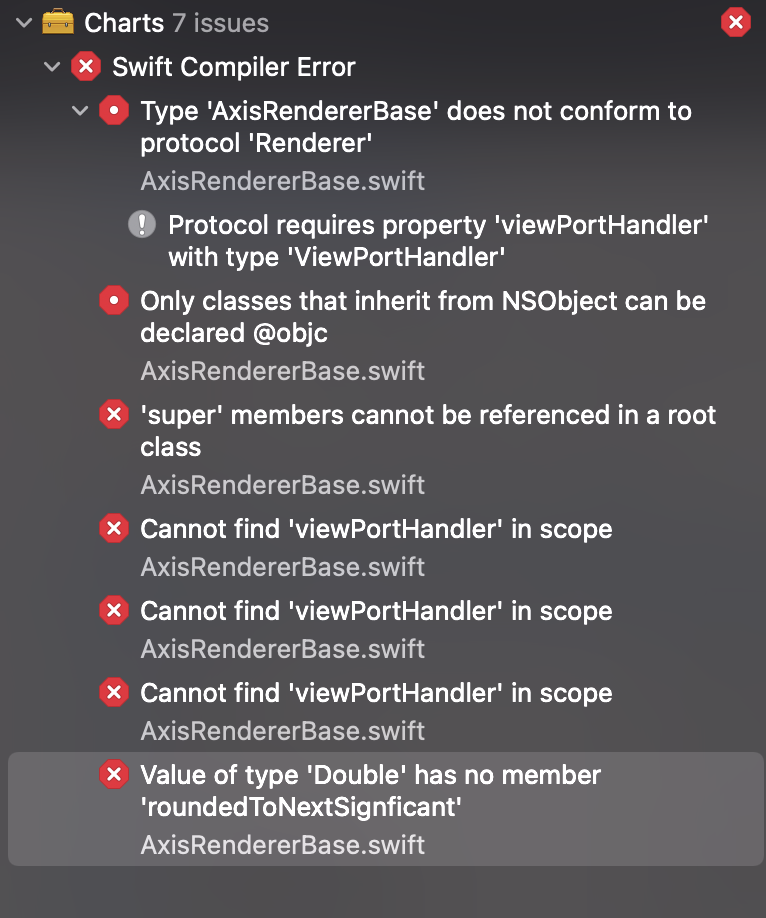
Charts Environment
Charts version/Branch/Commit Number: 4.0/Master Xcode version: 12.2 Swift version: 5.3 Platform(s) running Charts: iOS macOS version running Xcode:
created time in 20 hours
issue commentmopub/mopub-ios-sdk
How to remove swift dependencies
When I don’t delete the swift file, the program runs normally, but I found that there is still a situation of stuck when playing rewarded videos on iOS 13 and iPhone X devices. The close, get, and advertising buttons on the page can be clicked normally.
comment created time in a day
issue openedmopub/mopub-ios-sdk
How to remove swift dependencies
One line summary of the issue here
- [√] I am submitting a bug report for existing functionality
- [√] I visited https://developers.mopub.com/ and found no answer
- [√] I checked https://twittercommunity.com/c/advertiser-api/mopub to make sure that this issue has not already been filed
- [√] I checked to make sure that this issue has not already been filed
MoPub SDK Version:
5.15.0
Device model and OS Version:
iPhone 8, iOS 14
Xcode Version:
12.0
Ad Unit IDs used in reproducing the issue:
NO
Steps to reproduce the behavior:
i use Pod manager, when i pod install ok.
Build xcode project had one error:'MoPub-Swift.h' file not found in MRController

this is my podfile
source "https://github.com/CocoaPods/Specs.git"
install! 'cocoapods', :deterministic_uuids => false
platform :ios, '10.0'

target 'AdMopubSDK' do
  # Comment the next line if you don't want to use dynamic frameworks
  # use_frameworks!
#  pod 'mopub-ios-sdk', '~>5.11.0'
#  pod 'mopub-ios-sdk/Avid' will include the IAS SDK, but not the Moat SDK, as well as the MoPub SDK.
#  pod 'mopub-ios-sdk/Moat' will include the Moat SDK, but not the IAS SDK, as well as the MoPub SDK.
  pod 'mopub-ios-sdk/Core' , '~>5.15.0'

end
Expected behavior:
Get a framework that does not contain swift dependencies, and run successfully
Observed behavior:
No
Evidence:
No
created time in a day
issue commentmopub/mopub-ios-sdk
when trying load rewarded video second time
@sashastg, I was working on another issue today that might help with this issue. Make sure you run pod update to get latest adapter versions (that's what I did, which explained why I did not reproduce the issue in your sample app). Old adapter versions will not work properly with MoPub 5.15.0.
Since you are using Chartboost, refer to the Chartboost changelog for the latest adapter versions. You want to be on v8.3.1.1.1 or newer if you are using MoPub 5.15.0.
comment created time in a day
issue commentdanielgindi/Charts
"chartValueSelected" is not getting called.
@anoo-radha and @SatishBirajdar I have this same problem, did you manage to solve it?

comment created time in 2 days
issue openeddanielgindi/Charts
- [ ] I've read, understood, and done my best to follow the *CONTRIBUTING guidelines.
What did you do?
I have a chart where multiple line data shows and when click on a legend the data disappear.
What did you expect to happen?
I expected that after a data disappears the chart should scale itself with the current highest data accordingly.
What happened instead?
Instead it was as it is
Charts Environment
2.9.3
Demo Project
created time in 2 days
issue commentdanielgindi/Charts
Is this issue resolve because i have suffer from same issue. can i get update?

comment created time in 2 days
issue commentmopub/mopub-ios-sdk
when trying load rewarded video second time
@sashastg, your project works for me and does not reproduce that issue. I can load and show multiple videos one after the other in the manner you used. Here's a screen recording of what I did: https://chauduyphanvu.s3.us-east-2.amazonaws.com/demos/mopub-ios-sdk-issues-356.mov.
Let us know if the issue persists. You may also reference our iOS sample app on this repository if needed. Vu Chau MoPub Team
comment created time in 2 days
issue openeddanielgindi/Charts
Issue tapping on chart to display marker
- [x] I've read, understood, and done my best to follow the *CONTRIBUTING guidelines.
What did you do?
I have just added a CombinedChartView with a bar and line chart and the displaying of marker on tapping on it, no possibility to zoom and move on the graph. It is fixed on the view.
What did you expect to happen?
I expected to can tap on each element (bar or line) of the chart to display a marker with associated informations, no matter where I tap on the element. If I tap on bar it is the bar informations which are display and if I tap on the line of the line chart I whould like to have point of line chart informations. Also I hoped to be able to tap outside charts (on empty parts without line and bar) without having a displayed marker.
What happened instead?
Often when I try to tap on a bar the marker display is the marker of the line which is further down.
An other problem occurs when I have some long bar and a line which is at the middle of it. When I tap in the lower part of the bar (below the line chart) only line’s marker is display, instead of displaying a marker associated the tapping bar or line.
It seems the tapping on the bar chart is possible only on the upper part of bar but I would like to can tapped all over the bar and all over the line chart to display the associated marker.
Also when I tap outside charts (line or bar), marker is displayed but it shouldn’t, normally nothing should be displayed.
<img src="https://user-images.githubusercontent.com/49160467/100724761-86509780-33c3-11eb-923e-128368f1379e.gif" width="200" height="400"/>
Charts Environment
Charts version/Branch/Commit Number: 3.6.0 Xcode version: Xcode 12.0.1 Swift version: Swift 5 Platform(s) running Charts: iOS macOS version running Xcode: macOS Catalina 10.15.7
Demo Project
I have tested the process on the combined chart of the demo project of the lib. I have just kept the bar and the line chart, remove the double tapping to zoom and add the displaying of the marker(radarMarker) on tapping on chart.
created time in 3 days
issue commentmopub/mopub-ios-sdk
No ads found for test ad unit: 0ac59b0996d947309c33f59d6676399f
Wanted to +1 this issue.
Ran into it this past week and lost ~4 weeks of revenue as a result. Seems like a better error message would be beneficial.

comment created time in 3 days
issue openeddanielgindi/Charts
SwiftUI: Graph is not updated when @ObservedObject changes
- [ ] I've read, understood, and done my best to follow the *CONTRIBUTING guidelines.
What did you do?
Create a graph inside a UIViewRepresentable with an @ObservedObject viewModel
Attempted the below update code, which does not work `func updateUIView(_ uiView: LineChartView, context: UIViewRepresentableContext<LineChartSwiftUI>) {
chart.data = addData()
chart.data?.notifyDataChanged()
chart.notifyDataSetChanged()
chart.animate(xAxisDuration: 0.01)
}`
What did you expect to happen?
When the @Published data within the view model changes, the graph should reload
What happened instead?
Nothing
Charts Environment
Latest Xcode Version 12.2 SwiftUI Platform(s) running Charts: Big sur
`struct LineChartSwiftUI: UIViewRepresentable { @ObservedObject var viewModel: viewModel
let chart = LineChartView()
func makeUIView(context: UIViewRepresentableContext<LineChartSwiftUI>) -> LineChartView { //setUpChart() let chart = LineChartView() chart.data = addData() updateChart()` } }
Within my view:
case .loaded(let data): VStack { LineChartSwiftUI(viewModel: viewModel) }
created time in 3 days
issue openedmopub/mopub-ios-sdk
when trying load rewarded video second time
One line summary of the issue here
- [ ] I am submitting a bug report for existing functionality
- [ ] I visited https://developers.mopub.com/ and found no answer
- [ ] I checked https://twittercommunity.com/c/advertiser-api/mopub to make sure that this issue has not already been filed
- [ ] I checked to make sure that this issue has not already been filed
MoPub SDK Version:
5.15.0
Device model and OS Version:
iphone x, 14.2 (all devices same)
Xcode Version:
12.2
Ad Unit IDs used in reproducing the issue:
443c215fd0e44ef597ab5c334e5ee69b
Steps to reproduce the behavior:
I attached link to video with issue. Please check it
Expected behavior:
I expected to get new rewarded video.
Observed behavior:
As you can see on video, i have issue when i am trying to load rewarded video second time. I got immediately event rewardedVideoAdDidLoad, but after when i call method: MPRewardedVideo.hasAdAvailable - i got false Also if i am trying to: MPRewardedVideo.presentAd nothing happens.
NOTE! This happens only with second video. (With 1st all goes well). Please check links below.
Evidence:
video of issue: https://drive.google.com/file/d/1aOXN2tGQvtqASA7y2dEHaWzjslXNHGht/view?usp=sharing
1 file code: https://drive.google.com/file/d/1Hk15ZVwB85xIxWdp6qSzpDpyYysxiID9/view?usp=sharing
project with issue: https://drive.google.com/file/d/1zns46deUHOEsCS6gtMYMa_slxUW1Zm4l/view?usp=sharing
created time in 4 days
pull request commentdanielgindi/Charts
Codecov Report
Merging #4516 (b5f2367) into master (9b24868) will not change coverage. The diff coverage is
n/a.

@@           Coverage Diff           @@
##           master    #4516   +/-   ##
=======================================
  Coverage   58.96%   58.96%
=======================================
  Files          50       50
  Lines         290      290
=======================================
  Hits          171      171
  Misses        119      119
Continue to review full report at Codecov.
Legend - Click here to learn more
Δ = absolute <relative> (impact),ø = not affected,? = missing dataPowered by Codecov. Last update 9b24868...b5f2367. Read the comment docs.
comment created time in 5 days
PR opened danielgindi/Charts
Added Video Link
Added a link to a video showing how to add the Charts framework (specifically a Bar Chart) to a SwiftUI project
pr created time in 5 days
issue closeddanielgindi/Charts
4.0最新版本的Charts 问题:这个charts是移植的那个安卓的,MPAndroidChart这个三方, MPAndroidChart有方法public String getFormattedValue(float value, AxisBase axis) {} 可以拿到自动生成的Y轴的刻度值,然后很方便的解决刻度格式化(例如:20000.22转成2.2万) iOS 的Charts有类似方法吗? 谢谢,很着急
closed time in 7 days
qq1341738311
issue commentdanielgindi/Charts
4.0 latest version of Charts Question: This chart is a MPAndroidChart ported to Android. MPAndroidChart has a method public String getFormattedValue(float value, AxisBase axis) {} This can get the automatically generated Y-axis scale value, and then it is very convenient to solve the scale formatting (for example: 20000.22 converted into 2.2万) Is there a similar method for Charts in iOS? Thanks, very anxious
comment created time in 7 days