








megvii-research/neural-painter 536
Paint artistic patterns using random neural network
ppwwyyxx/Adversarial-Face-Attack 316
Black-Box Adversarial Attack on Public Face Recognition Systems
ppwwyyxx/dash-docset-tensorflow 185
dash/zeal docset for tensorflow
curimit/SugarCpp 133
SugarCpp is a language which can compile to C++11.
ppwwyyxx/GroupNorm-reproduce 95
An official collection of code in different frameworks that reproduces experiments in "Group Normalization"
my dotfiles..
Over 1200+ lines of vimrc
ppwwyyxx/FRN-on-common-ImageNet-baseline 30
Filter Response Normalization tested on better ImageNet baselines.
ppwwyyxx/dash-docset-matlab 19
Generate Dash Docset for Matlab
Proof-of-Concept CNN in Halide
startedppwwyyxx/vim-PinyinSearch
started time in 14 hours
startedlucidrains/sinkhorn-transformer
started time in 14 hours
startedlucidrains/linformer
started time in 14 hours
startedlucidrains/routing-transformer
started time in 14 hours
startedlucidrains/reformer-pytorch
started time in 14 hours
startedppwwyyxx/OpenPano
started time in a day
issue openedfacebookresearch/moco
Why the lr in main_lincls is 30?
HI, I wonder why the learning rate is set to 30 when traing classification ? I have never seen such a big learning rate.
parser.add_argument('--lr', '--learning-rate', default=30., type=float, metavar='LR', help='initial learning rate', dest='lr')
created time in a day
issue openedtensorpack/tensorpack
ImportError: cannot import name 'tfv1'
If you're asking about an unexpected problem which you do not know the root cause, use this template. PLEASE DO NOT DELETE THIS TEMPLATE, FILL IT:
If you already know the root cause to your problem, feel free to delete everything in this template.
1. What you did:
(1) If you're using examples, what's the command you run: I am using Mask/Faster RCNN examples, and I run python predict.py --predict 00000.jpg 00001.jpg --load ./weights/COCO-MaskRCNN-R101FPN9xGNCasAugScratch.npz
(2) If you're using examples, have you made any changes to the examples? Paste git status; git diff here:
No
2. What you observed:
(1) Include the ENTIRE logs here:
Traceback (most recent call last):
  File "predict.py", line 23, in <module>
    from modeling.generalized_rcnn import ResNetC4Model, ResNetFPNModel
  File "/home/lqzhu/FasterRCNN/modeling/generalized_rcnn.py", line 4, in <module>
    from tensorpack import tfv1 as tf
ImportError: cannot import name 'tfv1'
It's always better to copy-paste what you observed instead of describing them.
It's always better to paste as much as possible, although sometimes a partial log is OK.
Tensorpack typically saves stdout to its training log.
If stderr is relevant, you can run a command with my_command 2>&1 | tee logs.txt
to save both stdout and stderr to one file.
(2) Other observations, if any: For example, CPU/GPU utilization, output images, tensorboard curves, if relevant to your issue.
3. What you expected, if not obvious.
If you expect higher speed, please read http://tensorpack.readthedocs.io/tutorial/performance-tuning.html before posting.
If you expect the model to converge / work better, note that we do not help you on how to improve a model. Only in one of the two conditions can we help with it: (1) You're unable to reproduce the results documented in tensorpack examples. (2) It indicates a tensorpack bug.
4. Your environment:
Python 3.6.11 TF 1.14.0 tensorpack 0.10.1
Paste the output of this command: python -m tensorpack.tfutils.collect_env
If this command failed, also tell us your version of Python/TF/tensorpack.
Note that:
- You can install tensorpack master by
pip install -U git+https://github.com/tensorpack/tensorpack.gitand see if your issue is already solved. - If you're not using tensorpack under a normal command line shell (e.g., using an IDE or jupyter notebook), please retry under a normal command line shell.
You may often want to provide extra information related to your issue, but at the minimum please try to provide the above information accurately to save effort in the investigation.
created time in a day
issue commentppwwyyxx/wechat-dump
SQLiteManager works, wechat-dump does not
I don't want to still your thread but could you please describe precisely which steps you are doing and on which platform/version. I see strange things too and I'm trying to decrypt my database.
Also, regarding your issue, there are some reports of problem of sqlcipher on some Linux Ubuntu system. Are you on Ubuntu?

comment created time in 2 days
starteduber/h3
started time in 2 days
startederadman/entr
started time in 2 days
issue openedppwwyyxx/wechat-dump
SQLiteManager works, wechat-dump does not
Hi, as the issue is titled, I am running a Samsung S20 on Android 11, and the hardcoded 1234567890ABCDEF + UIN from system_config_prefs.xml generates a key "877f804" however I get the error "file is encrypted or is not a database" when running the decrypt-db.py script. If I use this same key with the SQLiteManager, it works.
created time in 2 days
startedFluidex/zkutil
started time in 2 days
startedswords123/IDA-3D
started time in 2 days
startedminrk/appnope
started time in 3 days
issue commentppwwyyxx/wechat-dump
I have WeChat version 7.0.17 and I don't think it can work. I have calculated the MD5 as explained in the referenced article.

comment created time in 3 days
issue commentppwwyyxx/wechat-dump
Also if I subtract my two potential UIN (272...) and (-157...), I get 0xFFFFFFFF
comment created time in 3 days
issue commentppwwyyxx/wechat-dump
No. If I login to the website, my uin cookie is 272... But even if I force this number for UIN and I use my IMEI from my phone, I still can't decrypt the database. Am I doing something wrong?
comment created time in 3 days
issue openedppwwyyxx/wechat-dump
I have run everything and I get:
[10:24:53 [email protected]:wechat] found uin=-157... in system_config_prefs.xml [10:24:53 [email protected]:wechat] found uin=272... in com.tencent.mm_preferences.xml [10:24:53 [email protected]:wechat] found uin=-157... in auth_info_key_prefs.xml [10:24:53 [email protected]:wechat] found uin=-157... in systemInfo.cfg [10:24:53 [email protected]:wechat] Possible uin: [-157..., 272...] [10:24:53 [email protected]:wechat] found imei=353... from iphonesubinfo [10:24:53 [email protected]:wechat] found imei=1234567890ABCDEF in CompatibleInfo.cfg [10:24:53 [email protected]:wechat] Possible imei: ['353...', '1234567890ABCDEF', '1234567890ABCDEF'] Traceback (most recent call last): File "/tmp/wechat-dump/decrypt-db.py", line 175, in <module> key = get_key(imei, uin) File "/tmp/wechat-dump/decrypt-db.py", line 132, in get_key a = md5(imei + uin) TypeError: can't concat int to bytes
I have tried to force the positive uin (272...) in the command line but it doesn't decrypt. Can you please look into this? Is this possible to have a negative uin?
created time in 3 days
startedgo-git/go-billy
started time in 3 days
issue openedfacebookresearch/moco
ValueError: Decompressed Data Too Large and acc is strangely low
Thanks for your amazing work!
When I run python main_moco.py and main_lincls.py, an error occured:


I searched the error in the Internet and tried to add some lines in front of the python code:

The error is gone and I can run the two python file well. However, the accuracy is strangely low. For example, this is when I run python main_lincls.py with your provided 800-epoch MOCOv2 pre-trained model, which is supposed to get a 71.1 top-1 acc after 100 epochs of linear classify training.
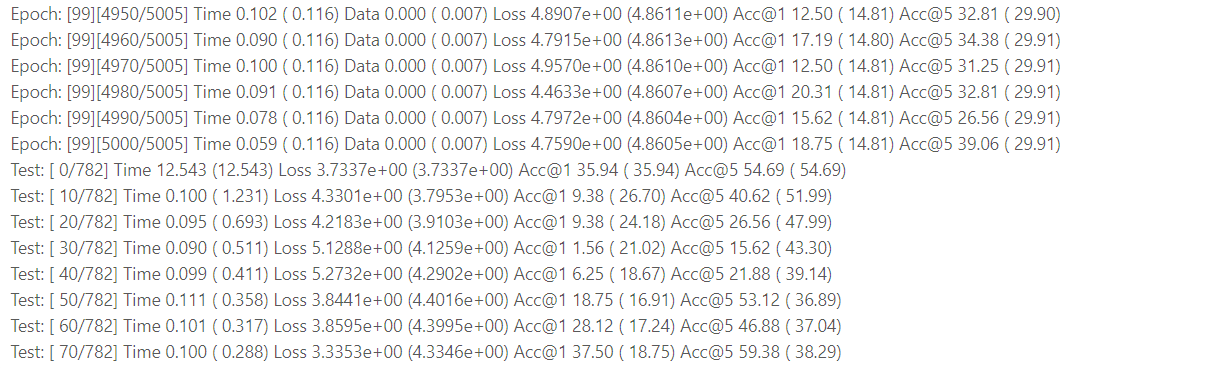
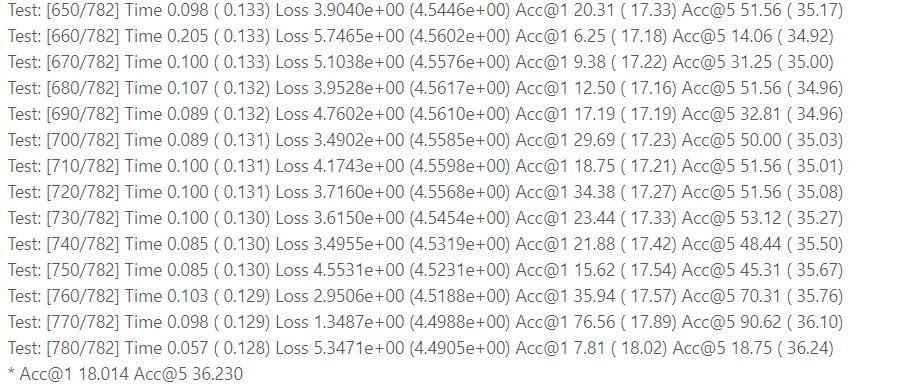
I'm really confused, and I think my env of python, pytorch, torchvision is OK. I have no idea what is going wrong. I hope you could help me. Thank you very much!
created time in 3 days
startedantonj/Highlight-Indentation-for-Emacs
started time in 4 days
🍻 Default formulae for the missing package manager for macOS
fork in 4 days
PR opened pytorch/rfcs


The main aims of this proposal are:
- to make it easier for package authors to release packages that depend on PyTorch
- to make it easier for conda users to install a set of packages that depend on PyTorch
- ensure this set of packages is integration tested
Credits for the initial idea of this "integration tested distribution" go to @jph00. Thanks also to @pearu and @hameerabbasi for feedback on an earlier version, on the conda-forge section in particular.
More details on how the CI for this should work can be added, but that can be done after there's agreement that this proposal is the right direction to go in.
pr created time in 4 days
startedarkworks-rs/r1cs-std
started time in 4 days
issue commentfacebookresearch/moco
question about training the linear classification model
Hi,i did unsupervised pre-training of a ResNet-50 model on a dataset which contains 122,208 unlabeled bird images and the last epoch log is below:
the loss stucks at ~6.90 which is similar to another closed issue #12. In that issue it seems not tha bad. Is this normal?
Then i use this pretrained model to train and eval on a dataset which contains 3,959 train images and 2000 val images. These images are in 200 categories of birds. I follow the ''' python main_lincls.py -a resnet50 --lr 30.0 --batch-size 256 --pretrained [your checkpoint path]/checkpoint_0199.pth.tar --dist-url 'tcp://localhost:10001' --multiprocessing-distributed --world-size 1 --rank 0 [your imagenet-folder with train and val folders] ''' however the validate accuracy is quite low (~12%), which is much lower than supervised training method(~60%). I tried serval learning rate (0.1, 5,10, 100.0) but the results seems still bad. So can i ask how do you set these hyperparameters?Or, the pretrained model is bad? how can i check this probelm? Thanks!

Hi, how many GPU did you use for training? I have 8 Tesla v100 (32G) GPU, but it still can not afford batch_size 256.

comment created time in 5 days
startedppwwyyxx/wechat-dump
started time in 5 days
issue openedtensorpack/tensorpack
Write in files during training
Hello,
I am using Tensorpack for FasterRCNN training and I want to know if it is possible to use the tf.io.write_file function (which returns a tf.Operation object) during training.
If I add these lines in generalized_rcnn.py, a file is written when building the graph but not during the training:
with tf.device('/cpu:0'), tf.Session(config=tf.ConfigProto(
        allow_soft_placement=True, log_device_placement=True), graph=tf.get_default_graph()).as_default():
        tf.io.write_file(file_path, text).run()
It seems that the tf.io.write_file function needs to be used with CPU and under a session, and removing allow_soft_placement=True, log_device_placement=True in the session config induce Colocation errors.
My question is: is it possible to make so that the tf.io.write_file function is run for each new image during training?
I would like to use it to store in a file the total cost associated to each image during training.
created time in 5 days